
User Mode vs Kernel Mode: Understanding Privilege Levels in OS
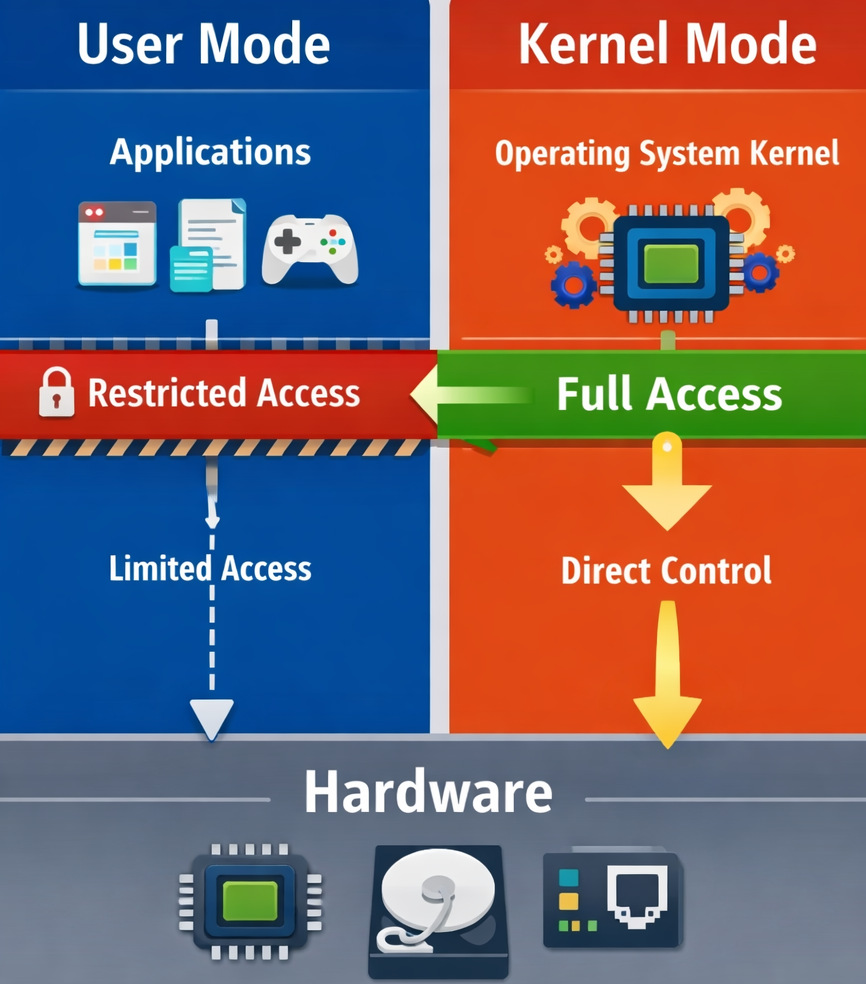
Ever thought why a broken app just stops working without making any noise, while a bad driver brings down the whole system, or why apps can’t talk to hardware directly?
On the surface, operating systems look as calm as a duck in a pond. Tap an icon, run a line of text, pull up a document — everything works smoothly. But choices are never not being made behind the curtain, like the frenzy of a duck’s feet pedaling along beneath the surface. Access is granted or blocked, second by second, without interruption.
That’s where the OS user mode and kernel mode come into play.
Here’s a closer examination of user mode vs. kernel mode, exploring the two layers — and how operating systems manage processor state through this differentiation. We take a look inside as well, to see what happens when programs operate under different privileges. There is real code that relies on this division, even if it plays a passive role. The reason? Systems should protect core functions and let apps do their thing. That balance is reflected in everything from debugging tools to device drivers.
| Key Takeaways: |
|---|
|
Modes of Operating System: Why Privilege Levels Exist
What if we tackled an easier question first, before jumping into user mode versus kernel mode… What makes operating systems require different modes in the first place?
Early computers let every program do whatever it wanted. Fine at first, then problems started piling up. One glitched app might wipe data, wreck storage, or lock up the whole machine.
- Security – Prevent apps from damaging the system
- Stability – Isolate failures
- Control – Manage shared resources fairly
Instead of trusting all programs, the OS relies on privilege levels using hardware-supported execution modes.
- User Mode
- Kernel Mode
Kernel Meaning in Computer Systems
Before diving into the different modes, let’s first understand what a kernel is. The kernel in computer architecture isn’t just a piece of code: it’s a design philosophy.
- How processes share CPU time
- How memory is allocated
- How I/O is handled
This leads us to…
Types of Kernel in OS (And Why They Matter)
Understanding the types of kernels in OS helps explain real-world trade-offs.
1. Monolithic Kernel
Everything runs in kernel mode.
Pros:
- Fast performance
Cons:
- One bug can crash everything
Used by: Linux
2. Microkernel
Only core services in kernel mode.
Pros:
- More stable
- Smaller trusted codebase
Cons:
- Slower due to message passing
3. Hybrid Kernel
Mix of both approaches.
Pros:
- Balance of performance and safety
Used by: Microsoft Windows
One important con of this approach is that hybrid kernels grow complex fast. Debugging interactions across layers is tough.
What Is Kernel Mode in OS? (Kernel Mode Explained)
Let’s start with the more powerful one.
Kernel Mode in OS
- CPU instructions
- Physical memory
- Hardware devices
- Interrupts and timers
In simple terms, kernel mode can do anything.
- Process scheduling
- Memory management
- File systems
- Device drivers
- Interrupt handling
If you’re wondering about the kernel’s meaning in computer terms, think of it as the OS’s control center. Everything important flows through it.
While it sounds good in theory, in practice, any bug in kernel mode is dangerous. One null pointer, one unchecked buffer, and the entire OS can crash.
That’s why kernel code is written conservatively and tested rigorously.
What Is User Mode in OS? (User Mode Explained)
Now let’s talk about the safer mode.
User Mode in the Operating System
- Browsers
- Editors
- Games
- Business apps
- Cannot access hardware directly
- Cannot execute privileged CPU instructions
- Cannot access kernel memory
- They are restricted to their own virtual address space
This limitation is intentional.
A limitation that teams often overlook is that you cannot bypass the kernel just because performance is tight. Any attempt to do so either fails or becomes a security nightmare.
If an application crashes in user mode, the OS simply stops that process. The rest of the system survives.
User Mode vs Kernel Mode: Core Difference Explained
Let’s make the difference between user mode and kernel mode crystal clear.
| Aspect | User Mode | Kernel Mode |
|---|---|---|
| Privilege Level | Low | Highest |
| Hardware Access | Not allowed | Direct |
| Memory Access | Owns virtual memory only | All system memory |
| Instruction Set | Restricted | Full |
| Crash Impact | App crashes | System crashes |
| Typical Code | Applications | Kernel, drivers |
The above table explains why kernel mode vs user mode separation is non-negotiable in modern OS design.
Processor and User Modes in OS: What the CPU Enforces
This separation is not only software-based. The processor and user modes in the OS are enforced by the CPU itself.
- Ring 0 → Kernel Mode
- Ring 3 → User Mode
Now here’s how it works: the CPU looks at what mode it is in before running sensitive instructions. When a program runs in user mode and attempts a restricted task, say, talking directly to physical devices, an exception gets raised instead. That sudden halt keeps the system protected without warning.
When do real projects fail? When most developers think they can quietly adjust deep system functions. That idea stops dead in its tracks the moment the CPU says no.
What turns OS security from idea into practice is this hardware-backed enforcement. It actually works because the system has physical protection built in.
User Mode and Kernel Mode in OS: How Switching Works
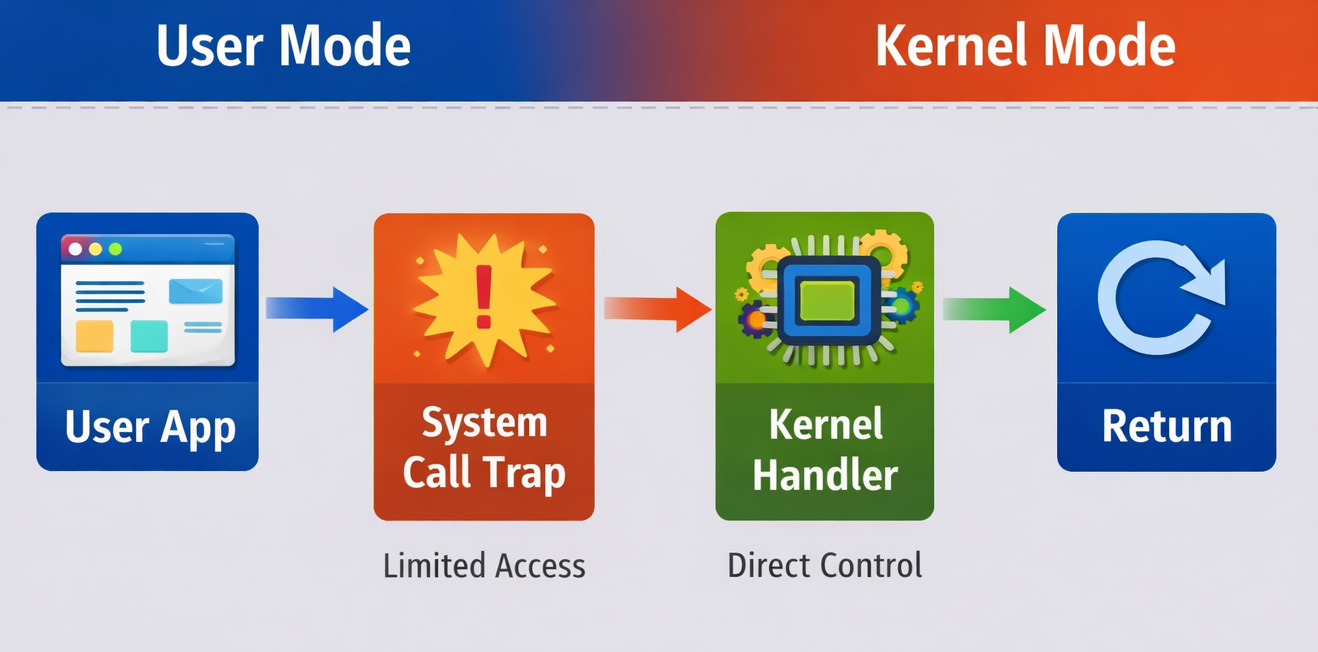
Applications still need services like file I/O or network access. So, what makes that possible?
System calls.
User Mode and Kernel Mode Switching
- App runs in user mode
- App makes a system call (e.g., read a file)
- CPU switches to kernel mode
- Operating is handled by the kernel
- Control returns to user mode
Using system calls is fine on paper, but in real time, it may fail when a program makes too many system calls; things slow down fast. High-performance systems aggressively batch work to reduce mode switches.
Difference Between User Space and Kernel Space
People often confuse user mode and kernel mode with user space and kernel space. They’re related, but not identical.
User Space and Kernel Space
- User space: Memory region where user-mode programs run
- Kernel space: Memory region reserved for kernel-mode code
Difference Between User Space and Kernel Space
| Feature | User Space | Kernel Space |
|---|---|---|
| Who Accesses It | User-mode apps | Kernel only |
| Isolation | Strong | None |
| Safety | High | Risky |
| Debugging | Easier | Harder |
Oftentimes, teams may forget that debugging kernel space is slow, painful, and often requires rebooting. These mistakes are expensive.
User Mode vs Kernel Mode: Real-Life Practical Examples
Example 1: Application Crash
A browser crashes → tab closes → OS keeps running.
That’s user mode isolation working as intended.
Example 2: Driver Failure
A faulty GPU driver crashes → system freezes.
That’s kernel mode power and risk.
Real projects may run into issues when third-party drivers skip proper validation. One unchecked pointer and boom: blue screen.
Why User Mode and Kernel Mode in OS Matter for Security
Most modern attacks try to escalate from user mode to kernel mode.
Why?
Because once attackers reach kernel mode, the system is theirs.
- Minimize kernel code
- Move drivers to user mode where possible
To make the system even more secure, you’ll see OS designers adding permission checks everywhere.
Virtualization and Hypervisor Mode: How Modern CPUs Add a Level Below Kernel Mode
For a long time, operating systems lived at the top of the privilege ladder. The kernel mode ruled everything beneath it. Then came virtualization, quietly stepping into the spotlight. Everything shifted after that.
Why Kernel Mode Wasn’t Enough Anymore
When running a single OS, kernel mode having full control made sense. Yet with multiple operating systems on the same machine, chaos shows up quickly.
Most OS kernels expect to be in kernel mode.
For sure, this won’t work.
Few realized how deep it would go when chip makers added a new, more privileged execution layer below the core, sometimes named hypervisor mode, or simply ring -1.
Hypervisor Mode Explained (Ring -1)
Modern CPUs (like Intel VT-x and AMD-V) add a mode below kernel mode, allowing a hypervisor to control multiple guest OSes safely. Instead of sitting at the top, control shifts one level deeper. Safety comes from separation, quietly managed by hardware itself.
Here’s how the hierarchy looks now:
| Level | Mode | Who Runs Here |
|---|---|---|
| Ring -1 | Hypervisor Mode | Virtual Machine Monitor |
| Ring 0 | Kernel Mode | Guest OS Kernel |
| Ring 3 | User Mode | Applications |
- Each OS kernel thinks it owns the hardware
- The hypervisor quietly intercepts sensitive operations
- Hardware virtualization ensures isolation
This might seem fine at first glance, yet once things get moving, well… Some core tasks resist smooth virtual handling. When setup lacks fine-tuning, speed takes a hard hit.
For this reason, today’s hypervisors lean more on hardware-powered virtualization instead of depending solely on software methods.
Real-World Impact
Tools like VMware, Microsoft Hyper-V, and KVM rely on this model.
This often fails in actual work if most developers think running in kernel mode means full power. Yet on virtual machines, the hypervisor still wins.
Understanding this extra layer helps explain why debugging kernel issues inside VMs feels slower and opaque.
User-Mode Drivers: Why Some OSes Push Drivers Out of Kernel Space
Few realize how tightly device drivers bind to the kernel mode in the OS. Since hardware talks best through low-level code, these components live deep inside – right where the system manages memory and tasks. That closeness brings risk: one flawed instruction can crash everything. Stability often suffers when driver errors ripple upward into critical areas.
Drivers are one of the most common causes of system crashes. Crashes often trace back to these background programs. Faulty code inside them leads to instability across core functions.
The Driver Problem
- Written by third parties
- Poorly tested
- Rushed to meet hardware deadlines
Still, these operate with full kernel privileges.
What slows teams down the most? It’s something they rarely pay attention to.
When a faulty driver stumbles, the whole operating system often crashes along with it. It’s not just one piece breaking – everything gets dragged under by its collapse.
Out of this came changes in how certain operating systems handled their approach.
Understanding User Mode Drivers
- Communicate with the kernel through controlled interfaces
- They are isolated from the core OS memory
- Can crash without bringing down the system
When a user-mode driver crashes, restarting it is something the OS handles directly.
Why Push Drivers to User Mode?
| Benefit | Why It Matters |
|---|---|
| Better stability | Driver crash ≠ system crash |
| Improved security | Less trusted code in the kernel |
| Easier debugging | No kernel debugger needed |
| Faster development | Fewer catastrophic failures |
Operating systems like Linux and Microsoft Windows increasingly support user-mode drivers—especially for non-critical devices.
This may encounter hurdles in practical situations when high-performance devices (GPUs, network cards) still need kernel-mode drivers. User-mode adds latency.
- Critical path → kernel mode
- Everything else → user mode
This balance keeps systems usable without compromising performance.
Performance Benchmarks: System Call Overhead Comparisons
One of the biggest compromises in user mode vs kernel mode design is performance, specifically, the cost of system calls.
Why System Calls Are Expensive
- Switching from user mode to kernel mode
- Saving CPU state
- Validating arguments
- Executing kernel logic
- Switching back to user mode
Each step adds overhead.
Often in real-life scenarios, tiny inefficiencies add up when you’re making millions of system calls per second.
Typical System Call Costs (Approximate)
| Operation | Time Cost |
|---|---|
| Simple function call | ~1-2 ns |
| System call | ~100-300 ns |
| Context switch | ~1-5 µs |
Even though a few hundred nanoseconds may appear small, at scale it’s enormous.
Real-World Example
- Batch system calls
- Use shared memory
- Avoid kernel crossings wherever possible
In real projects, it may fail when developers write clean abstractions without realizing that each abstraction triggers a system call.
epollio_uring- memory-mapped files
exist, to bring down user-kernel switches.
What This Means for Design Decisions
| Scenario | Better Choice |
|---|---|
| Safety-critical systems | More user mode |
| High-frequency trading | Fewer system calls |
| General applications | Balanced approach |
| Kernel development | Extreme caution |
The goal is not to avoid kernel mode, but to enter it only when absolutely necessary.
Choosing Between User Mode and Kernel Mode in Real Systems
Here’s the decision framework engineers actually use:
| Requirement | Preferred Mode |
|---|---|
| Hardware access | Kernel mode |
| Safety and isolation | User mode |
| Rapid development | User mode |
| Maximum performance | Kernel mode (carefully) |
A limitation that teams may underestimate is that kernel code slows development dramatically. Changes take longer, testing is harder, and mistakes cost more.
Common Myths About User Mode vs Kernel Mode
Myth 1: Kernel mode is always faster
False. Mode switching overhead can negate gains.
Myth 2: User mode is too restricted
Restrictions are the reason systems survive bugs.
Myth 3: More kernel code means better control
It usually means more crashes.
Final Thoughts
- OS security
- System stability
- Performance ceilings
- Developer productivity
Because putting faith in apps hasn’t worked out before, a solid OS always depends on these distinctions.
- User mode protects the system from applications.
- Kernel mode protects the system from itself.
Making sure each one works right matters just as much as having them both. Still, how they’re handled can change everything.
FAQs
What is the main difference between user mode and kernel mode in an operating system?
The main difference between user mode and kernel mode in an OS lies in privilege levels.
In simple terms, user mode executes applications with limited access to hardware and memory, while kernel mode runs the operating system core with complete access to system resources.
If a program fails in user mode, usually only that application crashes. But if something crashes in kernel mode in the OS, the entire system can be impacted.
In short, user mode secures the system from applications. Kernel mode gives the OS complete control.
What happens during a system call between user mode and kernel mode?
When a program in user mode in the OS needs privileged access (like reading a file), it makes a system call.
- Switches from user mode to kernel mode
- Executes the requested operation
- Switches back to user mode
This switching is handled by hardware through privilege levels, also called CPU rings.
While secure, this process brings in overhead. That’s why high-performance applications try to reduce system calls.
What are the different types of kernels in an OS?
- Monolithic Kernel – Everything runs in kernel mode (e.g., Linux)
- Microkernel – Minimal kernel, most services run in user mode
- Hybrid Kernel – Combination of both (used in systems from Microsoft)
Each type balances performance, stability, and security differently.
Additional Resources
- What Is Pseudo-Code?
- Why Every Engineering Team Needs Version Control: Ensuring Safe, Collaborative, Traceable Code
- What is Composable Architecture in Software Development?
- What are the Qualities of a Good Software?
- Four Types of Software Maintenance: A Detailed Guide
- What is Code Optimization?
- What are the Different Types of Code Smells?
 |