
Process Control Block (PCB) Explained
Modern operating systems support multitasking and run multiple programs efficiently and simultaneously. Whether you are browsing the web, editing a document, running a background service, or playing music, the operating system (OS) manages multiple processes simultaneously. Internally, the OS handles these tasks as processes. Since there are multiple processes, the OS must keep track of each process’s state, resources, and execution details. One of the most important structures used for this purpose is the Process Control Block (PCB).
| Key Takeaways: |
|---|
|
This article explains what a PCB is, why it is important, its components, how it works in process management, and how it helps operating systems perform context switching.
What is a Process in an Operating System?
A process is an execution unit of a program. It is created by the OS when you open an application instance. Each instance has its own corresponding process.
For example, when you open an application such as a browser or a text editor on your computer, the OS creates a corresponding process for that program.
A process has its own memory space, registers, program counter, and system resources.
- New – The process is being created.
- Ready – The process is waiting for CPU allocation.
- Running – The process is currently executing on the CPU.
- Waiting (Blocked) – The process is waiting for an event such as I/O completion.
- Terminated – The process has finished execution or stopped.
At any moment, the OS may have multiple processes to manage and execute. In this case, the OS needs a way to store information for each process so it can allocate CPU time fairly and avoid starving processes. This is where the Process Control Block becomes essential.
What Is a Process Control Block (PCB) in an OS?
A Process Control Block (PCB) is a data structure maintained by the operating system that contains all the information needed to manage a process.
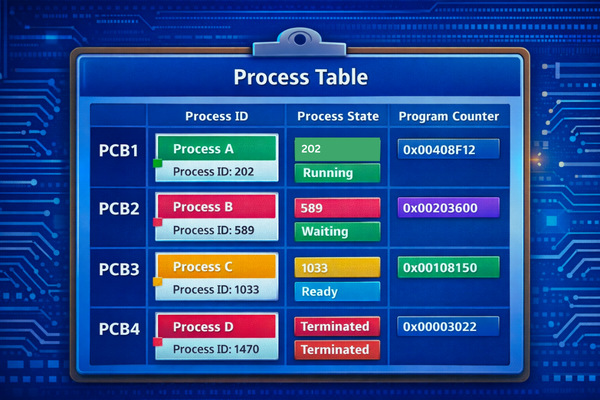
A PCB is also known as a process descriptor or a task control block (TCB). The PCBs for the different processes are stored in a structure known as the process table in the operating system’s kernel.
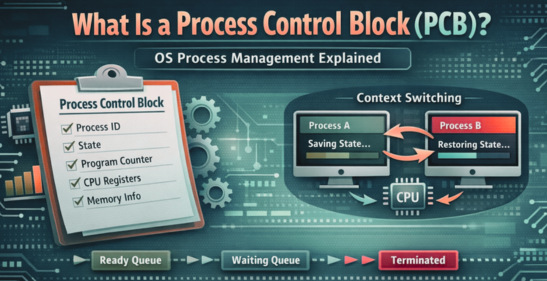
When the OS creates a new process, it initializes a PCB for that process. A PCB stores the values of the parameters associated with the process, as well as process state information. Using this information, the OS can track the process. The OS uses a PCB to manage scheduling, resource allocation, and process coordination.
In simple terms, the PCB acts like a record card for a process, storing all the information the OS needs to pause, resume, and manage it efficiently.
PCBs are essential for process management across almost all process-related activities. Many utility programs, like schedulers and resource managers, access and/or update PCBs. Since PCBs track process state, they also play a vital role in context switching.
Components of a Process Control Block
A PCB contains several important fields related to the process. These fields store different types of information needed to manage a process effectively.
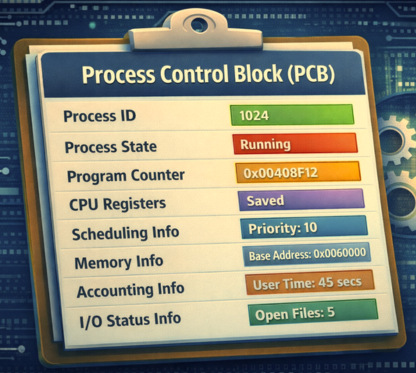
1. Process Identifier (PID)
Each process in an operating system is assigned a unique process identifier known as PID.
The OS uses PID to distinguish between processes and manage them individually.
For example, in Linux, commands such as ps and top display process IDs (PIDs).
2. Process State
The current state of the process is stored in the PCB.
- New
- Ready
- Running
- Waiting
- Terminated
The OS uses this information to determine how to handle the process.
3. Program Counter (PC)
The program counter stores the address of the next instruction to be executed for that process.
The PC is used by the CPU to resume execution of the process from the correct location after being paused.
4. CPU Registers
- General-purpose registers
- Index registers
- Stack pointers
- Status registers
- Accumulators
These values are required during context switching and restored when the process resumes.
5. CPU Scheduling Information
Scheduling information like process priority, scheduling queue pointers, CPU usage statistics, and time slice data is stored in the PCB. This data is used by the OS schedulers to determine which process should run next.
6. Memory Management Information
- Base and limit registers
- Page tables
- Segment tables
- Memory allocation details
With this information, the OS manages virtual memory and ensures process isolation.
7. Accounting Information
- CPU usage time
- Process creation time
- User or account ID
- Resource limits
This information helps with system monitoring and resource allocation.
8. I/O Status Information
- List of open files
- Devices allocated to the process
- Pending I/O requests
This status information helps the OS manage I/O efficiently.
Advantages of Using Process Control Block in OS
The PCB is fundamental to operating system functionality because it acts as the operating system’s central repository for tracking, managing, and controlling process execution. It enables multitasking by storing essential state information, such as registers and program counters, needed for context switching.
- Process Management and Identification: The PCB acts as an “identity card” for each process. It stores each process’s unique Process ID (PID), current state (running, ready, or blocked), and priority, helping the OS to track all active processes.
- Context Switching: During context switching (when the CPU switches from one process to another), the OS saves the current process’s state in its PCB to be restored once it has resumed its execution. This helps the process to resume its execution exactly where it left off, ensuring system stability and continuity.
- Resource Management: Information about memory allocation, open files, and devices used by the process is stored in its PCB. This helps with resource management and prevents resource conflicts.
- Process Scheduling: The OS uses information stored in PCBs to schedule processes. Schedulers use information stored in PCBs, such as process priority and execution history, to determine which process should execute next, ensuring efficient CPU utilization.
- Security and Protection: The PCB is stored in a protected, kernel-level memory space, preventing unauthorized access and ensuring that processes cannot interfere with each other.
- Inter-Process Communication: PCBs can include fields like message queues, semaphores, and signals for managing inter-process communication. Processes communicate and synchronize with one another using this information.
Process Management Tasks That Utilize PCB
PCBs play an important role in process management by storing vital information about processes. Some of the major operations in which the details stored in PCBs are accessed frequently are as follows:
PCB in Process Scheduling
OS determines which process should run next on the CPU through process scheduling. The scheduler relies on the PCB data (process priority, process state, etc.) for each process.
Processes are typically stored in queues, and their PCBs are linked together.
- Ready Queue – processes waiting for CPU time
- Waiting Queue – processes waiting for I/O operations
- Job Queue – all processes in the system
Schedulers manipulate PCBs to move processes between these queues.
- When a process finishes an I/O operation, its PCB is moved from the waiting queue to the ready queue.
- When the CPU scheduler selects a process, the OS loads the process’s PCB.
PCB and Context Switching
This is one of the most important uses of the PCB. In context switching, the CPU switches from executing one process to another. Since only one process can access the CPU at a time, the OS must save the current process state before switching to another process.
- The OS interrupts the currently running process.
- The CPU state (registers, program counter, etc.) is saved in the PCB of that process.
- The scheduler selects another process.
- The CPU loads the new process’s state from its PCB.
- Execution resumes.
The context-switching process is extremely quick, giving the illusion that programs are running concurrently.
Multitasking
The operating system can multitask and run multiple processes simultaneously using information stored in PCBs, such as resource allocation, process scheduling, and process synchronization.
Resources Sharing
The PCB stores information about the resources allocated to a process, such as open files, shared variables, common tables, and memory space. When a new process requests resources, the OS searches the allocated processes in the PCBs, checks whether they are shareable, and allocates the resources accordingly. Thus, PCBs play an important role in resource sharing.
How are PCBs Stored in the Operating System?
PCBs are stored in a protected, dedicated area of main memory (RAM) known as kernel space. The OS maintains an organized data structure (typically a linked list, an array, or a hash table) known as the Process table or PCB table.
This table lists all PCBs for all processes currently in the system, with each entry representing a single process and its PCB.
Lifecycle of a Process Control Block
The lifecycle of a PCB tracks a process from its creation to termination, acting as the operating system’s (OS) data structure for managing process states, scheduling, and resource allocation. The PCB is created at process initialization, updated during state transitions (Ready, Running, Waiting), and deleted upon termination.
- Process Creation: When a new process is created:
- The OS generates its corresponding PCB.
- The PCB is initialized with process information (default values), including process state, program counter, and priority.
- Ready State: The PCB is placed in the ready queue, indicating the process is loaded into main memory and is ready to execute. The PCB stores information about the process’s readiness.
- Process Execution: The OS scheduler assigns the CPU to the process, and its state changes to running. During execution:
- The OS continuously updates the PCB (for example, with current register values and CPU).
- Scheduling and context-switching activities use the PCB data.
- Waiting/Blocked State: If the process requires an I/O operation or is waiting for an event, it moves to this state. The PCB is updated to reflect this status and moved to a waiting queue.
- Process Termination: Upon completion of the task, the process terminates. When the process finishes:
- The OS retrieves final information from the PCB.
- The memory allocated to the PCB is freed.
- Its PCB is removed from the process table.
Limitations of PCBs
- High Memory Usage: Each process requires a unique PCB, which consumes system memory, especially when there are many processes or threads. In this case, a significant amount of memory and processing power is consumed, particularly during frequent context switching.
- Context Switching Cost: Frequent context switching involves saving and restoring PCB data, which consumes CPU time and creates performance bottlenecks.
- Synchronization Issues: In multi-threaded environments, ensuring that PCBs are updated consistently requires complex mechanisms; without them, data can become inconsistent.
- Difficulty in Modification: Modifying or updating the PCB structure after its initial creation can be complex, requiring substantial redesign.
- Deadlock Risk: If not properly managed by the OS, synchronization issues related to PCB data can lead to system deadlocks.
PCB vs Thread Control Block (TCB)
PCBs manage overall process resources (PID, memory, file handles), while Thread Control Blocks (TCBs) manage individual thread execution states (PC, stack pointer, register values) within a process. A PCB can contain one or more TCBs; if a process is suspended, all its threads are suspended.
The key differences between a PCB and a TCB are summarized in the following table:
| Feature | PCB | TCB |
|---|---|---|
| Scope | PCBs manage the entire process. | TCBs manage individual threads. |
| Purpose | The PCB facilitates high-level resource management. | The TCB is used for granular thread scheduling and context switching. |
| Content | PCBs hold resource-related information (memory mapping, open files). | TCBs hold execution-specific data (program counter, registers, stack pointer). |
| Relationship | A PCB can contain multiple TCBs. | A TCB is contained within a PCB (threads are part of a process). |
| Context | Used during context switches to save and restore the entire process. | Used during thread-level context switching to save and restore the execution context. |
| Memory | Has a separate memory space. | Shares memory with other threads. |
Threads within a process typically share the same PCB but have separate TCBs.
Conclusion
The Process Control Block (PCB) is a fundamental component of operating system process management. It is a central data structure that stores all information related to a process, enabling the OS to track process states, allocate resources, schedule processes, and perform context switching efficiently.
Without PCBs, operating systems would not be able to manage multiple processes simultaneously. The PCB ensures that each process can pause and resume execution seamlessly while maintaining its state and resources.
PCBs store essential data, such as process IDs, CPU registers, memory information, and scheduling details, enabling modern operating systems to maintain stability, efficiency, and responsiveness even when running dozens or hundreds of processes simultaneously.
In summary, the PCB serves as the foundation of process management, enabling operating systems to handle multitasking, scheduling, and system resource allocation effectively.
Frequently Asked Questions (FAQs)
- How does a PCB help in context switching?
During context switching, the operating system saves the current process’s state (such as CPU registers and program counter) in its PCB. When the process resumes later, the OS restores this information from the PCB so the process can continue execution from the exact point where it stopped.
- Where is the PCB stored in an operating system?
PCBs are stored in a system structure called the process table. This table contains a PCB entry for every active process in the system, allowing the operating system to quickly access process-related information.
- What is the difference between PCB and TCB?
The Process Control Block (PCB) manages an entire process, while the Thread Control Block (TCB) manages individual threads within a process. A process may have multiple threads, each with its own TCB, but all threads share the same PCB.
- When is a PCB created, and when is it deleted?
A PCB is created when the operating system generates a new process. It remains active throughout the process lifecycle and is deleted when the process finishes execution or is terminated.
- Is PCB used in all operating systems?
Yes. Almost all modern operating systems, such as Linux, Windows, and macOS, use PCB-like structures to manage processes. Although the internal structure may vary, the fundamental concept remains the same.
 |