
What is Cloud Computing? Types, Benefits, and Challenges
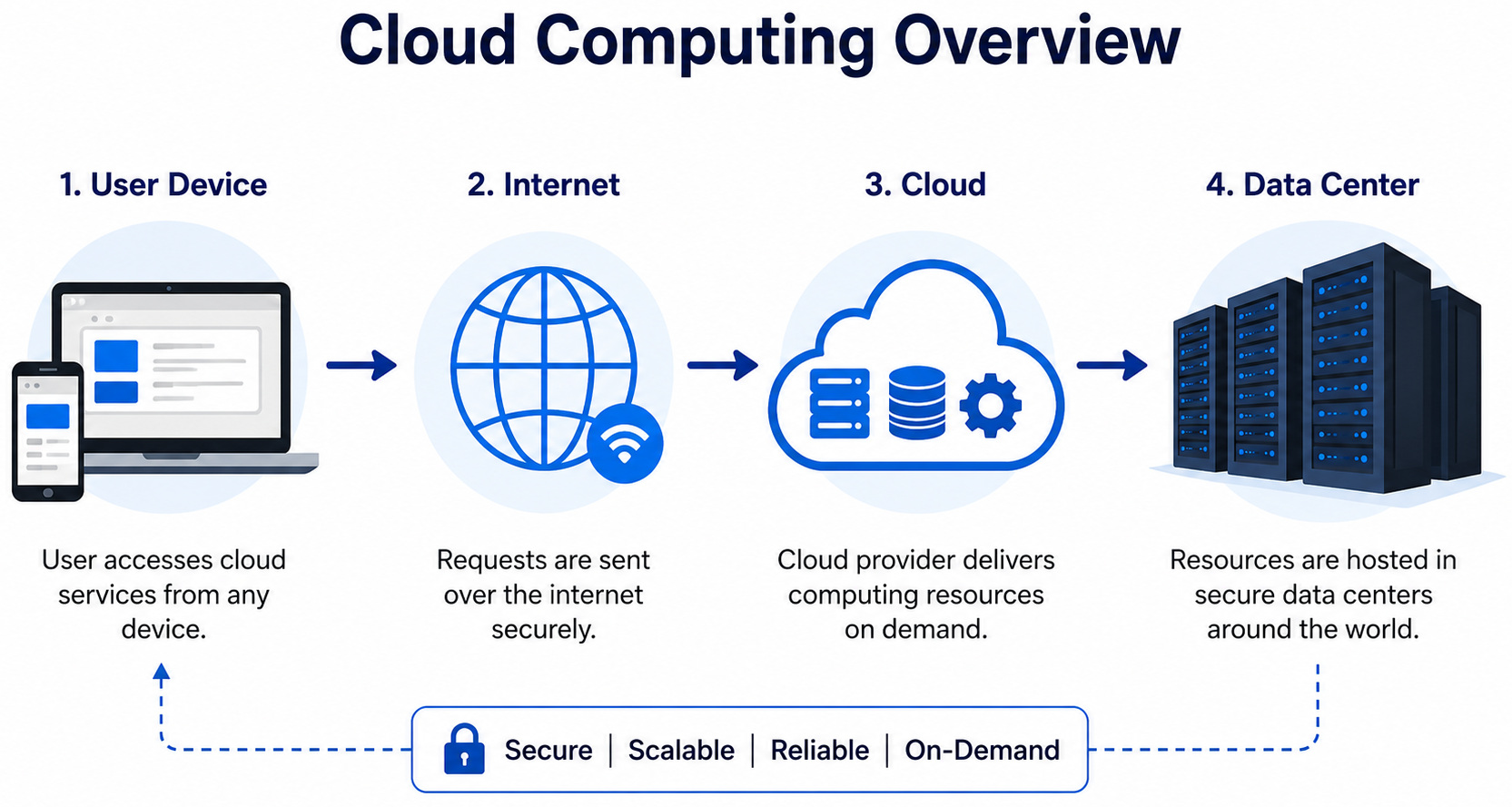
Cloud computing is defined as the delivery of different types of on-demand computing resources. This includes software, hardware, networking, databases, and storage. The delivery is done to individuals and businesses, generally via a network, typically the internet.
As the volume of data being generated and distributed continues to scale, so does the customers’ demand for more access to online services. This makes it difficult for organizations to ensure their businesses continue to operate on in-house computing servers.
Say how you check your email inbox online via a web browser, cloud computing allows organizations to access and manage resources from any location that has an internet connection. Cloud services are also usually managed and maintained by a third-party service provider. It allows IT teams to quickly adjust the storage without the burden of having to set up and maintain even more systems and apps. This also avoids the risk of paying upfront infrastructure charges.
| Key Takeaways: |
|---|
|
Understanding the Need for Cloud Computing
As previously explained, cloud computing is the process of delivering computing services over the Internet. Rather than owning and maintaining physical hardware or data centers, users can access such services as needed from cloud providers. It allows businesses and individuals to leverage powerful computing resources without paying hefty upfront costs.
A simple way to explain is when you are streaming a movie on Netflix or writing on Google Docs, you’re accessing the software via the cloud, and it’s not running on your device.
How Does Cloud Computing Work?
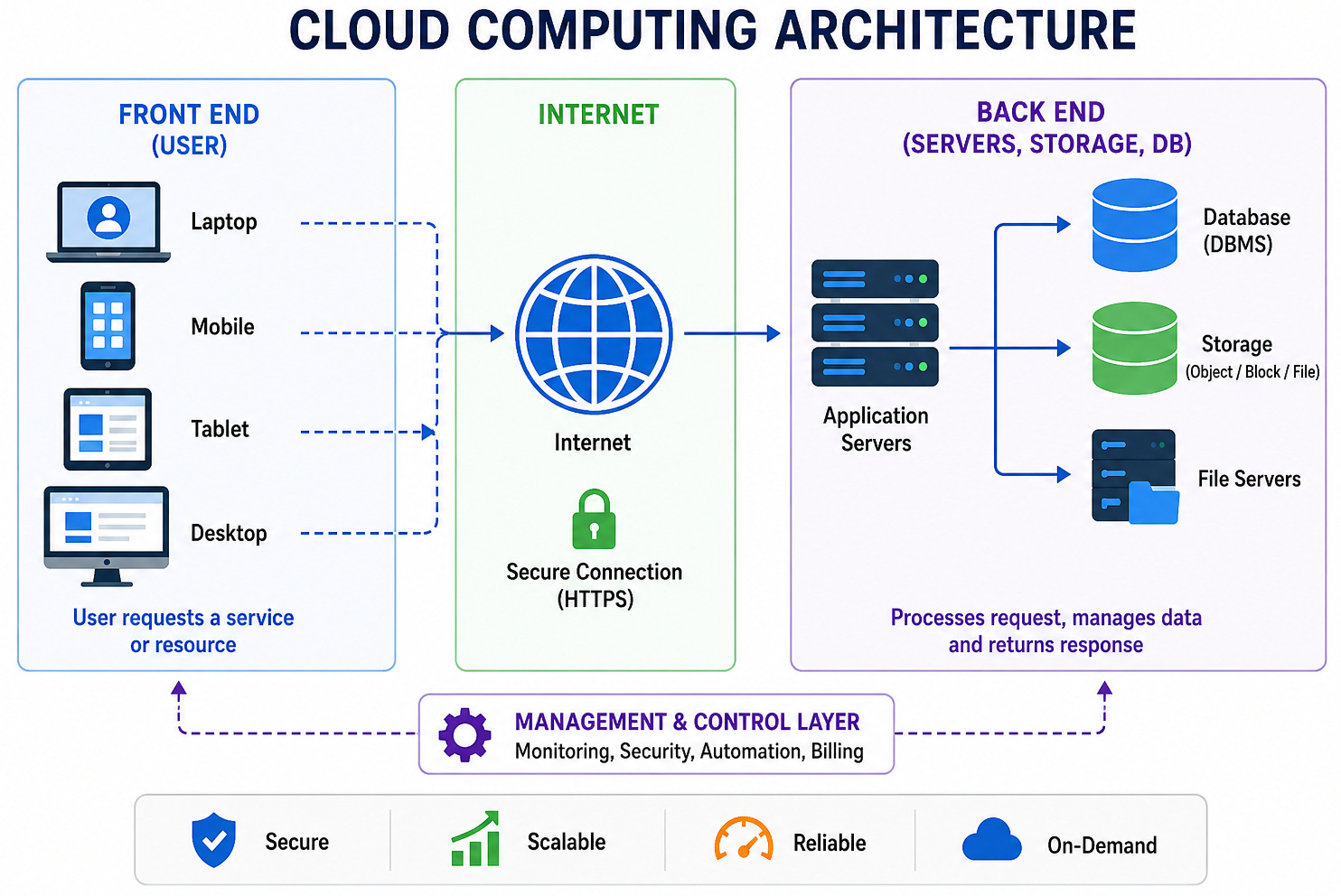
Cloud computing functions by allowing devices such as laptops or smartphones to use computing resources, such as storage, applications, or processing power. They access these resources over the internet instead of relying on local hardware. These resources are hosted in large remote data centers managed by cloud service providers, who manage infrastructure, security, and maintenance.
When you utilize a cloud service, your device (the front end) sends a request through the internet to the provider’s systems (the back end), which include servers, databases, and storage. A central system coordinates this communication, making sure the request is processed correctly and efficiently.
Here’s what usually happens behind the scenes: a user initiates a request, such as uploading a file or running an application. The cloud provider’s system receives it and assigns the necessary resources, like virtual machines or storage, on demand. These resources manage the task, and once it’s completed, the result is sent back to the user. Billing is usually based on how much of these resources you consume.
An important technology behind cloud computing is virtualization, which allows multiple virtual systems to run on a single physical server. In combination with automation, this allows rapid provisioning of resources without manual setup, making cloud services scalable, efficient, and easy to use.
Types of Cloud Service Models
Service models describe how cloud resources are made available to users. They decide how much control an organization will exercise over the infrastructure, applications, or platforms.
Infrastructure-as-a-Service
IaaS offers virtualized computing resources, such as servers, storage, and networking, over the internet. Users rent cloud infrastructure but handle their individual OS, applications, and data.
Advantages of IaaS include flexibility, scalability, and decreased capital costs. Organizations enjoy full control over their environment.
Disadvantages include the need for IT skills to handle infrastructure, and businesses are responsible for the security and updates.
Best suited for: IaaS is ideal for startups working on building custom apps, IT departments, and companies needing scalable infrastructure without having to own physical hardware.
Platform-as-a-Service
PaaS provides the full development platform in the cloud. This includes OSs, tools, and databases. Developers can create, test, and deploy applications without having to handle the underlying infrastructure.
Advantages include the rapid development cycles, reduced operational overhead, and built-in scalability.
Disadvantages include less control for the customers, a higher risk of vendor lock-in, and restrictions on compatible programming languages or frameworks.
Best suited for: PaaS is good for software companies, development teams, and organizations looking to achieve faster innovation.
Software-as-a-Service
SaaS provides ready-to-use apps over the internet. Customers only need to log in via a browser, removing the need for installation or frameworks.
Advantages include easier access, predictable subscription pricing, and users are not required to manage maintenance or updates.
Disadvantages include restricted customization, reliance on internet availability, and obvious concerns around data ownership.
Best suited for: SaaS is ideal for businesses of all sizes that require productivity tools, collaboration platforms, or CRM systems.
Function-as-a-Service
FaaS enables users to run code in response to events. They don’t have to handle the complicated infrastructure. Write the code, upload it, and the cloud provider executes it only when needed. Payment is done only for the time the code runs.
Advantages include cost efficiency, scalability, agility, and event-driven execution.
Disadvantages include the “cold start” issue faced by developers. This is due to the cloud provider spinning down the environment due to a lack of action to save resources. So the next time an event triggers a function, there is a noticeable delay in setting up the environment and loading the code.
Best suited for: Legacy apps and complex custom infrastructure.
Read: Cloud Computing vs SaaS: Key Differences, Benefits & Use Cases.
Types of Cloud Deployment Models
- Private Cloud: It is a dedicated environment for a single organization, hosted either on-premises or by a third-party provider. It provides increased control, security, and customization, making it perfect for sensitive or regulated workloads.
- Public Cloud: Infrastructure is owned and operated by external cloud service providers and delivered over the internet to numerous tenants. Resources like compute, storage, and networking are provisioned dynamically and billed on a usage-based model. This strategy provides high scalability, elasticity, and minimal upfront investment.
- Hybrid Cloud: This architecture integrates private and public cloud environments, allowing interoperability and data/workload portability between them. Organizations can retain critical or regulated data inside a private cloud while using public cloud resources for scalable or less-sensitive workloads. This model offers flexibility, cost optimization, and workload distribution.
- Multi-Cloud: Includes using multiple public cloud providers simultaneously. This decreases vendor dependency and allows organizations to select the best services across platforms for performance and cost efficiency.
Advantages of Cloud Computing
- Faster Time to Market: Cloud platforms allow faster provisioning of resources, enabling quick deployment and testing without hardware restrictions. On-demand access to GPUs/TPUs supports high-performance workloads like AI.
- Scalability and Flexibility: Resources can be scaled dynamically as per demand, removing the need to provision infrastructure for peak usage.
- Cost Efficiency: A pay-as-you-use model brings down capital expenditure and avoids overprovisioning. FinOps practices help with efficient cloud spending.
- Improved Collaboration: Cloud services allow real-time data access and sharing across distributed teams through internet-connected devices.
- Enhanced Security: Cloud environments provide centralized security, automated updates, and advanced threat detection via Zero Trust and AI/ML techniques.
- Sustainability: Energy-efficient cloud data centers decrease environmental impact compared to on-premises infrastructure.
- Data Protection: Built-in backup and disaster recovery mechanisms make sure of data durability and resilience against failures or attacks.
Limitations with Cloud Computing
As with any distributed computing model, cloud computing brings in some trade-offs alongside its advantages.
A big limitation is its dependence on network connectivity (Internet availability), where latency or outages can impact access to applications and data. Even major providers can experience downtime due to infrastructure failures or unforeseen issues.
- vendor lock-in,
- limited control over the underlying infrastructure,
- security concerns (such as data privacy and cyber threats),
- integration complexity with existing systems,
- unpredictable costs under usage-based pricing models.
These risks can be tackled through careful provider selection, a clear understanding of shared responsibility models, and embracing interoperable architectures to reduce dependency and improve flexibility.
Why Should Organizations Adopt Cloud Computing
To be honest, the advantages far outweigh the disadvantages. Most organizations today are not considering if they should migrate; they are considering what they should be migrating.
With the cloud, they get to enjoy higher reliability and flexibility, better efficiency and performance, and it also helps bring down IT costs. It also improves innovation, enabling companies to ensure faster time to market and include AI/ML use cases in their strategies. These benefits enhance productivity, enable remote operations, and simplify overall system efficiency.
Adoption does not need a full migration; many organizations use hybrid architectures to extend existing infrastructure while using cloud capabilities where most effective.
Read: Serverless 2.0: What the Next Wave of Cloud Abstraction Means for Developers.
Is Cloud Computing Secure?
Cloud computing can be secure if proper measures are taken.
- Use strong passwords
- Enable multi-factor authentication
- Encrypt sensitive data
- Choose reliable providers
Security is a shared responsibility between the provider and the user.
Are Cloud Computing and Remote Desktop Access the Same?
In short, no, they are not.
Cloud computing is built for scalable infrastructure and services, while remote desktop access is focused on communicating with a specific machine remotely.
In practice, organizations often use both together: cloud for backend systems and remote desktop for direct system access. The comparison table below explains the concept in an easy-to-understand manner:
| Aspect | Cloud Computing | Remote Desktop Access |
|---|---|---|
| Primary Purpose | Provides on-demand computing resources and services over the internet | Provides remote control of a specific physical or virtual machine |
| Core Functionality | Resource provisioning (compute, storage, networking, platforms) | Full desktop access and control of an existing system |
| Scalability | Highly scalable with dynamic resource allocation | Restricted to the capacity of the target machine |
| Access Model | Access via APIs, web interfaces, or managed services | Access via remote desktop protocols (RDP, VNC, etc.) |
| Cost Model | Pay-as-you-use (consumption-based) | Mostly fixed cost based on hardware or licensing |
| Performance | Distributed and optimized across cloud infrastructure | Depends on the host machine’s performance and network latency |
| Typical Use Cases | Application hosting, data storage, virtual machines, analytics | IT support, remote work, and accessing local or specialized software |
| Flexibility | High flexibility with multiple service models (IaaS, PaaS, SaaS) | Limited flexibility—focused on a single system environment |
| Dependency | Independent of physical hardware | Directly tied to a specific device or VM |
| Best Fit | Building and scaling applications or infrastructure | Accessing and managing individual systems remotely |
How do You Select the Right Cloud Provider?
- Use Case Alignment: Analyze if the provider’s service portfolio (e.g., AI, analytics, compute) matches application and workload requirements.
- Pricing Model: Compare consumption-based pricing structures, including differences in billing tiers and cost optimization options.
- Data Residency: Take into account the geographic location of data centers, especially for compliance and handling sensitive data.
- Reliability and Security: Review SLAs for uptime guarantees and assess the provider’s security controls, configurations, and compliance standards.
Conclusion
Cloud computing has changed how technology is accessed and used. By providing scalable, cost-effective, and flexible solutions, it has become necessary for businesses and individuals alike.
While there are bottlenecks such as security and dependency on the internet, the benefits far outweigh the drawbacks when managed properly.
As technology continues to evolve, cloud computing will play an even bigger role in guiding the future of digital innovation.
Frequently Asked Questions (FAQs)
- What is virtualization in cloud computing?
A: Virtualization is the process of creating virtual instances of servers, storage, or networks on a single physical system. It allows efficient resource utilization and is a core technology behind cloud computing.
- What is serverless computing (FaaS)?
A: Serverless computing, or Function-as-a-Service (FaaS), allows developers to execute code in response to events without managing servers. The cloud provider automatically manages scaling and execution.
- What is the shared responsibility model in cloud security?
A: It is a security framework where the cloud provider is responsible for infrastructure security, while the user is responsible for securing applications, data, and access controls.
 |