
What is Cloud Migration?
This is an era of digital transformation, and businesses are increasingly shifting their operations to the cloud. Cloud computing offers tools, storage, security, software, and services to organizations to accelerate their business processes and achieve objectives. To get the most out of the cloud, organizations often need to migrate their core systems, databases, and applications to the cloud.
This migration, known as Cloud Migration, is a fundamental shift in how organizations manage, store, and process data.
| Key Takeaways: |
|---|
|
This article explains the cloud migration in detail with emphasis on types of cloud migration, its importance, migration phases, and strategies with benefits and drawbacks it faces.
Cloud Migration – Definition, Importance, and Types
Cloud migration moves digital business operations, including data, IT processes, applications, and workloads, from on-premises infrastructure or another cloud provider to a new cloud computing platform.
- Switching from a traditional data center to a public cloud (e.g., Azure, Google Cloud, AWS).
- Transferring workloads from one cloud platform to another (cloud-to-cloud migration).
- Migrating from on-premises applications to SaaS platforms (e.g., moving from Microsoft Office, a desktop application, to Microsoft 365, the cloud version).
Cloud migration may involve moving traditional data centers to a public or private cloud or between different cloud providers. It can be a partial (select service or applications) or complete (entire infrastructure) shift.
Why Cloud Migration Matters
One of the biggest reasons for migrating to the cloud is to reduce costs. Traditional infrastructure models are expensive to maintain and scale, and they struggle to meet the demands of modern applications and services.
Organizations can focus more on strategic growth by adopting cloud environments instead of managing IT infrastructure.
At the same time, expensive infrastructure and on-premises data centers need not be owned, operated, maintained, or refreshed.
- Innovate faster and increase uptime
- Reduce capital expenditures
- Respond to market demands swiftly.
- Improve security, resilience, and performance.
- Modernize workloads, avoid licensing fees from legacy applications.
- Safeguard the information, increase governance, and compliance with the regulator.
In addition, organizations migrate to the cloud to:
- Unlock Data Analytics: By migrating existing apps to the cloud, businesses can create more value from tools they already use, such as CRM, SAP, and marketing databases. Also, systems get modernized in the cloud, helping companies unlock their data and look for more business opportunities.
- Increase Agility: Organizations can access on-demand IT resources from cloud providers, so they don’t have to wait endlessly to build apps or install on-premises hardware. With cloud computing, organizations can adapt to market changes and competitor actions faster, making them more agile.
- Consolidate and Modernize Data: Cloud computing allows companies to consolidate and organize their data in a universal data platform, opening up opportunities for more sophisticated and robust digital transformations.
Different Types of Cloud Migration
- The type of resource (or workload) and
- The location to which it is being migrated.
The cloud migration, too, is dependent on these factors. You can expect the following scenarios in cloud migration:
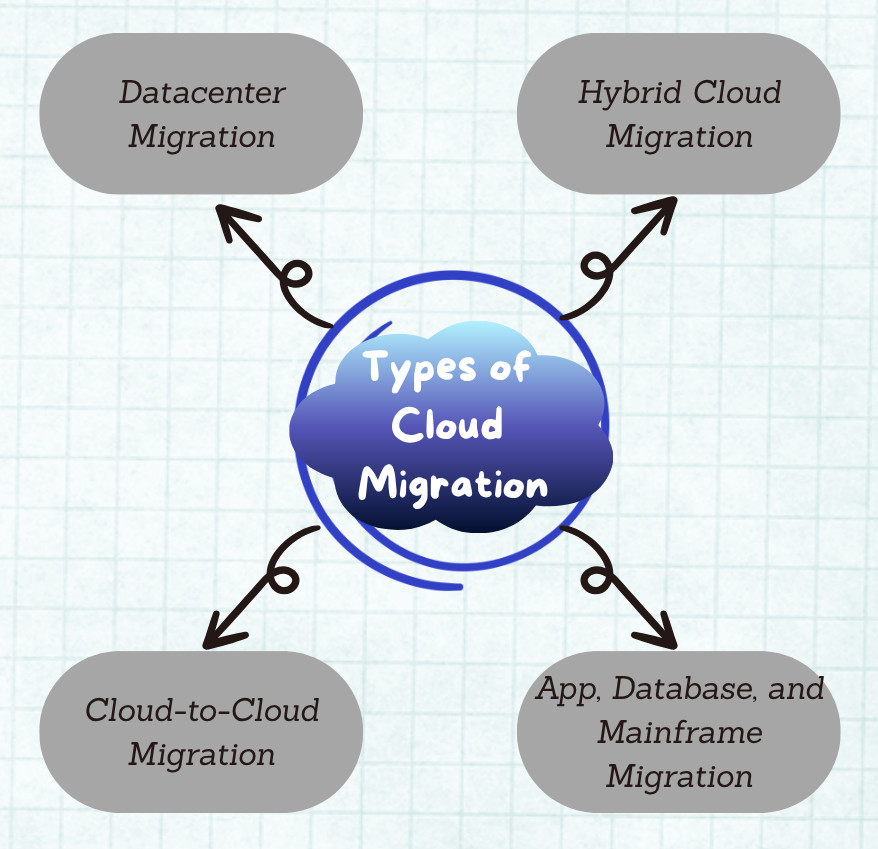
Datacenter Migration
In this type of cloud migration, data from on-premises servers and mainframes (stored in server rooms) is moved to the cloud provider’s servers, which are stationed in very large, highly secure, and professionally maintained buildings.
Resources are usually migrated using high-capacity networks, but in their absence, they are first moved to high-capacity disks and data boxes and physically shipped to the cloud provider, from where they are uploaded to cloud servers.
Hybrid Cloud Migration
In this migration model, organizations choose to leave some resources in their on-premises datacenter and only migrate a portion of their resources to the cloud, creating a hybrid cloud. With a hybrid cloud, the value of existing on-premises data center equipment is maximized, and organizations can meet industry and government compliance requirements.
Hybrid clouds are useful as a disaster recovery method in which on-premises data is backed up on the public cloud in the event that an on-premises data center becomes unavailable or inoperable.
Cloud-to-cloud Migration
Many organizations use multiple clouds and sometimes choose to move resources between their public clouds using cloud-to-cloud migration. This type of migration is proper when organizations intend to use different cloud platforms’ products, pricing, and services.
Organizations use a central management tool to manage the resources across multiple clouds.
App, Database, and Mainframe Migration
The most commonly migrated workloads are applications and databases such as Linux, SAP, SQL Server, and Windows Server. The two most used systems, IBM and Unisys, are good examples of mainframes.
By migrating these applications, databases, and mainframe workloads, the costs are reduced significantly, resulting in faster and more reliable performance with access to cloud platforms’ developer tools and APIs. The migrated systems are also more secure, and they can easily increase or decrease their capacity without needing to purchase, install, and maintain new equipment.
Different Types of Cloud Environments
Let us understand the types of cloud models before going into the details of migration:
- Public Cloud: This is owned and operated by third parties, such as AWS and Azure, and offers services over the Internet. Public cloud platforms are ideal for scalability and cost-effectiveness.
- Private Cloud: A private cloud is a dedicated infrastructure for a single organization, either managed by a third party or internally by the organization. It offers more control and security.
- Hybrid Cloud: This cloud platform combines public and private clouds, enabling data and applications to move between them. Hybrid clouds are ideal for regulatory compliance and flexible workloads.
- Multi-Cloud: In this environment, multiple cloud providers are used. Multi-cloud avoids vendor lock-in and offers flexibility in choosing the best tools from each provider.
Benefits of Cloud Migration
Cloud migration offers several benefits to migrating organizations:
-
Cost Efficiency: Migrating to the cloud reduces the organization’s spending from capital to operational costs. Organizations can use the cloud to adopt tools like SaaS apps and elastic usage models that can be scaled up or down depending on the requirements. This results in significant savings.Cloud migration frees skilled employees from data center administration tasks to focus on business development, thus saving human resources. Additionally, you only pay for the cloud resources you use.
- Scalability: Cloud platforms have inherent scalability, and businesses can easily adjust IT resources in response to fluctuating workloads without costly and time-consuming infrastructure upgrades. With dynamic scalability, applications perform optimally during peak times, and no resources are wasted during off-peak hours.
-
Performance Optimization: Core applications and systems perform better and reliably on the cloud than legacy systems since cloud hardware is consistently upgraded and optimized. With increased performance, organizations can provide a better customer experience, as their internal resources can work on high-priority workloads, focusing on customer satisfaction.Cloud technologies are constantly evolving, and platforms are continuously upgrading them. Hence, developers work with the most recent technologies, which help in faster processing speeds and optimal performance.
- Disaster Recovery & Business Continuity: Cloud platforms have built-in backup and recovery capabilities. This ensures that downtime is minimized during disasters, as recovery is quick. In the event of a disaster, since recovery is fast, business continuity is not affected.
- Security Enhancements: Modern cloud providers offer robust security mechanisms such as identity and access management (IAM), encryption key management, data loss management, and zero-trust architecture. These security measures protect organizations’ data from threats and vulnerabilities. Cloud platforms also have several backup and disaster recovery mechanisms to protect all digital assets.
- Accelerated Application Development: Migrating to the cloud from traditional systems increases developer efficiency and speeds up application development. Cloud-native apps also perform more reliably with reduced downtime. With more rapid growth, deployment cycles are also faster, allowing businesses to innovate more quickly.
- Compliance: Cloud platforms employ advanced compliance tools that are regularly updated, making it easier for organizations to meet evolving industry regulations.
Cloud Migration Strategies: The 6 R’s
Gartner introduced the concept of the “6 R’s” of cloud migration strategies. The following are the 6 R’s used in cloud migration:
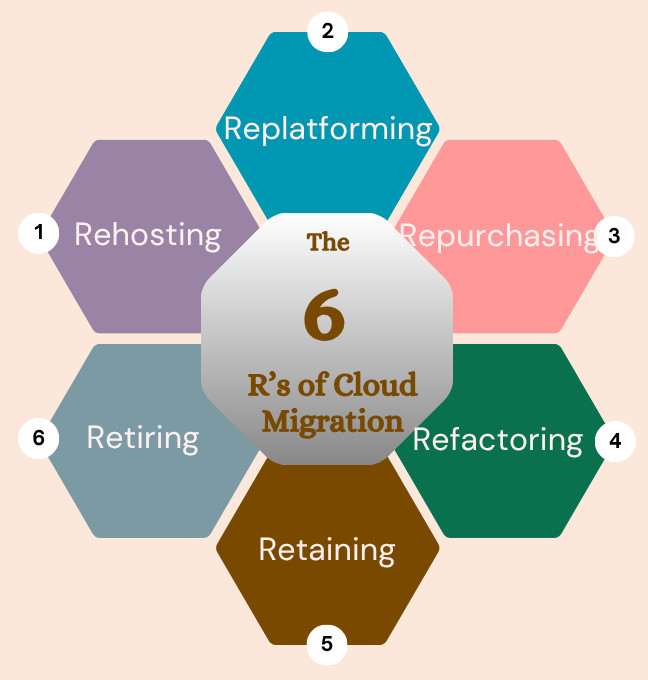
1. Rehosting
This is also known as the “Lift and Shift” strategy, and it aims to make as few changes during cloud migration as possible. The applications are redeployed to the cloud without substantially changing their configurations.
Rehosting is the most straightforward cloud migration strategy. Administrators just “lift” their applications, workloads, server operating systems, and virtual machines and “shift” them to a new operating model in the cloud. Thus, the same software running in the data center is now in the cloud.
This migration strategy is best for organizations with predictable peak usage patterns, such as food delivery. The drawback, however, is that it often does not use all the cloud-native capabilities and efficiencies that make public clouds so powerful.
2. Replatforming
The replatforming strategy slightly modifies the migrated applications to take advantage of cloud offerings, such as using managed databases instead of self-managed ones. This is an extension or the next step of the rehosting strategy. This strategy “lifts” the existing applications, workloads, and virtual machines and then optimizes them for the new cloud environment (tweaks them) and then “shifts” them to the cloud.
For example, a service may replatform a workload to take advantage of cloud-based microservices architecture or containers like Docker and Kubernetes.
The main advantage of a replatforming strategy is that applications running in the cloud have higher performance and greater efficiency. However, replatforming takes more work than a straight lift-and-shift strategy. In addition, since the applications are modified, more rounds of testing will be required to ensure everything works fine.
3. Repurchasing
In this strategy, an organization moves from a purchased on-premises application to a cloud-hosted Software-as-a-Service (SaaS) equivalent. In the process, the current applications are retired. For instance, an organization may move from on-premises collaboration software and local storage to Google Workspace’s cloud-hosted apps such as Docs, Slides, Sheets, and GDrive.
From a resource perspective, this strategy is much easier than refactoring and rebuilding. However, it can be much more expensive than on-premises licenses, software, and infrastructure are retired, and organizations do not get to control their own environment.
4. Refactoring (Re-architecting)
In a refactoring or rearchitecting strategy, applications are reengineered to be cloud-native. The application’s code is rewritten without changing its front-end behavior or experience.
The refactoring strategy is applied when application capabilities need to be enhanced, such as increasing scalability, adding AI or machine learning capabilities, or providing new, intuitive, and faster data analysis.
For example, long strings of code may be broken into more modular pieces that can take advantage of cloud-native features.
Refactoring allows organizations to set priorities on which applications are moved based on business requirements, providing greater flexibility and the ability to keep up with competition.
5. Retaining
In the retention strategy, migration is held up for some time. This might be due to regulatory or latency constraints, or it might be needed for applications or workloads that have recently been upgraded significantly or for which the reasons for migration are unclear.
The applications must be periodically revisited and reassessed to determine if and when they should be migrated or whether there is a compelling reason for migration.
6. Retiring
This involves decommissioning obsolete or redundant applications. In a retiring strategy, the assets that are no longer required or outdated in the modern cloud computing environment are turned off.
This way, organizations can focus their resources and efforts on what matters most.
Phases of a Cloud Migration Process
Cloud migration is a multi-phase process with six phases: assessment, planning, testing, migration, and Optimization/modernization.
Here is the description of various phases of a cloud migration:

Assess
- Inventorizing existing resources and capacity of applications.
- Creating a list of applications that potentially will be migrated.
- Identifying key stakeholders and understanding business requirements.
- Specifying security and compliance requirements.
Plan
- Identifying the strategy for each application.
- Deciding the type of cloud to which the application is to be migrated, such as public, private, hybrid, or multi-cloud.
- Designing cloud infrastructure, such as compute, networking, security, and storage.
- Aligning with security, compliance, and cost requirements.
- Choosing appropriate services.
- Preparing migration plans for apps and their data.
Test
- Devising a testing strategy before migration
- Testing data migration and synchronization.
- Validating performance, security, and functionality.
- Documenting necessary changes to be performed as part of the migration.
- Planning the time for application cutover.
Migrate
- Migrate each app, workload, and instance according to the plan.
- Migrating using appropriate tools (e.g., AWS Migration Hub, Azure Migrate) in stages, executing each wave followed by cloud validation.
- Applying lessons learned from one wave to the next.
Optimize and modernize
- Monitoring applications and cloud usage
- Optimizing infrastructure and user experience.
- Monitoring cloud costs and adjusting as required.
- Implementing governance and compliance standards.
- Upgrading apps and systems to more modern solutions such as SaaS or PaaS.
When beginning the cloud migration process, organizations have several options. They can choose to migrate the applications by themselves with existing employees, or they can partner with the public cloud vendor, utilizing its migration suite. Alternatively, they can employ third-party migration partners to provide technical support and expertise.
Tools and Technologies for Cloud Migration
The following table provides the list of tools used for cloud migration:
| Tools/Technologies | Examples |
|---|---|
| Cloud-Native Tools |
|
| Third-Party Tools |
|
Common Challenges in Cloud Migration
- Downtime and Business Disruption: Cloud migration may lead to application downtime or data loss in case of poor planning.
- Security and Compliance Risks: Transferring sensitive data from on-premises to the cloud raises security and compliance risks.
- Cost Overruns: Unexpected costs may arise if cloud usage is not properly managed or optimized.
- Technical Complexity: Old legacy systems have complex interdependencies that may make migration difficult. In addition, technical interdependence may also affect migration, as moving one component without the other may disrupt application operations.
- Skill Gaps: The in-house team might be lacking in cloud expertise, which can hinder migration. Hence, organizations must train the existing staff or hire new talent with the necessary cloud skills.
- Scalability Challenges: Moving a large number of applications to the cloud needs careful planning and staged efforts. For example, moving a large amount of data with limited bandwidth. Such scalability issues should be considered and addressed promptly as they arise post-migration; rolling them back to the previous state might be complex.
Post-Migration Considerations
- Performance Monitoring: Monitor the performance of CPU, memory, network usage, and apps, and track their responsiveness.
- Cost Management: Avoid possible overspending by continuously analyzing resources.
- Security Audits: Test the migrated system regularly for vulnerabilities and maintain compliance.
- Governance: Establish policies for resource usage, data access, and service provisioning.
Cloud Migration Use Cases
-
Healthcare: In healthcare, cloud migration may be employed for:
- Secure storage of electronic health records (EHRs)
- HIPAA-compliant data handling
- Telemedicine platforms
-
Finance: This industry benefits from migration in:
- Real-time fraud detection using AI/ML in the cloud
- Secure customer data storage and compliance
-
Retail: Retailer platforms benefit in the following ways:
- Scalable e-commerce platforms
- Personalized marketing via cloud analytics
-
Education: Cloud migration is crucial in the education sector with:
- Virtual classrooms and online learning management systems (LMS)
- Data analytics for performance tracking
-
Manufacturing: Cloud migration helps manufacturing with:
- IoT integration for smart factories
- Predictive maintenance powered by cloud AI
Future of Cloud Migration
- AI-Assisted Migration: The migration process will be automated and optimized using machine learning tools.
- Serverless Computing: Platforms will increasingly adopt event-driven, serverless architectures.
- Cloud-native Development: Organizations will opt for cloud-native development using technologies like microservices, containers, and DevOps.
- Sovereign Clouds: Companies will adopt locally hosted clouds that meet national data residency requirements.
- Zero Trust Architecture: Security models where no user or device is automatically trusted will be increasingly adopted.
Conclusion
Cloud migration cannot be looked upon only as a technological shift, but it is a business transformation. By migrating their workloads, systems, and applications to the cloud, organizations unlock new capabilities, streamline operations, and position themselves for future growth. However, this migration journey requires meticulous planning, a clear strategy, and tools.
Understanding the nitpicks of cloud migration and planning accordingly ensures your organization is prepared to maximize the value while minimizing threats.
 |