
What is YAML?
Data formats play a crucial role in modern software development. Systems use data formats to communicate, store configuration, and represent structured information that is both machine-readable and human-friendly.
Among the many data serialization formats available today, including JSON, XML, and TOML, YAML has emerged as one of the most widely adopted, particularly in configuration management, DevOps tooling, and cloud-native ecosystems.
| Key Takeaways: |
|---|
|
This article provides an in-depth explanation of YAML, covering its origins, fundamental syntax, advanced features, real-world use cases, and both its advantages and drawbacks.
Understanding YAML – A Human-Friendly Data Format
YAML stands for “YAML Ain’t Markup Language” and is a human-readable data serialization language commonly used to create configuration files.
Originally, YAML stood for “Yet Another Markup Language,” but its maintainers redefined the acronym to emphasize that YAML is not a markup language like HTML or XML. Instead, YAML is a data serialization language designed to represent structured data in a form that is both easy for humans to read and edit and easily parsed by machines.
YAML is a popular choice among developers owing to its ease of use and interaction.
YAML is a strict superset of JSON, another data serialization language, and can do everything that JSON can do. YAML uses indentation and newlines to signify structure, rather than relying on brackets and braces, making it cleaner and easier to read.
A Brief History of YAML
- Clark Evans
- Oren Ben-Kiki
- Ingy döt Net
It was created to improve the readability of JSON-like data and provide a cleaner alternative to XML.
You will see YAML being a de facto across DevOps, cloud platforms, and many other tools like Kubernetes, Docker Compose, GitHub Actions, Ansible, and CloudFormation.
Core Philosophy of YAML: Human First
YAML is based on the following design principle:
Data should be easy for humans to write, read, and understand.
If you see YAML code, it resembles natural language and relies heavily on indentation, uses minimal punctuation, and keeps syntax very simple.
- JSON is compact, but it can become difficult to read in large files.
- XML is a robust yet verbose language that requires the use of opening and closing tags.
- TOML/INI are simple but less expressive for nested data.
Key Features of YAML
- Human-readable Syntax: YAML has a clean, minimalistic syntax that is easy for humans to read and write.
- Indentation for Structure: It uses indentation, similar to the Python language, to denote hierarchy and structure.
- Data Types: YAML supports a variety of data types, including:
- Scalars: Hold simple values, such as strings, numbers, and booleans.
- Sequences: Lists or arrays of elements, typically indicated by a dash (-) at the beginning of each item.
- Mappings: YAML supports key-value pairs, also known as dictionaries or associative arrays.
- Versatility: YAML is not a programming language but a data format that can be used with any programming language.
- Configuration Files: Many software applications use YAML for their configuration files and infrastructure automation.
- Data Exchange: It is used to exchange data between various systems and programming languages.
- Superset of JSON: YAML is a strict superset of JSON, meaning all valid JSON is also valid YAML. Additionally, YAML can represent more complex data structures.
YAML vs. Other Data Formats
Although there are many data serialization languages in the market, YAML stands out in several ways. In this section, we compare YAML with other formats such as JSON, XML, and TOML/INI.
YAML vs JSON
The following table shows key differences between YAML and JSON:
| Feature | YAML | JSON |
|---|---|---|
| Readability | YAML is highly readable | JSON is readable but denser |
| Comments | It supports comments | JSON does not natively support comments |
| Syntax | YAML has strict indentation rules | JSON relies on braces and brackets |
| Expressiveness | YAML is more flexible | JSON has simpler data types |
| Use cases | YAML is used in config files, complex structures | JSON is used in APIs and web applications |
YAML and JSON are both human-readable data serialization formats and share similar data types and structures. However, they differ in their syntax, design priorities, and everyday use cases.
YAML vs XML
The table below shows key differences between YAML and XML:
| Feature | YAML | XML |
|---|---|---|
| Readability | YAML is more readable with indentations | XML’s readability is low to medium. It uses tags to define elements and attributes |
| Verbosity | It has minimal verbosity | XML is very verbose |
| Comments | YAML supports comments | XML supports comments as well |
| Schema | YAML schema is less formal | XML has a strong schema ecosystem |
| Use cases | YAML is used for configs and DevOps | XML is used in documents, SOAP, and enterprise systems |
YAML and XML are both data serialization formats. However, they differ significantly in their syntax, readability, and primary use case. YAML excels in lightweight, human-edited environments, whereas XML offers stronger schema validation for enterprise-level use cases.
YAML vs TOML / INI
The following table compares YAML with TOML and INI formats:
| Feature | YAML | TOML | INI |
|---|---|---|---|
| Complexity | YAML syntax is complex compared to TOML and INI | TOML has a simple syntax, but it is more complex than INI | INI has the simplest syntax |
| Data Structures | YAML supports arbitrary, complex, hierarchical data. | TOML adds nested tables and arrays. | INI handles only flat key-value pairs. |
| Syntax | YAML uses indentation and key-value pairs (key: value) | TOML uses [table] and key = value with explicit typing | INI uses [section] and key=value |
| Readability | YAML’s indentation is sensitive to errors, though it is human-readable | TOML has more explicit and robust syntax | INI has a straightforward syntax and lacks complex structures, which makes it highly readable |
YAML, TOML, and INI are all file formats used for configuration and data serialization, but each has distinct characteristics and use cases.
YAML Syntax: The Building Blocks
YAML syntax is based on a few fundamental structures that enable the representation of data in a human-readable format.
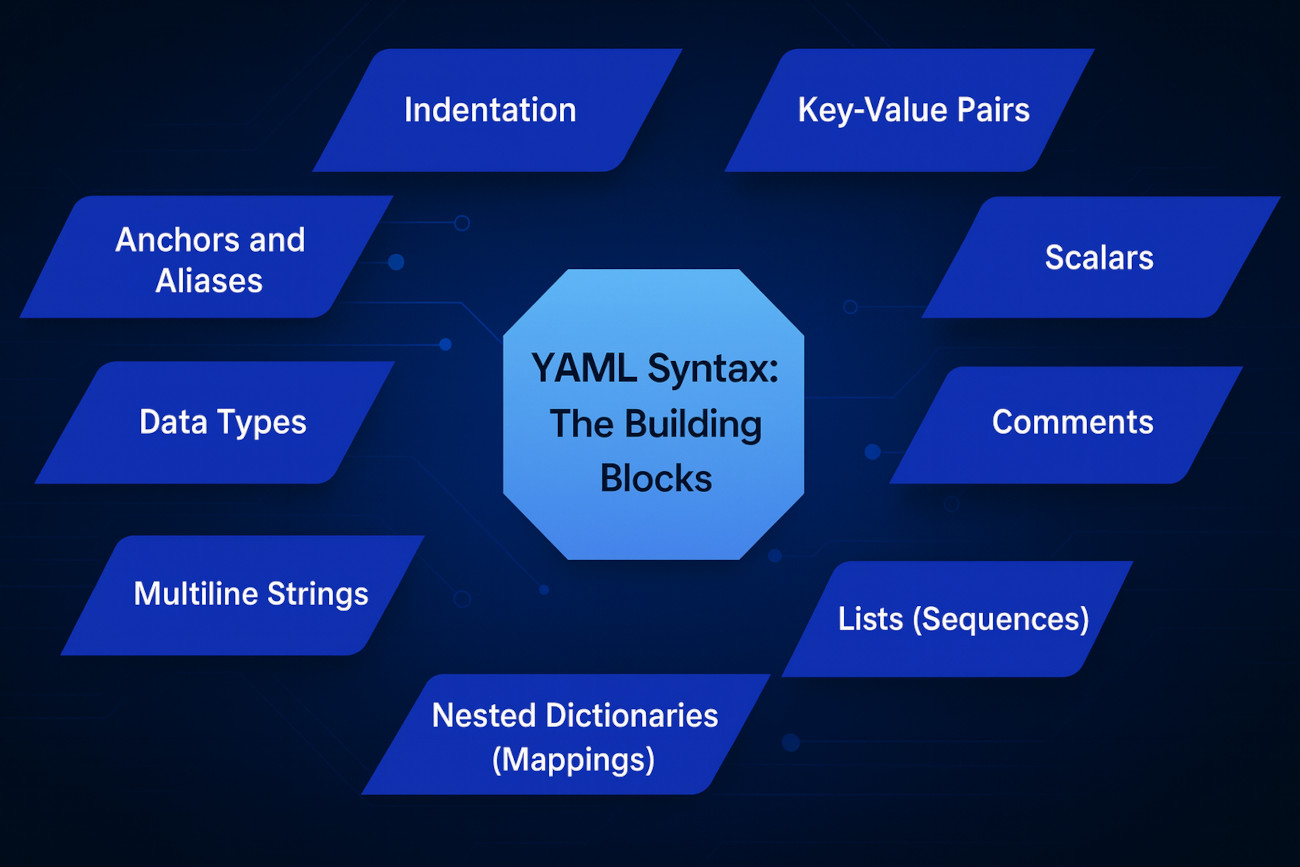
1. Indentation
YAML relies heavily on indentation and the number of spaces to represent the structure of data. It uses spaces, not tabs, to denote hierarchy and nesting.
person:
  name: Joe
  age: 25
In YAML, consistent indentation is crucial. Although most people use two spaces, four spaces also work if they are consistent. The specification forbids tabs because tools treat them differently.
Newlines represent line breaks, or the end of a line within YAML format, and are used to separate different elements.
2. Key-Value Pairs
This is the most basic building block of YAML, representing a single piece of data associated with a descriptive key.
The general format of a key-value pair is: key: value (note the space after the colon).
title: YAML Tutorial
version: 1.0
The above code represents two key-value pairs: the key ‘title‘ with the value ‘YAML Tutorial‘ and another pair with the key ‘version‘ and the value ‘1.0‘.
The strings can be quoted or unquoted. This means that both YAML Tutorial and “YAML Tutorial” are valid titles.
3. Scalars
- Strings
- Numbers
- Booleans (
true,false) - Null (
null) - Lists
- Maps
- Nested objects
product: Laptop
  price: 1200.50

  in_stock: true

  description: >

    This is a multi-line string

    that will be folded into a single line.
4. Comments
YAML supports comments (non-executable statements provided to describe the code) using the # symbol.
# This is a comment

name: Test User # Inline comment
As seen, comments can be multi-line or inline.
5. Lists (Sequences)
Lists in YAML represent an ordered collection of items. Items are denoted by a leading hyphen (-) and indentation.
fruits:
  - apple
  - banana
  - cherry
fruits: [apple, banana, cherry]
6. Nested Dictionaries (Mappings)
Complex data structures can be created in YAML by nesting mappings and sequences. Indentation is crucial in this case for defining the relationships between elements.
user:
  - id : 1
    name: Sam
    address:
      city: Austin
      zip: 78701
  - id : 2
    name: Max
    address:
      city: California
      zip: 28501
7. Multiline Strings
YAML supports multi-line strings, allowing text to span multiple lines without requiring explicit line breaks. Multi-line strings help include blocks of text in YAML documents.
# Literal block (|) preserves newlines

description: |
  This is a multiline
  string that preserves
  line breaks.

#Folded block (>) converts newlines into spaces

summary: >
  This will be a single
  line when parsed.
8. Data Types
YAML supports various data types, including strings, integers, floats, booleans, and null values, to represent different kinds of information flexibly.
- Boolean:
true,false - Integer:
42 - Float:
3.14 - Null:
nullor~ - Date/time:
2024-01-01 - String:
“YAML”
YAML automatically interprets these data types, but this can sometimes cause issues, such as with strings like "on", "off", "yes", and "no".
9. Anchors and Aliases
default: &defaults
  timeout: 30
  retries: 5

service1:
  <<: *defaults
  name: api-service
Anchors and aliases in YAML function similarly to variables or templates.
Real-World Examples of YAML
YAML’s simplicity makes it ideal for configuration files across various tools, including Kubernetes, Docker Compose, and Ansible. It is also used for defining CI/CD pipelines on platforms like GitHub Actions and GitLab CI, as well as in cloud infrastructure definitions such as AWS CloudFormation.
Here are some examples of real-world applications of YAML:
Kubernetes Resource Definition
apiVersion: v1
kind: Pod
metadata:
  name: my-app
spec:
  containers:
    - name: web
      image: nginx
      ports:
        - containerPort: 80
Kubernetes almost entirely uses YAML for defining deployments, services, and other resources.
Docker Compose File
version: '3'
services:
  database:
    image: postgres:14
    environment:
      POSTGRES_USER: admin
      POSTGRES_PASSWORD: secret
  app:
    build: .
    ports:
      - "8080:8080"
    depends_on:
      - database
GitHub Actions Workflow
name: CI Pipeline

on: [push]

jobs:
  build:
    runs-on: ubuntu-latest
    steps:
      - uses: actions/checkout@v2
      - name: Install Dependencies
	run: npm install
      - name: Run Tests
	run: npm test
Ansible Playbook
- name: Install web server
  hosts: web
  tasks:
    - name: Install Nginx
      apt:
        name: nginx
	state: present
CloudFormation (AWS)
Resources:
  MyBucket:
    Type: AWS::S3::Bucket
    Properties:
      BucketName: my-sample-bucket
Advantages of YAML
- Highly Readable: YAML syntax prioritizes readability, using indentation, minimal punctuation, and a clean structure resembling natural language. It is this simple structure that enables both developers and non-technical users to understand and edit it, thereby reducing the likelihood of errors.
- Supports Comments: YAML’s support for comments is a small but critical feature for documenting configuration files. Comments also enhance the clarity and maintainability of configuration files by providing context and explanations for different settings.
- Flexible and Expressive: YAML can represent a wide range of native data structures, including scalars, multiline text, complex nested structures, and sequences, allowing serialization of complex data.
- Language Independence and Portability: YAML is platform-independent, enabling seamless data exchange and interoperability across various systems and programming languages. Most major languages support YAML through libraries as follows:
- PyYAML (Python)
- js-yaml (JavaScript)
- ruamel.yaml
- SnakeYAML (Java)
- Go-yaml (Golang)
- Version Control Friendliness: YAML is a plain text format, and files are easily managed and tracked within version control systems like Git, facilitating collaborative development and change management.
- Strict and Robust Syntax: The YAML specification’s strict and robust syntax reduces ambiguity in data representation, making it easier to parse and process programmatically.
- Structured Configuration: YAML defines structured configurations, particularly for applications and systems like Kubernetes and Ansible. It utilizes key-value pairs, sequences (lists), and mappings (dictionaries), enabling the clear and hierarchical organization of data.
Disadvantages of YAML
- Significant Whitespace Sensitivity: YAML’s use of whitespace for structure makes it highly sensitive to indentation errors, which can be challenging to spot and debug, especially in large files. Incorrect indentation can lead to parsing errors or unintended data structures, resulting in a file being broken.
- Harder for Machines to Parse in Some Cases: YAML’s specification is itself complex and can lead to varying interpretations and inconsistencies across different YAML parsers and libraries in various programming languages, potentially causing serialization/deserialization issues.
- Limited Debugging Capabilities: YAML lacks built-in debugging features, including breakpoints and step-through execution. Debugging and troubleshooting issues within complex configurations is challenging.
- Lack of Programmability and Reusability: YAML has a pure data serialization format and does not offer features for programmability, such as variables, functions, or loops. This makes it challenging to achieve code reusability and leads to repetitive configurations.
- Scalability Challenges with Large Files: While YAML is readable for small configurations, the indentation-based structure can become cumbersome and complex to navigate in huge YAML files, hindering maintainability.
Best Practices for Writing YAML
- Always Use Spaces, Never Tabs: YAML forbids the use of tabs and will cause errors if used. Configure your editor to use spaces and automatically convert tabs to spaces.
- Maintain Consistent Indentation: Maintain consistency while using identification by choosing several spaces consistently for each indentation level (e.g., 2 or 4). Stick to this identification throughout the file.
- Quote Strings When in Doubt: Use quotes when a string contains special characters, reserved words, or values that could be misinterpreted as other data types (e.g., true, false, numbers). Preferably use single quotes unless character escaping is required.
- Avoid Excessive Nesting: Keep your YAML structure as flat as possible by avoiding nesting.
- Validate YAML Using Linters: Integrate YAML linters, such as yamllint, into your development workflow to enforce style guidelines and automatically check syntax errors.
- Add Comments: Add comments (#) to explain complex configurations or logic.
- Use Blank Lines to Separate Sections: This helps organize your file and improve readability.
- YAML is Case-sensitive: Pay close attention to capitalization in keys and values.
- Handle Multi-line Strings: Control newlines and trailing spacing by using block style (|) or folded style (>) with chomp modifiers (+, -).
- Avoid Trailing Spaces: Delete any unnecessary spaces at the end of lines to avoid parsing issues.
When Should You Use YAML?
The following table summarizes when to use YAML and when to avoid it:
| Use YAML When |
|
|---|---|
| Avoid YAML When |
|
Future of YAML
- Continued Dominance in DevOps and Cloud-Native: YAML is widely used in tools such as Kubernetes, Ansible, Docker, and other cloud-native technologies. The rise of GitOps practices further solidifies YAML’s use for infrastructure and application configuration.
- Enhancements and Tooling Improvements: Efforts are underway to address YAML’s limitations, including the development of better tooling for validation, more sophisticated templating systems, and improved error reporting to enhance the user experience and reduce configuration errors. The YAML specification itself is subject to ongoing revisions to keep the language modern and address evolving needs.
- Integration with Emerging Technologies: YAML will play a crucial role in newer trends and technologies, such as:
- AI-Driven Automation: Integrating YAML with AI-based automation tools to predict and prevent configuration errors and enable more intelligent automation.
- Policy-as-Code: Utilizing YAML within Infrastructure as Code (IaC) workflows to define and enforce organizational policies.
- Serverless Architectures: Expanding YAML’s use in serverless architectures in defining and managing serverless functions and workflows.
Conclusion
YAML is a powerful, robust, flexible, and human-friendly data serialization language designed to simplify configuration and clearly express structured data. While it has its own limitations, such as whitespace sensitivity and unexpected automatic typing, it remains one of the most widely used data formats in the modern software industry.
Understanding YAML is essential for anyone working in DevOps, cloud computing, automation, IaC, or application configuration, as it forms the backbone of these tools and workflows.
By learning and mastering YAML, you not only configure systems more effectively but also deepen your understanding of how modern infrastructure and software pipelines operate.
 |