
Best Claude Prompts for Code Generation (With Examples)
With the rise of AI-assisted development, tools like Claude have become widely adopted. However, the success of coding and development using Claude depends on how you prompt it.
| Key Takeaways: |
|---|
|
This article explores the best Claude prompts for code generation, along with practical examples across different programming tasks.
Why Prompting Matters in Code Generation?
Unlike traditional programming, where precision is mandatory, prompting requires context, clarity, and structure. Prompt engineering directly influences the quality, relevance, and accuracy of generative AI outputs. A well-crafted prompt ensures the AI understands the user’s intent and produces meaningful, accurate responses, minimizing the need for extensive post-processing.
- Clearly define the task.
- Specify the programming language.
- Include constraints or requirements to narrow down the output.
- Provide input/output examples when necessary.
- Indicate coding style or performance expectations.
The more context you provide to the prompt, the better Claude can tailor its response.
Read Prompt Engineering for Beginners: How to Write Better AI Prompts
- Improved Accuracy and Quality: Well-structured prompts provided with appropriate context, such as specific languages and frameworks, ensure the AI produces relevant, context-aware code rather than generic, faulty, or insecure snippets.
- Increased Productivity: Good prompts speed up the development cycle, enabling faster prototyping and automating repetitive tasks such as boilerplate code.
- Reduced Debugging: If the prompt given is well-structured and includes all necessary details, it reduces incorrect assumptions, reducing the need for extensive debugging or code rewriting.
- Greater Control over Output: Prompting helps developers define the exact functionality required, ensuring the code fits within existing architectures.
- Enhanced Functionality: Code generation prompts facilitate complex tasks such as debugging, refactoring, and documenting code, transforming AI from a basic tool into a sophisticated assistant.
Best Claude Prompts for Code Generation
Effective code-generation prompts involve being explicit, providing structural context, specifying constraints, and defining required outputs to improve accuracy and reduce mistakes.
Key strategies include setting clear tasks, specifying files, referencing existing code patterns, and enforcing a test-first approach.
In this section, we present the best Claude prompts commonly used for code generation:
1. Basic Code Generation Prompts
Template:
"Write a [programming_language] function that [task description]."
Example:
As an example, we have given the following prompt:
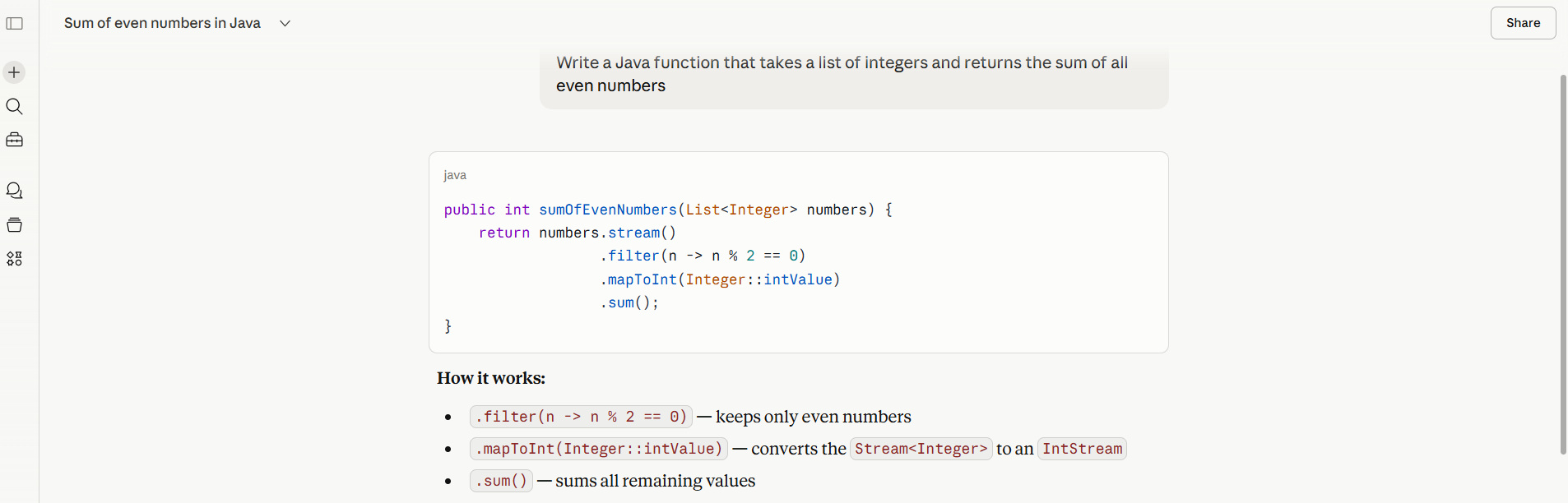
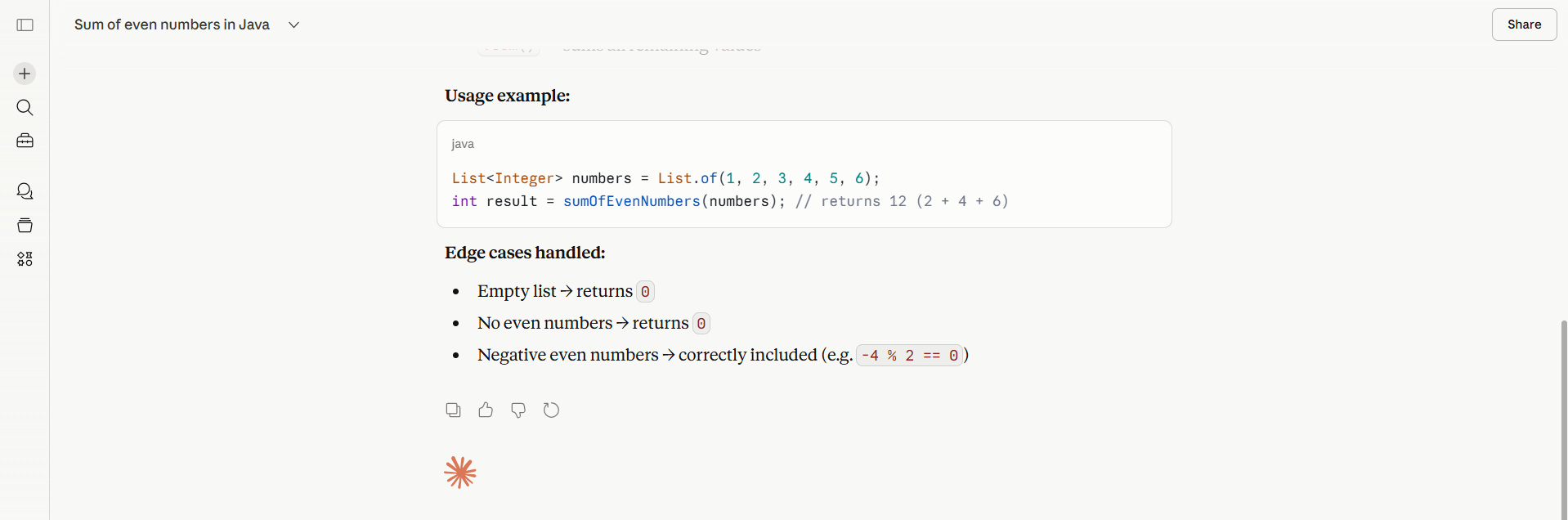
Write a Java function that takes a list of integers and returns the sum of all even numbers
Output (Expected):
Why It Works:
The above prompt is simple and direct. It specifies the programming language, input type, and expected behavior.
2. Structured Prompts with Constraints
A well-structured prompt with context and constraints improves accuracy and relevance.
Template:
"Write a [programming_language] function that [task]. Use [specific constraints]."
Example:
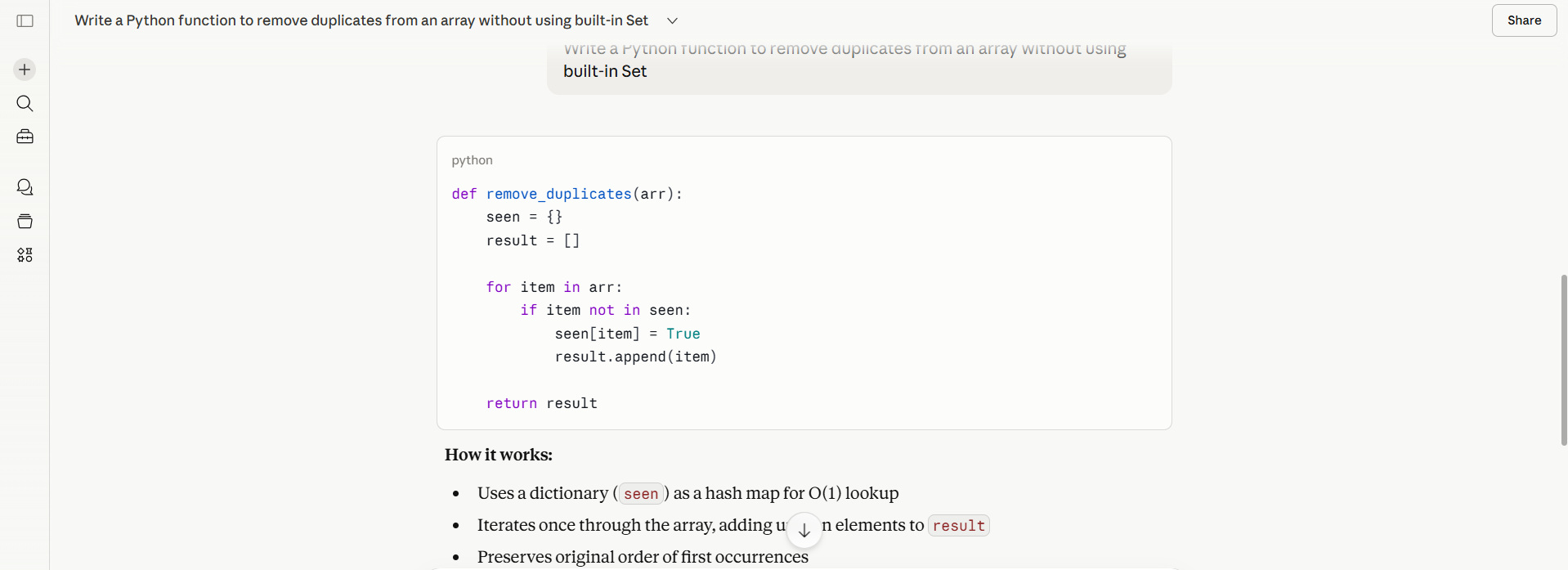
Write a Python function to remove duplicates from an array without using built-in Set
Output:
Why It Works:
The constraint specified in the prompt above forces Claude to avoid shortcuts and to produce a more thoughtful solution.
3. Prompts for Production-Ready Code
When you want Claude to generate production-ready code, the prompt should include more than just logic. It should also request structured error handling and documentation.
Template:
"Write production-ready [programming_language] code for [task]. Include error handling, comments, and edge cases."
Example:
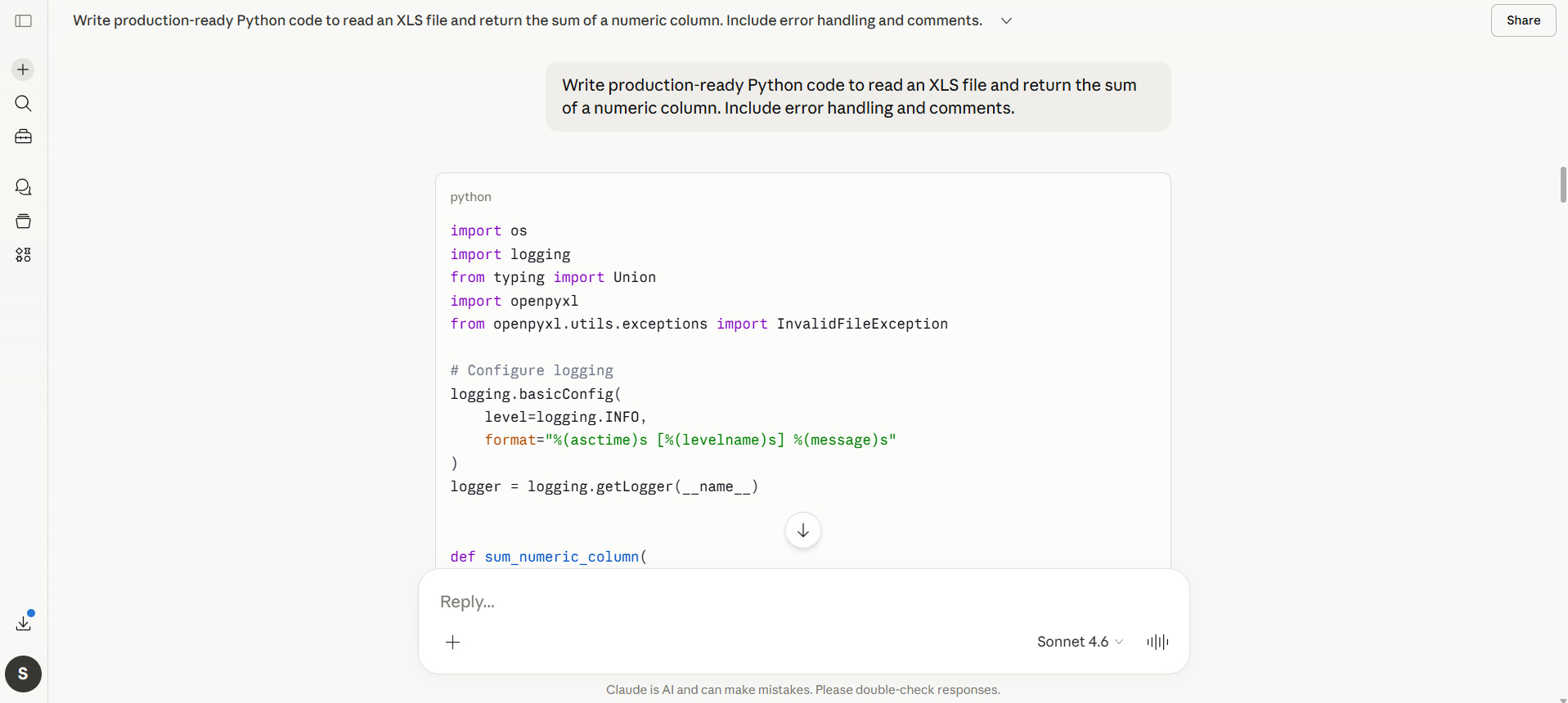
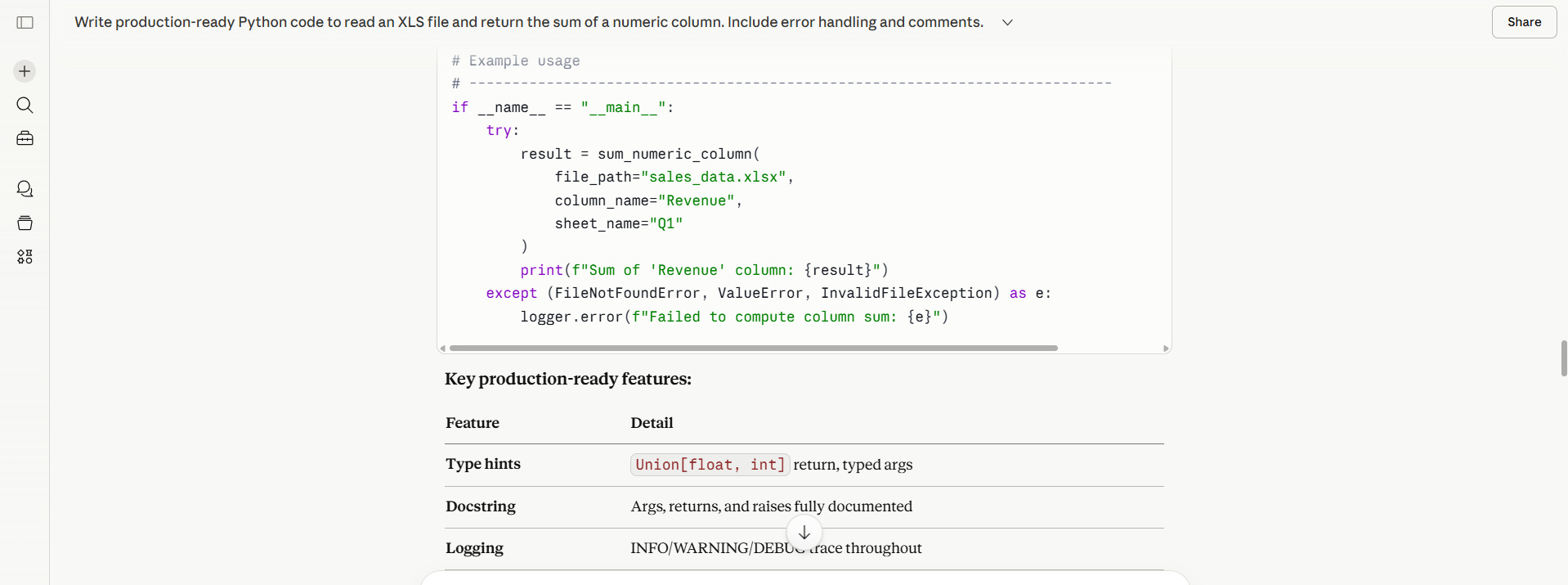
Write production-ready Python code to read an XLS file and return the sum of a numeric column. Include error handling and comments.
Output (Simplified):
Why It Works:
This prompt sets expectations for robustness and maintainability by including error handling and comments. Claude incorporates both requirements when generating the prompt’s output.
4. Prompting for Code Explanation + Generation
Claude excels at explaining its logic. You can pass a piece of code and ask it to explain it using a prompt, and Claude will generate an effective explanation for you.
Template:
"Write code for [task] and explain how it works step by step."
Example:
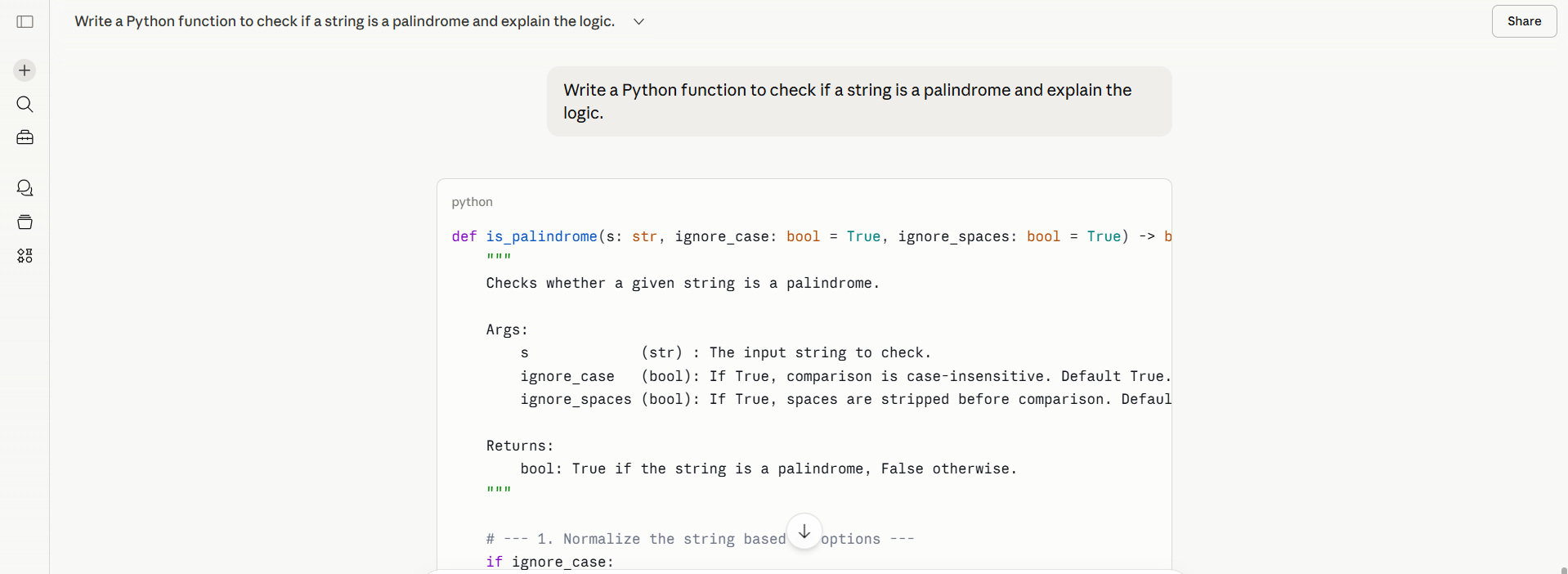
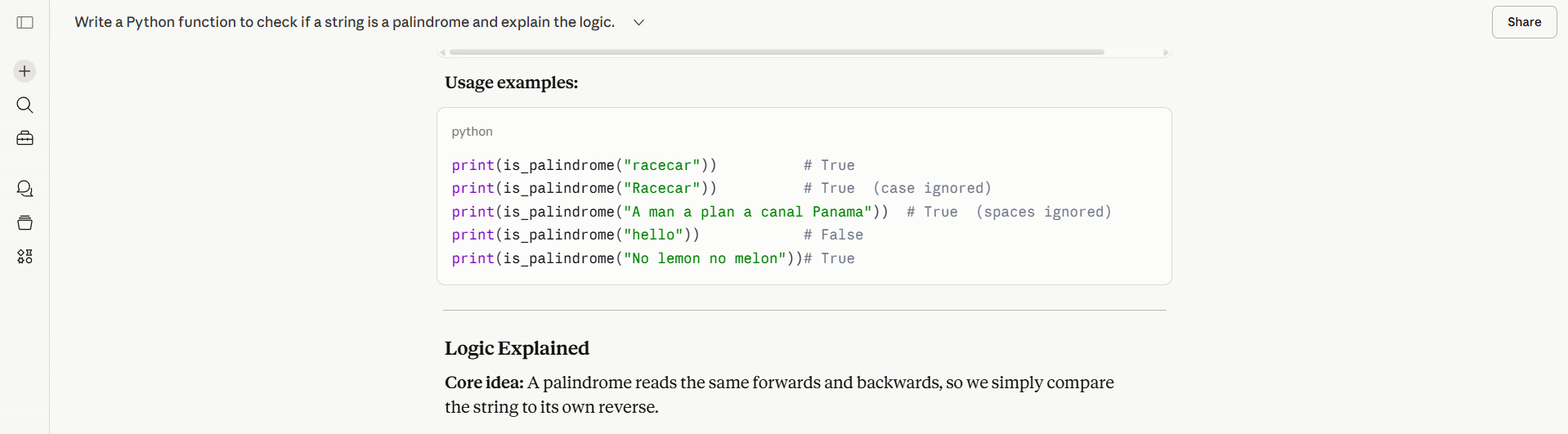
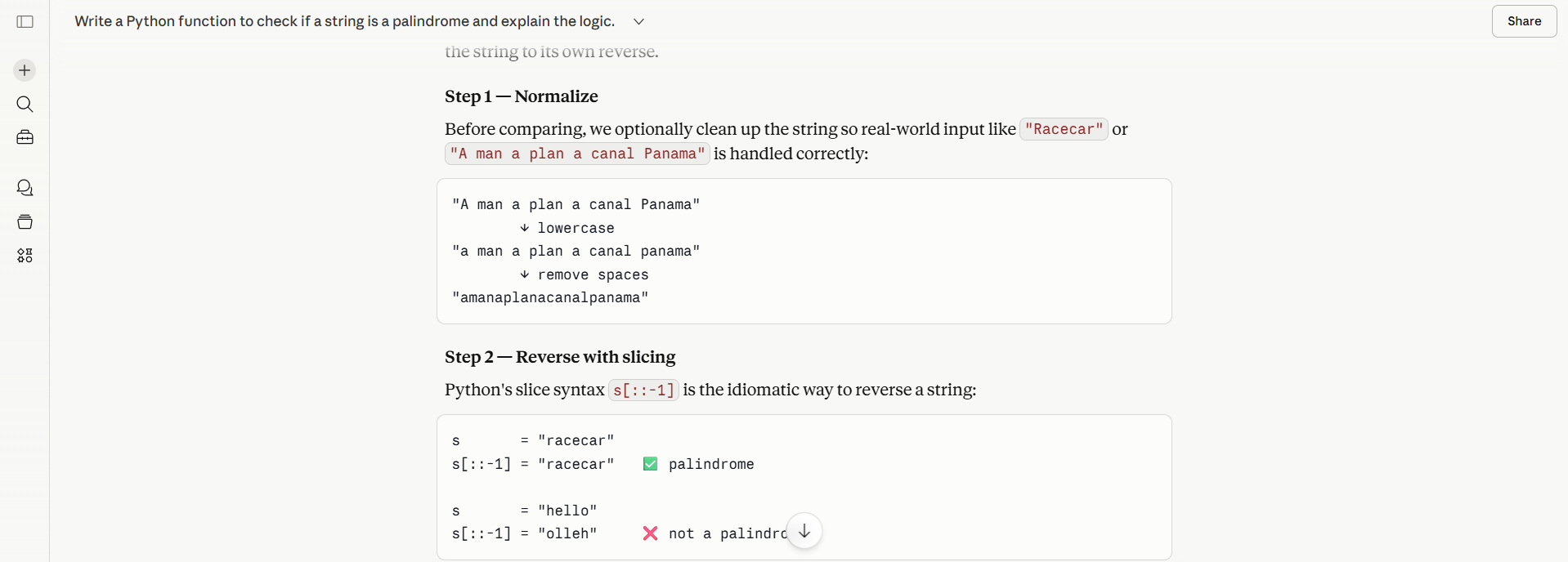
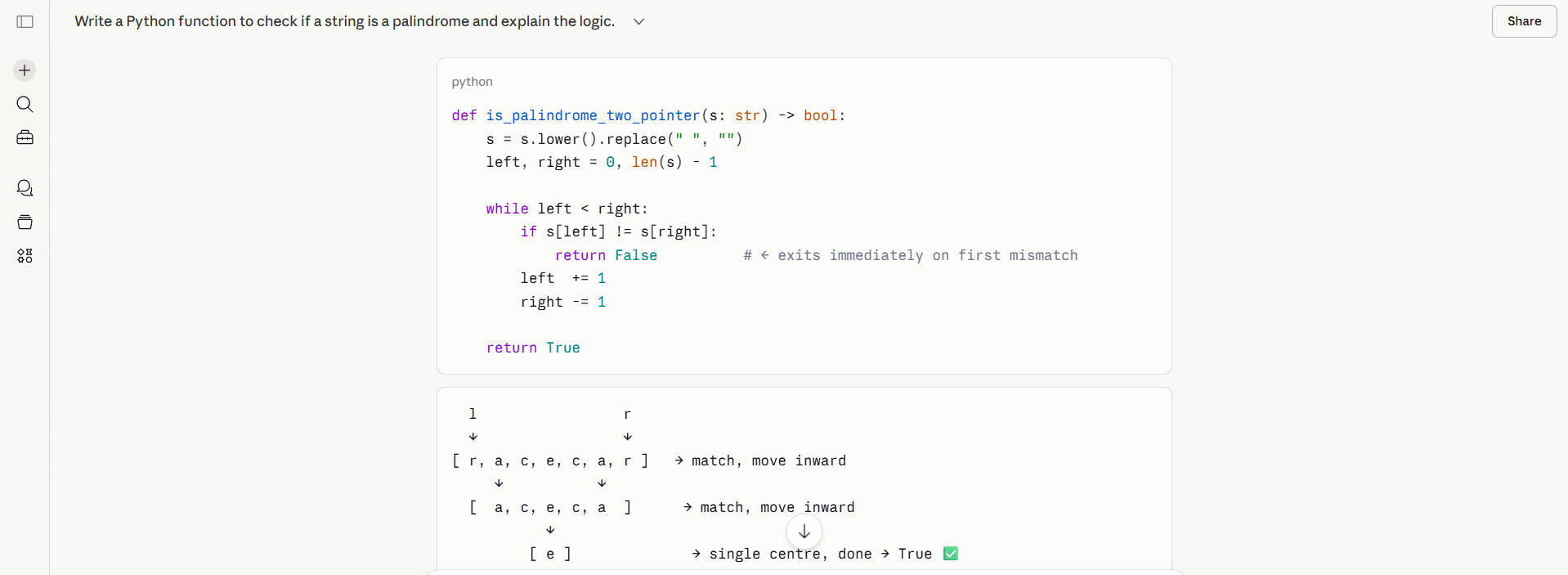
Write a Python function to check if a string is a palindrome and explain the logic.
Output:
Benefit:
This kind of prompt is especially useful for learning or onboarding developers.
5. Multi-Step Problem Prompts
When you have to accomplish a complex task, specifying step-by-step instructions is helpful.
Template:
"Break down the problem and then write code to [task]."
Example:
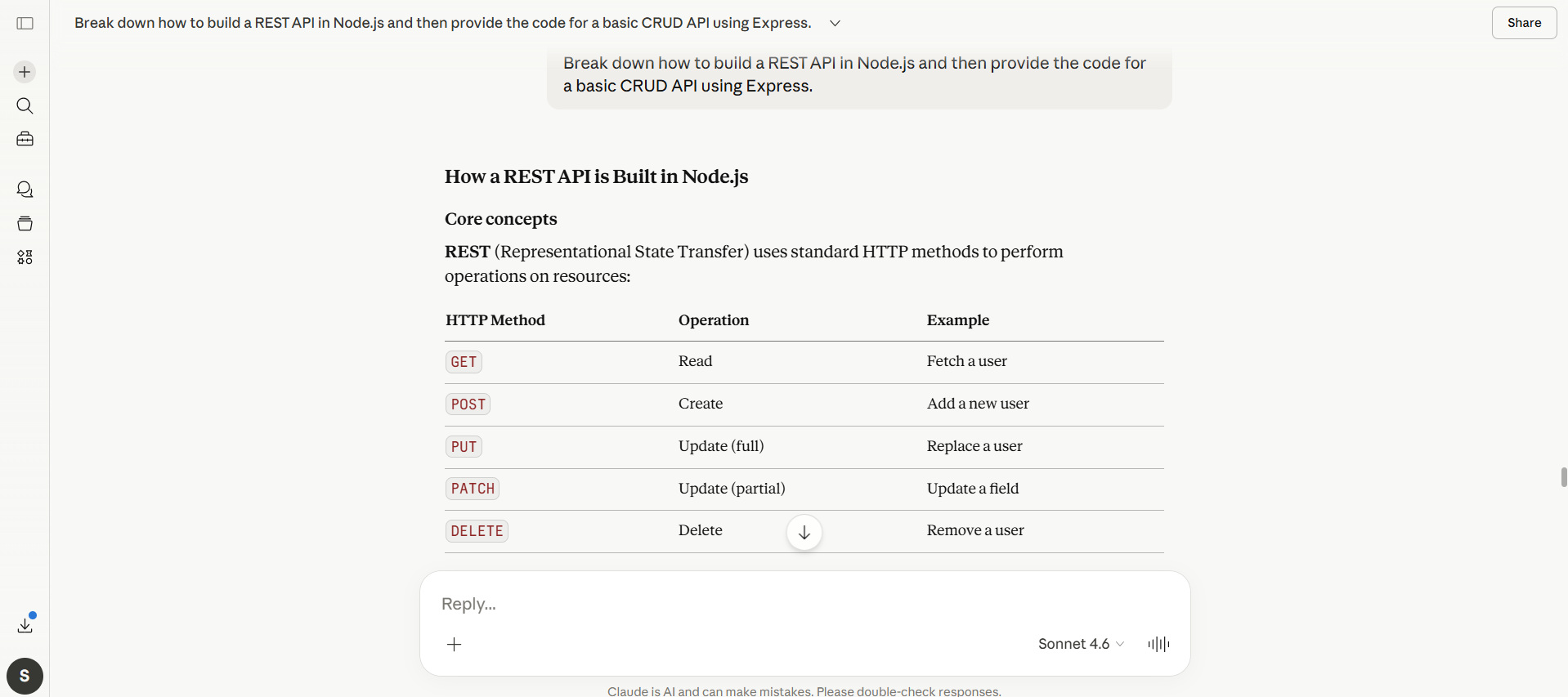
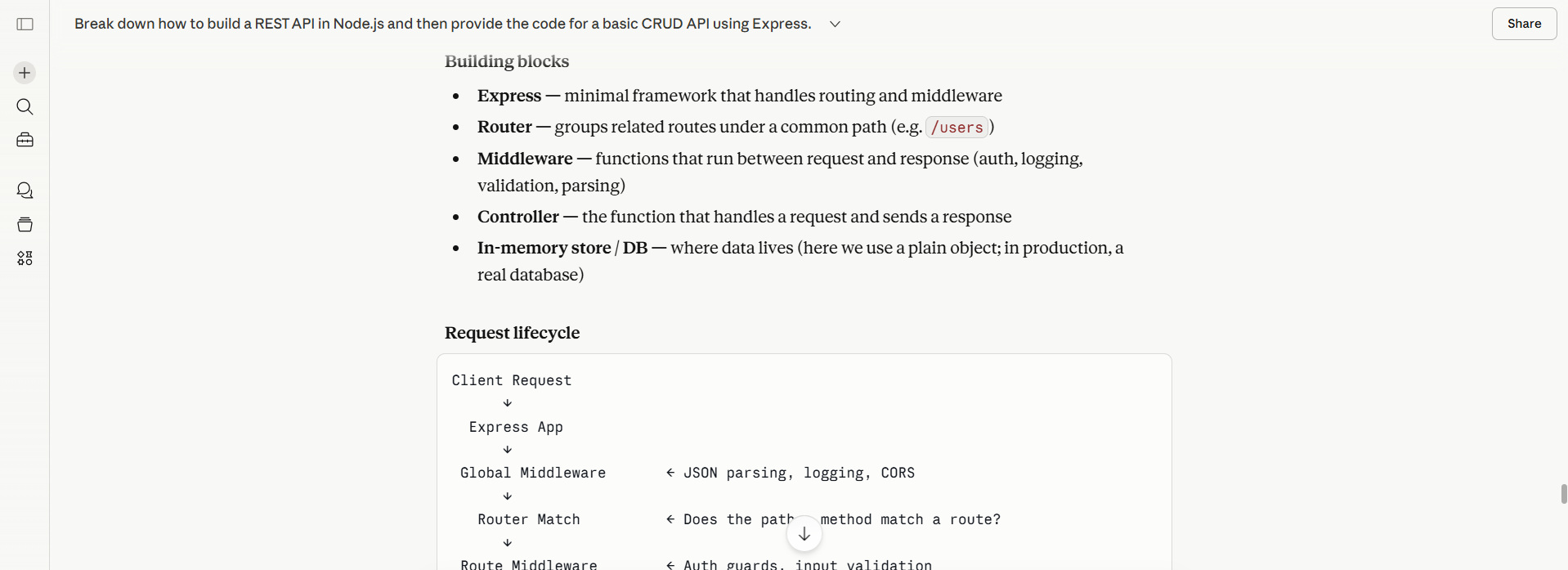
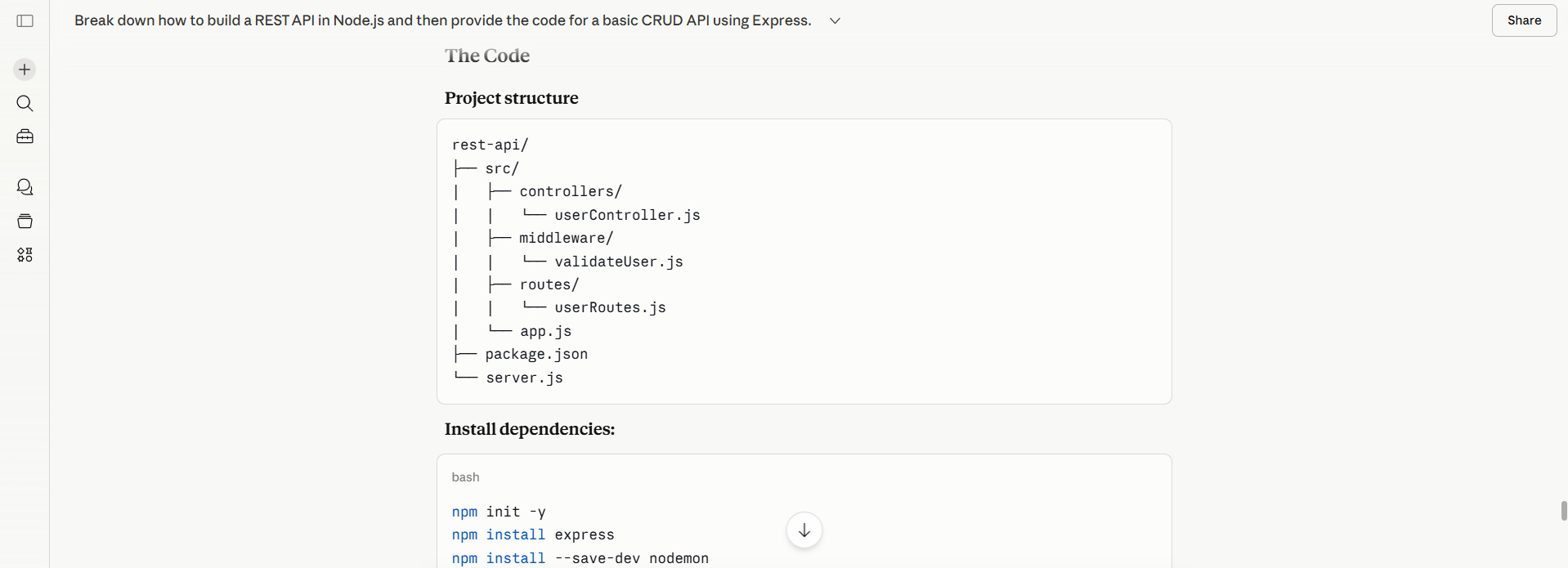
Break down how to build a REST API in Node.js and then provide the code for a basic CRUD API using Express.
Output (Partial):
Why It Works:
Claude first reasons through the problem, then implements it, resulting in a structured output that contains all the project details.
6. Debugging Prompts
When given proper context, Claude is highly effective at debugging. It not only identifies the problem, but also provides a way to fix it.
Template:
"Fix the following code and explain the issue: [code snippet]."
Example:
Fix the following Python code:

def divide(a, b):
  return a / b

print(divide(5, 0))
Output:
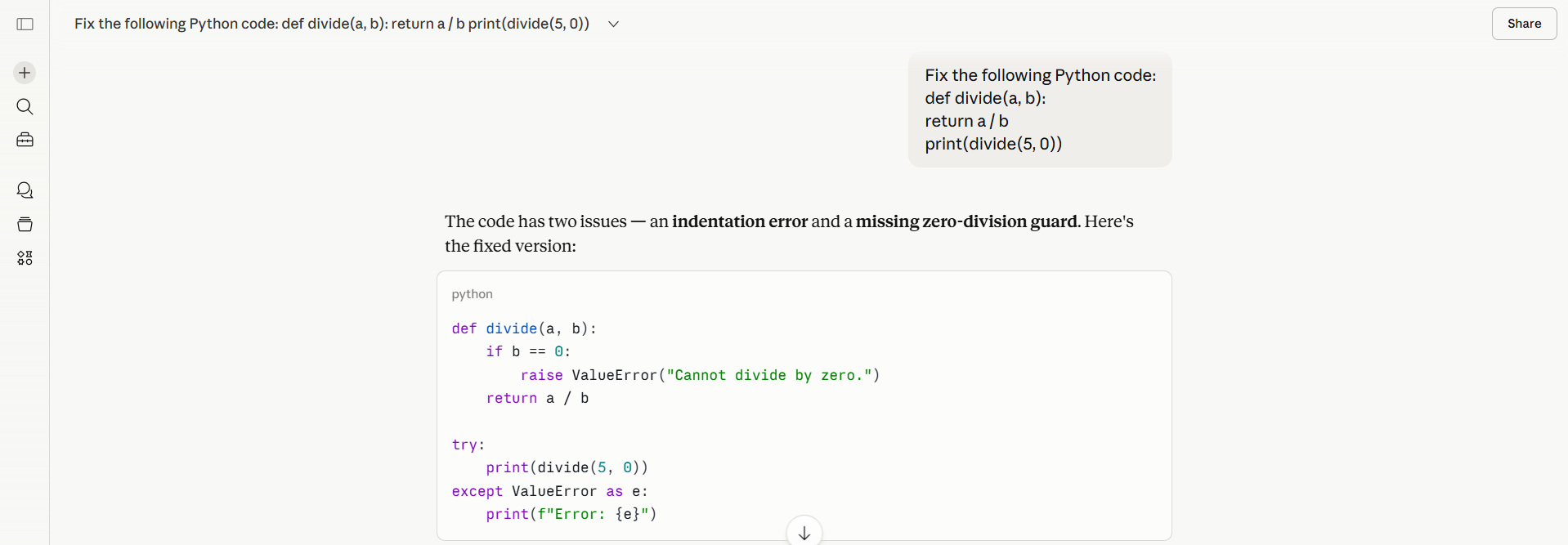
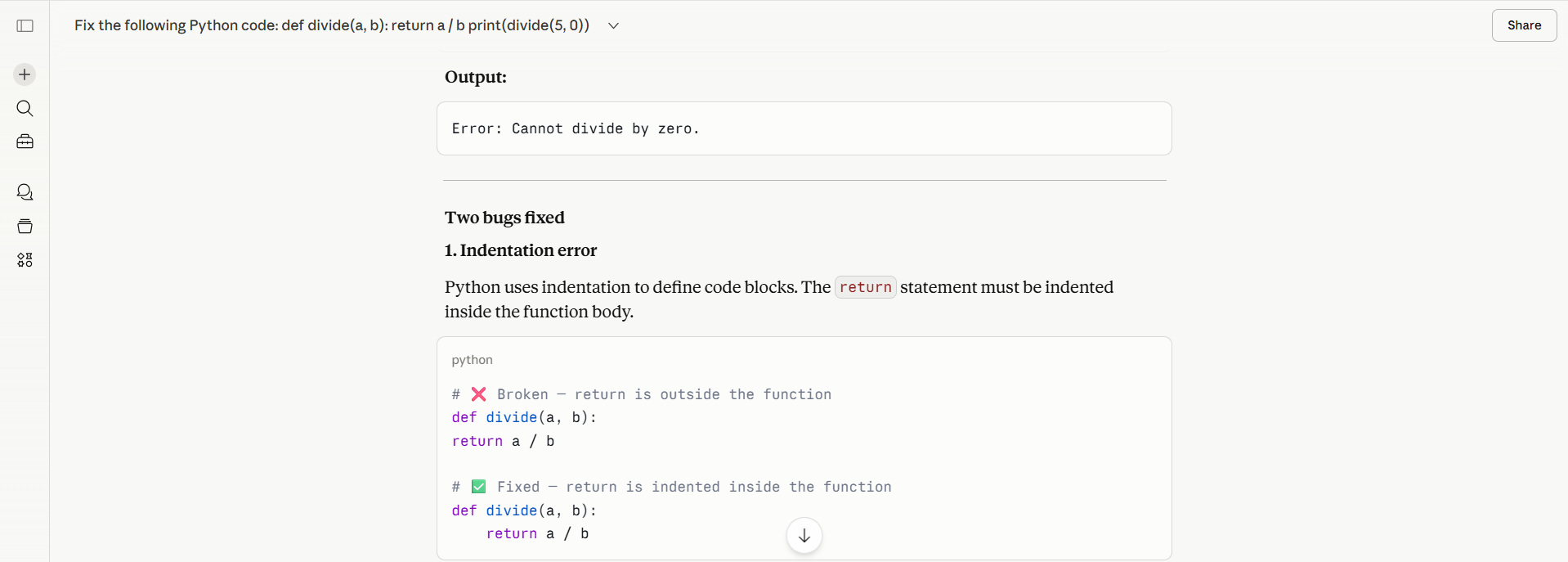
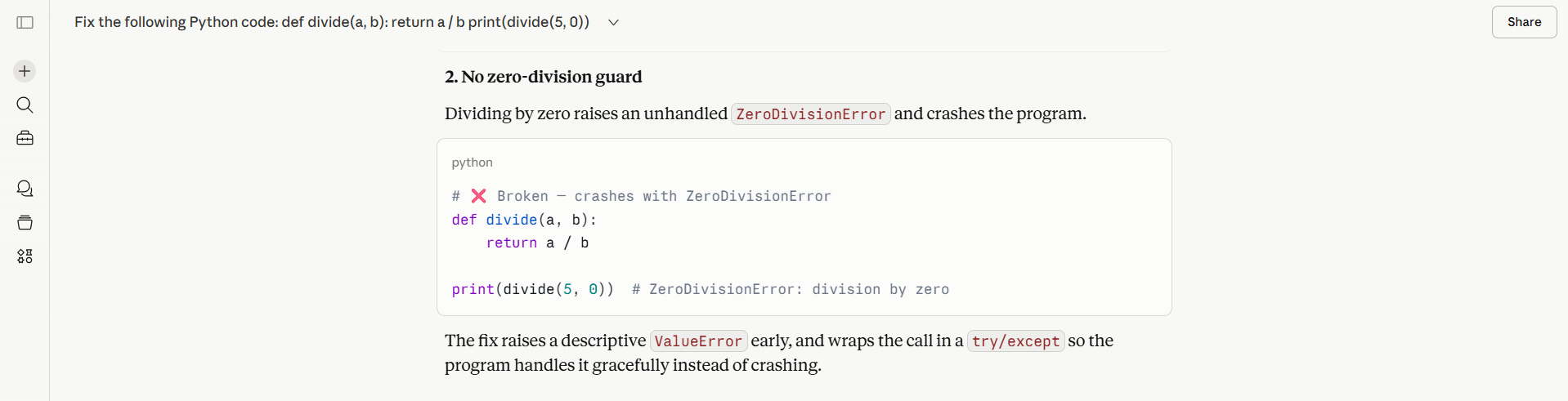
As seen in the screenshots above, Claude identifies division by zero and suggests error handling.
7. Refactoring Prompts
You can use Claude to improve existing code quality by asking it to refactor the code.
Template:
"Refactor this code to improve readability and performance: [code]."
- Simplify loops.
- Rename variables.
- Add a modular structure.
Example:
Task: Rewrite the following SQL query for performance.

Context: Query currently times out on large tables.

Requirements:
1. Optimize joins
2. Add comments explaining logic
3. Keep Postgres-compatible
When provided with an actual query, Claude will generate an output consisting of a new SQL query and the explanation.
8. Prompts for Specific Frameworks
When you are working with specific frameworks or IDEs and need assistance from Claude, be explicit about which one you are using. Clearly specify the framework or IDE in the prompt.
Template:
"Write a [framework]-based [language] application that [task]."
Example:
Write a Django API endpoint that returns a list of users in JSON format.
Why It Works:
When you specify the framework or IDE, it reduces ambiguity, and Claude focuses on the specific framework to generate the output.
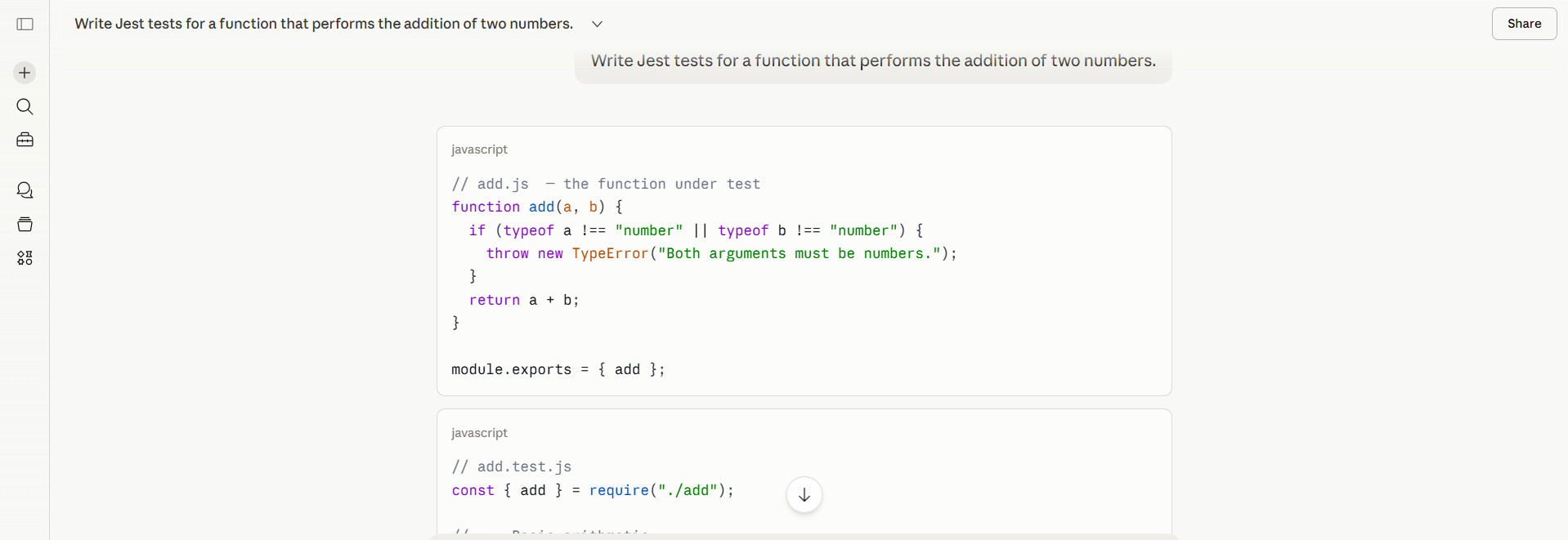
9. Prompting for Tests
Software testing is critical in the development cycle, and Claude assists in the process.
Template:
"Write unit tests for the following code using [framework]."
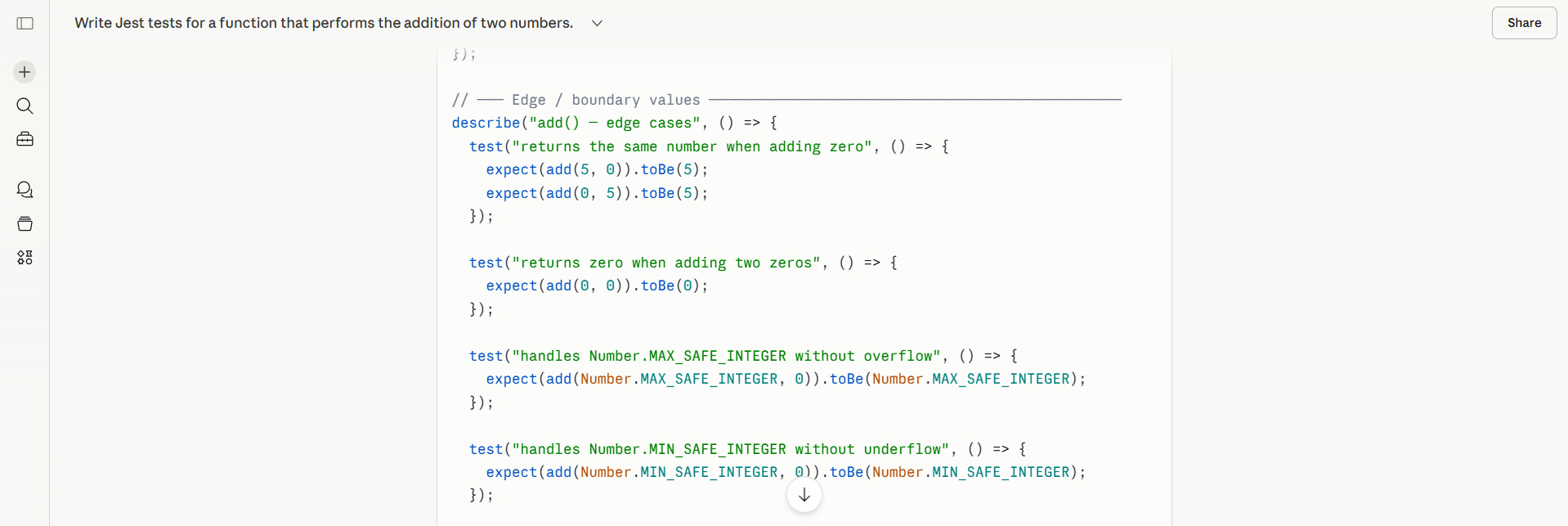
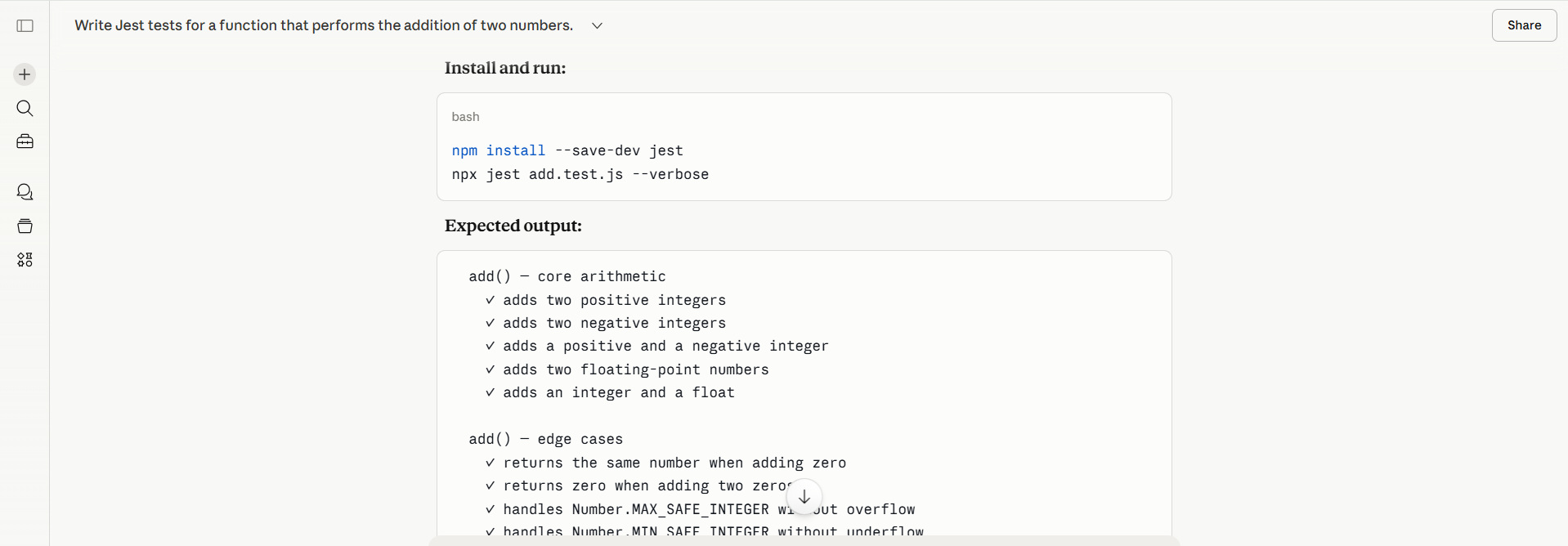
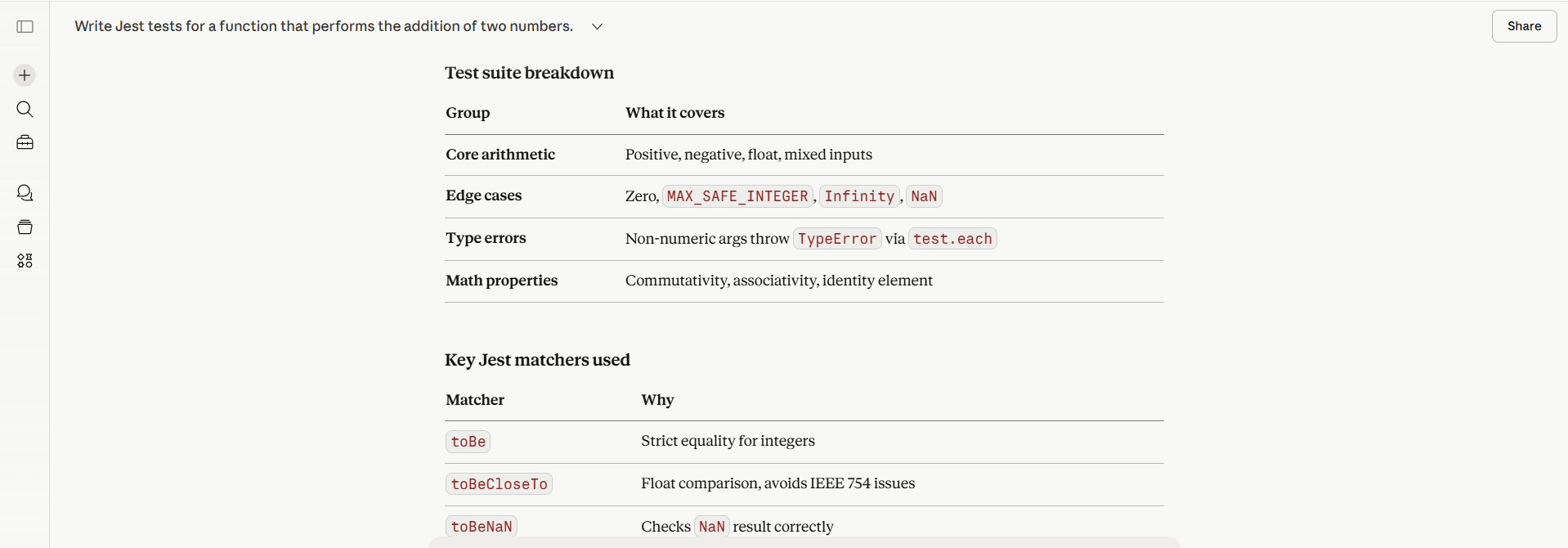
Example:
Write Jest tests for a function that performs the addition of two numbers.
Output (Partial):
Benefit:
Claude generates test cases, including edge cases, and summarizes the generated output.
10. Prompting for Optimization
Claude can optimize code for performance and other parameters based on what you specify in the prompt.
For code optimization, the best Claude prompts combine structured XML tags with explicit performance constraints and reasoning steps (Chain of Thought). In addition, you should provide a role, clear objectives, and a way to verify the output.
Template:
<role>You are a Senior Performance Engineer specializing in [LANGUAGE/FRAMEWORK].</role>

<task>Analyze and optimize the provided code for maximum efficiency.</task>

<code>
[PASTE YOUR CODE HERE]
</code>

<constraints>
- Maintain identical functional behavior (idempotency).
- Focus on reducing [TIME COMPLEXITY / MEMORY USAGE / NETWORK OVERHEAD].
- Avoid adding new external dependencies.
</constraints>

<instructions>
1. Identify the primary bottlenecks in the current implementation.
2. Propose optimized data structures or algorithms (e.g., O(n^2) to O(n)).
3. Provide the refactored code with inline comments explaining the changes.
4. Compare the time/space complexity of the original vs. the optimized version.
</instructions>
Optimization prompts can reduce time complexity and improve memory usage.
Coding and Development Prompt Templates
Here are a few structured Claude prompts. We have provided headings to make the prompt more readable. You can use these prompts in addition to the simple prompts and XML-styled prompts demonstrated above.
Code Review
Review the following code for best practices, coding conventions, performance, security, and maintainability:

[PASTE YOUR CODE]

Language/Framework: [e.g., Python/Django, JavaScript/React]

Provide:
1. Security vulnerabilities
2. Performance bottlenecks
3. Code smell detection
4. Best practice violations
5. Refactoring suggestions
6. Rating (1-10) with justification
Recommend a Design Pattern
Recommend appropriate design patterns for:

Problem: [DESCRIBE YOUR CODING CHALLENGE]
Language: [PROGRAMMING LANGUAGE]
Current approach: [PASTE CODE OR DESCRIBE]

Suggest:
1. Best design pattern to use
2. Why it fits
3. Implementation example
4. Pros/cons
5. Alternative patterns
Generate Code Documentation
Generate comprehensive documentation for:

[PASTE CODE OR FUNCTION]

Include:
- Function/class description
- Parameter documentation
- Return value documentation
- Usage examples
- Edge cases and error handling
- Time/space complexity

Format: [JSDoc / Docstring / XML Comments]
Analyze Stack Trace
Analyze this stack trace and help me fix the issue:

[PASTE FULL STACK TRACE]

Context:
- When it happens: [DESCRIBE SCENARIO]
- Recent changes: [WHAT YOU CHANGED]
- Environment: [Dev/Staging/Production]

Provide:
1. Line-by-line stack trace explanation
2. Root cause identification
3. Fix implementation
4. Prevention strategy
Detect Memory Leak
Identify potential memory leaks in this code:

[PASTE CODE]

Language: [e.g., JavaScript, Python, Java, C++]
Symptoms: [DESCRIBE MEMORY ISSUES]
Environment: [Runtime details]

Analyze:
- Potential leak sources [in code]
- Object retention issues
- Event listener problems
- Closure issues
- Recommended profiling approach
Create CLI Tool
Create a command-line tool for:

Purpose: [WHAT IT DOES]
Language: [Python / Node.js / Go / Rust]

Commands:
- [COMMAND 1]: [DESCRIPTION]
- [COMMAND 2]: [DESCRIPTION]

Include:
- Argument parsing
- Help text
- Error handling
- Progress indicators
- Configuration file support
- Installation instructions
- Example execution
Algorithm Implementation
Implement the following algorithm:

Algorithm: [NAME OR DESCRIPTION]
Language: [PROGRAMMING LANGUAGE]
Input: [DESCRIBE INPUT FORMAT]
Output: [DESIRED OUTPUT]
Constraints: [TIME/SPACE COMPLEXITY REQUIREMENTS]

Provide:
1. Clean implementation
2. Time complexity analysis
3. Space complexity analysis
4. Test cases
5. Edge case handling
Explain Code Like I’m 5
Explain this code in the simplest terms possible:

[PASTE CODE]

Audience: [Beginner / Non-technical stakeholder]

Explain:
1. What it does (high-level, no jargon)
2. Why it's structured this way
3. Real-world analogy
4. Key concepts used (explained simply)

Use everyday language and analogies.
Explain the Concept
Explain this programming concept:

Concept: [e.g., Closures, Recursion, Trees]
Language: [PROGRAMMING LANGUAGE]
My level: [Beginner / Intermediate / Advanced]

Provide:
1. Simple definition
2. Why it matters
3. Code example (simple)
4. Code example (advanced)
5. Common pitfalls
6. When to use it
7. Related concepts
Compare Technologies
Compare the following technologies:

Options:
1. [TECHNOLOGY 1]
2. [TECHNOLOGY 2]
3. [TECHNOLOGY 3]

Use case: [DESCRIBE PROJECT]
Team size: [NUMBER]
Experience: [SKILL LEVELS]
Constraints: [TIME/BUDGET/REQUIREMENTS]

Compare:
- Learning curve
- Performance
- Community support
- Ecosystem
- Cost
- Scalability

Recommendation with justification.
Best Practices for Writing Claude Prompts
- Be Specific: Avoid giving vague instructions. Be specific about your purpose for the prompt. Instead of “write a function”, say exactly what it should do.
- Provide Context: Define specific files, functions, language, and testing preferences in the prompt so that you get an accurate output.
- Use Iteration: Prompting is an iterative process. You should keep refining prompts till you are satisfied with the output. So, review and refine initial responses.
- Combine Techniques: Combine the role, constraints, and examples for the best results.
- Ask for Improvements: Follow up with prompts by asking for improvements such as “Can you optimize this?”, “Add error handling”, or “Make this production-ready”.
- Break Down Complexity: Break down complex, huge requests into smaller steps to improve accuracy.
- Use Existing Files: Use your existing codebase to specify patterns and other details, so Claude follows your architectural style.
- Let Claude Ask Questions: Ask Claude to ask clarifying questions about your
[task]before coding begins to refine the approach.
Common Mistakes to Avoid
- Being Vague or Lacking Context: Do not provide a vague prompt that gives a general instruction like “Give me a marketing plan”. Such vague prompts will confuse Claude in the same way humans get confused with vague questions.
- Overly Polite or Vague Language: Be direct and procedural when writing prompts. Do not be overly polite. “Rewrite this email” is better than “Can you please see if you could try to change this.”
- Not Using Examples (Few-Shot Prompting): Claude cannot guess your preferred style, tone, or format. Show, just not tell, Claude, what you prefer. Include examples of the exact output format you prefer it to generate.
- Failing to Set Boundaries and Constraints: Do not allow Claude too much freedom, as it may lead to off-topic, over-engineered, or over-long responses. Specify boundaries and constraints to structure your output.
- Overloading the Prompt (One-Shot Prompting): Do not stack multiple complex tasks into a single, massive prompt. Using words like “Brainstorm, outline, write, and format a 10-page report” in a single prompt will definitely generate a vague response. Use a modular approach and break complex projects into separate, sequential steps.
- Ignoring Iteration: Never take the first answer as the final. Treat Claude as a collaborating partner. Refine the prompt, ask for revisions, and do not give up till you obtain a satisfactory response.
Conclusion
Claude is a powerful code-generation tool, but its effectiveness depends largely on how effectively you communicate with it. By using well-structured prompts, adding constraints, and providing context, you can significantly improve the quality of generated code.
You can unlock the full potential of AI-assisted development by mastering prompt design.
Start experimenting with these prompt templates provided, refine them for your use case, and you’ll quickly see improvements in both speed and code quality.
As AI continues to evolve, prompt engineering is becoming an essential skill for developers. Learning how to “talk” to models like Claude is just as important as writing code itself.
The better your prompts, the better your results.
Frequently Asked Questions (FAQs)
Can Claude generate production-ready code?
Yes, Claude can generate production-ready code as long as you provide a correct prompt. Explicitly ask for error handling, edge case coverage, and clean structure and comments.
However, you should always review and test the code before using it in production.
Which programming languages does Claude support for code generation?
Claude supports a wide range of programming languages, including Python, JavaScript / TypeScript, Java, C++, Go, Ruby, and many more.
It can also work with frameworks like React, Django, and Node.js.
Can Claude help with writing tests?
Yes, Claude can generate unit and integration tests. Specify prompts such as:
"Write unit tests for this code using Jest/PyTest."
It can also include edge cases and mock data.
How do I make Claude generate optimized code?
You have to specifically ask for optimization:
"Optimize this code for performance and explain improvements."
You can also specify other goals, such as reducing time complexity or memory usage.
Is it safe to rely entirely on Claude-generated code?
No, you should not. You should always test the code thoroughly, validate logic, and check for security issues. Remember, Claude is a powerful companion, not a replacement for developer judgment.
 |