
CircleCI: A Comprehensive Beginner’s Guide
The days of manual deployments of code are over. The current time is the new age of DevOps, Continuous integration (CI), continuous delivery, and continuous deployment (CD). You are aware of the importance of CI if you have ever merged a pull request (PR) only to find a broken build minutes later. CircleCI is one of the most popular CI/CD platforms, and it is easy to use, fast, and flexible.
This beginner’s guide walks you through the CircleCI platform, its working, concepts, and configuration.
| Key Takeaways |
|---|
|
What is CI/CD, and Where CircleCI Fits
Continuous Integration (CI) is the practice where code (small changes) is added or merged into a repository shared amongst developers and engineers.
Features are built, committed, and integrated into a branch, triggering automated tests and builds each time there is a commit to the branch.
With CI, it is easy to check failed build logs, troubleshoot, revert to the last successful build, or recommit to solving the failed builds.
Continuous Delivery/Deployment (CD) is a practice where quality code is released due to chosen development branches (staging, testing, production). CD ensures that code is refined and bugs are detected before the application reaches the target audience.
CI/CD ensures that quality code is shipped out.
CircleCI is a CI/CD tool that easily builds, tests, and deploys software by using intelligent automation.
Adding CircleCI to Workflow
To add CircleCI to the workflow, the developer needs to have a code repository on a VCS(Version Control System) such as GitHub. GitHub has to provide authorization for CircleCI to connect to a project on the CircleCI website.
- Clones the repo into an isolated environment
- Installs dependencies
- Builds and tests code
- Publish artifacts (binaries, Docker images, coverage reports)
- Optionally deploys (with approvals and gates)
When CircleCI is added to the workflow, every time there is a change in code, commit, and push, it triggers automated tests that run each job in a separate container or virtual machine (VM).
CircleCI, by default, sends messages indicating the SUCCESS or FAILED state of a job and code coverage after the tests are complete.
Success: alanstone's workflow (pull_request_validation) in ShopRight/appkong (pull/2877)
- fix historical report crash when loading tooltip #TR-13589 (2721358 by TM-Fregdy)
It is usually integrated with apps like Slack or IRC to receive real-time alerts. For this, Orbs, reusable packages of parameterizable configuration, are used.
Why Should You Use CircleCI?
Although there are many other tools that can be used for the CI/CD process, CircleCI is commonly used as its builds are fast and can be optimized to increase speed.
- Use orbs, reusable packages that can be integrated with third-party apps like Slack and AWS.
- Use ARM executors by specifying a Linux virtual machine image that includes ARM resources, and then specifying an ARM resource class.
- Use pre-built Docker images in a variety of languages.
- Use the command line interface (CLI) to access advanced tools locally. The CircleCI CLI tool is used for this, and it helps debug and validate CI config, run jobs locally, and query CircleCI’s API.
- SSH into any job to debug build issues, as SSH details are provided at the end of every build.
CircleCI helps to catch defects early, standardize quality checks, and automate repeatable steps so humans can focus on design and code.
Core CircleCI Concepts
- Config: A single YAML file (
.circleci/config.yml) defines everything related to configuring CircleCI. - Pipelines: These are top-level runs triggered by events. A pipeline can have one or more workflows.
- Workflows: These are the directed graphs that orchestrate jobs (parallelism, dependencies, approvals, schedules). Workflows automate the execution of jobs and run in the defined order.
- Jobs: Units of work executed in a fresh environment (Docker, Linux VM, macOS, Windows). Jobs contain steps. They are essential to the structure of the configuration file. Each job must have a unique name and declare an executor that is either Docker, Machine, Windows, or macOS.
- Steps: Executable commands like
checkout,run,save_cache,restore_cache, andpersist_to_workspace. - Executors: The environment type a job uses (Docker, Linux VM, macOS, Windows). Executors define the kind of OS, tooling, and resource class.
- Orbs: Reusable packages of jobs/commands/executors published by CircleCI or the community (e.g.,
circleci/node). Orbs help automate repeated processes, accelerate project setup, and make it easy to integrate with third-party tools like Slack and AWS. - Contexts: These are the named collections of environment variables (often secrets) you can restrict by org or project. The context key can also be specified in the workflow section of
.circleci/config.ymlto provide access to the environment variables related to that context. - Artifacts: Files persisted after a job (reports, screenshots) are completed. It may be used for longer-term storage of the outputs of the build process.
- Workspace: A scratch space to pass files between jobs in the same workflow. They are the workflow-aware storage mechanism. Each workflow has a temporary workspace associated with it.
- Caching: A Process where copies of data are stored for quick retrieval. Cached dependencies are used to speed up later jobs (e.g.,
npm/yarn, Maven, pip). - Set up Workflows & Dynamic Config: These are advanced patterns to generate config at runtime for monorepos or selective pipelines. With dynamic configuration, there is no need to rebuild everything each time a pipeline is run. To use the CircleCIs dynamic configuration feature:
- First, enable that feature under Project Settings-> Advanced section.
- Next, add setup: true to the config.
- The other thing will be to use the continuation orb as an executor.
- Concurrency: In CircleCI, concurrency refers to using multiple containers to run multiple jobs at the same time. Soft limits for concurrency are set for each resource in CircleCI, according to needs.
- Configuration refers to how things are put together for execution. CircleCI employs the code-as-configuration approach and can be modified to suit project needs.
- Data Persistence: In CircleCI, data persistence refers to the movement of data between jobs to speed up the jobs. Data persistence is managed through programming and APIs. Artifacts, caches, and workspaces are the ways of persisting data in CircleCI.
- Parallelism: With parallelism, tests are spread across a specified number of separate executors by process of test-splitting. This speeds up the execution process.
- Projects: This is the code repository in VCS. It can be set up by clicking Set Up Project and choosing the appropriate branch on which the config.yml resides.
- Resource Classes: A way to specify available computing resources, such as CPU and RAM, for jobs.
- User Types: CircleCI has different user types with permissions derived from the associated VCS. They are:
- Github: Owner
- Gitlab: Admin
- Bitbucket: Admin
CircleCI Beginner’s Guide: Getting Started
Account & Repo Setup
- A prerequisite for setting up a CircleCI account is that the developer needs to have a VCS like GitHub or GitLab account.
- Next, sign up and connect to the CircleCI web app.
- A Dashboard with pipelines run and a Projects tab for the projects to be created or listed in the repository.
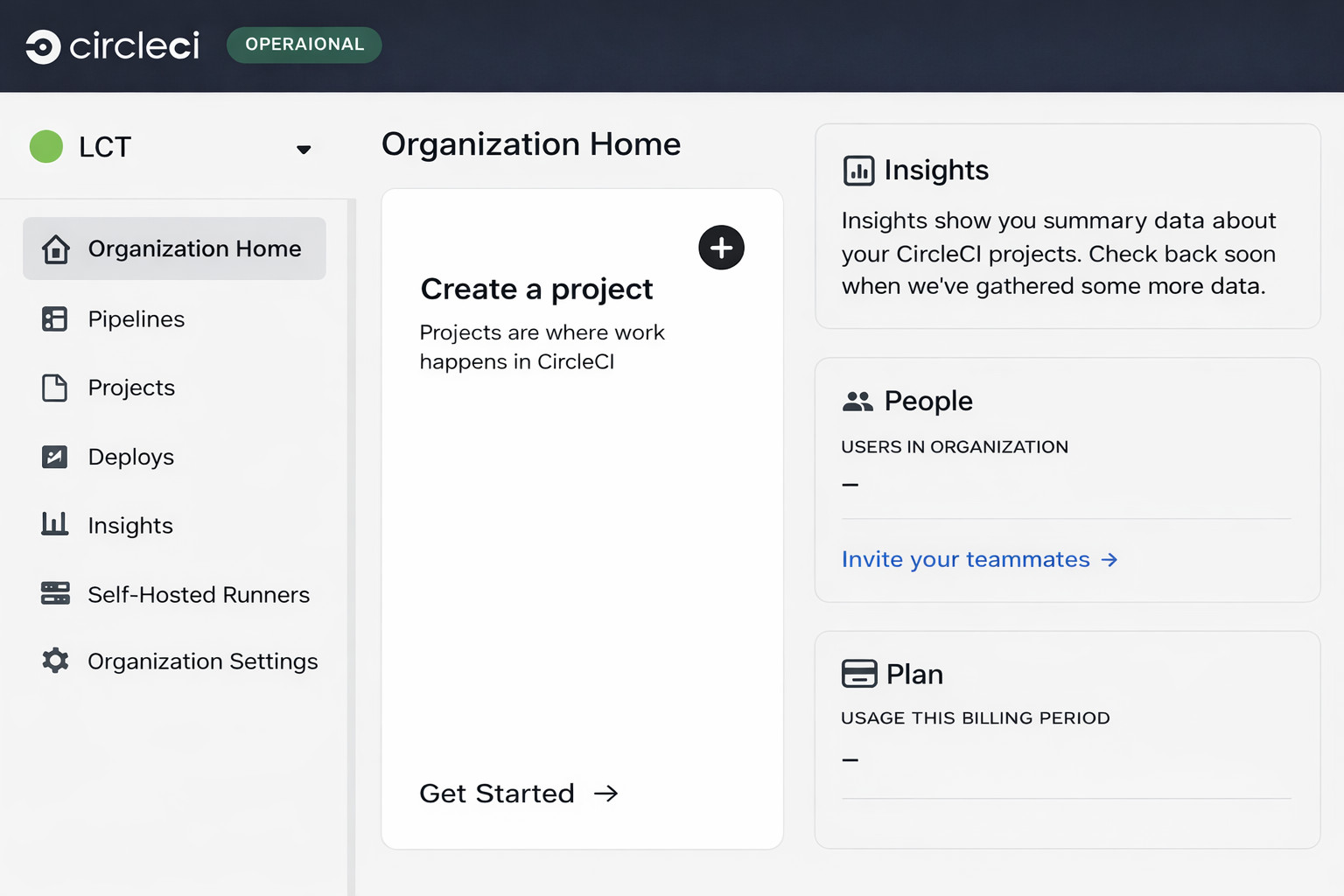
- Developer can now create a new project and follow the steps to connect their organization’s VCS to CircleCI and authorize it. This creates a deployment key on GitHub for the developer.
- A developer can also create a user key, which is a user-specific SSH key pair, and add it to the Project Settings.
To generate a user-specific SSH key pair:On Mac :
ssh-keygen -t ed25519 -C "your_email@test.com"Putty terminal can be used on Windows to generate the user key. - For CircleCI, configuration is a code concept and is specified within a config.yml file. The whole process from build to deployment is orchestrated in the
config.ymlfile. It is created in the root of the repository in the folder .circleci.Alternatively, a developer can also create a directory named.circleciat the root of the repository and add aconfig.ymlfile within it. - A sample configuration file,
config.yml, looks like this:
version: 2.1
jobs:
  test:
    docker:
      - image: cimg/python:3.9
    steps:
      - checkout
      - run:
        name: Install dependencies
        command: pip install -r requirements.txt
      - run:
        name: Run tests
        command: python -m unittest discover tests
workflows:
  main:
    jobs:
      - test
The config.yml file contains the instructions for the CI/CD pipeline. It consists of key components that are defined to get the job done.
These key components of the config.yml file are explained next.
YAML Building Blocks
The following table lists various YAML building blocks used in the config.yml file, along with their purpose:
| YAML Parameters | Purpose |
|---|---|
checkout |
Pulls repository. |
run |
Executes shell commands |
docker, machine, macos, windows |
Choose executors. |
environment |
Set env vars at job/step level. |
parameters |
Define reusable values or matrix builds. |
requires |
Express dependencies between jobs. |
filters |
Control the branches and tags a job runs on. |
when |
Conditionally run steps. |
store_artifacts / store_test_results |
Keep reports visible in the UI. |
persist_to_workspace / attach_workspace |
Move files between jobs. |
save_cache / restore_cache |
Speed up installs |
Choosing an Executor
- Docker (most common): This is a lightweight, fast spin-up, and easy-to-pin image (e.g.,
cimg/node:20.10). Docker is ideal for building containerized apps or standard Linux builds. - Machine (Linux VM): This is a complete VM with Docker-in-Docker, systemd, privileged operations (KVM, nested virtualization). It can be chosen when low-level access or custom services are needed.
- macOS: Generally used for iOS/macOS builds with Xcode images.
- Windows: NET/Windows apps used the Windows executor.
Unless there is a specific requirement for VM or macOS/Windows, Docker is commonly chosen as an executor.
Test Strategy for CircleCI
- Fail Fast: Put linting and unit tests first in the workflow as quick signals save compute and developer time.
- Parallelize: Use test splitting to split test suites by timing data to keep duration bounded as code grows.
- Artifacts: Publish coverage HTML and Junit results so failures are easy to diagnose.
- Flaky Tests: Quarantine known flaky suites into a separate job. Always keep the
maingreen.
Insights to Keep Pipelines Healthy
- Track median build time, and set a target (e.g., <10 minutes end-to-end).
- Identify top offenders (slow jobs, failing tests).
- Measure cache hit rates; poor hits suggest key problems.
- Spot regressions after dependency or image updates.
Cost & Resource Hygiene for CircleCI
- Right-size Resource Classes: Upgrade only when needed, as large VMs are expensive.
- Use Docker Executors by Default, as they have faster spin-up and a smaller footprint.
- Skip Unchanged Work: Use Path filters, dynamic config, and conditional steps (
when+ checksums) to skip unchanged work. - Cache Intentionally: Using over-specific keys erodes reuse, while under-specific keys cause stale bugs.
Benefits of CircleCI
- Automation and Efficiency: CircleCI automates the build, test, and deployment processes, which increases the speed and efficiency of the software development process. It reduces the manual effort and speeds up the delivery of new features and bug fixes.
- Improved Code Quality: Issues are identified and resolved early in the development cycle, leading to higher quality code and fewer bugs in production.
- Scalability and Flexibility: CircleCI can be scaled according to the needs of teams and projects, from small startups to large organizations. Its configurations are flexible to customize pipelines for different frameworks, deployment targets, and languages.
- Enhanced Collaboration: It provides a centralized platform for CI/CD, encouraging better collaboration and communication among developers, testers, and the operations team.
- Faster Feedback Cycles: CircleCI offers features such as parallelism, test splitting, and the ability to rerun failed tests that accelerate feedback cycles. Developers can quickly address issues and carry on with a smooth workflow.
- Security and Compliance: CircleCI offers features for secure secret handling, environment variable management, and configuration policies that enforce best practices and ensure compliance with organizational standards.
Tips for the Road
CircleCI gives a clean, declarative way to codify build, test, and deploy workflows. With a modest config and a couple of orbs, developers can go from zero to automated testing and safe deploys in no time.
- Start Simple. A single job that installs dependencies and runs tests is enough on Day 1.
- Add One Optimization at a Time in the order cache → parallelism → workspaces.
- Treat Pipelines like Code: version, review, and test changes to
config.yml. - Keep Feedback Fast: aim for sub-10-minute PR validation.
- Document how to run CI steps locally (e.g.,
npm test, ./gradlew test) to reduce “works on CI only” surprises.
 |