
Claude vs. GitHub Copilot: Which is Better for Coding?
As a developer or someone who is even mildly interested in the realm of software development, you would have surely come across GitHub Copilot and Claude. Both these AI-enabled tools are powerful in their own ways. Both of them promise to make your life as a developer several times easier. Things go sideways when you need to select between one of them.
At first glance, they seem like the main competitors. However, the two tools are not built for the exact same purpose. The right decision is made when you understand this key difference.
| Key Takeaways: |
|---|
|
What Makes Claude and GitHub Copilot Different?
Both tools represent two different schools of approaches to AI-powered development. This makes them useful for different types of development workflows.
Claude Code
It is Anthropic’s terminal-based agentic coding tool. It functions external to the IDE, runs in the command line, analyzes and reasons across complete codebases. Technically, Claude Code is an AI-powered coding assistant that helps you fix anomalies, build features, and automate development tasks. The tool can comprehend your full codebase and can operate across multiple tools and files to complete a task.
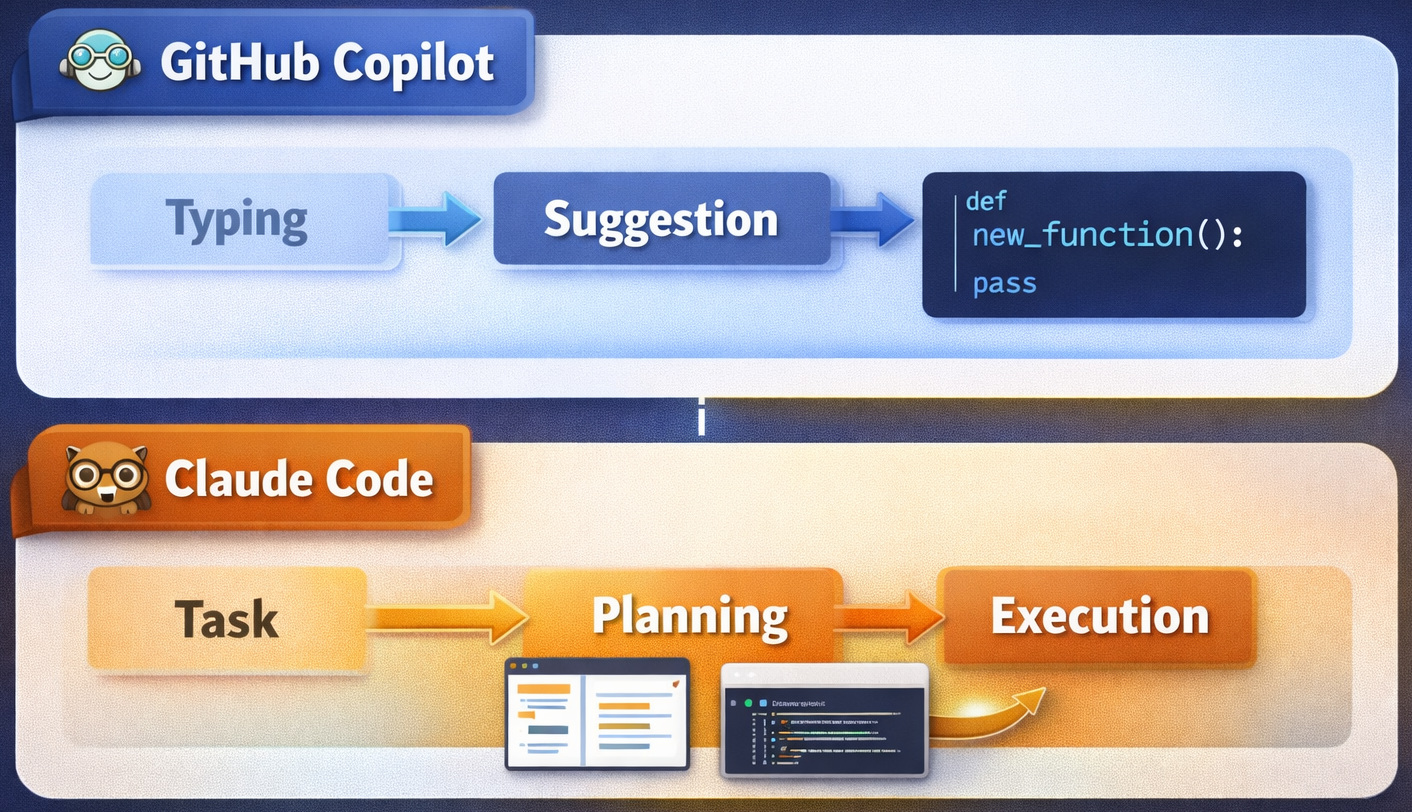
“Agentic” is the key difference here. Instead of writing a single line of code, Claude Code (powered by Opus 4.6 and Sonnet 4.6) plans and runs a sequence of actions such as multi-file refactoring, file creation, git operation, and test execution. It is an intern or a junior developer who can be delegated tasks to, definitely not a pair programmer who is directing the actions.
Read: What Is Agentic Coding? Understanding Autonomous AI in the Developer Workflow.
Claude Code is compatible with the Model Context Protocol (MCP). It is an open protocol that allows AI tools to integrate with databases, APIs, documentation, and bespoke tooling during a session. Anthropic continues to update Claude Code with capabilities that support more autonomous function (for e.g.: guidelines for autonomous operation). Model availability differs by configuration and plan.
GitHub Copilot
It is GitHub’s AI coding assistant integrated directly into IDEs such as VS Code, Neovim, JetBrains, and Xcode. It delivers real-time code suggestions, chat-based assistance, and inline completions without leaving the editor. The tool offers contextualized assistance across the software development lifecycle. This includes inline suggestions and chat assistance in the IDE, to code explanations, and responses to docs in GitHub and more.
Copilot is unique in its deep integration with the GitHub ecosystem: code reviews, pull requests, issues, and GitHub Actions all connect natively. GitHub has also bought in multi-model support thus making Google Gemini, OpenAI models, and Anthropic Claude usually available through a premium request system. It has an ever-increasing “agent mode” for multi-step tasks and a coding agent that works independently within GitHub Actions.
Copilot is built to decrease friction for in-flow coding, keeping you inside the editor at all times.
You can read: Context Engineering for AI Agents: A Step-by-Step Guide.
Comparison Table
| Feature | Claude | GitHub Copilot |
|---|---|---|
| Core Function | AI assistant/agent | Code autocomplete tool |
| Best For | Complex coding tasks | Writing code quickly |
| Context Handling | Very large (multi-file) | Limited to the current file |
| Integration | Browser/API | Deep IDE integration |
| Learning Curve | Medium | Very low |
How They Feel in Real Use
If you’re a fresher, the first thing that would impress you is the ease of use with Copilot. Once installed on your IDE, open a file, and just start typing. Almost immediately, it begins suggesting code. It’s seamless, fast, and doesn’t need much thought about instructions or prompts.
Claude, in comparison, needs a bit more interaction. You don’t simply type and get suggestions. You ask queries, give instructions, and have an interaction. For example, you might give a piece of code and ask, “Why is it failing?” or “Can you optimize this?” The answers are usually comprehensive and thoughtful, which is extremely hopeful when you’re trying to explore.
This distinction makes Copilot feel like a good assistant, helping you. And Claude is more like a mentor that you can discuss with.
How They Work Differently
As previously explained, the main difference isn’t just about the AI model. It’s how they fit into your workflow.
For example, you should ask Copilot to build a function, and it will suggest the inline code. And you should ask Claude Code to add authentication to your app. It reads your route files, generates the middleware, updates imports, and changes the config.
Developer Experience: IDE vs. Terminal
Copilot is directly built into editors such as JetBrains and VS Code, so it’s smooth. You don’t have to keep switching tools; it just works in the background while you code.
Claude Code usually executes through the terminal or a separate interface. This means it has more capabilities and power, such as executing tests, managing Git, or running commands. But it also means you have to be intentional when using it.
Put simply, Copilot is easier to use during everyday coding. In contrast, Claude Code gives you better control for bigger tasks.
Context and Code Understanding
Claude Code is meant to handle larger contexts. It can comprehend multiple files and how they integrate. This makes them useful for bigger projects or complicated systems.
Copilot concentrates on the files you are working on presently. While the tool has evolved over time, its understanding is still more restricted compared to Claude Code.
While both are adjacent AI-powered tools, they behave differently because they gather and implement context. This is why different results are obtained from the same model based on the tool.
Where Each Tool Shines
Claude Code is good when you’re working with large-scale modifications. Say, you need to refactor an entire codebase or migrate from a legacy system. It can handle these tasks in a more structured and automated manner.
For daily development? Copilot is your champion. It’s excellent at writing code fast. Helps with repetitive tasks and staying productive inside your editor.
GitHub Integration and Workflow
Copilot has an obvious bigger advantage if you wish to work with GitHub. It can help with pull requests, assist in issue-based workflows, and code reviews.
Claude Code can also work with Git. But it does so via commands rather than direct integration with GitHub’s interface.
Copilot is a better option for teams that depend heavily on GitHub for collaboration.
Pricing Difference
Pricing also plays an important role in selecting the tool.
With a monthly subscription, Copilot is predictable and easy to budget.
With Claude Code, you pay for how much you use (usage-based model). This is more flexible, especially if you tend to use it for bigger tasks only rarely.
Claude Code Pricing Plans
| Plan | Price | What You Get | Best For |
|---|---|---|---|
| Free | Limited (rate-limited) | Basic access with usage limits | Trying out Claude |
| Pro | ~$20/month | Access to Claude models (e.g. Sonnet), moderate usage | Individual developers |
| Max (5x) | ~$100/month | Higher limits, faster execution, access to advanced models | Heavy users |
| Max (20x) | ~$200/month | Very high usage, concurrent sessions | Power users/teams |
| Team | ~$25/seat/month | Team features, SSO, centralized billing | Small teams |
| Enterprise | Custom pricing | Security, compliance, audit logs | Large organizations |
| API Usage | Pay-as-you-go | ~$3-$5 per million input tokens, $15-$25 output tokens | Custom workflows |
GitHub Copilot Pricing Plans
| Plan | Price | What You Get | Best For |
|---|---|---|---|
| Free | $0 | Limited completions + limited premium requests | Beginners/trial |
| Pro (Individual) | ~$10/month | Unlimited code completions + ~300 premium requests | Individual developers |
| Pro+ | ~$39/month | Higher premium request limits | Advanced users |
| Business | ~$19/user/month | Org-level controls, collaboration features | Teams |
| Enterprise | ~$39/user/month | Enterprise security + compliance | Large companies |
| Overage | ~$0.04/request | Extra premium requests beyond the limit | High usage |
When to Use What
More than the features, the best tool for your team depends on how your team works.
- You want zero context-switching and mostly work with VS Code or JetBrains
- You have daily development tasks and need fast inline suggestions for boilerplate test writing and regular functions
- They are deeply integrated in the GitHub ecosystem with Actions, PRs, and issues
- Need predictable per-seat pricing that is simple to budget for a team
- Prefer remaining in the IDE for all coding interactions
- Your team has mixed experience levels, as Copilot has a smaller learning curve
- Needs understanding of project structure and working regularly with complex codebases
- Need an AI tool that can execute shell commands, handle git, and run independently
- Has a requirement to integrate with external tools and data through MCP
- Need strong reasoning for architectural decisions and deep code analysis
- Frequently do repo-scale refactoring or cross-file modifications
- Need both regular large refactors and fast iteration
- Need agentic power for bigger tasks and inline completion when coding
- Your team has different preferences and experiences. Some developers need IDE-native while others like terminal workflows.
The Smarter Approach for 2026
Most developers are pushing for using both tools together.
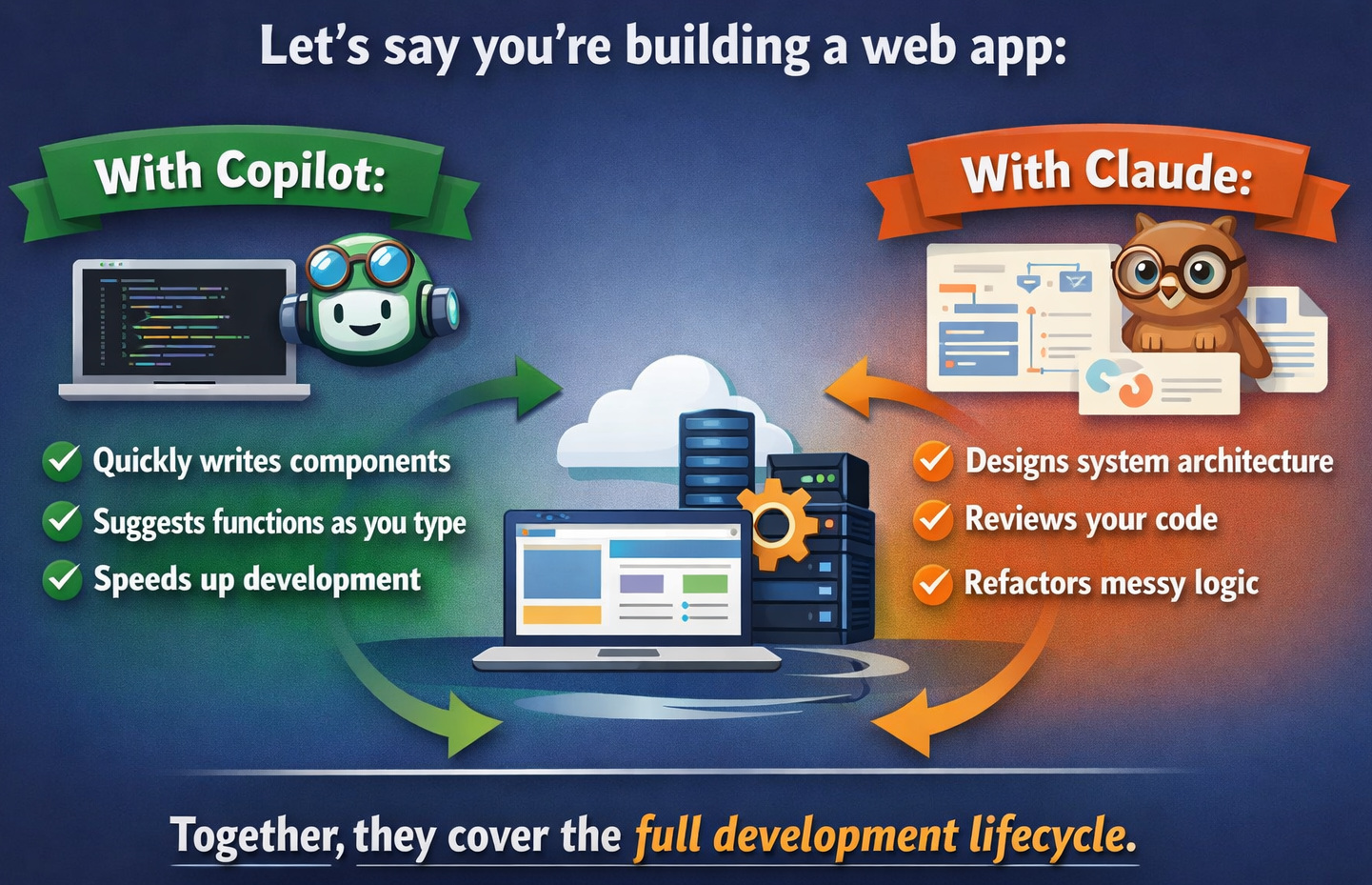
They depend on Copilot during daily coding to stay consistent and productive, and to maintain flow. And switch to Claude when they need guidance, deeper insight or have run into challenges.
The combo works well as it covers both sides of development: spending and understanding.
A Different Approach: Test-Driven AI Code Development
While tools like Claude Code and GitHub Copilot focus on generating code, codeCake takes a different approach.
Instead of writing code directly, it uses test cases written in plain English to define what the application should do, and then generates or updates code so that those tests pass.
- You can describe a feature as a test, and codeCake builds it
- If a test fails, it can fix the underlying code automatically
- Copilot helps you write code faster
- Claude helps you solve coding problems
- codeCake helps you build based on requirements (tests first)
This makes it especially useful for teams following test-driven development (TDD) or working with structured requirements like Jira tickets.
Additional resource: Code Generation: From Traditional Tools to AI Assistants.
Final Thoughts
Claude and Copilot are not fighting for the same role as everyone assumes. They tackle different problems and thus are good for working together.
If you’re a fresher, starting with Copilot can make coding feel less scary. Adding Claude to your workflow later can help you grow faster and understand things more deeply.
In the end, the “better” tool depends on what you need right now. But if you’re serious about improving as a developer, learning how to use both might be the best decision you can make.
Frequently Asked Questions (FAQs)
- Is Claude better than GitHub Copilot for coding?
A: Claude is better for complex tasks and large codebases, while Copilot is better for fast, real-time coding.
- Should I use Claude or Copilot?
A: Leverage Copilot for daily coding and Claude for problem-solving and architecture.
- Which AI coding assistant is best in 2026?
A: The best setup is a combination of Claude and GitHub Copilot, depending on your workflow.
- Is there an alternative to Claude and Copilot for test-driven development?
A: Yes. Tools like codeCake by testRigor take a different approach by generating code based on test cases instead of prompts or inline suggestions. This makes them especially useful for teams that follow test-driven development (TDD) or want to automate bug fixes based on failing tests.
 |