
Code Generation: From Traditional Tools to AI Assistants
Code-generation is no longer something only a developer can do. There’s no shortage of tools in the market that help generate code; besides all the traditional ones, there are now even ones based on AI. Code generation is getting the right answer to drive code, and it’s becoming less rules-based and more dynamic, promoting intelligent collaboration.
| Key Takeaways: |
|---|
|

Let’s take a look at the tried and tested methods that have fueled development for years, before delving into how today’s AI code generation tools are changing everything we know.
What is Code Generation?
With code generation, you can automate the creation of source code. Instead of manually writing every line, a developer uses a tool to generate code based on a set of rules, a template, or a high-level description.
What is a Code Generator?: A code generator receives an input, such as a simple instruction or a very complex design model, and converts it to commands that the machine directly understands.
Types of Code Generation
- Boilerplate and Repetitive Code: These code generators can handle the tedious, repetitive code you’d normally have to write manually. This includes things like:
- Getters and setters for class properties.
- Constructor methods with multiple parameters.
- CRUD (Create, Read, Update, Delete) operations for database applications.
- Basic unit tests for a function or module.
- Standard configuration files like web.config or .env.
- Project Skeletons and Frameworks: It can set up the folder structure, create the initial files, and add all the necessary dependencies. You see this a lot in web frameworks, where a single command will generate an entire app, including routes and components.
- API Client Libraries and Documentation: If you have an API, a code generator can parse its specification (i.e., a Swagger or OpenAPI doc) and produce client libraries in your favorite programming language. It can even write clear, current documentation for you.
- Code for Different Platforms: Some generators can generate code for different platforms from a single high-level model. For instance, a model-driven tool could read a data model and write from the same input code for web front-end, mobile apps, database schema, etc.
- Specialized and Niche Code: Generators are also used for highly specific, technical tasks that are too complex to be written manually every time. This includes generating:
- Parsers and lexers for a new programming language.
- Object-relational mapping (ORM) code to connect your application to a database.
- Custom user interface components and HTML templates.
How Traditional Code Generation Works
The way code generators usually work is that they perform a three-step process:
- Input and Parsing: The generator needs to be able to parse what you want it to make. In turn, it takes some input – for example, a command from the user (“create new component”), a template with placeholders, or a high-level model (such as a database schema). It “parses” this input to interpret it into a form it can process.
- Conversion: A generator converts the parsed input using a predetermined set of rules. So, for example, if you pass a user profile template into the generator, it will apply those rules to take name and email address as placeholder values and transform them into more usable data.
- Generation of Output: Lastly, the code generator generates the code. It takes transformed data and writes it out as a full end-to-end syntactically valid file for the target programming language (Python, JS, Java, etc.).
Why Do Developers Use AI Code Generators?
- Increased Productivity: Code generators take care of all the mundane aspects, such as writing boilerplate code (such as getters and setters, simple test files, or config files for your project).
- Consistency (with Fewer Errors): When a generator generates code, it does so the same way, every time. This helps to avoid coding style conflicts within a team, as well as the types of typos and errors people encounter when writing code manually.
- Rapid Prototyping: You can write up enough code to get a project or a feature in place, so that you can play with an idea, experience it from 0 to up and running, and be sure it is what you require before doing further work.
- AI Assistants: The newest generation of code generators is powered by artificial intelligence to move the process another step further. Platforms such as GitHub Copilot have the ability to predict and suggest entire blocks of code based on developer comments or surrounding code, making them even more intuitive and efficient.
Code Generation Tools and Techniques
Here we have some commonly used code generation tools and techniques:
Template-Based Generation
A template file full of placeholders that function as variables is created by a developer. A tool then uses this template to fill in the blanks with actual values and creates a full, functional file. It’s useful for building files with a repeated structure but different content—like web pages, configuration files, and simple class definitions.
- Jinja2 (Python): A very popular templating engine often used with Python web frameworks like Flask and Django. It’s great for generating not just HTML but also configuration files and code. Here’s a sample template in Jinja2.
{% extends "base.html" %} {% block title %}Members{% endblock %} {% block content %} <ul> {% for user in users %} <li><a href="{{ user.url }}">{{ user.username }}</a></li> {% endfor %} </ul> {% endblock %} - Pug (JavaScript): A high-performance templating engine for JavaScript. It allows developers to write cleaner, more concise HTML code using indentation and a simplified syntax instead of a mountain of angle brackets and closing tags. It was formerly known as Jade.
- Handlebars.js (JavaScript): A simple but powerful templating language used to build semantic templates. It’s widely used in front-end development to generate HTML and other client-side code.
- Cookiecutter (Python): A command-line utility that creates projects from project templates. It’s a fantastic tool for quickly scaffolding new projects, ensuring every new project adheres to a specific, pre-defined structure.
- Plop: A “micro-generator framework” for JavaScript. It’s a simple, universal tool for creating your own custom generators to produce any kind of text file, making it highly flexible for any project.
- Rails Generators: A built-in command-line tool within the Ruby on Rails framework. It generates everything from a new model and its corresponding database migration to a full-stack scaffold for a new resource.
- Angular CLI: The official command-line tool for the Angular framework. It generates the basic building blocks of an Angular application, such as components, services, and modules, with a single command.
Model-Driven Development (MDD)
Instead of using code as a template, it uses high-level, abstract models to describe a system’s design. These models can be visual, like a UML diagram showing the relationships between different parts of an application. A specialized tool then reads this model and automatically generates the application’s basic code, including classes, interfaces, and database schemas.
- Acceleo: A code generator that uses a template-based approach to generate code from models. It’s part of the Eclipse ecosystem and is specifically designed to work with models created using the Eclipse Modeling Framework (EMF). Acceleo can generate any kind of text-based code – Java, HTML, Python, or even documentation – from an input model. It uses templates that contain special expressions to pull information directly from the model and transform it into code.
- Umple: A framework for Model-Driven Development that blends abstract modeling with traditional coding. It allows developers to write models and code in a single file, and it automatically generates code in popular languages from the modeling parts. Umple generates source code in languages like Java, C++, PHP, and Ruby from a human-readable modeling notation. It can also generate diagrams (like UML class diagrams) from the same model, making documentation a seamless part of the process.
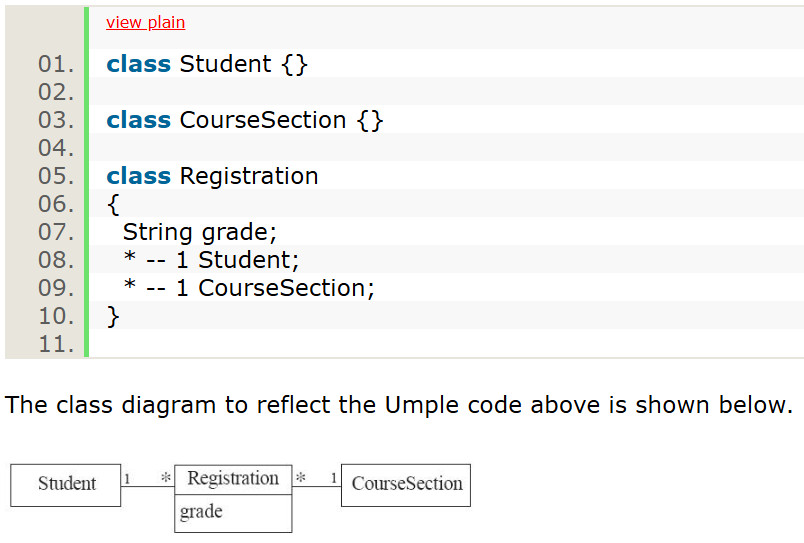
- IBM Rational Software Architect: A robust tool for model-driven development that helps in designing, analyzing, and building software, with capabilities for generating code from models.
Parser and Compiler Generators
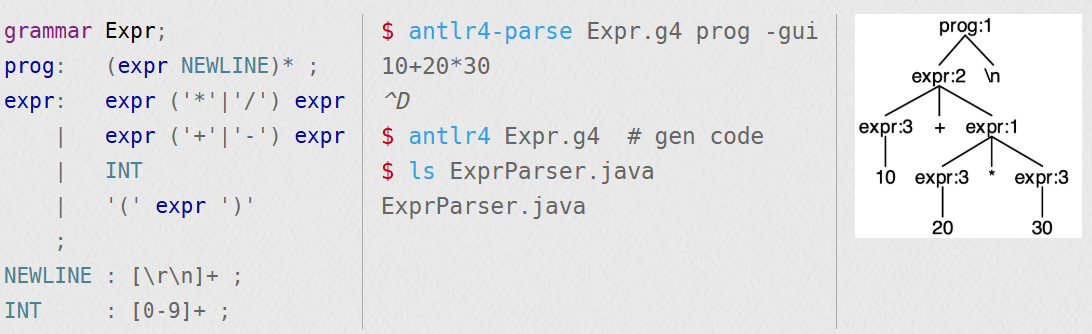
A developer provides the tool with a formal grammar – the set of rules for a language’s syntax. The generator then creates the code for a parser and a lexer. These components are what read and interpret source code, breaking it down into a structured format that a compiler can then turn into an executable program.
- ANTLR: This stands for “ANother Tool for Language Recognition.” It’s an incredibly popular parser generator used to read, process, and translate structured text or binary files. It’s used in many well-known projects and is great for building custom languages.
- YACC / Bison: YACC (Yet Another Compiler Compiler) and its modern version, Bison, are classic tools for generating parsers. They are the go-to choice in the C and C++ worlds for building compilers and interpreters.
- JavaCC: A top-down parser generator specifically for use with Java applications. It creates pure Java code, so there are no runtime dependencies on the tool itself.
Database-Related Generation
A generator reads a database schema and creates the code needed to manage data. It eliminates the need to manually write SQL queries and data-handling code for every table, ensuring consistency and reducing the risk of errors.
- TypeORM / Hibernate: These are Object-Relational Mapping (ORM) tools. While they aren’t “code generators” in the traditional sense, they automatically generate the code needed to map your programming objects to database tables, handling all the complex data operations for you.
// Data Mapper approach const userRepository = dataSource.getRepository(User) // Create and save a user const user = new User() user.firstName = "Timber" user.lastName = "Saw" user.age = 25 await userRepository.save(user) // Find all users const allUsers = await userRepository.find() // Find user by ID const user = await userRepository.findOneBy({ id: 1 }) - Celerio: A code generation tool for data-driven applications. It’s designed to automate the development of applications that revolve around database schemas. It performs a “reverse engineering” of a database and then generates a full-stack application, including the data access layer (ORM entities), business services, and even a user interface for performing CRUD (Create, Read, Update, Delete) operations.
- Swagger Codegen: An open-source tool that reads an OpenAPI (Swagger) specification for an API and automatically generates a client library, server stubs, or API documentation in dozens of different languages. This eliminates the need to manually write code to interact with an API.
Domain-Specific Languages (DSLs)
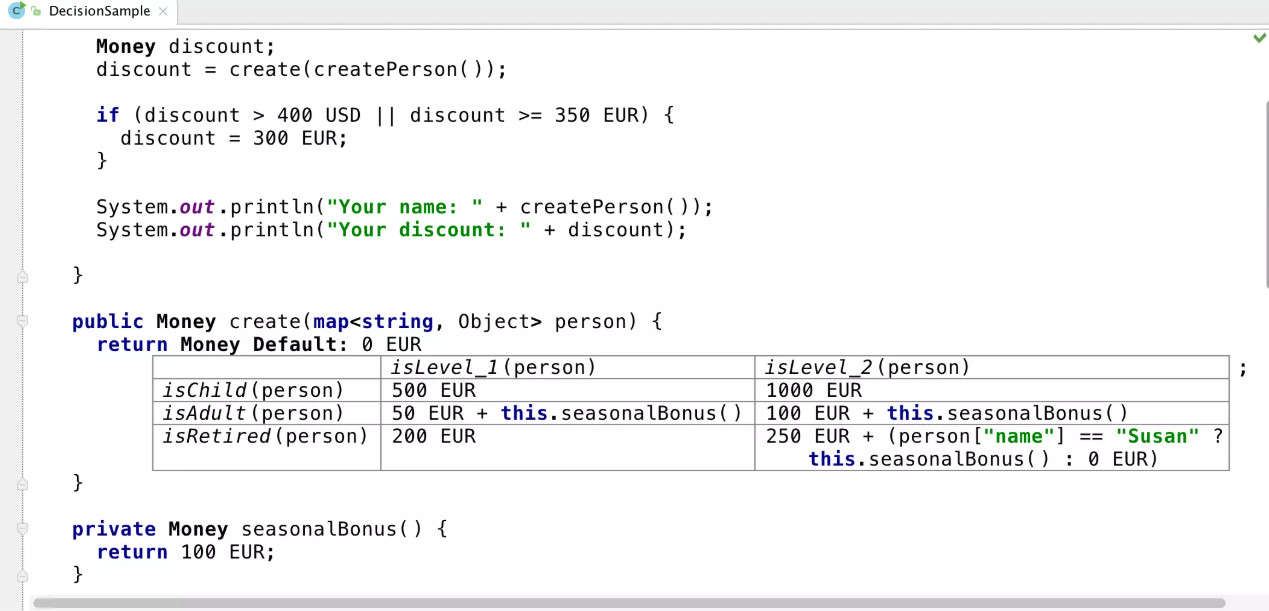
A DSL is a programming language tailored for a specific task or “domain”, unlike a general-purpose language like Python or Java. A code generator can read a program written in a DSL and translate it into a more common language.
- Xtext: A powerful framework for developing and implementing your own domain-specific languages. It’s integrated with Eclipse and provides tools to create an editor and a parser for your DSL.
- JetBrains MPS: This is a unique and comprehensive tool for creating DSLs. It uses a “projectional editor” that allows you to design the language’s structure directly, making it easier to create and work with complex languages.
- PlantUML: This is a great example of a simple but effective DSL. You write text-based instructions to describe a UML diagram, and the tool generates the corresponding visual diagram for you.
Low-Code / No-Code Platforms
- Microsoft Power Automate: A service from Microsoft that allows users to automate workflows and business processes. It uses a visual flowchart-like interface to connect different applications and services, and then generates the underlying code to run those automations.
- FAB Builder: A platform that uses a low-code interface to help developers and business users create web and mobile applications. It’s designed to streamline the entire development lifecycle, offering tools to generate both front-end and back-end code from a single platform.
Wizard-Based Generation
This is a very common technique seen in modern Integrated Development Environments (IDEs). When you use a wizard to create a new project, a class, or a function, the IDE is acting as a code generator. It asks you a series of questions (the “wizard” part) about what you want to create and then generates the correct, ready-to-use files and code structure based on your answers.
The Rise of AI Code Generation
AI is turning the process of writing code into a dynamic conversation between a developer and a smart assistant. Unlike traditional tools that simply follow instructions, AI code generators learn from an immense amount of existing code to understand context, predict what you’re trying to do, and even suggest entirely new solutions.
An interesting practice that has gained traction among developers is vibe coding, which uses generative AI to create applications from scratch.
How AI Code Generation Works?
At the heart of this revolution are large language models (LLMs), which are the same technology behind tools like ChatGPT. These models are trained on large amounts of publicly available code and natural language text from across the internet. When you type in your code editor, the AI tool analyzes your input – whether it’s a line of code you just wrote or a natural language comment you’ve added. It then uses its training to predict the most likely and relevant piece of code you need, offering it as a suggestion in real time.
- Auto-complete feature where you start typing in the code, and then the AI tool analyzes the surrounding code and context to suggest the next lines or even entire functions.
- Natural language prompts where a developer can provide a text prompt describing what they need the code to do, and the AI will generate the corresponding code.
- Direct interaction (like GitHub Copilot Chat) allows you to have a conversation directly within your code editor. You can ask it to explain a piece of code, suggest improvements, or even write a new function based on your conversation.
- Translate code as AI understands the logical equivalent of a function in one language and can translate it into another.
Popular AI Code Generation Tools
- GitHub Copilot is a favorite among developers because of its deep integration with popular code editors. It provides intelligent code completions and can even write entire functions based on a simple comment or function signature.
- Cursor’s core workflow is designed around interacting with a powerful AI. It allows you to edit and debug your code using natural language. You can ask it to generate new code based on a prompt, “fix” a piece of code with a simple chat command, or even ask it to explain a complex function.
- Amazon CodeWhisperer generates code recommendations in real-time, but it also goes a step further by including built-in security scans. It can identify and flag security vulnerabilities in the code it suggests, as well as in your own code, helping you fix them before they become a problem. It can also be configured to learn from an organization’s private codebase, making its suggestions more relevant to the company’s specific projects.
- TabNine is another great option, known for its real-time code completion that learns from your personal coding style, making its suggestions highly personalized and accurate.
- ChatGPT and other LLMs are versatile tools that can generate code snippets, explain complex concepts, or debug code based on a natural language query. While not as deeply integrated into an IDE as Copilot, they are incredibly useful for brainstorming and quickly getting a piece of code for a specific task.
- codeCake allows you to generate code by simply providing an end-to-end test written in codeCake in plain English, alongside a description of what needs to be done and a reference to a Jira ticket. Using this information, codeCake will generate the code for you. Its AI engine keeps working until the generated code compiles successfully, passes all linters, and passes the end-to-end test case you’d written initially. Once all of these pass, it will trigger a pull request for you as well. This is great because humans are still in the loop of this code generation process.
Challenges with AI Code Generation
- Lack of Context and Understanding: An AI code generator has no idea about your project’s history, its specific architecture, or your team’s unique coding conventions. It only sees a small window of your codebase and a text prompt. This lack of deep understanding means the generated code might be inefficient, introduce redundant logic, or fail to follow the design patterns and best practices you’ve established. It can also produce code that is not optimized for your specific application’s performance needs.
- Security Risks and Hidden Flaws: Many AI models are trained on publicly available code, including examples that contain security vulnerabilities. As a result, the AI can sometimes generate code with its own security flaws, such as improper input validation, hardcoded secrets, or injection vulnerabilities.
- Code That Looks Right, But Isn’t: One of the biggest issues is that AI can confidently produce code that is subtly or even outright wrong. This is often referred to as an “AI hallucination”. It might generate a function that looks like it should work but has a hidden bug, a logical flaw, or simply won’t compile.
- Code Quality and Maintenance Overhead: Since you didn’t write the code yourself, it can be extra difficult and time-consuming to figure out what went wrong. This can further complicate matters when you want to scale your code or refactor it.
- Low Productivity Due to Poor Tool Selection: While it is a popular belief that AI improves productivity, the truth is that a patched-up solution, where one tries to forcefully push an AI tool into the current ecosystem, tends to hamper productivity. Mainly because developers end up spending more time trying to decode what the AI did and then make it suitable for the existing system.
Traditional Code Generation vs. AI Code Generation
| Feature | Traditional Code Generation | AI Code Generation |
|---|---|---|
| Core Principle | Rule-based & Deterministic. Follows a fixed set of rules or templates. The same input always produces the exact same output. | Data-driven & Probabilistic. Learns patterns from vast amounts of code data. The output is a “best guess” based on learned patterns and context. |
| Speed | Fast for repetitive, well-defined tasks. Requires initial setup time to define rules and templates. | Extremely fast for a wide range of tasks. Provides instant suggestions and completions, reducing typing time. |
| Code Quality | Highly Consistent. Generates predictable, clean code that adheres to the defined rules. Errors are typically syntax-related and easy to spot. | Variable. Can produce highly efficient and correct code, but may also introduce bugs, security vulnerabilities, or inefficient logic if not carefully reviewed. |
| Customization | High. Provides full control over the code’s structure and logic. Developers can customize templates and rules to fit specific project needs. | Limited. The output is restricted by the AI’s training data. It excels at common patterns but may struggle with unique or highly specific business logic. |
| Creativity | None. The tool has no creative ability; it only executes the rules it’s given. | High. Can generate entirely new code patterns and even innovate solutions by combining different code concepts in unexpected ways. |
| Debugging | Straightforward. The generated code is predictable, making it easier to trace its origin and fix any issues in the source template or rule. | Complex. The “black box” nature of AI can make it difficult to understand why it generated a specific piece of code, making debugging more challenging. |
| Ideal Use Cases | Boilerplate code, database-related tasks, project scaffolding, and generating code from formal models (e.g., UML diagrams). | Writing quick functions, creating unit tests, translating code between languages, and providing real-time suggestions in an IDE. |
| Developer Role | The developer is the designer and architect who defines the rules. | The developer is a collaborator and editor, guiding the AI and refining its suggestions. |
AI-Based Code Generation vs. Low-Code/No-Code
| Feature | AI-Based Code Generation | Low-Code/No-Code |
|---|---|---|
| Primary User | Professional developers or those with coding knowledge. | “Citizen developers” or business users with little to no coding knowledge. |
| Core Method | Data-driven and predictive. Uses large language models to “guess” and write code based on context and prompts. | Visual and declarative. Users drag and drop pre-built components and configure them to create a finished product. |
| Output | Raw, editable source code. Generates code snippets, functions, and files that must be reviewed and integrated into an existing project. | Complete, functional applications or workflows. The underlying code is often hidden from the user and not meant to be manually edited. |
| Purpose | To accelerate coding. Acts as a smart assistant to help developers write code faster and with fewer errors. | To democratize development. Aims to allow anyone to build software without learning a programming language. |
| Customization & Flexibility | High. The generated code is fully editable and can be deeply customized to fit specific requirements and complex logic. | Limited. Customization is restricted to the pre-built components and features provided by the platform. You are locked into the platform’s ecosystem. |
| Learning Curve | Low. The user interacts with the AI using natural language or familiar coding patterns. | Low. Users learn a graphical interface, not a programming language. |
Conclusion
Code Generators are your Swiss Army Knives to generate anything from simple code snippets up to full application frameworks. They’re not tied to one programming language or type of project. With AI in the mix, the opportunity is vast. They are now capable of doing whatever you tell them to.
However, one must recognize the fact that code generation with AI inherits all the problems associated with AI itself — unpredictability and quality issues. How developers strike that balance between human intelligence and dependency on AI will be what enables them to grow alongside these power tools.
Related Resources
- What is Code Optimization?
- What are the Different Types of Code Smells?
- Which Version Control System is the Best?
- Different Merge Strategies in Git
- How to Get Better Results from Claude Code Every Time
 |