
Context Switching in OS Explained: How it Works and Unveiling its Hidden Costs
Have you ever wondered why your computer slows down under heavy load? Or why do you feel drained when multitasking? The culprit might be context switching. Let us explore this mechanism in operating systems.
| Key Takeaways: |
|---|
|
This article explores the concept of context switching in operating systems, how it works internally, and why it carries a performance cost.

What are Processes and Threads?
Before we dig into context switching, it is important to understand the processes and threads in the OS, the two primary units of execution managed by the OS.
The following diagram shows the arrangement of processes and threads in the OS.
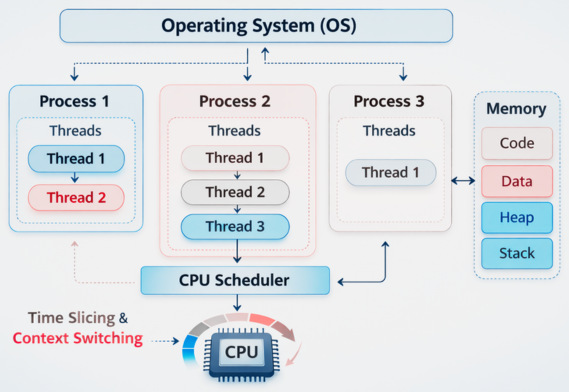
A process is an independent unit of execution. Each process has its own system resources, memory space, and its own execution state. For instance, when you open Google Chrome, a corresponding process runs on the OS.
A thread, on the other hand, is a smaller unit of execution within a process. The same process can have multiple threads that share memory and resources. However, each thread executes independently. Threads are often used when tasks are to be performed concurrently. For example, loading data in the background while the user interacts with the application.
A CPU can execute only one instruction per core at a time. Hence, the OS must continuously switch between processes and threads so that each gets a part of CPU time. A scheduler in the OS manages this switching and decides which task executes next.
The mechanism for switching between tasks is called context switching.
What Is Context Switching in OS?
Imagine you are hosting a gathering at your place. As a host, you have to entertain too many people. They are your close friends, family, colleagues, and so on. However, instead of spending most of your time talking to just one person, you switch your attention among all the guests.
Something similar happens in the OS when your computer runs multiple processes.
So, what is context switching in the computing world?
In computing, context switching is the process by which the OS switches the CPU’s attention from one task (or process) to another.
The OS saves the state of the currently running process or thread and restores the state of another process or thread so execution can continue from where it left off.
With context switching, the computer can run multiple tasks seemingly at the same time, even on a single processor system. This context switching happens extremely quickly, often thousands or millions of times per second.

The word “context” in the term “context switching” refers to the state or data that defines the execution of a process or thread at any given time. This context includes all the data the OS requires to store to pause a process and resume it later without losing any progress.
Elements of a Process’s Context
- Program Counter (PC): Holds the address of the next instruction to be executed.
- CPU Registers: These are the temporary storage locations for data that the CPU uses for computations.
- Memory Management Information: Contains information about the process’s address space, including pointers to memory segments and page tables.
- Stack Pointer: Is the current position in the process’s stack, used for managing function calls and local variables.
- Process State: Execution state of the process and may have any of the following at a given moment: running, ready to run, waiting for resources, etc.
- I/O Status: Holds information about pending input/output operations.
Why Context Switching Happens?
Context switching enables efficient multitasking by allowing a single CPU to manage multiple processes: pausing one, saving its state, and running another. It occurs due to interrupts, high-priority tasks, or I/O requests, ensuring that resources are shared and that no single process monopolizes the system by holding them forever.
- Multitasking: Modern OSes support preemptive multitasking, in which multiple processes share CPU time. These small time slices, called time quanta, are allocated to each process by the scheduler. When a process’s time slice expires, the CPU switches to the next process. This gives an illusion that multiple applications are running concurrently.
- I/O Operations: When a process performs an I/O operation, such as reading from a database or waiting on an event, the CPU remains idle until I/O completes. Rather than leaving the CPU idle, the OS switches to another process looking for CPU time.
- Interrupts: Hardware devices such as keyboards, timers, or networking devices generate interrupts. Interrupts temporarily halt the CPU execution. When an interrupt occurs, the current process is temporarily halted by the CPU to switch to the interrupt handler.
- Synchronization Events: Sometimes, a process may wait for semaphores, locks, or other signals. When a process blocks on a resource, the scheduler switches to another executable process.
- User/Kernel Mode Switching: The OS switches context when transitioning between user applications and kernel-level tasks.
- Preemption: The scheduler may pause the current, low-priority task in favor of a higher-priority process.
Although context switching is essential for system efficiency, an excess of it can degrade performance because the process of saving and loading states consumes time and resources.
How Does Context Switching Work?
The context switching process involves several steps managed by the operating system kernel as follows:

Step 1: Interrupt or Scheduler Trigger
- Timer interrupts (end of time slice)
- I/O completion
- System calls
- Process blocking or termination
When a context switch is triggered, the CPU switches from user mode to kernel mode to allow the operating system to handle the switch safely.
Step 2: Saving the Current Process State
The operating system saves the current process state in a special data structure known as the Process Control Block (PCB).
- CPU register values
- Program counter
- Stack pointer
- Memory management details
- Process state (running, waiting, ready)
- Scheduling priority
Saving this state ensures that when the process resumes later, it can resume execution exactly where it left off.
Step 3: Updating the Process State
- Running → Ready
- Running → Waiting (if blocked on I/O)
The process is then placed into the appropriate scheduling queue.
Step 4: Selecting the Next Process
- Round Robin
- Priority Scheduling
- Shortest Job First
- Multilevel Queue Scheduling
The chosen process becomes the next one to run.
Step 5: Restoring the New Process Context
The OS then loads the new context of the selected process from its PCB. The CPU is now focused on a new task, and the process continues from where it was paused.
Step 6: Resuming Execution
Finally, the CPU resumes execution in user mode using the restored program counter. The process continues execution as if it had never been paused. This continues until all tasks have had their share of CPU time.
Why Context Switching Is Expensive?
Context switching is expensive because the CPU is forced to stop productive work, saving the current state (registers, memory mapping) and loading a new state, which wastes cycles. In addition, cache flushing/reloading, TLB invalidation, and scheduler execution cause overhead. Process switching is costlier than thread switching due to memory isolation.
- CPU Overhead: CPU registers must be saved and restored, which consumes significant time and memory bandwidth. During this time, the CPU does not perform useful work for the application.
- Cache Pollution: When a context switch occurs, the CPU cache, optimized for the previous task, must be cleared and refilled with the new task’s data, causing significant delays. It also degrades the performance of the system.
- Translation Lookaside Buffer (TLB) Flush: When a process context switch is triggered, the memory address space may change, requiring the Translation Lookaside Buffer (TLB) to be updated or flushed. The TLB stores recent mappings between virtual memory addresses and physical memory addresses, and if it is flushed or updated, it results in additional memory lookups and reduced performance.
- Kernel Mode Switching: For context switching, the CPU enters kernel mode to execute OS code. This transition between user mode and kernel mode involves additional overhead.
- Scheduler Overhead: Selecting the next process to execute involves evaluating scheduling policies and managing queues by the OS. These are very small computations, but they accumulate when switches occur frequently.
- Pipeline and Branch Predictor Disruption: These mechanisms used by modern CPUs may be disrupted as a result of context switching. CPU is then forced to rebuild prediction history and refill pipelines, resulting in temporary performance degradation after each switch.
- Process vs. Thread: Switching between threads of the same process is faster because they share the same memory map, reducing the need for extensive TLB flushes.
If context switches occur too frequently, a good portion of CPU time is spent managing processes rather than executing them.
How to Reduce Context Switching Overhead?
- Use Efficient Thread Management: Use thread pools and asynchronous programming to reduce unnecessary switches. Scheduling overhead increases considerably when too many threads are created.
- Reduce Lock Contention: Use lock-free structures or better synchronization strategies to reduce switches. Frequent locking/unlocking can cause threads to block and wake repeatedly.
- Increase Time Slice Length: If time slices are longer, the frequency of switches is reduced. This is an OS feature and may affect responsiveness. OS must balance this trade-off carefully.
- Use Event-Driven Architectures: It can handle multiple tasks using fewer threads, reducing context switching.
- CPU Affinity: Try binding processes or threads to specific CPUs to improve cache locality and reduce switching costs.
Conclusion
Modern operating systems use context switching for multitasking. It is a basic mechanism through which several tasks can use the CPU.
But that is not without a cost. Every time you switch, there is a cost in CPU cycles (as the CPU fetches) (largely) from memory now instead of cache, TLB flushing issues, etc. If there are too many context switches, the system performance drops significantly.
By knowing how context switching works and why it’s expensive, developers can create better applications and systems. Strategies like avoiding unnecessary threads, limiting blocking operations, and employing scalable programming patterns can help minimize context-switching overhead and improve system performance as a whole.
As computing workloads continue to increase in complexity and scale, effectively managing context switching remains a key challenge in operating system design and software engineering.
Additional Resources
- User Mode vs Kernel Mode: Understanding Privilege Levels in OS
- What Are System Calls? How Operating Systems Communicate with Applications
- What is Code Optimization?
- What is Software Architecture?
- Data Structures and Algorithm Complexity: Complete Guide
- How to Use Load Balancers and Horizontal Scaling: Optimizing Performance and System Reliability
Frequently Asked Questions (FAQs)
- What information is stored during a context switch?
During a context switch, the OS saves the execution context of a process or thread, including CPU registers, the program counter, the stack pointer, process state, and memory management information, in the Process Control Block (PCB).
- What is the difference between process switching and thread switching?
Process switching occurs when the CPU switches between processes with separate memory spaces, which is more costly. Thread switching occurs within the same process, which shares memory, making it generally faster and less resource-intensive.
- How does context switching affect system performance?
Excessive context switching can degrade system performance by increasing CPU overhead, reducing cache efficiency, and delaying execution of actual program instructions.
- Does context switching still occur on multi-core processors?
Yes. Even on multi-core systems, context switching occurs when there are more threads than CPU cores or when processes block due to I/O operations or synchronization events.
- How can you monitor context switching in Linux?
You can monitor context switching in Linux using tools such as:
- vmstat
- top
- pidstat
- perf
These tools display metrics for voluntary and involuntary context switches, helping diagnose performance issues.
 |