
Differences Between Continuous Integration, Continuous Delivery, and Continuous Deployment
Speed, flexibility, and reliability are expected when you are building software. Users now expect effortless user experiences, zero downtime, and consistent updates so that they can keep using the application without any obstruction. In order to be able to respond and live up to these needs and expectations, software teams use DevOps practices that streamline the process from code writing all the way through deploying to production. Continuous Integration, Continuous Delivery, and Continuous Deployment are widely known practices for supporting automation-driven modern development.
| Key Takeaways: |
|---|
|
Continuous Integration (CI)
CI is a foundational practice that frequently merges code changes from multiple developers into a shared repository. Each integration is then automatically verified by building the application and executing automated tests.
CI aims to detect and fix integration issues early, rather than waiting until the end of the development cycle to merge code. Using CI, developers merge small, incremental changes multiple times per day. CI emphasizes testing automation to verify application functionality and to ensure that it does not break when new commits are integrated into the main branch.
How Continuous Integration Works
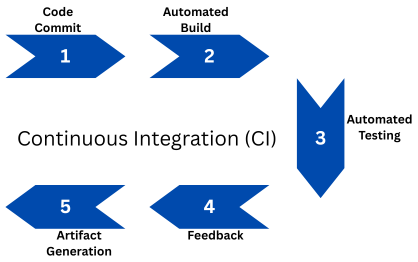
- Code Commit: Developers commit code changes to a shared version control system such as GitHub or GitLab.
- Automated Build: A CI server (like Jenkins, CircleCI, or GitHub Actions) automatically triggers a build whenever new code is pushed.
- Automated Testing: Unit tests and integration tests are executed to verify the integrity of the new code.
- Feedback: Developers are immediately notified by the CI system if the build or tests fail, enabling them to address issues quickly.
- Artifact Generation: If the build is successful, it produces deployable artifacts (such as binaries or Docker images) stored in repositories.
Benefits of Continuous Integration
The CI process has the following advantages:
- Early Bug Detection: With frequent testing, issues can be identified before they escalate.
- Improved Code Quality: Automated tests enforce higher standards, ensuring code quality is consistently maintained.
- Reduced Integration Problems: Continuous merging of code changes minimizes conflicts between developers’ work.
- Faster Development Cycles: Automated builds and tests accelerate feedback loops.
Challenges in Implementing CI
The CI process also faces several challenges as follows:
- Test Flakiness: Presence of unreliable tests can reduce trust in the CI pipeline.
- Slow Builds: If builds are poorly optimized, they can slow down the feedback process.
- Cultural Resistance: Developers must embrace more minor, more frequent commits.
Common Tools for CI
The following are the tools commonly used for the CI process:
- Jenkins: This is an open-source automation server.
- GitHub Actions: This tool performs CI/CD automation within GitHub repositories.
Other tools used for CI are CircleCI, Travis CI, Bamboo, GitLab CI, and Azure DevOps Pipelines.
Continuous Delivery (CD)
CD extends the CI process and aims to ensure that code changes are automatically prepared for production release. Every code change that successfully passes automated tests is packaged and made ready for deployment with minimal manual intervention.
Continuous delivery not only integrates the code but also makes it ready for release at any time. In CD, the deployment may require a manual trigger, but the entire release process is fully automated, consistent, and predictable.
In a continuous delivery process, an automated release process is implemented on top of automated testing, allowing the application to be deployed at any time by simply clicking a button.
How Continuous Delivery Works
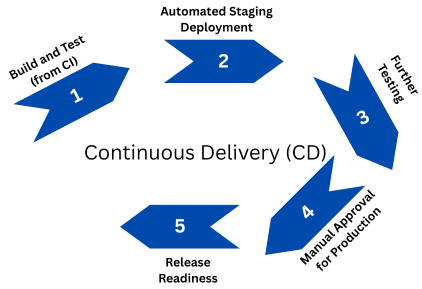
- Build and Test (from CI): The CI pipeline hands off code that has been successfully tested and verified.
- Automated Staging Deployment: The code is deployed to a staging or pre-production environment.
- Further Testing: The application undergoes automated integration, performance, and user acceptance tests.
- Manual Approval for Production: Once the build is thoroughly tested, a release manager or stakeholder approves deployment to production.
- Release Readiness: The system ensures the product is always in a deployable state.
Benefits of Continuous Delivery
Here are the primary benefits of the continuous delivery process:
- Reduced Risk: Small, incremental releases are easier to test and debug, resulting in a lower risk of errors.
- Higher Release Frequency: Organizations can deploy applications on demand rather than on fixed schedules.
- Improved Quality Assurance: Automated test suites validate every change to ensure the application’s correctness and integrity.
- Business Agility: Provides rapid response to market feedback and customer needs.
Challenges in Continuous Delivery
The continuous delivery process may encounter the following challenges:
- Complex Test Automation: The process requires reliable end-to-end integration and regression tests, which can make automation complex.
- Environment Parity: Staging and production environments must closely mirror each other to ensure consistency and reliability.
- Change Management: Organizations must adapt to frequent deployment readiness.
Tools Supporting Continuous Delivery
Here are the tools that support this CD process:
- Jenkins and Spinnaker: These tools are used for CI/CD orchestration and delivery pipeline management.
- Argo CD: This is a GitOps-based delivery tool for Kubernetes.
- Octopus Deploy: This is a release automation and deployment tool.
Apart from these, other tools that support continuous delivery are GitLab CD, Azure Pipelines, Harness, and AWS CodePipeline.
Continuous Deployment (CD)
Continuous Deployment process takes automation one step further by passing every code change through automated tests. The build is then automatically deployed to production without requiring manual approval.
The continuous deployment process is one step further than continuous delivery and represents the highest level of DevOps automation maturity. By removing all manual gates between commit and production, it aims to deliver value as quickly and safely as possible.
This process has no human intervention, and only a failed test will prevent a new change from being deployed to production.
How Continuous Deployment Works
The process of continuous deployment is as follows:
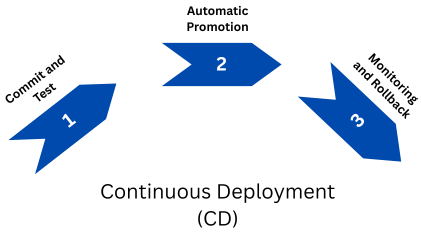
- Commit and Test: The CI/CD pipeline runs all unit, integration, and acceptance tests.
- Automatic Promotion: If all tests pass, the system automatically deploys the code to production without any human intervention.
- Monitoring and Rollback: Real-time monitoring detects issues post-deployment, and if necessary, automated rollback mechanisms are employed to revert changes.
Benefits of Continuous Deployment
There are several advantages of the continuous deployment process, as listed below:
- Fastest Time-to-Market: Changes reach users instantly as they are deployed immediately once successfully built and verified.
- High Developer Productivity: There is no need to wait for manual approvals or release cycles.
- Improved Feedback Loops: Immediate customer feedback is received, which drives rapid iteration.
- Enhanced Reliability: With continuous automation, consistent deployments are ensured, promoting reliability.
Challenges in Continuous Deployment
The continuous deployment process has the following drawbacks:
- Cultural Shift: The process represents a significant cultural shift for traditional developers, requiring strong trust in automation and rigorous testing.
- High Test Coverage: If test automation is Inadequate, it can lead to production failures.
- Monitoring Complexity: The process must be closely monitored, and robust observability tools should be utilized to detect any issues promptly.
Standard Tools for Continuous Deployment
Tools like Spinnaker, Argo CD, Flux, Harness, GitLab CD, AWS CodeDeploy, Kubernetes + Helm are used for the continuous deployment process.
Comparing CI, CD, and CD: Key Differences
Continuous integration (CI) and continuous delivery or deployment (CD) are often referred to as CI/CD. To break down the work involved in setting up the CI/CD process, it is essential to understand the difference between these DevOps practices for improved quality and stability.
CI/CD (Delivery and Deployment) are key stages in the software development workflow. The primary objective of this workflow is to deliver minor, frequent changes to customers, enabling regular feedback on the application. Both CI and CD depend on automation for enhanced efficiency and reliability.
The following table summarizes key differences between continuous integration, continuous delivery, and continuous deployment processes.
| Aspect | Continuous Integration (CI) | Continuous Delivery (CD) | Continuous Deployment (CD) |
|---|---|---|---|
| Primary Goal | Integrates code frequently and verifies it with automated tests | Ensures every change is deployable at any time | Automatically releases every change to production |
| Automation Scope | Builds and tests automation | Builds, tests, and automates staging deployment | Automates full pipeline, including production deployment |
| Human Intervention | Developers monitor builds | Manual approval is needed before production | Fully automated, no manual approval required |
| Release Frequency | Multiple times daily (integration level) | On demand (release readiness) | Continuously (every change) |
| Risk Level | Low | Moderate | High without robust testing and monitoring |
| Feedback Loop | Internal feedback at the developer level | Input in the pre-production or staging environment | Feedback in the production environment from end users |
| Example Tools | Jenkins, CircleCI, GitHub Actions | Spinnaker, Argo CD, Octopus Deploy | Argo CD, Flux, Harness, AWS CodeDeploy |
The CI/CD Pipeline: How They Work Together
CI, Continuous Delivery, and Continuous Deployment form part of a single end-to-end DevOps pipeline, although they differ in the depth of automation. Simply put, CI is part of both continuous delivery and continuous deployment. Furthermore, continuous deployment is similar to continuous delivery, except that releases occur automatically without human intervention.
A complete CI/CD workflow is shown here:
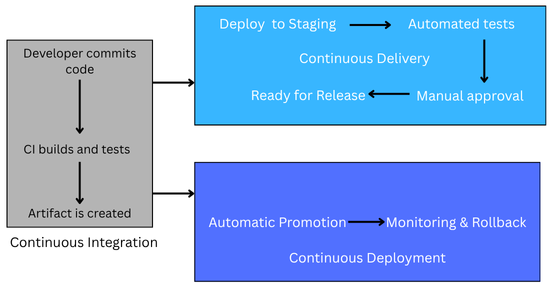
The following steps specify the functions performed by each stage:
- Continuous Integration handles:
- Merging code changes
- Building artifacts after successful builds
- Running unit and integration tests (automated)
- Continuous Delivery ensures:
- Code is automatically prepared for release
- Deployment pipelines are automated
- Manual approval gates exist before production
- Continuous Deployment finalizes:
- Automated deployment to production
- Real-time monitoring and rollback
- Continuous user feedback integration
- Developer commits code → CI builds and tests → Artifact is created
- CD pipeline deploys to staging → Automated tests → Manual approval
- (If Continuous Deployment) → Code automatically goes live once validated
A CI/CD pipeline is a tool that helps to increase confidence in your code progressively. This confidence is built at every successful stage until you’re comfortable releasing the code to users. However, if any stage fails, you stop the build process, either fix the bug or revert the changes. Once resolved, the process restarts from the beginning.
Choosing the Right Approach
Organizations should adopt CI/CD practices based on their maturity, team size, and risk tolerance.
When to Start with Continuous Integration
Take the following aspects into account when starting with CI:
- Whether it is an early-stage team or a startup.
- If the teams are new to automation.
- When manual QA processes dominate.
- When the objective is to improve code quality and integration speed.
When to Adopt Continuous Delivery
Go for continuous delivery (CD) when faced with the following situations:
- When the teams have established CI practices.
- Organizations seek predictable and repeatable release processes.
- Businesses where compliance or regulation requires controlled releases.
When to Move to Continuous Deployment
Continuous development can be adapted when:
- There are mature DevOps organizations with strong test automation.
- Teams require rapid user feedback (e.g., SaaS products).
- There are environments where risk is manageable through feature flags, canary releases, and monitoring.
Best Practices for Implementing CI/CD
Here are some of the best practices teams should follow while implementing CI/CD:
- Automate Everything: From builds and tests to deployments and rollbacks, automate everything for the best outcome.
- Maintain Version Control: Ensure transparency and collaboration with Git-based workflows.
- Write Reliable Tests: Prepare valid unit, integration, and end-to-end tests to ensure reliability.
- Use Feature Flags: Deploy code safely without exposing incomplete features.
- Monitor Continuously: Utilize observability tools, such as Prometheus, Grafana, and Datadog, to continuously monitor processes.
- Ensure Environment Parity: Dev, test, and production environments should be consistent in their configurations.
- Promote a DevOps Culture: Encourage collaboration among development, QA, and operations to foster a DevOps culture.
The Future of CI/CD
As software systems grow more complex, CI/CD practices continue to evolve. Emerging trends include:
- AI-Powered Pipelines: Machine learning models will be used for predicting build failures and optimizing test selection.
- GitOps: A Tool to manage deployment configurations declaratively using Git.
- Progressive Delivery: Continuous deployment combined with canary and blue-green deployments to ensure progressive delivery.
- Security Integration (DevSecOps): Security checks embedded into CI/CD pipelines.
Conclusion
Collectively, these three DevOps practices are part of a continuous pipeline that supports faster innovation, better quality, and more reliable end-to-end processing. Incrementally adopting CI/CD will be a radical shift in how you think about how software is built, tested, and delivered, and development becomes an ongoing stream of value to customers.
 |