
How to Use Load Balancers and Horizontal Scaling: Optimizing Performance and System Reliability
Today’s world has adopted digital technologies. Applications, especially cloud-based web applications, must handle millions of users concurrently while ensuring reliability, performance, and uptime. Whether it is a social media platform scaling to billions of requests, an e-commerce website during Black Friday sales, or a SaaS product growing its user base, managing load and distributing traffic evenly effectively is vital.
Scalability and load balancing stand as pillars in the ever-evolving landscape of web applications and services. Two of the most critical techniques for achieving this are load balancing and horizontal scaling.
| Key Takeaways: |
|---|
|
This article examines how load balancers function, the various types available, and how to effectively utilize them in conjunction with horizontal scaling to create resilient, high-performance systems.

Why is Scalability and Load Distribution Needed?
Understanding the Problem
Applications start small, often running on a single server with limited resources. As people start using the app, the number of users increases. With this, the traffic increases, and CPU, memory, and network resources quickly become bottlenecks. A single machine, no matter how powerful, has limits. When these limits are reached, users experience slowdowns, failed requests, or downtime.
To keep the applications running smoothly, they have to be scaled by adding more resources. However, it is not enough that applications have more resources; these resources must be distributed effectively so that network traffic is distributed equally among them and none of the resources are overloaded.
This is where load balancing and scaling come into play. Before discussing how load balancing and scaling work, let us first understand the concept of scaling.
Vertical vs. Horizontal Scaling
- Vertical Scaling (Scaling Up): In this type of scaling, additional resources, such as CPU, RAM, and SSD, are allocated to a single machine or existing server. Upgrading RAM or CPU to enhance performance is a typical example of vertical scaling.
- Horizontal Scaling (Scaling Out): In horizontal scaling, more servers are added to the system to distribute the increased workload. By distributing the workload across multiple servers, horizontal scaling prevents a single point of failure and improves overall reliability.
Vertical scaling is relatively easy to implement, but is limited by the capacity of individual servers. If the server can no longer handle the load, it will cease to function, which can result in downtime.
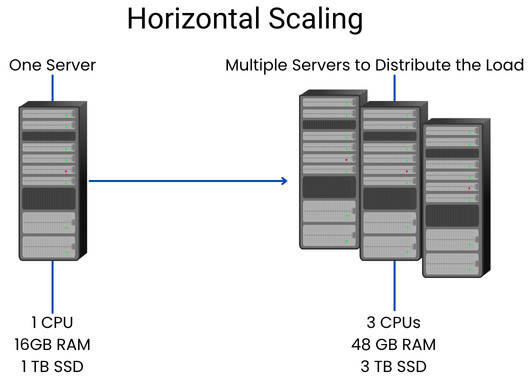
- Cost-Effectiveness: Adding more machines can be less expensive than upgrading a server to an extreme degree.
- Increased Fault Tolerance: If one server shuts down, the others can still handle the load.
- Ease of Maintenance: Maintenance becomes easier as you can take down one server at a time without affecting the whole operation.
- Elasticity: Servers can scale up or down easily in response to demand.
Vertical scaling has an upper limit on how much to scale; you can’t infinitely upgrade one server. Horizontal scaling, on the other hand, allows you to add machines almost endlessly, creating a distributed system capable of handling vast workloads, provided there is a good mechanism to distribute traffic among those machines.
This is where the load balancers come in to distribute traffic among servers in a system that has been scaled through horizontal scaling.
What Is a Load Balancer?
A load balancer is a networking device or software that distributes incoming network traffic across multiple servers. It acts as the “traffic cop” of your infrastructure, ensuring that no single server becomes overloaded.
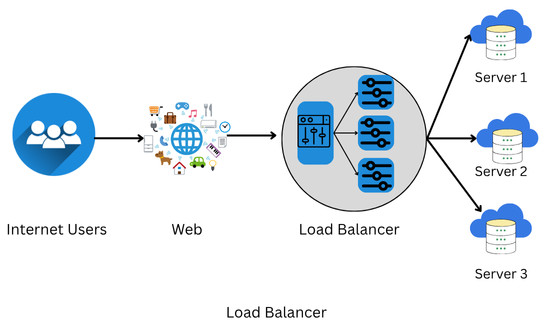
A load balancer also plays a key role in fault tolerance: if one server fails, it automatically redirects the traffic to other working servers, ensuring minimal disruption.
The purpose of load balancing is to enhance resource utilization, bolster reliability, and maintain high availability. The technique encompasses various components and strategies to achieve these goals effectively.
A load balancer is extensively used in cloud computing domains, data centers, and large-scale web applications where traffic flow needs to be managed.
Core Functions of a Load Balancer
- Traffic Distribution: The load balancer routes client requests evenly (or strategically) across backend servers to prevent any one server from becoming overloaded.
- Health Monitoring: Monitors the health of each server and avoids sending traffic to unhealthy ones.
- Failover Handling: It redirects requests seamlessly in the event of a server failure.
- SSL Termination: The load balancer offloads SSL encryption/decryption, which are resource-intensive tasks, from the backend servers.
- Session Persistence: It ensures users’ sessions remain consistent even if requests go to different servers.
- High Availability: Load balancers enhance the reliability and availability of applications by distributing traffic across multiple servers.
- Scalability: Load balancers enable horizontal scaling by making it simple to add servers or resources to meet growing traffic demands.
- Optimization: It optimizes resource utilization, ensuring efficient use of server capacity and preventing bottlenecks.
Types of Load Balancers
Load balancers are categorized based on their location within the OSI model and the manner in which they handle traffic. The common types of load balancers are:
1. Layer 4 (Transport Layer) Load Balancer
A Layer 4 load balancer makes routing decisions based on transport-layer information, such as IP addresses and TCP/UDP ports. While routing traffic, it ignores the actual content inside network packets.
Layer 4 load balancers are high in performance and low in latency. They have a simple configuration and are easy to implement. However, there is no visibility into application data, including URLs or cookies.
- Amazon ELB (Classic Load Balancer)
- HAProxy in TCP mode
- NGINX with stream module
2. Layer 7 (Application Layer) Load Balancer
A Layer 7 load balancer operates at the application layer and routes traffic based on HTTP headers, paths, or even cookies.
A Layer 7 load balancer makes smart routing decisions, for example, routing/api to backend A or /static to backend B, and so on. It can inspect and modify requests, and is primarily helpful for microservices and API-based architectures.
Due to deeper packet inspection, layer 7 load balancers, however, can consume slightly more latency.
- AWS Application Load Balancer (ALB)
- NGINX or Envoy
- Google Cloud HTTP(S) Load Balancer
3. Hardware & Software Load Balancers
- Hardware Load Balancers: These are physical appliances with specialized processors for high throughput. They offer advanced features but come at a high price. Hardware load balancers are suitable for enterprise data centers.
- Software Load Balancers: These load balancers run on general-purpose servers or in the cloud. They’re flexible, scalable, and cost-effective.
4. DNS Load Balancers
DNS load balancers use DNS records to distribute traffic across multiple IP addresses. While they are practical and straightforward for global distribution, they lack fine-grained control since DNS caching can delay updates.
Load Balancing Algorithms
A load balancer uses a load-balancing algorithm to decide where to send traffic. The following table lists the standard algorithms used by load balancers:
| Algorithm | Description |
|---|---|
| Round Robin | The request is sent to each server sequentially in a loop. |
| Least Connections | Traffic is directed to the server with the fewest active connections. |
| IP Hash | The client’s IP address is used to determine the server, which is helpful for session persistence. |
| Weighted Round Robin | Weight is assigned to each server based on its capacity, and traffic is routed accordingly. |
| Random Selection | Requests are randomly distributed. This algorithm is rarely used alone. |
| Least Response Time | Requests are sent to the server with the fastest average response. |
Choosing the correct algorithm depends on individual traffic patterns, backend workload, and application architecture.
How Load Balancing Facilitates Horizontal Scaling
- Load balancing distributes traffic across multiple instances.
- As a result of horizontal scaling, the system has enough instances available to handle the traffic.
Load balancing plays a critical role in the success of horizontal scaling. It allows systems to operate efficiently without overburdening any single resource by distributing requests evenly across servers.
To promote consistent application performance, a load balancer is often integrated into a horizontally scaled architecture.
If you have a pet website with adorable videos of cats, a sudden influx of feline lovers might jeopardize the website traffic. A load balancer ensures that users are not left staring at a spinning wheel of death (a website that loads forever).
Load balancers working with horizontal scaling methods, such as orchestration frameworks like Kubernetes, enable auto-scaling, where the system can add or remove servers automatically based on traffic demands.
Example: Web Application Architecture
- Frontend Layer: Web servers (NGINX or Apache)
- Application Layer: App servers (Node.js, Django, etc.)
- Database Layer: SQL or NoSQL database
The load balancer sits in front of the frontend or app layer, routing requests across multiple instances. As the load increases, new instances are added, and the load balancer automatically starts sending traffic to them.
Load Balancing in the Cloud
- AWS: Elastic Load Balancer + EC2 Auto Scaling
- Azure: Azure Load Balancer + Virtual Machine Scale Sets
- GCP: Cloud Load Balancing + Managed Instance Groups
This automation enables systems to adjust in real-time, ensuring efficiency and resilience.
Implementing Load Balancing
The general steps for implementing load balancing and horizontal scaling are as follows:
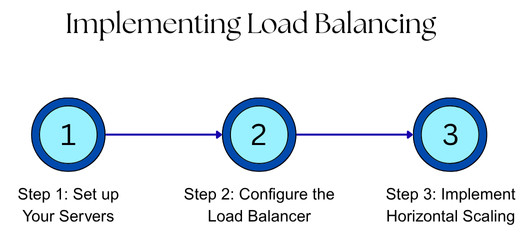
Step 1: Set up Your Servers
- Provision Multiple Servers: Run your application on multiple instances instead of running on a single machine.
- Ensure Uniformity: Configure all servers with the same application version and dependencies, ensuring they can handle any request consistently.
- Implement Health Checks: Create a specific URL or endpoint (e.g., /health) on each server. A load balancer can ping the server to check if it is functioning correctly.
Step 2: Configure the Load Balancer
- Choose a Load Balancer: Select an appropriate load balancer solution (e.g., NGINX, AWS ELB, or a cloud provider’s service) that fits your needs.
- Set up the Load Balancer: Place the load balancer at the front of your servers, making it a single entry point for all incoming traffic.
- Configure Listeners: Set up listeners on the load balancer to accept incoming connections on specific ports, like port 80 for HTTP.
- Create Target Groups: Create a logical grouping of servers called a “target group” and associate your servers with this group. The load balancer will send traffic to this group.
- Define a Load Balancing Algorithm: Determine how the load balancer will distribute traffic using an appropriate load balancing algorithm. Common options include:
- Round Robin: Distributes requests to servers in a rotating sequence.
- Least Connections: Sends new requests to the server with the fewest active connections.
- Least Response Time: Sends traffic to the server with the fastest response time.
- Configure Health Checks: Set the load balancer to check the health endpoint on each server regularly. Stop sending traffic to the server that fails the health check until it becomes healthy again.
Step 3: Implement Horizontal Scaling
- Use Auto-scaling: Utilize an auto-scaling service, such as AWS Auto Scaling or Kubernetes, and integrate it so that it can automatically add or remove server instances.
- Set Scaling Policies: Define rules for scaling based on performance metrics, such as network traffic or CPU utilization. For example, if CPU usage crosses 70%, add more servers. If it drops below 30%, remove some.
- Monitor Performance: Continuously monitor the system performance to observe traffic patterns and adjust your scaling policies as needed.
- Manage Updates: When the application is updated, instead of updating the instances in place, use the load balancer to direct traffic to new servers with the updated code in a graceful manner. After that, shut down the old instances.
Monitoring and Health Checks
- HTTP Checks: The load balancer periodically requests a specific URL (e.g., /health) from each server to verify that it functions as expected.
- TCP Checks: Load balancer verifies if a specific port is accepting connections.
- Custom Checks: Application-level probes returning detailed status (e.g., readiness/liveness probes in Kubernetes).
If a server fails health checks, it’s temporarily removed from the rotation until it recovers.
Scaling Databases and Caches
- Read Replicas: Used for read-heavy workloads (MySQL, PostgreSQL).
- Sharding: Splitting data across multiple nodes.
- Distributed Databases: Such as MongoDB or Cassandra, designed for horizontal scaling.
- Caching Layers: Use Redis, Memcached, or CDN edge caching to reduce database load.
Load balancers can also distribute read requests among replicas to increase throughput.
Best Practices for Load Balancing and Horizontal Scaling
- Use Health Checks Aggressively: Detect and remove failed instances promptly, ensuring no traffic is directed to them.
- Automate Scaling: Use cloud auto-scaling to respond to demand spikes so that the system is scaled up or down automatically as per demand.
- Monitor Metrics: Track latency, error rates, and traffic patterns to optimize performance and ensure optimal performance.
- Ensure Redundancy: Utilize multiple load balancers for fault tolerance, allowing one to take over if another fails.
- Implement Graceful Shutdowns: Avoid dropping in-flight requests during scaling events and implement methods for a graceful shutdown.
- Utilize a CDN for Global Reach: Offload static content delivery and minimize latency by using a CDN.
- Plan for Failover: Use multi-region or multi-zone architectures to plan for potential failure events.
- Use Session Persistence: If your application is stateful, ensure session persistence (also known as sticky sessions) to manage user state correctly.
Common Challenges and Solutions
The following table summarizes the challenges with their possible solutions in implementing load balancing and horizontal scaling:
| Challenge | Solution |
|---|---|
| Uneven traffic distribution | Use least-connections or weighted load-balancing algorithms to route traffic |
| Server overload during scale-up | Use predictive scaling based on metrics |
| Sticky session issues | Switch to a stateless design or distributed session stores |
| DNS caching delays | Use shorter TTLs or global load balancers |
| SSL certificate renewal | Automate with tools like Let’s Encrypt or AWS ACM |
Real-World Examples
Here are some of the real-world examples where load balancing is used with horizontal scaling:
Netflix
Netflix utilizes a combination of AWS ELB, custom routing logic, and microservices-level load balancing to achieve massive scalability. Netflix’s internal load balancer, “Zuul,” handles routing and resilience across the hundreds of services it offers.
Amazon
Amazon runs a global network of load balancers and edge caches (via CloudFront) to ensure consistent performance across continents when using its e-commerce website.
Google utilizes Maglev, an internal software load balancer capable of handling millions of requests per second, ensuring reliability across its global infrastructure.
Conclusion
Load balancing in horizontal scaling may sound complex, but with a thorough understanding and a dash of best practices, it becomes an integral part of systems design. They both form the backbone of modern scalable systems. Together, load balancing and horizontal scaling ensure that your applications can handle increasing traffic, maintain uptime, and deliver consistent performance without bottlenecks.
Whether you’re deploying a small web app or a global cloud service, mastering these techniques is crucial for building scalable, reliable, and efficient systems.
 |