
HTML or XML? Understanding Their Core Differences
Markup languages are the foundation of web development, data presentation, and exchange. Two of the most popular are HyperText Markup Language (HTML) and eXtensible Markup Language (XML).
| Key Takeaways: |
|---|
|
This article explains HTML and XML, covering their definitions, purpose, syntax, advantages, and disadvantages. It also further explains the key differences between HTML and XML.
Introduction to Markup Languages
A markup language is a system for adding information, in the form of text-based tags or codes, to a page or document to define its structure, presentation, format, and meaning in a way that humans and machines can understand.
Markup languages add meaning to raw text using tags, elements, and attributes. Tags are often enclosed in angular brackets (e.g., <html>), which convey how to display or process the text they surround.
Popular markup languages used in web development include:
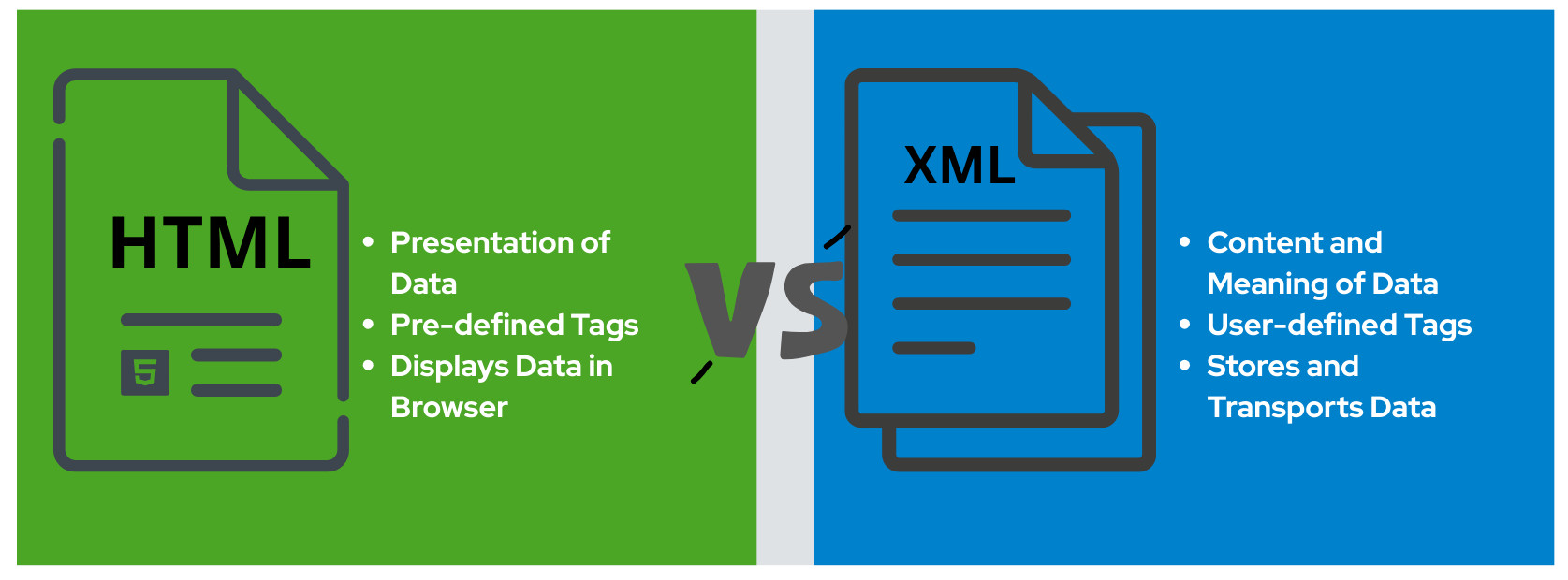
- HTML is the standard language for creating web pages. It is a presentation language designed to display data in web browsers. HTML structures content like text and images to display them on the Internet.
- XML is primarily a data transport language. It is a flexible markup language that users can use to define their own tags. XML is mainly used to store, describe, and exchange data in a structured way.
What is HTML?
HTML is the standard markup language for creating webpages. It defines the structure and content of web pages using tags to mark up text, images, multimedia, and links, and tells web browsers how to display them.
HTML is the fundamental building block of the web. It provides the core structure of the page, which can be enhanced further using CSS and JavaScript for appearance and interactivity, respectively.
Key Features of HTML
- HTML focuses on how data is presented to the user.
- It uses tags to define the structure and content of web pages, such as
<h1>,<p>,<div>, and<table>. - HTML is displayed in browsers even if there are errors. There is no strict syntax for it.
- It enables the creation of hyperlinks (
<a>) to different sections within the page or web pages. - Modern HTML (HTML5 onwards) uses semantic elements like
<header>,<footer>,<nav>,<article>,<article>, and<aside>to provide more meaning to the structure of a web page. This improves accessibility and search engine optimization (SEO). - HTML can embed various media types, including images (
<img>) and audio (<audio>).
Example of HTML
<!DOCTYPE html>
<html>
<head>
  <title>HTML Sample</title>
</head>
<body>
  <h1>Welcome to Sample HTML</h1>
  <p>This is a paragraph displayed in a browser.</p>
</body>
</html>
When the above code is saved as an HTML file and opened in a browser, it looks as shown below:
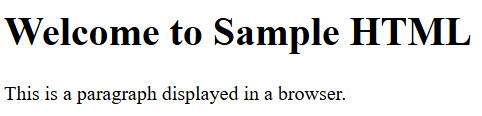
Here, the <h1> tag defines a heading, and the <p> tag defines a paragraph.
What is XML?
XML is a markup language designed to store and transport data. It is a flexible language that enables applications to share information in a structured, human-readable form.
Unlike HTML, which has predefined tags, XML allows users to define custom, extendible tags to describe the data. Because of this, data sharing and management are software-independent.
Key Features of XML
- XML is a self-descriptive markup language that uses tags to describe the type of data it contains. This provides clarity, making the document understandable to humans and machines.
- XML allows users to design their own tags and create custom data formats. It is highly flexible and adaptable.
- XML organizes data hierarchically using a tree-like structure with elements and attributes. It follows strict rules for tags, elements, and attributes.
- It is platform-independent and enables easy data sharing and communication between platforms and applications.
- XML’s primary focus is structuring and carrying data, not presentation.
- XML is used widely in SOAP, RSS feeds, configuration files, and document storage.
Example of XML
<?xml version="1.0" encoding="UTF-8"?>
<student>
  <name>Max Kirk</name>
  <age>32</age>
  <course>Computer Engineering</course>
</student>
The representation of the above code in the browser is shown as:

Here, <student> is a user-defined tag that organizes information, and due to a lack of styling, the document tree is shown in the browser.
Key Differences Between HTML and XML
The main difference between HTML and XML is their purpose. HTML is a presentation language for structuring and displaying web content using predefined tags. XML focuses on data storage and transfer with custom tags. Both are markup languages and have readable formats by humans and machines.
The following table shows the key differences between HTML and XML:
| Feature | HTML | XML |
|---|---|---|
| Full Form | HyperText Markup Language | eXtensible Markup Language |
| Year of release | 1993 | 1998 |
| Definition | A markup language used primarily for displaying structured content in a browser. | A markup language used primarily for exchanging structured data between computer systems. |
| Purpose | Displays data in browsers. | Stores and transports data. |
| Tag Type | Predefined tags (<h1>, <p>, <img>) |
User-defined/custom, extendible tags |
| Focus | Presentation (appearance of data) | Data (content and meaning) |
| Case-sensitive | Not case-sensitive (<p> same as <p>) |
Case-sensitive (<Name> ≠ <Name>) |
| Strictness | Flexible. Browsers handle most errors. | Strict. Errors break the doc. |
| Closing Tags | Sometimes optional (<p> may be unclosed). |
Mandatory, as every tag must close properly. |
| Typing | Dynamic. | Fixed when using an XML schema. |
| Whitespace Handling | Ignored by browsers in many cases | Preserved as part of the data. |
| Data Storage | Not suitable for structured data storage. | Ideal for structured data storage and transport. |
| Extensibility | Limited, only a predefined set of tags is available. | Highly extensible, users define their own schema. |
| Output | Visual representation in a web browser. | Structured data usable across systems. |
| Use | When building client-side webpages or web apps. | Exchanging data between two systems. |
| Static/Dynamic | HTML is a static language whose primary intention is to display data. | XML is a dynamic language used to store and transport data. |
| Parsing | You cannot parse the HTML files without an HTML parsing facility. | In XML, you need to parse the XML files to execute them. |
| Data Types | There is no special data type in HTML. E.g., characters, text, and numbers are present in HTML. | Some data types are defined in XML, such as boolean, integer, duration, date, etc. |
| Attributes | Can be empty. | Must have value. |
| Namespaces | HTML does not support namespaces | XML supports namespaces. |
Applications of HTML
- Building websites and web applications.
- Displaying multimedia content (images, audio, and videos).
- Integrating with CSS & JavaScript to develop interactive web pages.
- Forms for user input (using
<form>tags). - Front-end design of portals, blogs, and e-commerce sites.
Applications of XML
- Data exchange between APIs, SOAP, and REST applications with XML payloads.
- Configuration files in software (e.g.,
web.xmlin Java web apps). - Document storage (MS Office formats like
.docxand.xlsxinternally use XML). - RSS feeds for syndicating blog/news updates.
- Interoperability in enterprise systems (ERP, banking, telecom).
Similarities Between HTML and XML
- Syntax: Both languages have similar syntax using tags and attributes.
- Tags: These are denoted by brackets, commas, and periods, providing structure and type to data elements. In HTML and XML, tags are enclosed in angular brackets that define each element’s beginning and end.
- Attributes: Attributes provide more information about an element. For example, an image has ‘src’ as an attribute that provides the image’s URL. In HTML and XML, an element’s attributes are defined inside the opening tag.
- Well-defined Structure: Both HTML and XML adhere to the syntax rules of the given language for correct processing. IDEs or text editors are used to write and check the syntax.
- Usage: HTML and XML are combined with scripting languages to create dynamic web pages and applications.
- Platform Independence: HTML and XML are easy to interpret by different software applications and operating systems, and they work across browsers without any modifications.
Advantages and Disadvantages of HTML
Here are the main advantages and disadvantages of HTML:
Advantages:
- Ease to Learn and Use: HTML is a relatively simple language for beginners to learn and use for creating and editing web pages.
- Universal Compatibility: It is universally compatible with all web browsers, and HTML content can be accessed and displayed consistently across various platforms and devices.
- Integration with Other Technologies: HTML helps create rich web applications by seamlessly integrating with other essential web technologies, such as CSS for styling and JavaScript for dynamic and interactive functionalities.
- Lightweight and Fast Loading: It is a text-based language, and HTML files are typically lightweight, contributing to faster loading times for web pages, which enhances user experience.
- SEO Friendliness: Properly structured HTML code is beneficial for SEO, as search engines rely on HTML to understand and index web content effectively, potentially leading to better search rankings.
- Cost-Effectiveness: HTML is cost-effective as it is an open standard and does not require expensive proprietary software.
- Flexibility and Control: With HTML, developers have significant control over the structure and organization of web content, enabling them to arrange elements as desired.
- Accessibility: HTML facilitates the creation of accessible websites that are easy for individuals with disabilities to navigate and interpret.
Disadvantages:
- HTML cannot store or transport structured data.
- It uses predefined tags and has limited extensibility.
- HTML is a presentation-oriented, not data-oriented.
- HTML is designed to create static, plain web pages and lacks the functionality to create dynamic content independently.
- It offers minimal security features, and websites built only with HTML are vulnerable to attacks.
- Extensive coding is necessary to create simple HTML pages, leading to complexity and reduced readability.
- HTML relies on other technologies like JavaScript for interactivity and CSS for advanced styling.
Advantages and Disadvantages of XML
The advantages and disadvantages of XML are as follows:
Advantages:
- Self-Descriptive and Human-Readable: XML documents are self-descriptive with tags to define the structure and meaning of data. They are relatively easy for humans to understand and interpret.
- Platform Independence: XML, a text-based format, can be created, read, and processed on virtually any operating system or programming language without compatibility issues.
- Data Transport and Exchange: XML provides a standardized, structured format, simplifying data exchange between disparate systems and applications.
- Separation of Data from Presentation: XML focuses on describing the data itself, allowing for the separation of data from its presentation.
- Flexibility and Extensibility: Users can define custom tags and structures, allowing them to represent various data types and adapt to specific application needs. The system also supports extensibility, enabling the addition of new features without breaking existing applications.
- Increased Data Availability: XML provides a standardized and easily parsable format, making data more accessible to various applications and devices, including those with accessibility features for users with disabilities.
Disadvantages:
- XML’s tag structure leads to larger file sizes compared to more compact formats like JSON, especially for high-volume data.
- XML requires detailed validation and parsing with complex XML schemas, leading to increased processing overhead and memory usage.
- When dealing with intricate data structures or large amounts of data, XML can become complex to manage and understand.
- XML is primarily text-based with hierarchical structures. Its representation of binary data (e.g., images) is often inefficient and cumbersome.
- Mastering XML requires a steep learning curve, especially for advanced XML features such as schemas and transformations.
HTML vs XML: Which to Use?
- Choose HTML if your goal is to create web pages for human users.
- Choose XML if you require data exchange, configuration, or document storage.
- HTML and XML often coexist as HTML displays data, while XML or JSON provides the structured backend.
Future of HTML and XML
- HTML enhanced by CSS3, JavaScript, and frameworks like React, Angular, and Vue, will continue as the backbone of web development.
- Although JSON dominates modern web APIs, XML will remain crucial in enterprise-level integrations, configuration, and legacy systems.
- Hybrid approaches like XHTML highlight ongoing crossovers.
Conclusion
HTML and XML may look syntactically alike, but they serve different purposes. HTML displays information in browsers, while XML structures and transports information between systems.
In other words, HTML deals with “How Data Looks” while XML defines “What Data Means”.
Both remain cornerstones of the digital world, and understanding their differences ensures software professionals use the right tool for the right job.
 |