
Master Deployment Strategies: Blue-Green, Canary & More
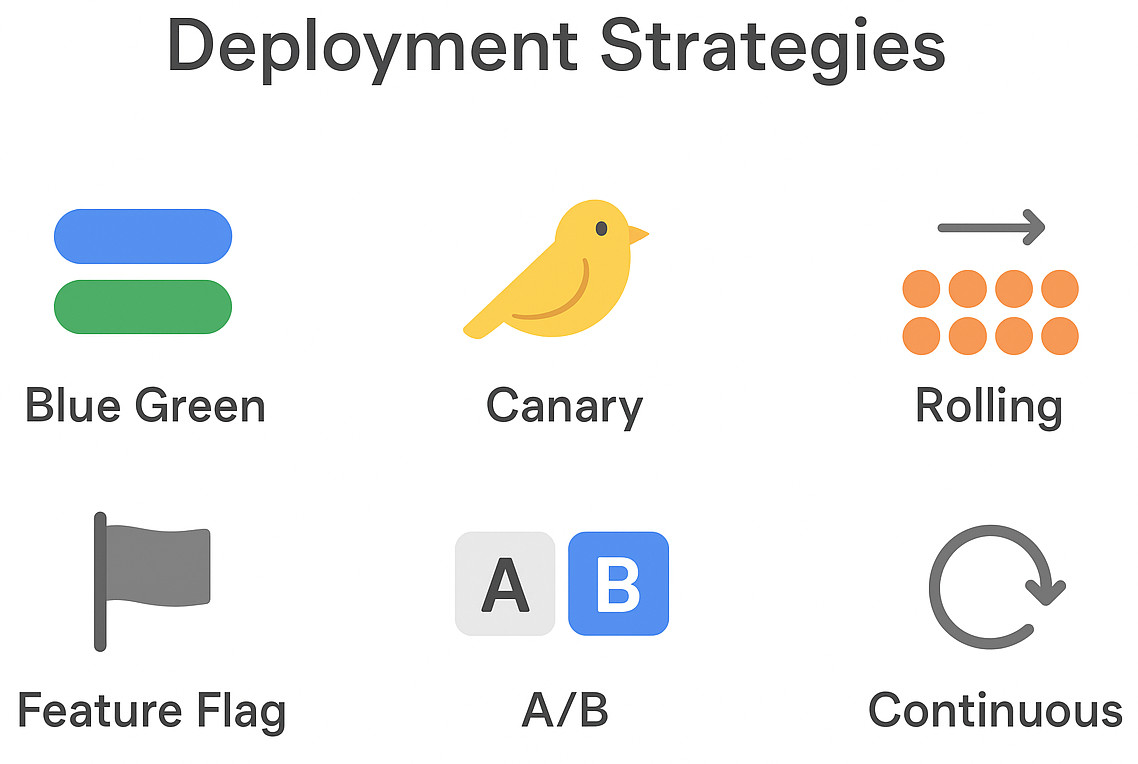
Software development in the digital age is quick. The manner in which we deploy apps to production has evolved significantly as continuous integration and delivery pipelines have become incredibly commonplace. When releasing features, modern organizations have to strive to maintain a balance between safety, speed, and scalability. Deployment strategies are relevant in this scenario.
| Key Takeaways: |
|---|
|
Let us examine the prominent software deployment techniques, along with comparisons between blue-green, canary, rolling, and feature flag strategies. In addition, we will also explore A/B deployment, Kubernetes (K8s) deployment techniques, and progressive deployment. We will also touch on the best practices that can help you reach zero downtime deployment.
Why Software Deployment Strategies Matter
When releasing software, organizations do way more than just “pushing code”. Infrastructure, application logic, business continuity, and user experience are all involved in a deployment. The stakes are sky high, especially in sectors such as healthcare, finance, and e-commerce, where even a mere 5 minutes of downtime can cause significant monetary losses or negatively impact the organization’s reputation.
- Downtime during releases: Service interruptions brought on by poorly planned deployment could frustrate users and possibly violate SLAs.
- Every user impacted by bugs: Big bang deployment, which releases everything at a go, means that if a problem avoids testing, it affects every user immediately.
- Complication of rollback: Imagine discovering your latest release is unstable a few hours later. Without a well-defined rollback strategy, the team will have to improvise, which can lead to delays and inconsistent data.
- Ineffective testing cycles: Deployments that lack flexibility often need long testing freezes, which delay delivery.
- Teams can release more often without feeling as stressed out.
- Organizations are able to ensure zero downtime deployment, which is now a need for SaaS products.
- Product managers can make efficient data-driven decisions by utilizing feature flag deployment or A/B deployment to progressively validate changes.
- Rather than firefighting, engineering and operation teams work with predictability and repeatability.
To put it in a simpler manner, deployment strategies, a pillar of modern DevOps culture, transform releases from high-street events into regular, secure processes.
The Major Software Deployment Strategies
There is no one-size-fits-all deployment strategy. Each has benefits and cons that make it better suited for specific infrastructures, organizations, or release goals. Let’s take a closer look at the most prominent software deployment techniques.
Big Bang Deployment (The Simplest, Yet Riskiest Approach)
Putting all of the changes into production at once is called a “big bang deployment.” While this method is straightforward, it is very risky because the system as a whole can completely crash if something goes wrong. These days, this method is rarely recommended for critical systems.
Blue Green Deployment
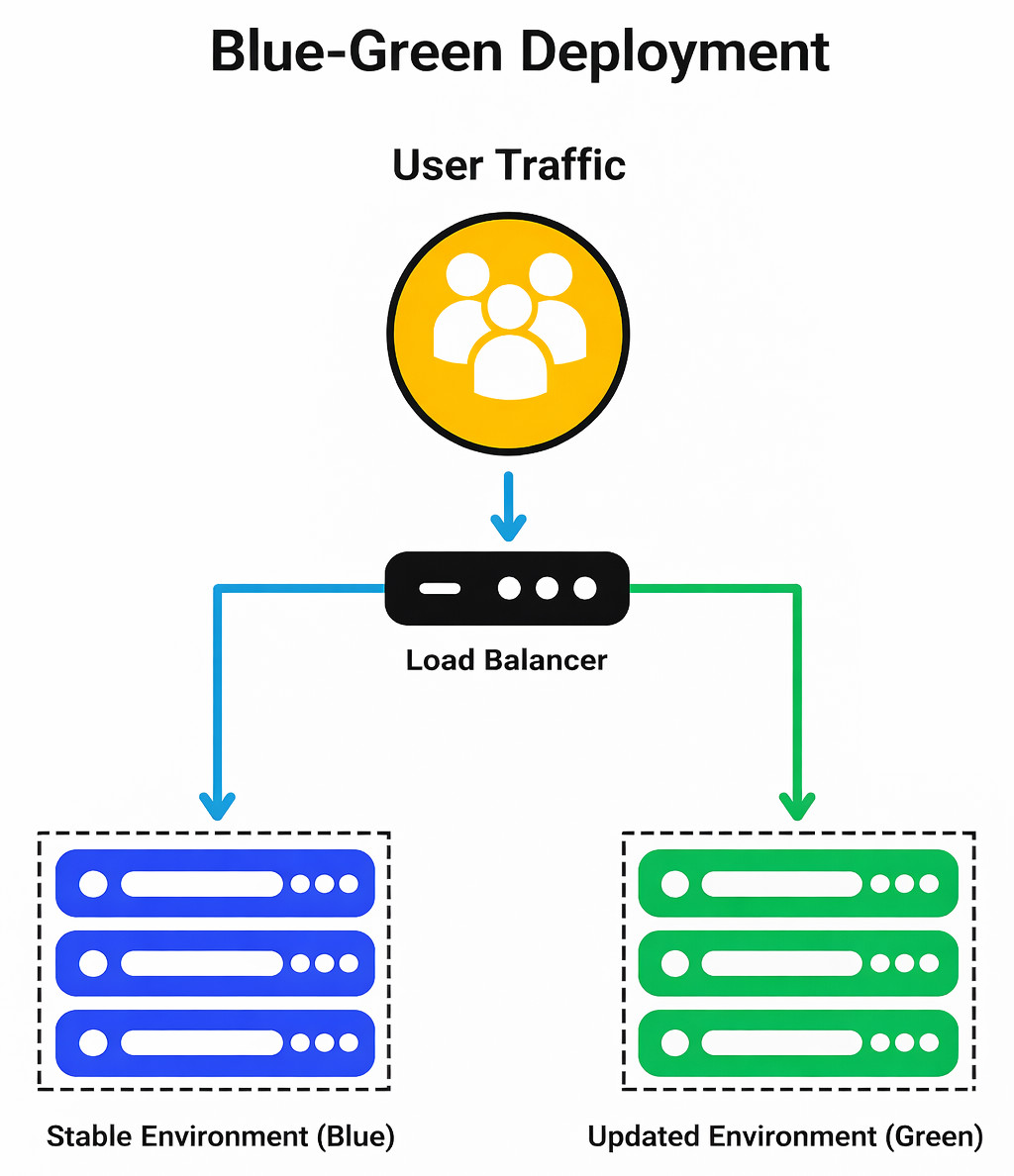
- There are two identical environments- Blue (the live version) and Green (the latest version).
- The Green environment receives the new release.
Traffic is modified from Blue to Green post extensive testing.
- No downtime for users.
- Instant rollback (back to Blue).
- Requires redundant infrastructure, which can be costly.
Canary Deployment
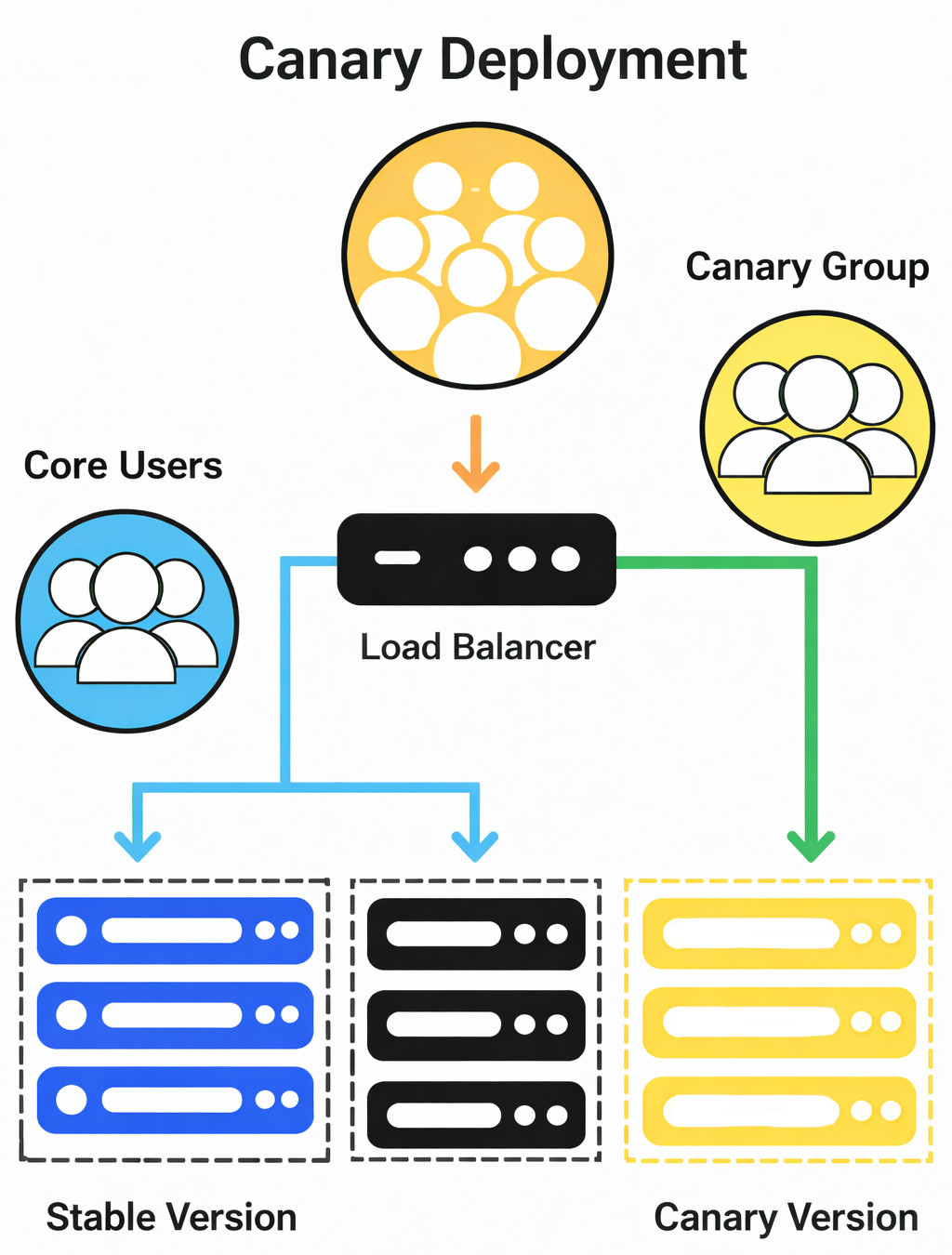
A canary deployment, which draws motivation from the “canary in the coal mine” analogy, releases software to a restricted number of users before gradually reaching the entire population. This method reduces the potential exposure while helping organizations to validate new features under actual traffic. Canary deployments are critical for organizations such as Facebook, Google, and Netflix to maintain stability while releasing updates regularly.
- Aids real-world testing with a restricted blast radius.
- Decreases risk by exposing changes incrementally.
- The rollout needs to be meticulously planned.
- It necessitates sophisticated routing and monitoring.
Rolling Deployment Strategy
Using a rolling deployment strategy, new application instances are gradually added to old ones in batches. For example, the new version is installed on each server one at a time.
- Downtime is eliminated.
- Performs well in cloud-native or containerized environments, such as K8s deployment strategies.
- Rollback is slower when compared to blue-green deployment.
- Close monitoring is necessary during rollout.
Feature Flag Deployment
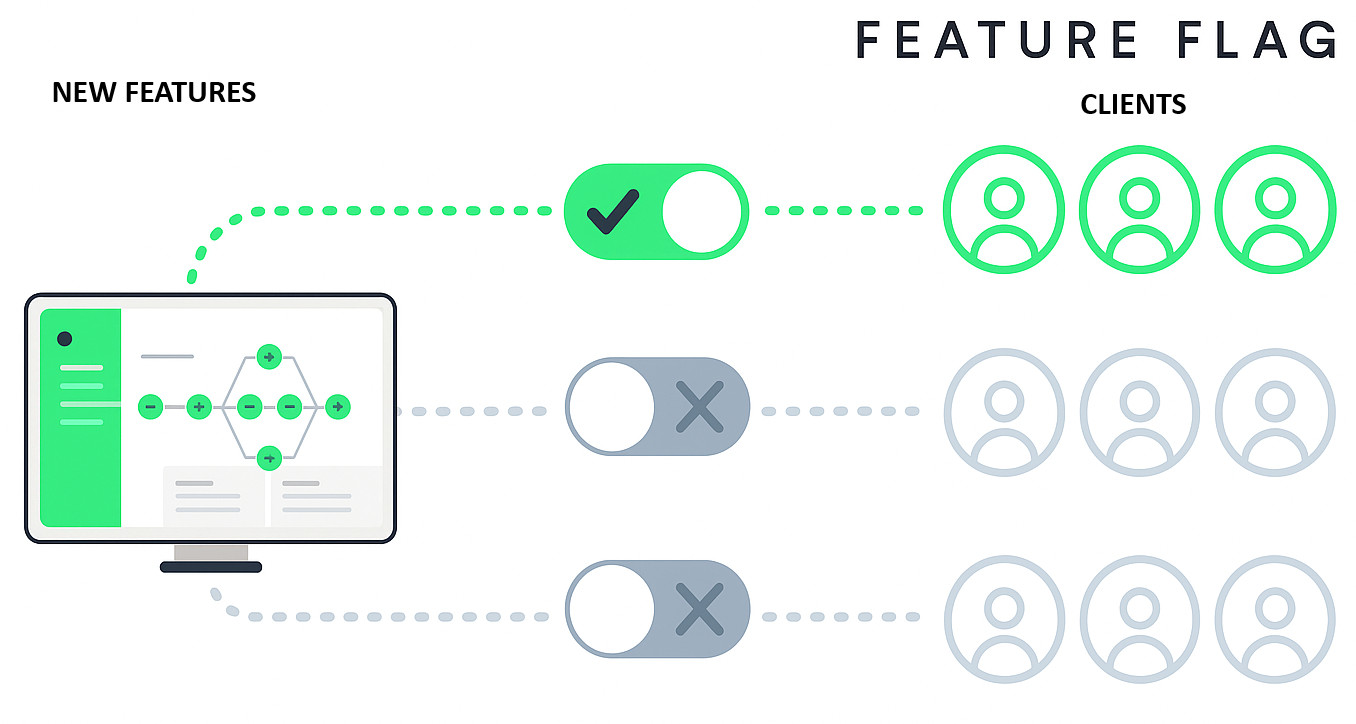
Teams can segregate feature release from code deployment by utilizing feature flag deployment. Toggles (feature flags) that can be dynamically enabled or disabled are utilized to wrap new features rather than tying functionality to a single production push. This helps product managers to decide which users will view new features, while developers can release code consistently. The method enables experimentation and gradual deployment without endangering the application as a whole.
- Enables progressive deployment.
- Reduces the possibility of releasing functionality that hasn’t been thoroughly validated.
- Enables A/B deployment for testing.
- Adds complexity to flag management and the codebase.
A/B Deployment
This method, also called A/B testing deployments, includes executing two versions (A and B) simultaneously for different user segments. Before selecting which version to retain, it is regularly used to compare conversion rates, performance, and user experience.
Shadow Deployment
In the shadow deployment, a copy of the live traffic is sent to the new version, which runs alongside the old one. But users can only receive responses from the previous version. Regression testing and performance benchmarking under production load benefit well from this method.
Constant Deployment
The highest level of automation is continuous deployment. Any change that passes automated testing is immediately pushed to production.
- Boosts the rate of development.
- Reduced manual labor is needed.
- Requires strong testing confidence and mature CI/CD pipelines.
- Not every organization can implement it immediately.
Deployment Strategies Best Practices
- Automate the build and deploy process: Manual deployments are error-prone. Consistency across environments is guaranteed by using container orchestration, CI/CD pipelines, and IaC (Infrastructure as Code). Helm charts or GitOps workflows, for example, can fully automate a rolling deployment strategy in Kubernetes.
- Adopt a progressive deployment strategy: New functionalities can be rolled out gradually with the help of progressive techniques like feature flag deployment and canary deployment. By restricting exposure and offering real-time feedback, this reduces risk. Progressive deployment, when paired with monitoring, provides a safety net before extending to all users.
- Keep an eye on everything: Monitoring entails user experience, business KPIs, and system performance in addition to uptime. For example, before switching traffic during a blue-green deployment, teams must ensure the “green” environment responds in the same manner under actual load.
- Offer reliable and rapid rollbacks: Slow or awkward rollbacks are often the cause of downtime rather than the issue itself. Rollbacks are easy with good strategies (like blue-green deployment), but rolling deployments might need more meticulous planning. Planning rollback routes with the same standard of care as forward deployments is the preferred practice.
- Test in production-like environments: When tests don’t correctly reflect reality, deployments fail. Before fully committing, you can verify changes with actual traffic using A/B deployment methods and shadow deployments.
- Align with business goals: Technical stability isn’t the main area of focus of every deployment. Some, like A/B deployments, focus on data collection and experimentation. Regardless of the goal, whether it is speed, stability, innovation, or user experience testing, the deployment strategy should be aligned with it.
By deploying these processes, organizations encourage an environment where deployment is not a cause for concern but rather a regular method.
K8s Deployment Strategies
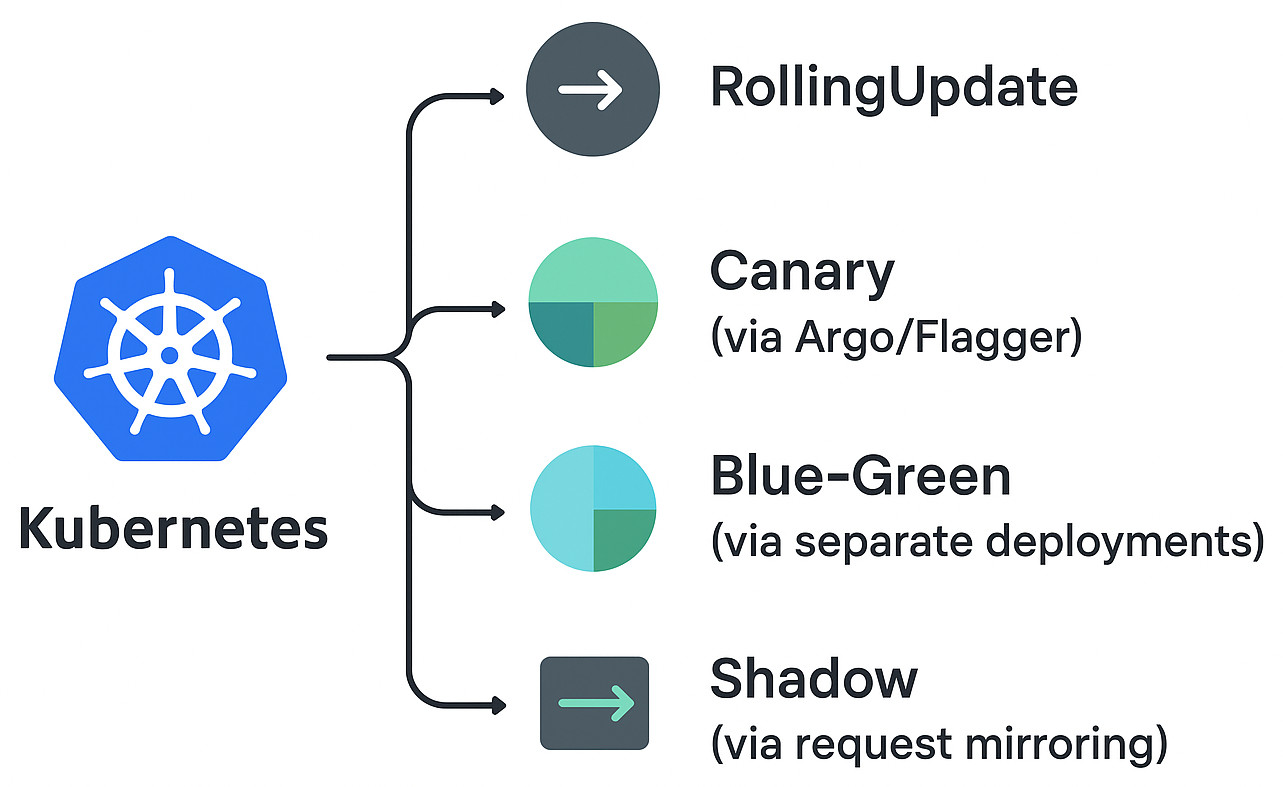
Organizations’ perspectives on deployment have been fully modified by Kubernetes (K8s). Kubernetes enables developers to specify the planned state of applications by abstracting infrastructure into declarative resources, with the platform fully managing orchestration by itself.
-
Rolling Updates (Default in Kubernetes)The rolling deployment strategy is natively supported by Kubernetes. As new pods emerge, those running the obsolete version are progressively shut down. This ensures constant availability with the minimal amount of disturbance to users. The rollout speed can be adjusted utilizing metrics such as maxSurge and maxUnavailable.
-
Canary Deployment in KubernetesKubernetes can direct a small portion of traffic to new pods while maintaining the stability of the remaining traffic using tools like Argo Rollouts, Flagger, or Istio. It is therefore ideal for progressive deployment. A team might, for example, introduce a new checkout procedure to 5% of users before boosting it to 50% and higher.
-
Blue Green Deployment in KubernetesBy running two unique versions of a service (such as v1 and v2) and utilizing a load balancer or ingress controller to switch traffic, Kubernetes streamlines blue-green deployment. This allows rapid rollback and deployment with no downtime.
-
Shadow Deployment in KubernetesKubernetes can mimic actual user requests and route them to a shadow version of an application by using traffic mirroring. This keeps users protected from possible bugs while verifying error handling, API behavior, and performance.In reality, teams often integrate these K8s deployment strategies depending on business needs and risk tolerance. For extra safety, a blue-green rollout might be followed by a canary deployment.
The Role of Testing in Deployment Strategy
- Pre-deployment testing: The new version should be validated in the green environment (blue-green deployment) or staging before being released. This ensures that it passes end-to-end, integration, and unit tests in an environment similar to production.
- During deployment: Continuous testing is required as the rollout progresses for strategies such as rolling and canary deployment. To detect regressions before they spread, automated smoke tests, for instance, can be performed on canary users.
- Post-deployment testing: Testing and monitoring must go on even after a rollout is finalized. Because toggles can drastically modify behavior, feature flag deployment specifically needs continuous verification across different configurations.
The main goal is to make sure users never experience malfunctioning functionalities. Even if the system remains “up”, downtime may still happen if automated regression and performance tests are not in place.
Conclusion
Modern software delivery needs deployment strategies. Every strategy has its own benefits and cons. The best option is determined by your risk tolerance, business goals, and infrastructure. All strategies, though, agree that intense automated testing is vital. Intelligent and effective tools offer organizations the guarantee to implement progressive deployment strategies, ensure zero downtime deployment, and switch to continuous deployment without sacrificing quality.
 |