
Processes in Operating Systems: Basic Concept, Structure, Lifecycle, Attributes, and More
When you use a computer to browse the internet, pay your utility bills, access documents, and use applications, you are not aware of the massive amount of operations that are performed behind the scenes. The operating system (OS) is at the center of these operations and computing. It is a core software that manages both computer hardware and software and provides services for computer programs. When we talk about programs, one of the most fundamental concepts in an operating system is the process.
| Key Takeaways: |
|---|
|
This article explains the concept of a process in operating systems, its characteristics, lifecycle, states, components, scheduling, and its role in modern computing systems.
What is a Process in OS?
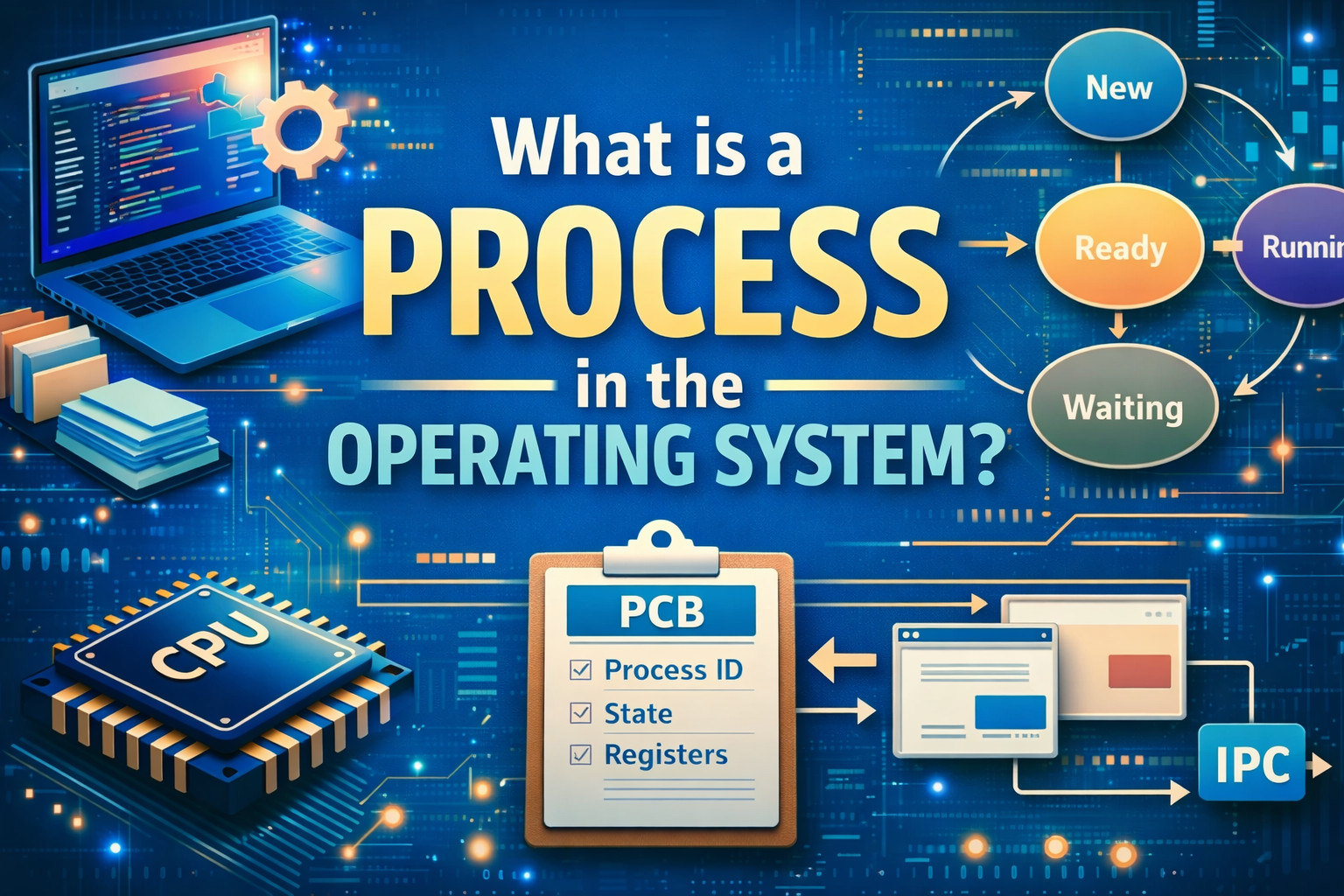
A process is a program in execution. It is an entity that represents the basic unit of work to be implemented in the system.
While a program is a passive collection of programming instructions stored on disk, a process is an active entity that executes those instructions.
- A program is a static file containing instructions.
- A process is a running instance of that program.
For example, if you open a web browser on your computer, such as Google Chrome, the OS creates a process to run it. In this manner, for each program or application you open on your system, there will be a corresponding process for it created by the OS.
A process not only contains program code, but also the current state (program counter), state, memory, and other resources required to execute a program.
The execution of a process must progress in a sequential fashion.
In simpler terms, a program becomes a process when it is loaded into memory.
Characteristics of a Process
A process has several important characteristics that distinguish it from a simple program.
- Dynamic Nature: A process is a dynamic entity as it represents a program in execution. It continuously changes as instructions are executed.
- Sequential Execution: The instructions in a process are executed in a sequential manner.
- Resource Ownership: A process uses resources such as CPU time, memory, files, and I/O devices.
- State Changes: During its execution, a process moves through different states, such as new, ready, waiting, and running.
- Unique Identity: Each process is identified using a unique identifier known as the Process ID (PID) assigned by the OS.
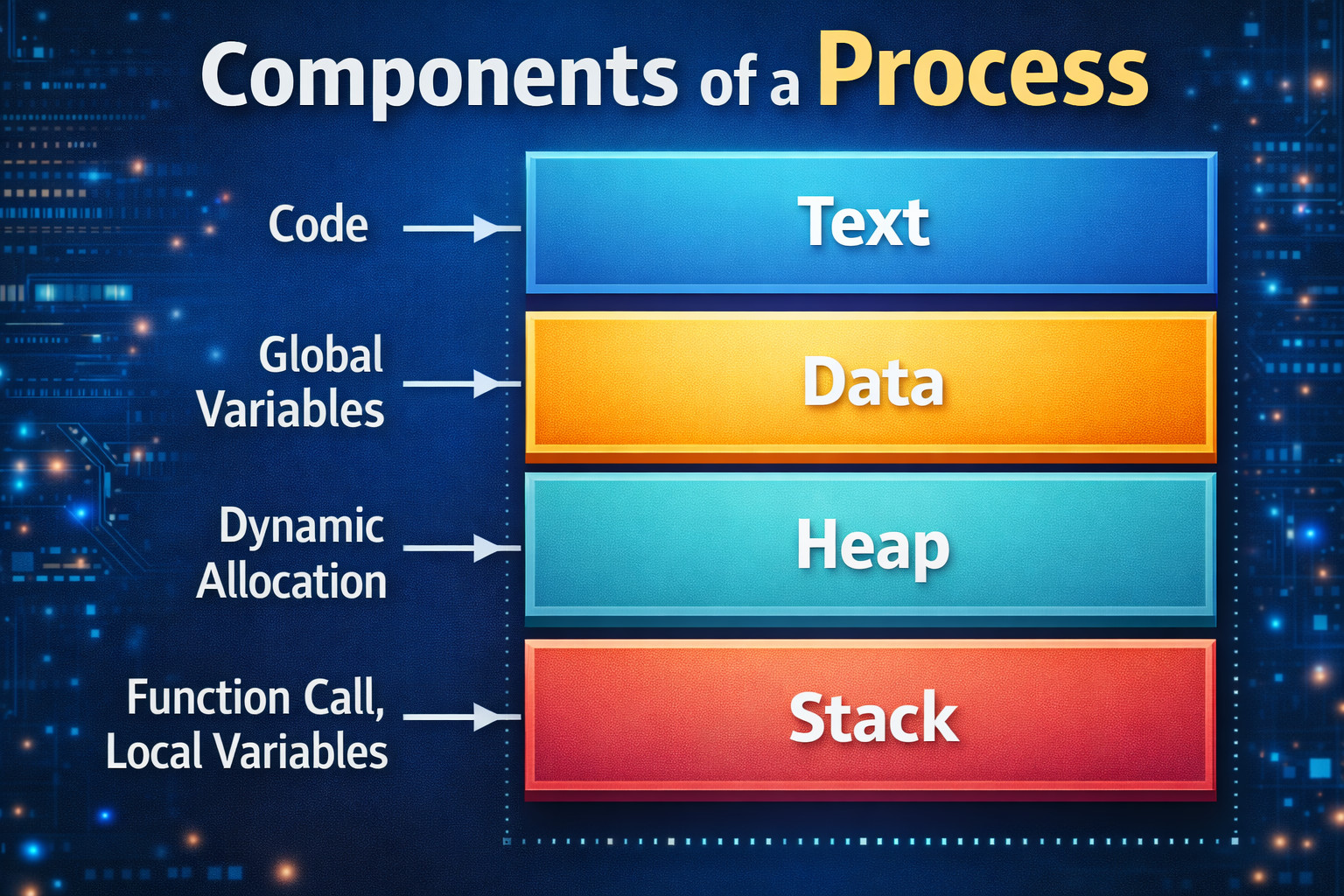
- Memory Structure: A process in memory consists of four components:
- Text: Compiled program code.
- Data: Global and static variables.
- Heap: Dynamically allocated memory.
- Stack: Local variables and function parameters.
- Independence: Each process runs in its own address space, ensuring one process cannot directly access another’s memory.
A single program can initiate multiple processes (e.g., opening multiple browser instances).
Components of a Process
A process consists of several components that define its execution environment. These components are usually stored in memory.
1. Text (Program Code Section)
The text section contains the compiled program code read from non-volatile storage, such as disk, when the program is launched.
For example, the code for a text editor or a browser is stored in system memory.
2. Data Section
The data section stores global variables and static variables used by the program. They are initialized before main is executed.
3. Heap
This is used for dynamic memory allocation during runtime. It is managed via calls to new, delete, malloc, free, and related functions.
4. Stack
Each function call creates a corresponding stack frame in the process stack. The stack is used to add local variables when they are declared at the function’s entry or elsewhere. The space is freed up when these variables go out of scope. The stack is also used for function parameters and return values.
When a process is swapped out of memory and later restored, additional information, such as the program counter and CPU registers, is also stored and then restored.
The program counter holds the address of the next instruction to be executed, while CPU registers store intermediate values and instructions during execution. Read: Stack in Data Structures: A Complete Guide with Operations & Examples
Process Control Block (PCB) and Context Switching
The OS maintains the information about the process in a data structure known as the Process Control Block (PCB).
- Process ID
- Process state
- Program counter
- CPU registers
- Memory management information
- Scheduling information
- Accounting information
- I/O status information
Each process has its own PCB. Whenever the CPU switches from one process to another, the OS saves the current process state in its PCB and loads the next process’s state.
This mechanism, known as context switching, occurs when the CPU switches from executing one process to another.
Although context switching allows multitasking, it introduces overhead because the CPU must save and load process information.
Process Lifecycle
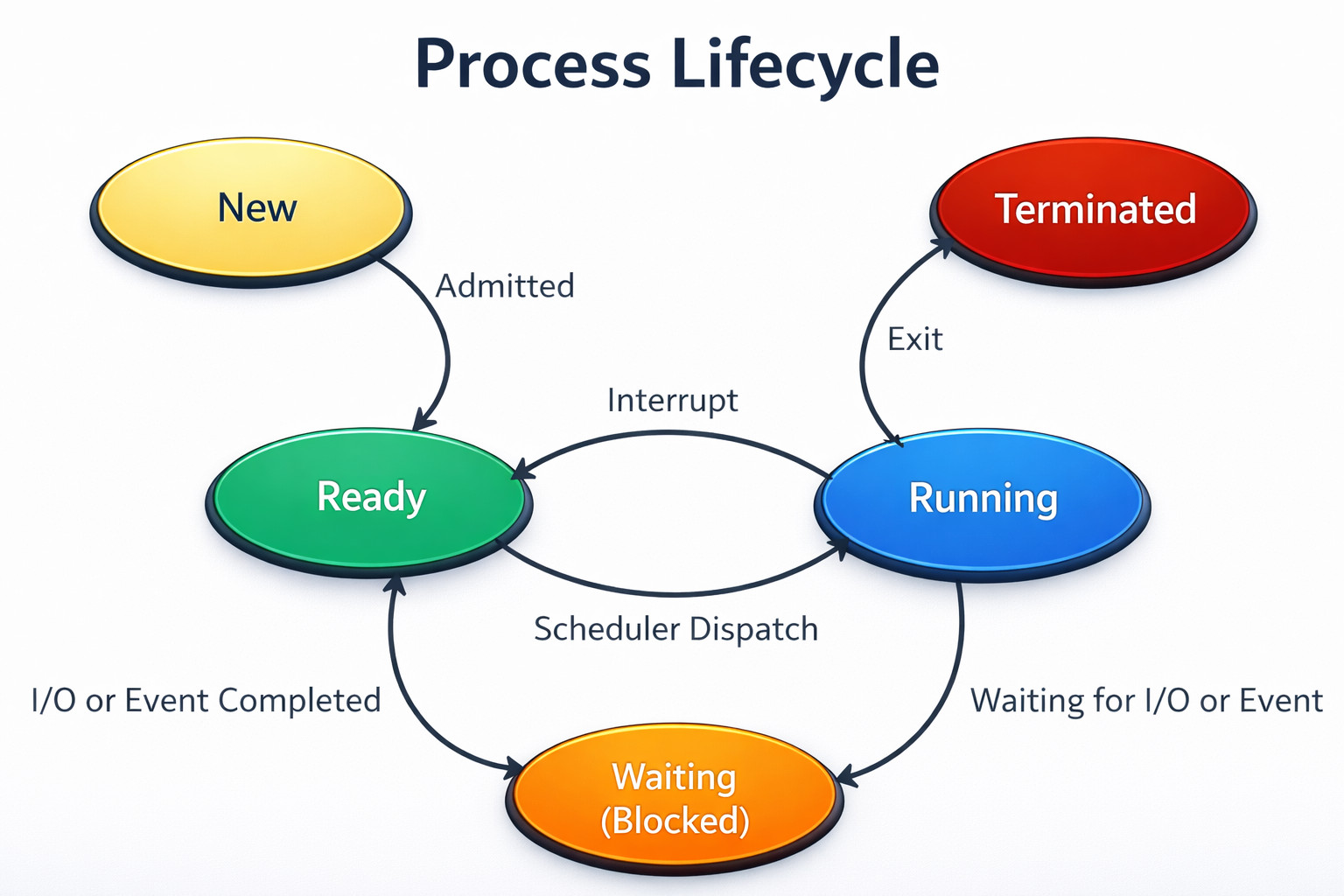
A process goes through several states during its execution. This change in states constitutes the lifecycle of a process. Though the stages may differ depending on the OS and their names may also be different, a process typically has one of the following five states at a time:
1. New
A newly created process is in this state. It is the initial state of the process.
2. Ready
When a process is waiting to be assigned to a processor, it assumes the “Ready” state. The process may enter this state after the New state or while running, but is interrupted by the scheduler to assign CPU to another process.
3. Running
Once the OS assigns the process to a processor, the process state changes to “Running,” and it executes.
4. Waiting (Blocked)
Process’s state is changed to “Waiting” if it needs to wait for a resource, such as user input, or a file to become available. As the process is waiting for some resource or for some event to occur, it halts its execution.
5. Terminated
When the process completes its execution, it is deleted from the memory. This is the terminated state.
Process Scheduling
In modern multitasking operating systems, multiple processes compete for CPU time. The process scheduler decides which process should run at a given moment.
The two primary objectives of the process scheduling system are keeping the CPU busy at all times and delivering “acceptable” response times for all programs, particularly for interactive ones. Process scheduler tries to meet these objectives by implementing suitable scheduling strategies for swapping processes in and out of the CPU.
- Efficient CPU utilization
- Fair resource allocation
- High system performance
An efficient scheduling system will select a good process mix of CPU-bound processes and I/O bound processes.
Types of Schedulers
The following are the types of schedulers used in process scheduling:
1. Long-Term Scheduler
Also known as the job scheduler. It is typically used in a batch or very heavily loaded system. The long-term scheduler runs infrequently (for example, when one process ends, selecting one more to be loaded from disk to replace it). It can take time to implement intelligent and advanced scheduling algorithms.
2. Short-Term Scheduler
This is also called the CPU scheduler. It runs very frequently (on the order of 100 milliseconds) and is very quick to swap one process out of the CPU and another one in.
3. Medium-Term Scheduler
Some systems use a medium-term scheduler responsible for swapping processes in and out of memory to control the level of multitasking. This is used when system loads get high to swap one or more processes out of the ready queue for a few seconds. This is done to allow smaller, faster jobs to finish first and clear the system.
Scheduling Queues
- All processes are stored in the job queue.
- Processes in the Ready state are placed in the ready queue.
- Processes waiting for a device to become available or to deliver data are placed in device queues. There is a separate queue for each device.
- Other queues may also be created and used as needed.
Types of Processes in OS
Processes in the OS are categorized by their interaction, resource usage, nature, or operational state.
- User Processes: These processes are also called foreground processes and are created by users when they run applications.
Examples of user processes are:
- Web browsers
- Media players
- Text editors
These processes run directly in the user’s interface (e.g., terminal, web browser) and require user interaction. - System Processes: These processes are created by the operating system to perform system-level tasks and typically run with high privileges.
Examples:
- Memory management
- Device drivers
- File system management
- Background Processes: These processes usually run in the background without user interaction, often handling system tasks, daemons, or services (e.g., antivirus, database servers).
- CPU-bound Processes: CPU-bound processes spend most of their time using the CPU for calculations, requiring little I/O.
- I/O-bound Processes: These processes spend more time waiting for I/O operations (input/output from disk or network) than using the CPU.
- Independent Processes: Processes are not affected by other processes and do not share data.
- Cooperating Processes: These types of processes can affect or be affected by other processes, sharing data and resources (e.g., via Inter-Process Communication – IPC).
Process Creation
Processes in the OS are created when a program is launched, a user logs in, or through system calls like fork() (UNIX) or CreateProcess() (Windows). Each of these methods creates a new process by setting up a PCB, loading code into memory, and allocating resources.
- System Calls: This is the primary method by which a running process (parent) creates a child process. The following system calls create a process:
fork()(Unix/Linux): This system call creates a new child process that is an exact duplicate of the parent process.exec()(Unix/Linux): The call is used after afork()to replace the child’s memory space with a new program.CreateProcess()(Windows): A single system call that loads a new program and starts a new process.
- User Action: When the user initiates a new application, such as clicking a browser icon, a new process is created.
- System Initialization: During system startup (boot-up), the OS creates background services or daemons.
- Batch Job Submission: In legacy or large-scale computing systems, a job to be processed is submitted in a batch.
- Assign PID: A unique Process Identifier is assigned to a process.
- Allocate Resources: Memory, files, and I/O devices are allocated.
- Initialize PCB: The PCB is created with initial data (e.g., Program Counter).
- Load Program: The executable code is loaded into memory.
- Set State to “Ready”: The process is moved to the ready queue to await CPU time.
Process Termination
A process terminates when it completes execution or is stopped by the operating system.
- Normal Completion (Voluntary Termination): In normal situations, a process completes its task and calls
exit()to voluntarily terminate. The terminated process may return a status (usually an integer) to its parent process via thewait()system call. The value returned indicates success or failure. - Involuntary Termination (Abnormal): The operating system terminates a process involuntarily due to fatal errors, such as:
- Runtime errors: Errors like invalid memory access (segmentation fault), division by zero, or protection violations.
- Resource limits: Here, the resource limits are reached as the process exceeds its allocated memory or time limits.
- Parental Intervention: A parent process can also kill a child process using an
abort()orkill()system call. This can happen if the child is no longer required or has violated usage policies.
- Cascading Termination: In some operating systems, if a parent process terminates, all of its child processes are automatically terminated by the OS to prevent orphaned processes.
After termination, the OS releases the resources allocated to the process.
Process vs Program
A program is a passive, static set of programming instructions stored on disk (e.g., an .exe file). A process, however, is an active, dynamic instance of that program currently executing in main memory (RAM). Programs have a long lifespan, whereas processes are temporary, created, and terminated by the OS. The following table provides key differences between a program and a process.
| Feature | Program | Process |
|---|---|---|
| Definition | Set of instructions (code) | Program in execution |
| State | Passive / Static | Active / Dynamic |
| Location | Secondary Storage (Disk) | Main Memory (RAM) |
| Execution | Not executing | Currently executing |
| Lifespan | Long-lived | Short-lived |
| Resource Usage | Low (storage only) | High (CPU, RAM, I/O) |
| Example | chrome.exe on disk | An active Chrome tab/window |
| PCB | Does not have a PCB | Has PCB to store related information |
Importance of Processes in Operating Systems
Processes are the fundamental, active units of execution in an operating system (OS). Static apps or background programs are turned into dynamic, running actions as processes.
- Multitasking: Processes allow multiple applications to run concurrently on a single CPU. Example: Listening to music while browsing the internet.
- Resource Management: The OS manages resources such as memory, CPU time, and I/O devices for each process, ensuring fair access and preventing system overload.
- System Stability and Isolation: Processes are isolated in such a way that a failure in one process does not affect others, as each process operates in its own memory space. It also ensures system stability.
- Parallel Processing: Processes enable parallel execution on multi-core processors.
- Process Management and Lifecycle: The OS controls the entire lifecycle of a process, from creation to termination, managing states like “running,” “ready,” and “waiting/blocked” to optimize CPU usage.
- Communication: Processes can communicate with each other for complex software tasks via mechanisms like shared memory or message passing, which are essential for complex software tasks.
Conclusion
A process is one of the most fundamental concepts in an operating system and represents an execution unit of the program. It includes the program code, data, memory, and system resources needed for execution.
Using processes, the OS manages multiple tasks efficiently, supports multitasking, allocates resources, and maintains system stability. Each process has its own lifecycle, state, and control structure, enabling the OS to manage it effectively.
Key mechanisms such as process scheduling, context switching, and process control blocks ensure that processes execute smoothly and share system resources without conflict.
In modern computing environments where multiple applications run simultaneously, processes form the backbone of system operation.
Additional Resources
- User Mode vs Kernel Mode: Understanding Privilege Levels in OS
- What Are System Calls? How Operating Systems Communicate with Applications
- What are the Different Types of Code Smells?
- What is Software Architecture?
- Cohesion vs Coupling
Frequently Asked Questions (FAQs)
- What is the role of processes in multitasking?
Multiple programs can run concurrently on a computer using processes. As the OS rapidly switches between processes, it gives an illusion that multiple processes are running at the same time.
- What is the difference between a process and a thread?
A process is an independent unit of a program in execution with its own memory space, while a thread is a smaller unit of execution within a process that shares the process’s resources.
- Why are processes important in an operating system?
Processes are important in the OS as they enable multitasking, efficient resource management, program execution, system stability, and parallel processing in modern computing systems.
- What is process scheduling?
Process scheduling is the mechanism by which the operating system decides which process gets access to the CPU at a given time. It helps ensure efficient CPU usage and smooth multitasking.
- What is context switching?
Context switching is the process of saving the state of the currently running process and loading the state of another process, so the CPU can switch execution between them.
 |