
SQL Database Concepts: Fundamentals Every Developer Should Know
Think about your favorite streaming services, such as YouTube, Spotify, or Netflix. All of them are powered by millions of database operations that happen in milliseconds behind the scenes each time you hit play, add a song to your queue, or binge-listen to an entire season. What facilitates all of this? You guessed it: SQL databases.
The long unsung hero of computing, SQL (Structured Query Language), has been pulling its weight since the 1970s. It’s the Tony Stark of programming languages; slick, reliable, and always there when you need it. The issue here is that most devs know how to SELECT * FROM table, but there’s an entire world of SQL database concepts that drive the real world.
You need to know them in order to create scalable, reliable, and secure apps that won’t break as your user base grows from the hundreds to the millions.
| Key takeaways |
|---|
|
Buckle up, this isn’t your generic, tedious database lecture. We’re about to explore SQL the way it really works in the wild.
Understanding Relational Databases
Data is structured in relational databases into tables made up of rows and columns. While rows indicate records and columns specify attributes, each table represents an entity (like clients, goods, or orders). By highlighting relationships between entities, the relational model ensures consistency and gets rid of redundancy. Primary and foreign keys are often used to enforce these relationships.
The environment for handling relational databases with SQL commands is offered by Relational Database Management Systems (RDBMS), like MySQL, PostgreSQL, SQL Server, and Oracle.
SQL Data Types and Constraints
- INT – for integers
- VARCHAR(n) – variable-length strings
- DATE – calendar dates
- BOOLEAN – true/false values
- NOT NULL: prevents empty values
- UNIQUE: ensures uniqueness
- CHECK: enforces a condition (e.g., salary > 0)
- DEFAULT: assigns a default value when none is provided
These make sure databases remain dependable and consistent.
Keys in SQL Databases
- Primary Key: distinctly identifies each row in a table
- Foreign Key: establishes a link between two tables
- Composite Key: a key made of multiple columns
- Candidate Key: potential primary keys
- Super Key: any set of attributes that uniquely identifies rows
Using keys correctly avoids duplication and preserves relational integrity.
SQL Queries and Clauses
- DDL (Data Definition Language): CREATE, ALTER, DROP
- DML (Data Manipulation Language): SELECT, INSERT, UPDATE, DELETE
- DCL (Data Control Language): GRANT, REVOKE
- TCL (Transaction Control Language): COMMIT, ROLLBACK
- WHERE: filters results
- ORDER BY: sorts data
- GROUP BY: groups data for aggregates
- HAVING: filters aggregated results
Together, they provide developers with strong control over data.
Joins in SQL Databases
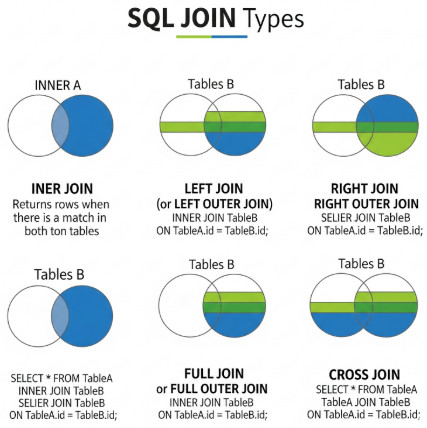
- INNER JOIN: returns matching rows from both tables
- LEFT JOIN: returns all rows from the left table, with matches from the right
- RIGHT JOIN: opposite of LEFT JOIN
- FULL OUTER JOIN: returns rows from both tables, matching wherever possible
- SELF JOIN: joins a table to itself
- CROSS JOIN: produces a Cartesian product of rows
Joins are necessary for retrieving relational data meaningfully.
Views and Subqueries
- Views: virtual tables built from queries. Useful for abstraction and security.
- Materialized Views: stored query results, faster but needs updates.
- Subqueries: queries nested within another query. These can be correlated (executed once per row) or uncorrelated.
They streamline complex queries and enforce encapsulation
Database Normalization Concepts
- 1NF: remove repeating groups, ensure atomicity
- 2NF: eliminate partial dependencies
- 3NF: eliminate transitive dependencies
- BCNF: stricter form of 3NF
While normalization ensures integrity, sometimes denormalization is preferred for performance optimization in analytics systems.
Transactions and ACID Properties
- Atomicity: all or nothing
- Consistency: maintains a valid state
- Isolation: ensures concurrent transactions don’t interfere
- Durability: modifies persistence after commit
SQL offers COMMIT and ROLLBACK commands for handling transactions.
Aggregate Functions and Window Functions
- COUNT(), SUM(), AVG(), MIN(), MAX()
Window functions such as ROW_NUMBER(), RANK(), and OVER(PARTITION BY …) aid advanced analytics by computing values across sets of rows related to the current row.
Different SQL Command Types: DDL, DML, DCL, and TCL
- DDL or Data Definition Language: Database structures such as tables, views, and indexes are defined and changed by commands such as CREATE, DROP, ALTER, and TRUNCATE.
- DML or Data Manipulation Language: SELECT, UPDATE, INSERT, and DELETE are commands for handling and retrieving actual data stored in tables that are part of the Data Manipulation Language (DML).
- Data Control Language (DCL): Access and permissions are handled by commands like GRANT and REVOKE. This ensures that certain operations can only be executed by authorized users.
- Transaction Control Language (TCL): Transaction management is managed by commands such as COMMIT, SAVEPOINT, and ROLLBACK, which guarantee the adherence to ACID properties.
Teams can arrange queries and maintain database consistency better throughout development and testing methods by having an in-depth understanding of these categories.
SQL in Modern Applications: Relational vs. NoSQL
NoSQL databases, such as MongoDB and Cassandra, have emerged as prominent solutions for managing unstructured and semi-structured data, even though relational databases still hold the major stake.
- Relational databases (SQL): Offer consistency and ACID compliance and are perfect for structured data with rigid relationships.
- NoSQL databases: Offer improved performance, flexibility, and horizontal scalability for unstructured or dynamic data.
Regardless, a lot of businesses utilize a polyglot persistence approach, using both SQL and NoSQL based on the needs of the application. SQL is still vital, specifically for transactional systems that have strict data integrity needs.
SQL Database Performance and Optimization
- Indexes: accelerates searches at the cost of write performance
- Execution Plans: displays how queries are processed
- Query Optimization: rewriting queries for efficiency, avoiding SELECT *
Proper indexing and query analysis can significantly improve application performance.
Advanced SQL Database Concepts
- Stored Procedures: reusable blocks of SQL code
- Triggers: automatic execution when conditions are satisfied
- Functions: encapsulate logic for reuse
- Temporary Tables: short-term data storage
- Sequences: auto-generate numeric values
- JSON support: modern databases allow semi-structured data
These features extend SQL beyond basic querying.
Security and Permissions in SQL Databases
- Users and Roles: define access levels
- GRANT/REVOKE: manage permissions
- Encryption: secure sensitive data
- Preventing SQL Injection: Utilize parameterized queries
Following best practices guarantees compliance and protects data integrity.
Partitioning, Sharding, and Replication in SQL Databases
- Partitioning: It is the method of segregating a table into smaller, vertical or horizontal sections to improve query manageability and performance. For example, dividing a sales table by year accelerates queries for specific time periods.
- Sharding: Data distribution among multiple servers is called sharding. It allows for horizontal scalability for very large datasets by distributing the load across machines, in comparison to partitioning.
- Replication: To increase availability and fault tolerance, data is copied across several servers. Replicas can continue to process requests in the situation that one server fails.
These tactics are necessary for SaaS platforms and enterprise systems that need to support millions of users simultaneously without experiencing any outages.
Execution Plans and Query Cost Analysis
Execution plans help developers and DBAs in understanding how SQL queries are executed in the event of performance issues. The sequence in which tables are accessed, whether indexes are used, and the estimated costs of different operations (joins, scans, and sorts) are all highlighted in an execution plan.
Teams can detect inefficient queries and optimize them by looking at execution plans. For instance, they can make indexes on regularly queried columns or use hash joins in place of nested loops. In production settings, where even minor inefficiencies can lead to sluggish applications and excessive resource utilization, query cost analysis is particularly critical.
Concurrency Control and Isolation Levels
- Read Uncommitted: Allows dirty reads (fastest, least safe)
- Read Committed: Prevents dirty reads but not non-repeatable reads
- Repeatable Read: Prevents dirty and non-repeatable reads
- Serializable: Most stringent level, ensuring complete isolation at the cost of performance
Especially in mission-critical or financial systems, understanding and setting these isolation levels helps in striking a balance between data consistency and performance.
Materialized Views vs. Regular Views
Materialized views physically store the query outcomes, whereas views are virtual tables that decrease query complexity.
- Regular Views: These are dynamic and always display the most recent data, but they might not respond as fast to complicated queries.
- Materialized Views: These outcomes are much faster for analytical workloads because they are pre-computed and stored, but they need refresh strategies to remain current.
Based on the use case, one may select standard views for transactional systems, while materialized views are better for reporting and analytics.
Window Functions: Advanced Querying
- ROW_NUMBER(): Assigns sequential numbers to rows
- RANK() and DENSE_RANK(): Rank rows based on criteria
- LAG() and LEAD(): Access data from preceding or following rows
In situations where conventional aggregates are inadequate, such as reporting, analytics, and trend analysis, these features are indispensable.
Backup, Recovery, and Error Handling in SQL Databases
- Backups: Data restoration is ensured by full, incremental, and differential backups.
- Point-in-Time Recovery: This feature allows databases to be restored to a specific point in time before the error occurred.
- Error Handling: To effectively handle runtime exceptions, use TRY…CATCH blocks in SQL Server or comparable constructs in other RDBMS.
These tactics are necessary for avoiding data loss and maintaining business continuity.
SQL Standards and Dialect Differences
- MySQL: Often used in web applications, earlier versions did not fully support windowing.
- PostgreSQL: Rich in features, it supports advanced indexing and JSON.
- Oracle: Provides PL/SQL extensions and is reliable for enterprise workloads.
- SQL Server: Excellent compatibility with the Microsoft ecosystem.
When writing portable SQL code or migrating systems, it is vital to be aware of these differences.
SQL Database Concepts in Software Development
Databases are vital to CI/CD pipelines and software development. Deployment success can be defined by data consistency, query performance, and schema modifications. Therefore, before deploying applications to production, database testing, which entails validating schema, queries, and relationships, becomes vital.
Real-World Use Cases of SQL Databases
- E-Commerce: Managing product catalogs, user information, orders, and payment transactions.
- Banking: Using ACID properties to guarantee precise and secure financial transactions.
- Healthcare: Maintaining patient information and ensuring that rules are adhered to.
- Analytics: Utilizing SQL queries and window functions to perform reporting and aggregations.
The versatility of SQL is established by these use cases, which additionally support its continued status as the industry standard for mission-critical systems.
The Future of SQL Databases & AI Integration
- Cloud-Native SQL: Scalability and availability are simplified by managed services such as Google Cloud SQL, Azure SQL Database, and Amazon RDS.
- AI and Machine Learning Integration: Predictive analytics is now possible within databases due to the extension of SQL with ML features.
- Automation in Testing and Deployment: AI-powered test automation solutions fit naturally into CI/CD pipelines, ensuring the stability of database-driven applications.
Conventional reliability will be combined with advancements in cloud computing, automation, and artificial intelligence in the future of SQL.
Conclusion
Contemporary software development leans heavily on the SQL model, from normalization down to the nitty-gritty, such as optimization and transactions. Detailed knowledge of these concepts is required to develop robust and well-scalable systems. Faster deployments can indeed be had without the sacrifice of quality when test automation is leveraged with deep database know-how.
Additional Resources
- Top 10 Backend Technologies Every Developer Should Know
- Four Types of Software Maintenance: A Detailed Guide
- Differences Between Continuous Integration, Continuous Delivery, and Continuous Deployment
- What is Code Optimization?
- Logging in Software Engineering: Best Practices
 |