
What Are System Calls? How Operating Systems Communicate with Applications
Modern computers run an infinite number of applications, from web browsers and video editors to databases and games. These applications need access to hardware and core system resources such as memory, storage, network interfaces, and input/output devices. However, applications must request services from the operating system (OS) to access the computer hardware. This interaction between applications and resources is facilitated by a mechanism called System Call.
| Key Takeaways: |
|---|
|
This article explores system calls in detail, why they exist, how they work, the different types of system calls, and how operating systems use them to maintain security, stability, and efficiency.
What Is a System Call in an OS?
A system call is a doorway between an application and the operating system. It is a way for a user program to interface with the OS to access resources.
A user-level program requests a service from the OS’s kernel through a controlled interface called a system call.
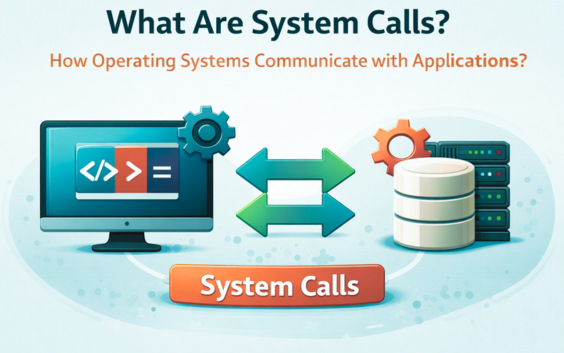
Applications run in user mode, a restricted execution mode that does not have direct access to memory or other hardware resources. The operating system kernel runs in kernel mode, which has full access to hardware and system resources.
When an application or a program requests a particular service, such as reading a file or allocating memory, the OS responds by invoking a series of system calls to satisfy the request.
This is depicted in the following diagram:
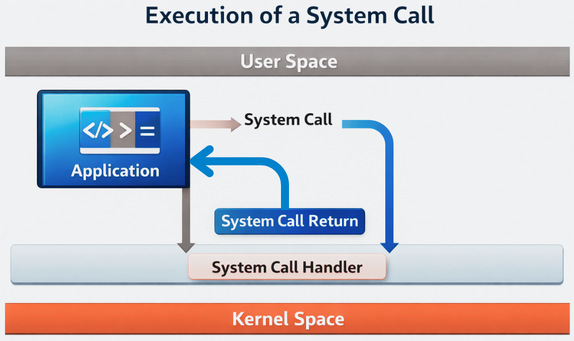
- The OS validates the application request and passes it to the system call handler.
- It switches to kernel mode and executes the requested operation in kernel mode.
- Returns the result to the application.
The program can be written in assembly language or in a high-level language such as C or Pascal. If a high-level language is used, system calls are predefined functions that the OS invokes directly.
System calls use the Application Programming Interface (API) to provide OS services to user programs. It provides a point of contact between processes and the OS so that user-level processes can request the OS’s assistance. The system calls are the limited ways to access the kernel system.
The System Call Interface
The OS exposes its services to the user space using the system call interface. Though implementation of the system call interface may differ based on the type of OS, the core concept remains the same: controlled privilege escalation to request OS services.
- Each system call has a unique number.
- Registers are used to pass arguments.
- Kernel entry is triggered by a software interrupt or special CPU instruction.
- System calls are invoked through the Windows API.
- Internally, the OS uses mechanisms like
Nt*functions to switch to kernel mode.
Examples of System Calls
The following table provides some examples of system calls:
| System Call | Description |
|---|---|
| Open | Open or create files and specify file access mode and permissions. |
| Read and write | Reading data from and writing data to files, respectively. |
| Fork | Creates the ‘child process’, that is, a copy of the parent process, which is a basic mechanism for process creation in Unix. |
| Exec | Load a new program after forking into the current process’s address space. |
| Exit | Terminate and return status to the parent process. |
System calls provide a fundamental interface for apps to communicate with the OS’s basic functions, enabling them to perform various operations efficiently.
User Mode vs Kernel Mode
System calls exist largely because of the separation between user mode and kernel mode. User mode is a restricted, low-privilege CPU state for running applications or user programs. It protects system stability by preventing direct hardware access.
Kernel mode is a highly privileged state in an OS that allows direct, unrestricted access to hardware, memory, and CPU instructions. Applications switch to kernel mode via system calls for privileged tasks.
User Mode
- Applications or user programs run in this mode.
- In user mode, access to system resources is limited.
- Applications cannot directly access hardware.
- This mode is safer as it prevents programs from crashing the entire system.
Kernel Mode
- The operating system core runs here.
- In this mode, there is full access to hardware and memory.
- It executes privileged instructions.
- The kernel model handles critical system operations.
When a user program makes a system call, the CPU switches from user mode to kernel mode. This switching of modes is known as a context switch or mode switch.
This clear separation of user and kernel modes ensures system security and stability, protecting critical OS resources from faulty or malicious user applications.
- Security (applications cannot interfere with each other)
- Stability (a faulty program won’t crash the OS)
- Controlled access to resources
The following table summarizes the key differences between user mode and kernel mode as discussed:
| Aspect | User Mode | Kernel Mode |
|---|---|---|
| Access Level | It has restricted access to memory and hardware. | Kernel mode has unrestricted access to memory and hardware. |
| Purpose | User mode runs user applications (browsers, editors, desktop applications). | Kernel mode runs the operating system core, drivers, and handles system resources. |
| Stability | A crash in user mode usually only kills that application and does not affect the entire system. | A crash in kernel mode often crashes the entire system. |
| Privilege Level | User mode operates at the lowest privilege level. | Kernel mode operates at the highest privilege level. |
| Transition | Applications use system calls to request services from the kernel, triggering a switch to kernel mode. | Invocation of system calls triggers a switch to kernel mode. |
Why Are System Calls Necessary?
System calls are essential as they act as a secure, controlled interface between user-level applications (which run in user mode with limited permissions) and the operating system kernel (which has full, privileged access to hardware and system resources). Without system calls, applications would have to manage complex hardware interactions directly, leading to system instability, security risks, and incompatibility across different hardware configurations.
- Security and Protection: System calls enforce a strict separation between user applications and the kernel, and prevent unauthorized access to hardware components such as memory, storage, or I/O devices. They guarantee that a program cannot interfere with or acquire the memory of another program.
- System Stability: Applications are forced to request services through the kernel using system calls. This ensures that a crashing user application does not take down the entire OS.
- Resource Management: Shared system resources are managed by the kernel using system calls. This ensures that multiple, simultaneously running applications do not interfere with each other when accessing resources like files, memory, or CPU time. This helps in multitasking.
- Hardware Abstraction: System calls use a standardized API through which developers interact with hardware without knowing the details of that hardware. This way, the hardware layer is abstracted from the developers.
- Enhanced Control: System calls permit you to begin and end processes, manage files, or perform various system-related tasks, giving you a high level of control over your device’s operations.
- Networking and Communication: System calls easily transfer data over networks, enable web browsing, send emails, and connect online, helping networking and communication between various applications.
How a System Call Works?
A system call typically hands off control from a user program running in user mode to the OS kernel mode to execute tasks that require access to shared system resources.
This mechanism allows user programs to access protected system resources and services safely.
The following sequence of steps shows a typical system call execution flow for opening a file:
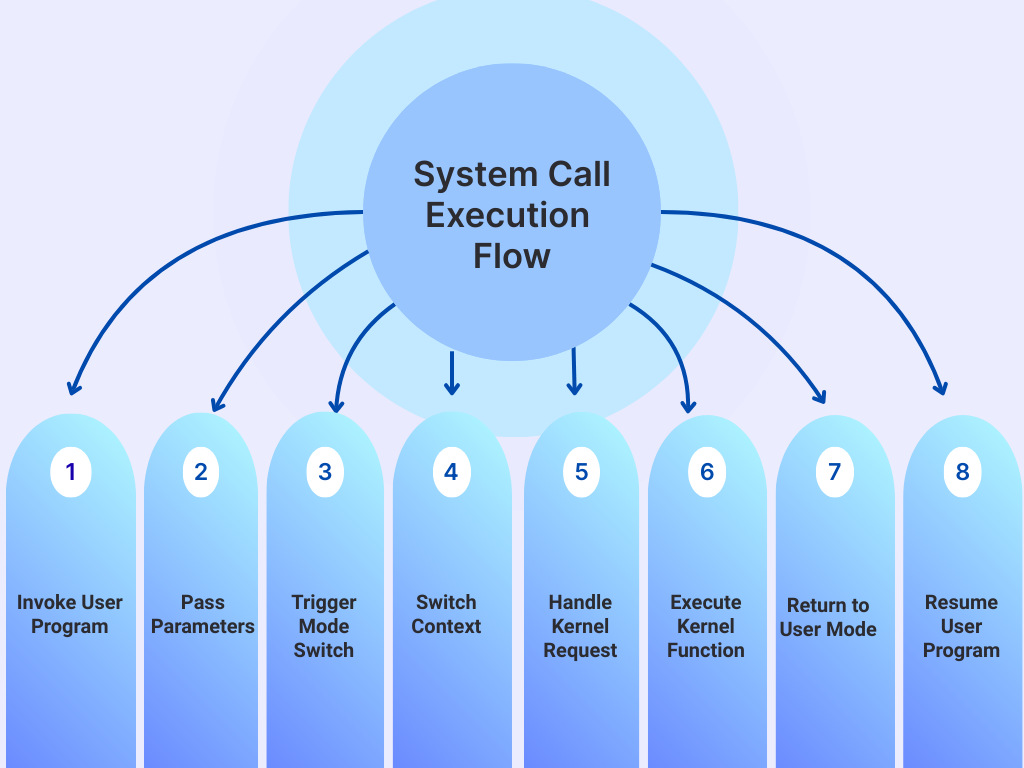
- Invoke User Program: An application running in user mode makes a request for a service to open a file using a standard library function (like
fopen()in C).This library function is typically a wrapper that prepares the necessary arguments for the actual system call. - Pass Parameters: The user program places the system call’s unique identifier (system call number) and any required parameters into specific CPU registers or a designated memory block, following a predefined convention.
- Trigger Mode Switch: A special assembly language instruction, such as a
TRAP,SVC(Supervisor Call),INT 0x80, orsyscall/sysenteron modern x86 architectures, is executed, causing an immediate software interrupt or exception. - Switch Context: In response to the trap/interrupt, the CPU hardware switches its context from user mode to kernel (or privileged) mode. The user program’s current state (registers, program counter, etc.) is saved onto the kernel stack and jumps to a preset location in the kernel, known as the system call handler entry point.
- Handle Kernel Request: The kernel’s entry point code identifies the requested system call by reading the system call number from the designated register and validates the passed parameters to ensure security and integrity. It then dispatches the request to the appropriate internal kernel function (e.g.,
sys_read()for a read request). - Execute Kernel Function: The kernel function executes the requested operation with full privileges, accessing hardware or managing system resources as needed (e.g., reading from disk, allocating memory, creating a process). If the operation (like I/O) is time-consuming, the calling princess may block at this point. This allows the CPU to execute another process (a context switch).
- Return to User Mode: Once the kernel operation is complete, it places any return values (e.g., data read, a success/error code) into a specified register. The CPU then performs the reverse operation using an instruction like
sysretoriretto restore the saved user program state and switch the CPU back to user mode. - Resume User Program: When the system call returns, the user program continues execution from the instruction immediately following the system call, processing the returned result as a normal function return value.
Types of System Calls
System calls can be classified into different categories as follows:
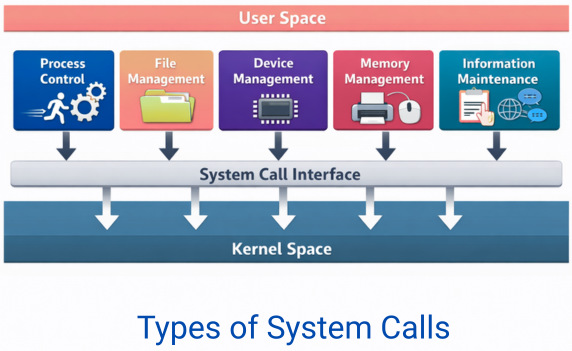
1. Process Control
Processes on a system can be stopped at any time or be controlled by another process. For this reason, they should be monitored. The system calls to start, run, or abandon a process help to manage the processes.
fork()– Create a new processexec()– Replace process memory with a new programexit()– Terminate a processwait()– Wait for a child process
2. File Management
System calls are required by application programs to access typical file operations that create, delete, or perform other file and directory manipulations.
open()read()write()close()unlink()
3. Device Management
Application programs need to interact with hardware devices like I/O (disks, printers) to accomplish their tasks. As programs cannot directly access these devices in user mode, the system calls are provided for managing various devices.
ioctl()read()/write()(for device files)- Other device-specific operations
4. Memory Management
Memory system calls are essential for performance and large-scale applications to access or manipulate memory locations.
mmap()– Map files or memorybrk()– Adjust heap sizemunmap()– Unmap memory
5. Information Maintenance & Communication
Individual processes are linked to one another and exchange a great deal of information through intercommunication. To exchange or demand this information, application programs use system calls to manage information and also to communicate with each other.
getpid()– Get process IDgettimeofday()– Get current timeuname()– Get system information
pipe()shmget()– Shared memorymsgsnd()– Message queuessocket()– Networking
System Calls vs API Calls
An API (Application Programming Interface) is defined as a general set of rules and protocols for building and interacting with software. An API generally ranges from web services to local libraries.
A system call is a low-level mechanism used by a program to request a service (like file or device access) directly from the OS’s kernel. A system call is of a specific type and requires a switch from user mode to kernel mode.
APIs and system calls often work together. For example, a high-level API function like a C-library function printf() or fopen() is actually a portable, convenient wrapper that internally makes specific, low-level system calls to the OS kernel to print (write()) or open (open()) the file.
Here are the key differences between an API call and a system call:
| Feature | System Calls | APIs |
|---|---|---|
| Definition | A programmatic request to access services from the OS kernel. | A set of functions, protocols, or routines allowing data exchange between different software components. |
| Abstraction Level | Low-level, close to the hardware | High-level, abstracting underlying details for ease of use. |
| Execution Mode | Executes in kernel mode, with privileged access to shared system resources. | Executes primarily in user mode within the application’s environment. Involves a kernel-mode switch if it makes a system call internally. |
| Scope | Specific to interacting with the local operating system kernel. | Can be for a local software library, an operating system interface (like the Win32 API or POSIX API), or a web service. |
| Usage | Used by system libraries and OS components; rarely called directly by application programmers. | Used extensively by developers for a wide range of tasks, from file I/O to web data fetching. |
System Call vs Function Call
A function call is a general term for invoking a subroutine (a sequence of steps) within a program’s own execution space. It differs from a system call as it is typically executed in user mode. Here are the key differences between a system call and a function call:
| Aspect | Function Calls | System Calls |
|---|---|---|
| Execution Context | Executed in the same user-mode address space as the calling program. | Executed in a separate, more privileged, kernel-mode context/address space. |
| Purpose | Performs tasks that are part of the program itself (e.g., calculations, data manipulation). | Request services from the operating system (e.g., file I/O, process creation, memory management). |
| Privilege Level | Requires lower privileges and operates in user mode | Requires kernel mode (higher privileges) to access system hardware and resources. |
| Mechanism | Uses standard instructions like CALL, which adjust the program stack and registers. | Uses special machine instructions (e.g., SYSCALL or a software interrupt) to trap into the kernel and switch modes. |
| Overhead | Lower execution overhead; resolved at compile or link time. | Higher execution overhead due to the required mode switch (context switching) and kernel interaction. |
| Portability | Generally, it is more portable across different operating systems (instructions are in a high-level language). | Less portable as they are specific to the operating system’s kernel interface (ABI). |
| Implementation | Implemented within standard libraries (e.g., libc) or the user’s program code. | Implemented by the operating system kernel. |
| Example | int sum = add(2, 3);,printf(); |
open("file.txt", O_RDONLY);, fork(), write(). |
System Call vs Interrupt
System calls and interrupts both operate at the low level and switch the CPU from user mode to kernel mode to execute privileged tasks. However, they differ in their origin and timing of execution.
System calls are synchronous requests that applications make to access kernel services (e.g., open(), read()).
Interrupts are asynchronous signals, often from hardware, that force the CPU to pause current work.
- System Call Example: An application calls
write()to save a file, generating a system call to the OS. OS then executes the call by context switching. Once complete, the context is switched back to the user mode and the application program is resumed. - Interrupt Example: A key is pressed on the keyboard that sends an interrupt to the CPU, forcing it to run the keyboard driver handler.
The following table provides key differences between a system call and an interrupt:
| Aspect | System Call | Interrupt |
|---|---|---|
| Origin | Generated by software (user application). | Usually generated by hardware (e.g., keyboard, disk, timer). |
| Timing | Synchronous (intentional, predictable timing). | Asynchronous (unplanned, unpredictable timing). |
| Purpose | System calls request services (file, network) from the kernel. | Interrupts notify the CPU of events needing immediate attention. |
| Handling | System calls use specialized mechanisms (like syscall or software interrupts/traps). |
Hardware interrupts are handled by specific entries in the Interrupt Descriptor Table (IDT). |
System Calls in Different Operating Systems
While operating systems broadly categorize system calls into similar types, the specific functions and their implementations (syntax, parameters, and number of calls) differ significantly across different systems like Windows, Linux, and macOS.
Here are the details of system calls in different operating systems:
Linux / Unix
- POSIX-compliant system calls
- Strong emphasis on file abstraction
- Everything is treated as a file.
Windows
- Windows API abstracts system calls.
- Native API uses
Nt*kernel calls (implemented inntdll.dll) - Different architecture but similar privilege separation
macOS
- Unix-based
- Combines Mach microkernel and BSD system calls
Though implementations vary, all modern OSes rely on system calls for application-kernel communication.
Conclusion
System calls are the most important communication mechanism between applications and operating systems. System calls are invisible to end users, but constantly work behind the scenes to power everything from simple file reads to complex distributed systems. They provide a secure, controlled, and standardized way for programs to request services such as file access, memory allocation, networking, and process management from the OS.
OS ensures that user applications cannot directly access or manipulate hardware and shared system resources by separating user mode and kernel mode. System calls enable multitasking, security, virtualization, and modern cloud computing.
Whether you’re a developer, systems engineer, or curious learner, understanding system calls unlocks a more complete understanding of modern computing architecture.
In essence, system calls are the language through which applications speak to the operating system, and through it, to the machine itself.
Frequently Asked Questions (FAQs)
1. Why do applications need system calls?
Applications access hardware or critical system resources using system calls. The operating system needs to access these resources to ensure security, stability, and proper resource management.
2. What is the difference between user mode and kernel mode?
User mode is a restricted execution mode where applications have limited access to system resources. Kernel mode is a privileged mode where the operating system runs with full access to hardware and memory.
3. Are system calls the same as API calls?
No. API calls are higher-level functions provided by libraries, while system calls directly request services from the kernel. Some API calls internally use system calls, but not all API calls result in immediate system calls.
4. Are system calls expensive in terms of performance?
Yes, system calls are more expensive than regular function calls because they involve switching from user mode to kernel mode. However, modern operating systems optimize them to minimize overhead.
5. Do all operating systems use system calls?
Yes, all modern operating systems, including Linux, Windows, and macOS, use system calls or equivalent mechanisms to allow applications to communicate with the kernel.
 |