
What is DevOps Lifecycle?
The digital environment at present is fast-paced, and businesses demand rapid software delivery without compromising quality or reliability. The DevOps Lifecycle offers a structured yet flexible framework bridging the gap between software development (Dev) and IT operations (Ops).
| Key Takeaways: |
|---|
|
This article explores the DevOps lifecycle in detail, from its fundamental principles to each phase that shapes it. It explains how it enables organizations to build, test, deploy, and monitor software with agility and precision.
What is DevOps?
DevOps is a combination of “Development” and “Operations”. It is a philosophy, a culture, a mindset, and a set of practices that promote collaboration between software developers and IT professionals.
DevOps breaks down the barriers that separate these teams, encouraging shared responsibility throughout the process.
- Development cycles with DevOps are shorter.
- The deployment frequency is faster compared to a traditional setup.
- Recovery from failures is significantly improved with DevOps.
- With continuous feedback, the product quality is enhanced.
DevOps is supported by automation and best practices that optimize the entire software delivery pipeline. DevOps also includes tools that, along with best practices and other concepts, improve an organization’s ability to create applications and services with higher velocity, improving productivity and infrastructure management methods.
The DevOps delivery method uses a cross-functional approach of creating and deploying faster and more iterative applications, which stems from an Agile approach to software development. DevOps promotes a more collaborative atmosphere throughout the development cycle, enhancing the application’s flow and value delivery.
What is the DevOps Lifecycle?
The DevOps lifecycle is the end-to-end process of continuous software delivery, involving all the stages from planning and coding to deployment and monitoring.
Contrary to traditional software development models, the DevOps lifecycle is cyclical and iterative, with each stage feeding into the next, enabling continuous integration, testing, deployment, and feedback.
With a clear distinction between various development phases, it becomes easier to distinguish between roles and responsibilities, and it increases the team members’ awareness of the effects of their work on future development cycles and other stakeholders.
The DevOps lifecycle is a structured approach to streamline software delivery. It focuses on collaboration, automation, and continuous feedback across key phases that are executed in a continuous, infinite loop.
The various DevOps lifecycle phases are shown below:
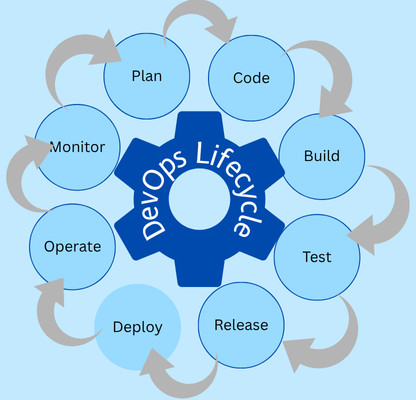
Each phase in a DevOps lifecycle has its unique purpose but works interdependently with others to ensure seamless collaboration, automation, and continuous improvement.
Phases of the DevOps Lifecycle
This section explores each phase of the DevOps lifecycle shown above in detail:
1. Plan
This is the initial phase of the DevOps lifecycle that sets the foundation for all subsequent activities. The planning phase defines the vision, scope, and objectives of the software project.
It gathers and analyzes the business requirements from stakeholders and creates roadmaps and backlogs using agile methodologies. In this phase, performance, security, and compliance expectations are also set. At the end of this phase, there is a clear development plan and timeline that aligns with the business goals.
Tools like JIRA, Trello, or Asana are used in this phase for prioritizing tasks.
2. Code
As part of the Code phase, developers write and manage source code according to the requirements defined during planning. The focus of this phase is on maintainability, version control, and collaboration.
Developers follow coding standards and best practices and encourage peer code reviews to maintain quality. Implementing modular, reusable code structures and using version control systems such as Git, GitHub, or BitBucket to manage code versions are the main highlights of the code phase.
At the end of the code phase, a stable, version-controlled codebase is ready for integration and building.
3. Build
Once the code is written, it is integrated into a central system, compiled, and built into an executable application.
The actual code from different developers is integrated into a shared repository, and it is compiled, packaged, and verified using build automation tools like Jenkins, Gradle, or Maven. In this phase, early-stage bugs and integration conflicts are also detected. This is the phase where automations begin to shine.
Successful builds indicate that new code has integrated smoothly with the existing system. The build phase is often supported by Continuous Integration (CI) practices to trigger builds whenever the code is committed automatically.
4. Test
Once the application is successfully built, it goes through thorough testing to ensure the product quality, performance, and security expectations. In DevOps, the testing process is automated and continuous.
Various automated tests, including unit tests, integration tests, UI tests, and regression tests, are performed to verify the code functionality and quality. Automated testing pipelines are set with tools like testRigor, Selenium, JUnit, or TestNG.
The code that successfully passed the automation moved forward for release. The test phase reduces manual effort and enables faster and reliable validation of new changes.
5. Release
The release phase signifies the transition of code from development to deployment. This phase focuses on packaging, approval, and ensuring production stability.
In addition to versioning and packaging software releases, final validation and approval processes are conducted. Release pipelines are automated using tools like Jenkins, GitLab CI/CD, or CircleCI.
Release notes and product documentation are also managed in this phase. The outcome of the release phase is the stable and tested build that is ready for deployment to production or staging environments.
6. Deployment
Making the application available to users is the deployment. In DevOps, the deployment process is typically automated, repeatable, and predictable. DevOps implements continuous deployment (CD), where new versions are automatically deployed once they pass the testing phase.
Deployments are achieved using containerization and orchestration tools like Docker, Kubernetes, and Ansible. Infrastructure as Code (IaC) is also managed in this phase using Terraform or AWS CloudFormation.
- Blue-Green Deployment: Two identical environments are used to switch between versions seamlessly.
- Canary Deployment: Updates are gradually rolled out to a subset of users before full release.
- Rolling Updates: Systems are updated incrementally without downtime.
DevOps results in fast and error-free deployment, ensuring minimal disruption to end users.
7. Operation
Once the application is deployed, it needs to be monitored continuously for its performance, reliability, and availability. In DevOps, the operations team ensures the smooth operation of the application by ensuring proactive management instead of reactive troubleshooting.
In the operations phase, the application is managed and maintained by managing servers, databases, and network configurations. Automation tools for infrastructure provisioning and configuration management are used.
Tools like AWS OpsWorks, Chef, Puppet, or SaltStack are used in this phase.
8. Monitor
The health and performance of the application are continuously monitored to identify and address any issues proactively. Feedback is obtained from users about the applications and is used to plan the following versions of the application.
The monitoring phase uses tracking metrics like response time, CPU usage, memory, and network latency. It may also set up real-time alerts for anomalies or failures.
With continuous monitoring, teams respond quickly to incidents, improve performance, and ensure better user experiences.
Key Components in the DevOps Lifecycle
The DevOps lifecycle includes seven components called the 7 C’s of DevOps Lifecycle to make it successful.
1. Continuous Development
Continuous development is crucial in defining the vision for the entire software development process and focuses primarily on project planning and coding. In this phase, stakeholders and project needs are gathered and discussed. The product backlog based on customer feedback is divided into more minor releases and milestones to facilitate continuous development.
Once business requirements are finalized, the development team begins coding to meet the business goals. Coding is a continuous process that also encompasses modifications to the project requirements or performance challenges.
2. Continuous Integration (CI)
This is the process of continuously integrating the code changes to the shared repository that triggers automated builds and tests, helping identify issues early. CI helps with easy bug detection and reduces integration risks, ensuring faster development feedback loops.
3. Continuous Testing
Continuous integration and testing are closely related, though continuous testing is an independent process. It describes the constant need to run and repeat rests throughout the DevOps lifecycle. Testing phase implements an effective Test-Driven Development (TDD) strategy in which tests are written before coding, which ensures all features behave as expected.
Automated tests are used in CI pipelines to execute the whole test suite before the code is integrated into the project. If tests fail, then the code cannot be merged. Testing doesn’t end after integration but is performed continuously by implementing checks, reviews, and approval for the build, deploy, and operate stages.
4. Continuous Delivery/ Deployment (CD)
Continuous Delivery ensures that the application is always in a deployable state. CD automates the release process, allowing new updates to be deployed quickly and safely at any time.
CD ensures reliable, repeatable releases and reduced time to market.
CD pipelines are typically implemented alongside CI pipelines, utilizing tools such as GitHub Actions and GitLab CI/CD. Once the CI stage is complete, the CD pipeline continues the DevOps lifecycle.
5. Continuous Monitoring
Continuous monitoring ensures visibility across the entire system, helps identify performance bottlenecks, and enables data-driven decision-making for improvements. With continuous monitoring, incidents are detected early. There is an improved user satisfaction with proactive performance tuning.
It is also known as continuous observability or continuous operations, referring to the need to review deployed apps to detect errors and performance defects constantly. Parameters like utilization rates, user feedback, and DevOps lifecycle metrics are also monitored to gauge the effectiveness of development workflows.
6. Continuous Feedback and Improvement
One of the final and ongoing aspects of the DevOps lifecycle is continuous feedback and improvement. Feedback loops from users, monitoring systems, and internal teams help improve every phase of the lifecycle, ensuring higher product quality, adaptability to changing user requirements, and encouraging a culture of constant innovation.
7. Continuous Operations
This final phase minimizes the scheduled maintenance and other planned downtime for the application. Continuous operation automates the application startup and subsequent upgrades, eliminating downtime using container management platforms like Kubernetes and Docker.
Benefits of Implementing the DevOps Lifecycle
Successful implementation of the DevOps lifecycle has several advantages, including:
- Accelerated Time-to-Market: Delays between development and deployment are reduced significantly because of automation and collaboration, enabling faster product delivery.
- Improved Collaboration: DevOps encourages collaboration and significant cultural transformation, eliminating the communication barriers and encouraging cooperation between people.
- Enhanced Product Quality: DevOps lifecycle ensures early bug detection and higher reliability with continuous testing and integration.
- Greater Efficiency Through Automation: By automating repetitive manual tasks, teams are freed to focus on innovation.
- Increased Customer Satisfaction: DevOps deepens customer engagement by creating practical applications more responsively. They are developed quickly through collaborative efforts, ensuring customer satisfaction.
- Faster Recovery from Failures: Continuous monitoring and automated rollbacks ensure quick recovery from failures and speedier resolution when issues arise. DevOps helps shorten the development cycle, reduce time to detect errors, and publish new versions more often.
- Cost Savings: DevOps helps organizations save money on maintenance and upgrades by avoiding needless investment and reducing project complexity and overruns.
Popular DevOps Lifecycle Tools
The following table shows the variety of specialized tools used in DevOps at each phase that enhance automation and collaboration:
| Phase | Tools |
|---|---|
| Plan | JIRA, Trello, Asana, Confluence, GitHub Projects, Azure Boards |
| Code | Git, GitHub, GitLab, BitBucket, Terraform, OpenTofu, Pulumi, AWS CDK, CloudFormation, ARM, GCP Deployment Manager, Packer |
| Build | Jenkins, Maven, GradleSpacelift, GitLab CI/CD, CircleCI, Travis CI, Bazel |
| Test | JUnit, testRigor, Selenium, Chef InSpec, Ansible Molecule, TestNG, Postman |
| Release | Jenkins, GitLab CI/CD |
| Deployment | Docker, Kubernetes, Ansible, Spinnaker, Jenkins |
| Operation | Chef, Puppet, Terraform, Ansible, Kubernetes, Nomad, OpenShift, SaltStack, Vagrant |
| Monitor | Prometheus, Grafana, Nagios, Datadog, Sensu, New Relic, ELK Stack (Elasticsearch, Logstash, Kibana) |
Best Practices for a Successful DevOps Lifecycle
- Adopt a Culture of Collaboration: Encourage open communication between all the teams. This tightens the feedback loops and helps prevent communication lapses. Ensure information and resources are accessible to developers, operators, and other stakeholders to improve overall productivity by enabling tasks to be completed more autonomously.
- Automate Everything Possible: Ensure speed, efficiency, and consistency at scale by automating the DevOps lifecycle. Combine CI/CD pipelines, infrastructure automation platforms, and observability suites to reduce manual work and prevent defects.
- Implement Infrastructure as Code (IaC): Use code to manage and provision infrastructure for reproducibility. IaC allows for rapid and repeatable deployments, and DevOps teams can scale or tear down infrastructure resources quickly to meet changing requirements, scale applications, or respond to demand.
- Utilize Microservices Architecture: Design and develop applications as a collection of small, independent services to enhance scalability.
- Focus on Security (DevSecOps): Integrate security and compliance standards into every phase of the lifecycle to minimize the risk of vulnerabilities occurring in code or infrastructure.
- Continuously Learn and Improve: Aim to search for inefficiencies and implement optimizations by continuously improving the workflows.
- Integrate All Tools and Processes: Integrate DevOps tools and processes to minimize delays between lifecycle phases. Follow a holistic approach to plan DevOps lifecycle improvements.
Challenges in the DevOps Lifecycle
- Cultural Resistance: Traditional teams may resist adapting to collaborative workflows.
- Tool Overload: Managing too many tools can lead to integration issues.
- Skill Gaps: Teams may require additional training in automation, cloud, and DevOps tools.
- Security Risks: Automation pipelines must include security checks to avoid vulnerabilities and threats.
- Scalability Issues: Maintaining performance across multiple environments can be challenging.
The Future of the DevOps Lifecycle
- AI and Machine Learning (AIOps): Automating root cause analysis and anomaly detection with AIOps.
- Serverless Architectures: Simplifying deployment and scaling through serverless architectures.
- GitOps: Managing infrastructure through Git-based workflows.
- DevSecOps: Embedding security into every stage of the pipeline.
- Edge Computing: Extending DevOps practices to decentralized infrastructures.
Conclusion
The DevOps lifecycle is more than just a sequence of technical steps; it’s a mindset that reshapes how teams collaborate, innovate, and deliver value. By integrating continuous planning, coding, building, testing, releasing, deploying, operating, and monitoring, DevOps transforms software delivery into a seamless, automated, and data-driven process, ensuring quality, error-free software delivery.
Organizations achieve faster releases, higher reliability, and continuous improvement by adopting DevOps.
Additional Resources
- What is Three-tier Architecture?
- What are the Different Types of Code Smells?
- What is Code Optimization?
 |