
What is Docker?
Technology advances fast. Applications are supposed to work smoothly on laptops, test servers, and large cloud platforms these days. But as any developer knows, just because something works on my computer doesn’t necessarily mean that it will work on another. Docker is critical in this situation.
One of the most important technologies in modern DevOps and software development is Docker. However, what is Docker, how does it function, and why has it become so vital to the development, shipping, and operation of software?
In simpler, beginner-friendly language, this article explains Docker’s definition, internal workings, components, advantages, and practical applications.
| Key Takeaways: |
|---|
|
What is Docker?
To put it clearly, Docker is a platform for creating, executing, and maintaining containers.
Everything an application needs to function, including code, libraries, dependencies, configuration files, and even some operating system components, is contained in a lightweight, stand-alone package called a container. Developers can “containerize” their apps with Docker so that they operate consistently across deployment locations.
Consider using Docker to package an application and all of its components into a container, which is a sealed box. It will act exactly the same whether you open that box in the cloud, on a test server, or on your laptop.
The Problem Docker Solves
Before Docker, software deployment was messy. The infamous complaint “it works on my machine!” that developers everywhere know was a prevalent problem.
This occurred due to incompatible software installation environments. Machines also had different operating systems, libraries, and configurations. Even a small variation could cause an application to crash.
To solve this problem, Docker implemented the concept of containers. This is the notion of baking all your app’s needs in one pan. A uniform set of development, testing, and production environments is maintained with containers. This directly translates into more robust systems, faster deployment, and fewer mistakes.
How Does Docker Work?
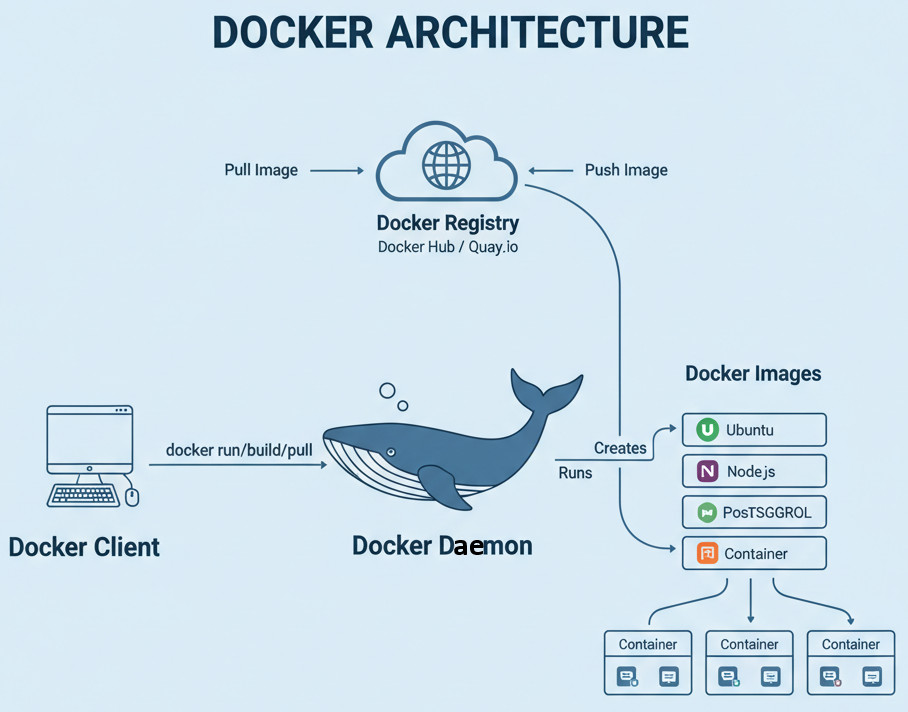
At its core, Docker runs multiple containers on a single host computer by using OS-level virtualization. Containers don’t need their own operating system, in contrast to virtual machines. Instead, they maintain application isolation while sharing the host OS kernel.
This is a condensed explanation of how Docker works:
Docker Engine
- Docker Daemon (dockerd): The heavy lifting of building, launching, and maintaining containers is done by the Docker Daemon (dockerd), which operates in the background.
- Docker Client (Docker CLI): A command-line tool you use to talk to the Docker daemon (for instance, typing docker run nginx).
Docker Containers and Images
- A Docker image functions similarly to a blueprint. It specifies the contents of the container, including your application, dependencies, and environment configuration.
- A running instance of that image is called a Docker container.
- Images are efficient because they are built in layers. Docker reuses the shared layers rather than making duplicates when several containers use the same base image (such as Ubuntu).
- Images are kept in repositories called Docker Registries. The most popular one is Docker Hub, which contains thousands of ready-to-use images, ranging from databases like MySQL or PostgreSQL to operating systems.
You can also build private registries for internal use in organizations.
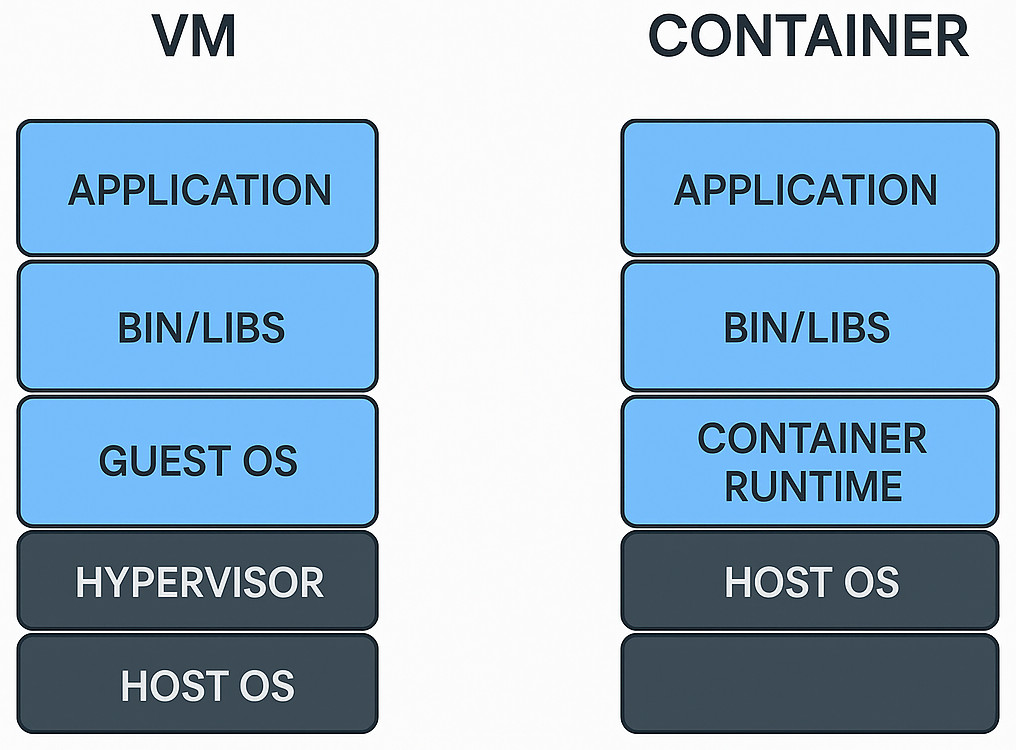
Docker vs. Virtual Machines
It is helpful to know how Docker differs from virtual machines (VMs) in order to fully appreciate it.
| Feature | Docker (Containers) | Virtual Machines |
|---|---|---|
| OS | Share the host OS kernel | Each VM runs a full OS |
| Startup Time | Seconds | Minutes |
| Resource Usage | Lightweight | Heavy (RAM/CPU) |
| Portability | Very high | Lower |
| Isolation | Process-level | Hardware-level |
The main takeaway is that Docker containers outperform virtual machines in terms of speed, portability, and weight. Containers excel when speed and flexibility are needed, but virtual machines (VMs) are excellent for complete system isolation.
Key Components of Docker Architecture
Knowing Docker’s fundamental components is vital to understanding it. The following are the main elements that provide Docker with its strength:
Dockerfile
A simple text document that provides instructions for creating a Docker image is called a Dockerfile. It provides a list of instructions, including how to install dependencies, copy code, and set environment variables.
FROM python:3.9
WORKDIR /app
COPY . .
RUN pip install -r requirements.txt
CMD ["python", "app.py"]
This file instructs Docker to run the application, install dependencies, copy the app files, and use a Python base image.
Docker Image
An image is a read-only template for building containers, as was previously stated. It can be shared or reused and is built from a Dockerfile.
Docker Container
A running instance of an image is called a container. It is portable, isolated, and only needs a single command to start or stop.
Docker Compose
You can define and execute multi-container applications with Docker Compose. For example, a straightforward docker-compose.yml file can be utilized to run an application and its database simultaneously.
Docker Registry/ Hub
Images are distributed and stored in a Docker registry. Although private registries are often used by organizations for security and control, Docker Hub is the public default.
Benefits of Docker
Docker’s multiple advantages are what make it so popular. Let’s review the most important ones.
Portability and Consistency
Containers work consistently whether they are in the cloud, on a testing server, or on a developer’s laptop. Collaboration is made easier by this consistency, which eliminates “it works on my machine” problems.
Speed and Efficiency
Instead of starting in minutes, containers start in seconds. They utilize a lot fewer resources than virtual machines (VMs) because they share the host OS kernel.
Scalability and Microservices
Microservices architectures, in which applications are divided into smaller, independent components that can be deployed and scaled separately, are easier to build and administer with Docker.
Simplified Implementation
Deployment becomes repeatable and predictable with Docker. CI/CD pipelines allow you to automate deployment, roll back your images with ease, and version control your images.
Cost Savings
Organizations can bring down infrastructure costs because containers make efficient use of system resources. Multiple lightweight containers, as opposed to large virtual machines, can be hosted on a single server.
Flexibility across Environments
Dockers ensures that your apps stay consistent and portable whether you deploy them on-premises, in the cloud, or in a hybrid configuration.
Common Use Cases of Docker
- Continuous Integration/Continuous Deployment (CI/CD)
- Microservices
- Development and Testing
- Legacy Application Modernization
- Cloud Migration
How Docker fits into DevOps
A key component of DevOps procedures is Docker. DevOps uses continuous delivery, automation, and teamwork to bring development and operations teams together.
- Automation: Docker images can be automatically built and pushed through pipelines, allowing for “build once, deploy anywhere”.
- Cooperation: The containerized environment is shared by the operations and development teams.
- Speed: Testing and continuous integration get faster and more dependable.
- Infrastructure as Code: Environments can be defined as code using Docker Compose and other tools.
To put it briefly, one of the main enablers of modern DevOps processes is Docker.
Security in Docker
Containers share the same operating system kernel even though they provide isolation. Best practices for security are therefore critical.
- Make use of official, validated photos from reliable registries or Docker Hub.
- Verify pictures for vulnerabilities on a regular basis.
- Do not run containers as root.
- Apply network segmentation between containers.
- Maintain the most recent Docker daemon and images.
Security checks can be automated with the help of programs like Docker Bench for Security and container scanning services.
Limitations and Challenges of Docker
- Learning Curve: While Docker makes deployment easier, understanding containers, networking, and image building takes time.
- Storage Management: As containers are meant to be temporary, handling persistent data needs careful volume planning.
- Security Risks: Since a kernel is shared, several containers may be impacted by a vulnerability.
- Orchestration Complexity: Kubernetes and Docker Swarm are two examples of orchestration tools that are necessary for managing a large number of containers.
- Windows vs Linux Differences: Docker uses a lightweight virtual machine (VM), which can marginally impact performance on other OSes. It works best on Linux.
Despite this, Docker is still evolving fast, with continuous enhancements in networking, security, and orchestration support.
The Docker Ecosystem
Docker is a whole ecosystem rather than just one tool. Here are a few of the essential elements:
- Docker CLI: A command-line interface for working with Docker.
- Docker Compose: An application execution tool for multi-container applications.
- Docker Hub: An image-sharing central registry.
- Docker Desktop: A Windows and macOS application for Docker management.
- Docker Swarm: An integrated orchestration tool (although Kubernetes is currently more widely used).
These elements work together to form Docker, a holistic containerization platform.
Docker vs Kubernetes: Understanding the Difference
Although they have different functions, many freshers mistake Docker for Kubernetes.
Kubernetes is used to manage and coordinate a large number of containers, while Docker is used to build and run containers.
In simpler terms, Kubernetes manages containers at scale, across multiple servers, managing scheduling, load balancing, and self-healing, whereas Docker builds and runs individual containers.
In truth, Docker and Kubernetes often collaborate: Kubernetes orchestrates the containers, while Docker builds and runs them.
Why Docker Has Become So Popular
Because it made software run consistently everywhere, Docker became a game-changing technology.
Software development and delivery have changed as a result of their advantages, which entail portability, speed, isolation, and scalability. Additionally, Docker has sped up the adoption of microservices and cloud-native architectures. Nearly every organization, from start-ups to tech giants, uses Docker at some point during the software lifecycle.
The Future of Docker and Containerization
Containerization is not going away. Other technologies like Podman, CRI-O, and containered are expanding under the Open Container Initiative (OCI) standards, even though Docker is still the most widely used container platform.
From cloud infrastructure to DevOps pipelines, Docker’s fundamental principles of portability, modularity, and consistency continue to have an impact.
Docker’s lightweight portability will continue to be vital for software innovation as cloud computing, artificial intelligence, and edge computing advance.
Real-World Examples of Docker in Action
- Netflix packages and deploys its microservices using Docker, enabling thousands of updates every day with little downtime.
- Docker is used by Spotify to create standardized development environments for its engineers worldwide.
- PayPal uses Docker to simplify infrastructure and standardize application deployment.
- Adobe uses Docker containers to ensure that its creative cloud services scale seamlessly.
- Small startups are also enabled by Docker to reduce infrastructure costs and accelerate development cycles.
These real-life use cases demonstrate that Docker is useful for freelancers, startups, and educational initiatives in addition to large corporations. Docker is a universal tool for modern development because it can run software dependably anywhere.
Why You Should Learn Docker
One of the best investments you can make, whether you are a developer, DevOps engineer, or even someone new to software, is to learn Docker.
- Build and deploy applications faster.
- Ensure consistency across environments.
- Collaborate easily with teams.
- Scale applications efficiently.
Docker is the base for modern application development, not just a tool. It makes your software future-ready, simplifies deployment, and closes the gap between developers and operations.
It has essentially changed the way software is delivered and packaged. Teams can deliver faster and scale better with containerization as compared to traditional methods. So, the next time you hear someone say “it works on my machine,” you’ll know Docker is the reason it can now work everywhere.
 |