
Why Every Engineering Team Needs Version Control: Ensuring Safe, Collaborative, Traceable Code
In software development, engineering teams collaborate continuously with each other and various teams. As projects grow in size and complexity, managing a codebase presents challenges of collaboration, reliability, and scalability. Without a structured system to manage the codebase, it can quickly become chaotic. This is where Version Control Systems (VCS) come in.
| Key Takeaways: |
|---|
|
This article explores why every engineering team, no matter its size, needs version control. We will also dive into its benefits, real-world applications, and how it underpins modern development practices.
What is Version Control?
Version control systems, or VCS, enable teams to track and manage changes to code, while enabling fast and clear communication between teams and developers.
VCS are sometimes also called source code management, revision control, and source control.
VCS tracks all the changes happening within code repositories to create a historical record of how they evolved over time. Changes to code, files, and directories in code repositories are logged in a database that resides either on a server or a local machine. This provides developer teams with a clean, transparent, and accessible system of record for code repositories.
Thus, VCS creates a collection of code “snapshots” that developers can access at any time and add to the historical record.
- VCS tracks and manages changes to software code, files, and directories in code repositories.
- It records who changed what, when, and why.
- VCS maintains a complete history of a project so that engineers can revisit its earlier versions, recover lost work, and collaborate seamlessly with other teams.
- These foundational capabilities of VCS eliminate the need for manual backups or file renaming and allow users to freely experiment with confidence that they can revert to a previous version at any time and check what was changed at each step of development.
- Today, Git is a popular VCS that dominates the software development landscape due to its distributed nature, speed, and compatibility with platforms such as GitHub, GitLab, and BitBucket.
How Version Control Works
When teams use VCS, they can better organize and coordinate their changes to the codebase made by every team member. Since changes are visible to the entire team, developers can use their VCS to track and share their code changes with other team members.
VCS enables code tracking, which creates a record of code changes and deltas, highlighting the differences between file versions. When teams can see their full history, they can merge to combine new changes with existing code and revert to previous versions.
Benefits of Using Version Control for Engineering Teams
Version control should not be perceived as just a technical tool; it is the backbone of modern software development teams and helps them to stay organized, prevent errors, and deliver results.
But what makes it so important in today’s fast-paced development environments?
- In addition to tracking and managing code changes, VCS helps develop and ship projects faster.
- It works well with DevOps and CI/CD workflows to test and build the latest versions upon submitting the changes.
- It helps flag and resolve potential conflicts before they enter the mainline of the project.
- The appropriate version control serves as a foundation of modern development pipelines. It keeps projects on track and teams in sync regardless of other project parameters such as deadline pressure, file types, or project size.
Read:
- What is DevOps Lifecycle?
- Differences Between Continuous Integration, Continuous Delivery, and Continuous Deployment
The Drawbacks of Not Using Version Control
- Lost Work: A misplaced or hard-to-find version of a file can erase days of effort and require the developer to redo the entire work.
- Conflicting Changes: Without a proper system, two engineers may edit the same file simultaneously, causing unintended overwrites. These accidental changes cascade through an entire project.
- No History: Without tracking the codebase, it is impossible to see how the code evolved or roll back a problematic change.
- Deployment Risks: Teams find it challenging to reproduce stable builds without versioning. Sharing information and assets may also be difficult as it may pass through insecure channels.
- Poor Collaboration: Sharing files via email or shared drives is not always convenient, especially when there is a large codebase or too many changed files are to be shared.
In short, without version control, software projects become fragile experiments instead of maintainable systems.
Importance of Version Control: Why is it Needed in Software Development?
Software development is a complex process, especially when large teams are involved. A version control system is vital for collaboration and allows for distributed and asynchronous communication. According to Google Cloud’s DevOps Research and Assessment (DORA) team, using version control is a key technical capability of high-performing engineering teams.
Version control enables better quality code, enhanced visibility, and faster delivery velocity.
Here are the reasons why teams need version control:
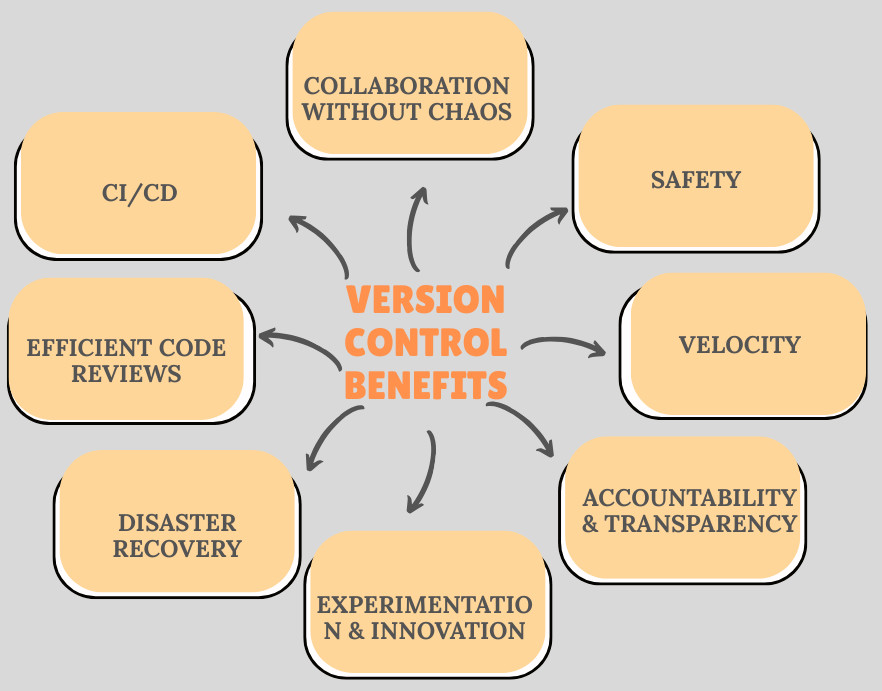
1. Collaboration Without Chaos
When teams use version control for their codebase, multiple developers can work on the same codebase simultaneously. They develop features in parallel without stepping on each other’s toes through branching and merging. Version control eliminates the inefficiencies of manual coordination and supports distributed teams working across time zones.
With VCS, knowledge transfer among team members is easy and efficient. They can read and access each other’s code using reviews and approvals before the code is deployed. Engineers can also request code reviews, make their branches visible for others through a code hosting tool, or stage their work for testing. This way, knowledge is shared, and any conflicts are resolved.
2. Safety
Version control makes it safer for teams to change their codebase and collaborate with others. It helps teams avoid code duplication or accidentally using outdated versions. Every team member uses the same versioning system to compile their edits into a single, team-wide record of changes.
Since VCS tracks changes to the code, teams can resolve code conflicts, easily compare changes, and minimize the likelihood of breaking changes or unexpected behavior from incompatible code changes.
If code changes cause problems, teams can quickly reverse them and investigate the problem. This allows developers to pinpoint specific code changes causing bugs or outages.
3. Velocity
VCS speeds development iterations. Developers can create branches and merge their changes to the codebase without blocking other developers. Conflicts can be resolved with fewer steps and less risk. As a result, the iteration and release cycles are faster using VCS.
4. Accountability and Transparency
With VCS, every change made to the codebase is recorded with metadata containing who made it, when, and why. This audit trail helps with accountability; developers can trace bugs to specific commits. While managers can understand the evolution of a feature, developers have confidence knowing their work is visible.
The comprehensive change history in VCS provides transparency regarding the project’s progress. Teams understand how decisions were made, and developers are held accountable for their contributions. VCS gives a clear picture of the project’s progress and the decisions that shaped it by tracking all changes to source files, designs, and digital assets.
5. Experimentation and Innovation
Experimentation for development teams is faster and safer as developers can sandbox their changes, confining experimentation to a separate branch without affecting the main branch. Since developers can create any number of branches, they have the freedom to experiment without causing damage to the codebase.
6. Disaster Recovery
Version control can recover from disasters rapidly. It is a safety net for the development team. If a bug is discovered in the codebase or a file is accidentally deleted, it quickly reverts to its previous version. Server failures are also handled in distributed systems like Git, where every developer has a full copy of the code history, providing redundancy against server failures.
7. Efficient Code Reviews
Modern VCS enables structured code reviews by integrating pull requests (PRs) and merge requests (MRs). Peers can review and comment on specific lines, discuss changes and implementation, and ensure quality standards are adhered to before code is deployed. This ensures fewer issues and defects in production.
8. Continuous Integration and Deployment (CI/CD)
Version control is at the center of DevOps practices. Automated pipelines depend on VCS triggers to build, test, and deploy software. Every commit is validated as code is tested by automated pipelines, reducing integration problems and accelerating release cycles.
Types of Version Control
The version control systems are classified as follows:
1. Local Version Control
A local VCS operates entirely on a single machine, managing and tracking changes to files and projects within a local database. It does not involve a remote server or repository for storing and sharing changes.
A developer tracks changes locally on their machine, often using local files or patches to manage versions. This is a simple and quick way to manage the codebase individually. However, it lacks collaboration and provides no backup, making it unsuitable for team environments.
2. Centralized Version Control (CVCS)
A CVCS has all users working with the same central repository. This central repository is either located on a developer’s local machine or on a server. The central repository stores all project files. Team members can “check out” files to work on them and commit changes to the central server.
CVCS provides precise control over who is working on which files. However, access to the server is required for all operations and can be a single point of failure.
Subversion (SVN) and Perforce are examples of CVCS.
3. Distributed Version Control (DVCS)
In DVCS, each team member has a full, local copy of the entire project repository, including its complete history. Changes are committed locally and then are pushed to a shared remote repository when ready to be deployed.
DVCS is often used by developers who need to work on projects from multiple computers or who need to collaborate with other developers remotely. In DVCS, many tasks are performed locally before pushing them into the shared repository, thus providing full offline access, greater flexibility, enhanced r
These systems, however, can have a steeper learning curve for beginners than centralized systems.
Git and Mercurial are examples of DVCS.
A local, centralized, and distributed version control system is the most commonly used. There are also some more types listed below:
4. Lock-based
In a lock-based version control system, file locking manages concurrent access to files and resources. This prevents two or more users from making conflicting changes to the same file or resource.
5. Optimistic
An optimistic version control system provides every user with a private workspace. If they want to share their changes with the rest of the team, they submit a request to the server. The server then reviews all the changes and determines which can be safely merged.
DVCS has become the standard for modern software development. It is highly favoured for its flexibility, enabling developers to work offline and sync when convenient. It is ideal for collaborative projects.
Real-World Use Cases
Here are some of the real-world use cases of CVS, indicating the importance of version control:
Case 1: Feature Development
Consider an e-commerce platform in need of a payment gateway. When a team is adding a payment gateway without version control, developers risk overwriting each other’s work. Using Git, each developer branches out the code, works independently on the branch, and merges only after peer review. This way, the conflicts are resolved, and a stable, quality code is obtained.
Case 2: Debugging Production Issues
When a bug appears in the production environment, it will be difficult to find the root cause of the bug without investigating the code. With version control, engineers can use the commit history to identify the commit that introduced the issue. This commit can then be rolled back or a targeted fix applied without affecting the unrelated features.
Case 3: Open-Source Collaboration
Open-source projects like Linux or Kubernetes have thousands of developers contributing to the code every day. Without distributed version control, this scale of development will be impossible to manage. DVCS allows individual contributors to submit patches, track issues, and maintain consistent quality.
What are the Main Version Control Systems?
The following are the most well-known version control systems being used in modern software development:
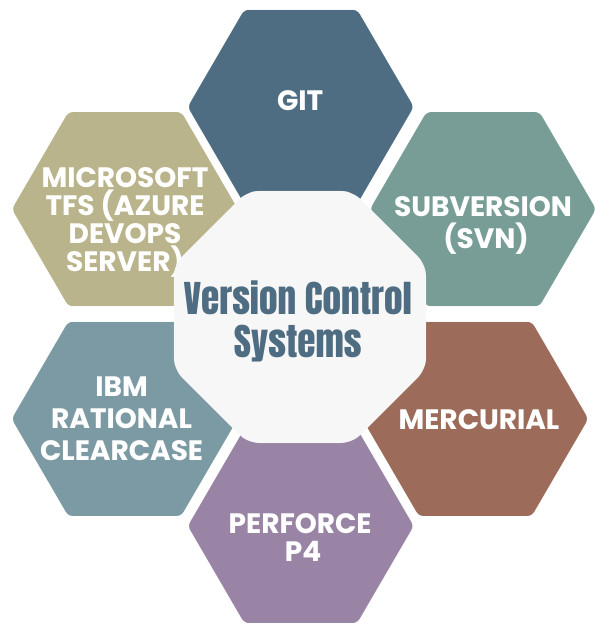
1. Git
Git is a popular open source distributed version control system used for software projects of any size, making it the primary choice for startups, enterprises, and everything in between. It was developed by Linus Torvalds in 2005 for the development of the Linux kernel and has since become the most widely used version control system in the world.
Git offers easy branching and is supported by many different companies to enable collaboration. It is known for its speed and efficiency in handling projects. Its easy branching and merging allows developers to work on new features or bug fixes without affecting the main codebase. Once work is complete, branches can be “merged” back into the main line.
Git provides a powerful and flexible system for managing changes, collaborating on projects, and ensuring the integrity and history of a codebase. It is the foundation for popular code hosting platforms like GitHub, GitLab, and Bitbucket. Read: Different Merge Strategies in Git
2. Subversion (SVN)
SVN is a widely adopted free, open-source, centralized VCS developed by Apache. It keeps all of the project’s files on a single code line. Though it is impossible to branch in SVN, it is easy to scale for large projects.
SVN offers a good concurrent development process for developers to work simultaneously. It is easy to learn and provides the feature of folder security measures to restrict access to subfolders.
SVN is widely used in various development environments and provides robust tools for managing code and other project assets in a collaborative setting.
3. Mercurial
Mercurial is a free, distributed source control management tool that efficiently handles projects of any size and offers an easy and intuitive interface. It offers simple branching and merging capabilities and enables rapid scaling and collaborative development.
Mercurial’s flexible command line interface allows users to begin using the system immediately.
4. Perforce P4
Perforce P4, also known as Helix Core, is a CVCS developed by Perforce Software. P4 gives teams visibility into who is working on what, helps prevent conflicts with file-locking strategies, and is free for up to five users.
It is designed to manage and track changes to digital assets, including the source code, large binary files (3D assets, video), intellectual property (IP), and other designs across various industries such as media and entertainment, game development, and semiconductor design.
5. IBM Rational ClearCase
IBM Rational ClearCase belongs to the IBM family of software and Rational, for software configuration management (SCM). Rational ClearCase supports complex development environments and large projects by offering features like a unified change management (UCM) mode, integration with popular IDEs, and different development methodologies.
6. Microsoft TFS (Team Foundation Server)
Microsoft TFS has been rebranded as Azure DevOps Server and is a version control and lifecycle management tool. Traditionally, it is a CVCS, though Azure DevOps supports Git for distributed workflows.
Read: Which Version Control System is the Best?
Best Practices for Using Version Control
- Commit Often, But Meaningfully: Reviewing and rolling back small, frequent commits is easier. Provide a message explaining why and what for every commit.
- Use Branching Strategically: Choose branching models that suit your workflow. Trunk-based development is popular for fast DevOps teams, while Gitflow suits structured releases.
- Protect the Main Branch: Perform reviews and automated tests and get approvals for every commit before merging it into the main branch to ensure production code stability.
- Write Clear and Descriptive Commit Messages: Instead of writing messages like “fixed bug”, write descriptive messages such as “Fixed Null Pointer Exception in xxx service”.
- Integrate with CI/CD: Test and deploy code automatically with CI/CD pipelines to reduce manual errors and speed up release cycles.
- Educate and Enforce: Establish and enforce guidelines through tooling and training to ensure all team members understand version control workflows.
Version Control in the DevOps Era
- Infrastructure Management: Tools like Ansible or Terraform use Git to manage infrastructure as code.
- Automated Testing: Pipelines trigger from commits, ensuring immediate testing and feedback.
- Compliance and Security: Regulatory industries use commit history to demonstrate compliance with standards like HIPAA or ISO.
The Future of Version Control
- AI-Assisted Version Control: Intelligent systems will help VCS by suggesting commit messages, detecting anomalies, and recommending merges.
- Integration Beyond Code: The trend of using version control for design assets, documentation, and data science models will grow.
- Decentralized Collaboration: With remote work becoming a norm, distributed workflows will make a Git-like system even more critical.
Conclusion
Every engineering team, big or small, regardless of industry, needs a version control system. VCS transforms software development from a manual, error-prone process into a disciplined, streamlined, collaborative, and reliable workflow.
VCS strengthens modern software engineering by preventing lost work, tracking and managing changes, and enabling continuous deployment. Without the proper version control, teams may face inefficiency, instability, and frustration. With version control, teams unlock scalability, trust, and innovation.
The truth is that version control is not optional but necessary.
 |