
Memory Allocation in OS: First Fit vs. Best Fit vs. Worst Fit Explained
In the early computing days, memory was so limited that engineers were forced to manually handpick where each program lived in RAM. A well-known story from old UNIX times tells of system crashes caused not by lack of memory, but by messy splits in available memory. That idea still holds weight today.
Edsger W. Dijkstra famously said, “Simplicity is a prerequisite for reliability.” Often in OS, the failures are not due to running out of memory but because it wasn’t allocated efficiently.
Even today, research on how systems run reveals that bad memory handling often cuts app speed by 20 to 30 percent when used in actual workloads. This figure isn’t trivial.
The topic is pretty basic at first glance – basically putting processes into memory. Yet the instant you actually attempt to implement it or debug, chaos shows up without warning. Memory allocation decisions are often underestimated until performance issues are observed.
Here’s when First Fit, Best Fit, or Worst Fit steps into the picture.
| Key Takeaways: |
|---|
|
What is Memory Allocation in Operating Systems?

Memory allocation in an operating system is the process of assigning available memory blocks to processes that need them. What runs must fit where placed, no exceptions.
Read: Process vs. Thread: Key Differences Explained with Examples.
- Free memory blocks
- Incoming process requests
When a new process arrives, a decision needs to be made:
“Which memory block should I assign?”
- First Fit
- Best Fit
- Worst Fit
These strategies are used when contiguous memory allocation is required.
The Real Problem: Why Allocation Strategy Matters
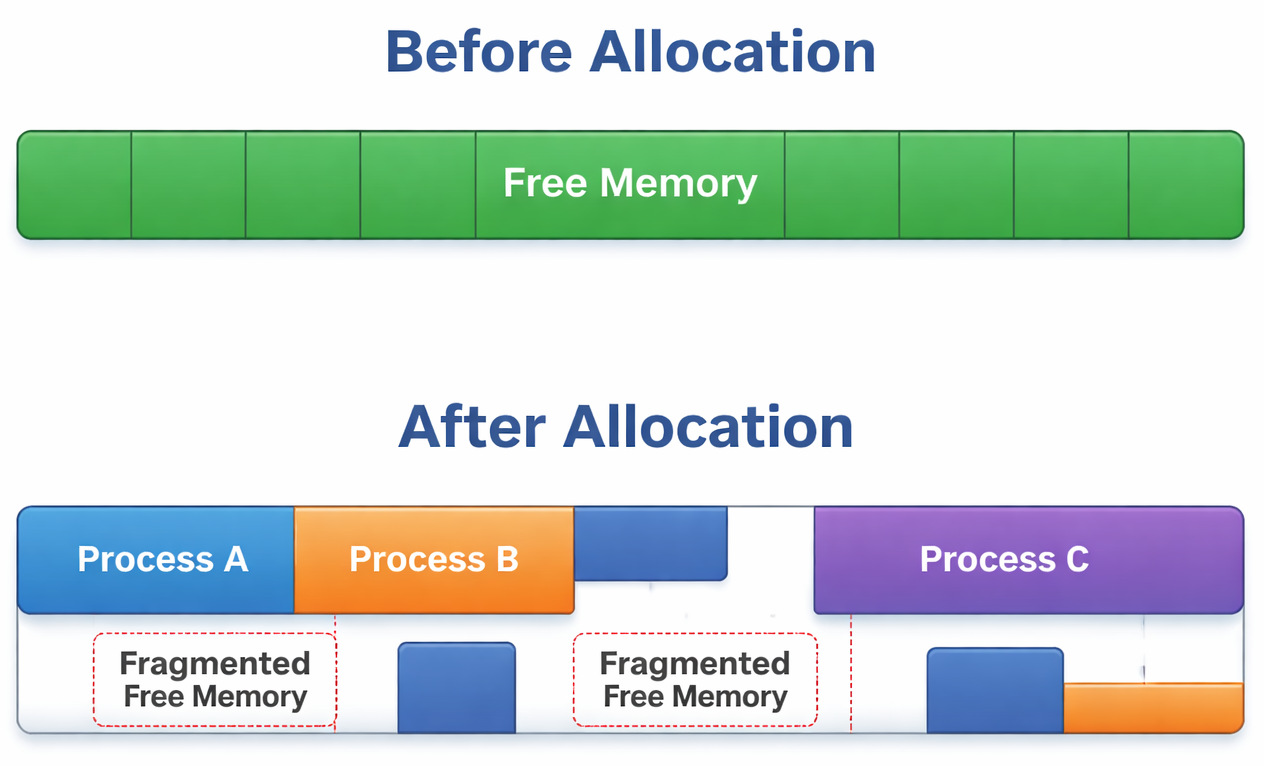
The thing about memory is that it rarely stays tidy. As processes come and go, holes begin to form, slowly turning it into something resembling Swiss cheese. Over days, those empty spots pile up.
- Free memory exists
- Yet it lies in broken pieces
- Large processes can’t fit
This might seem like a tiny flaw, yet when you actually see it play out…
In real projects, this usually breaks when memory-intensive processes suddenly fail despite having enough total memory.
I’ve seen this happen in backend systems where logs showed “out of memory” errors, but technically, there was still free space. It just wasn’t usable.
First Fit Algorithm in OS (Fast but Unpredictable)
Let us first understand what First Fit Memory Allocation is. In this method, the allocation takes place in the first available block that is large enough.
- Scan memory from the beginning
- Select the first block that fits
- Stop searching
It skips full memory scans while finishing allocation.
How First Fit Works (Example)
100KB, 500KB, 200KB, 300KB
150KB
- Skip
100KB(too small) - Pick
500KB(first suitable)
Done.
Where First Fit Shines
Actually, this method is fast. That’s its biggest strength. This method is perfect for minimal search time and reduced overhead. It is easy to implement.
Where First Fit Fails
But here’s the catch:
This sounds good on paper, but in practice, memory gets fragmented very quickly.
Because it keeps breaking larger blocks early, large memory blocks are often split unnecessarily.
One limitation teams often underestimate is how quickly fragmentation builds up. Imagine a simulation project where First Fit is used for simplicity. Within hours of runtime, allocation failures start appearing, not due to lack of memory, but poor distribution.
Best Fit Algorithm in OS (Efficient but Slower)
Fitting just right, it picks the tiniest block able to satisfy the need. Smaller slots come first when matching size.
- Scan entire memory
- Choose a block with the minimum leftover space
The smallest suitable block is always selected.
How Best Fit Works
100KB, 500KB, 200KB, 300KB
150KB
Best Fit chooses:
200KB (smallest sufficient block)
Why Best Fit Looks Good
- Minimizes wasted space
- Better memory utilization
The Hidden Problem
Yet this is when things start getting real
Good in theory, but in real-time scenarios, it creates tiny, unusable memory fragments.
Tiny bits of fragments can’t move forward. Later steps need more than what’s left here. What remains is simply too little to use again. Many small holes are created over time.
When production systems run varied workloads, Best Fit sometimes slows things down. Memory became unusable even though utilization metrics looked “efficient.”
Worst Fit Algorithm in OS (Counterintuitive Method)
The biggest free chunk gets picked by Worst Fit. It grabs whatever space is most spacious at that moment.
- Scan entire memory
- Pick the biggest block
The largest hole is always selected for allocation.
How the Worst Fit Process Works
100KB, 500KB, 200KB, 300KB
150KB
Worst Fit chooses:
500KB (largest block)
Why Worst Fit Exists
- Medium blocks stay as they are
- Keep memory flexible for future allocations
Where it Breaks
This one is slightly trickier.
In real projects, this usually breaks when large memory blocks get wasted too early.
- Fragments form when large chunks break apart
- Memory becomes inefficient quickly
Suddenly, big chunks break apart even when no need ever showed up. Splitting happens anyway, just because it can.
Rarely do systems choose Worst Fit. It breaks more than it solves issues.
First Fit vs. Best Fit vs. Worst Fit: Key Differences
Here’s a clean comparison:
| Feature | First Fit | Best Fit | Worst Fit |
|---|---|---|---|
| Strategy | First suitable block | Smallest suitable block | Largest block |
| Speed | Fast | Slow | Slow |
| Memory Efficiency | Moderate | High (initially) | Low |
| Fragmentation | Medium | High (small fragments) | High (large waste) |
| Search Scope | Partial | Full | Full |
Fragmentation in Memory Allocation Methods
- Free memory exists
- Just not all together in a single stretch
Memory is divided into non-contiguous holes.
- Allocated memory > Required memory
First Fit and Worst Fit handle space in the above problematic manner. These approaches often leave gaps behind. Not every system deals with fragmentation the same way. How memory gets used depends heavily on the method chosen.
Why it Matters
Fragments exist everywhere you turn. They are not limited to theory. One limitation teams often underestimate is how fragmentation silently reduces usable memory.
In long-running systems, it turns into a serious issue.
Which is the Best Memory Allocation method in an OS?
One single choice doesn’t work for everyone.
- When First Fit Works Best: It works best when speed matters, the system is dynamic, and simplicity is preferred.
- When Best Fit Works Best: It works well when memory is limited, and efficiency is critical.
- When Worst Fit Could Be Useful: It might work well in a few rare instances involving large operations and when fragmentation patterns are predictable.
Practical Decision Table
| Scenario | Recommended Method |
|---|---|
| Real-time systems | First Fit |
| Memory-constrained systems | Best Fit |
| Experimental/academic use | Worst Fit |
Real-Life Analogy (Because it Helps)
- First Fit → park in the first available spot
- Best Fit → find the tightest spot
- Worst Fit → take the biggest spot
Now imagine a busy mall parking lot…
A bigger car could have used the spot where you have parked your two-wheeler, or the spot you chose ended up trapping you in the car, because it’s tight, etc. You’ll quickly see how chaos builds up.
Real Project Incident (What Actually Happens)
An organization had a backend service that handled file uploads. Memory allocation wasn’t optimized, and First Fit was used.
- Large uploads started failing
- Logs showed memory errors
- Memory wasn’t full
- It was fragmented
The system was unable to allocate contiguous memory blocks. Switching strategy and adding compaction improved things significantly.
Here’s what matters most.
Mistakes happen, no algorithm is perfect, trade-offs are unavoidable, and most importantly, real-world behavior is different from theory.
In real-life projects, workload patterns decide everything.
Final Thoughts
What matters is seeing what sets them apart. Notice the contrasts, not just the surface stuff. Differences reveal more than similarities ever do.
- Start simple (First Fit)
- Monitor memory usage
- Optimize when needed
Speed is why people usually pick First Fit when it comes to real-world uses – though keeping an eye on things matters just as much.
Memory allocation strategies are chosen based on system requirements. Fitting programs into memory goes beyond mere space management. Stability across hours of running matters just as much.
And most implementations falter here.
Frequently Asked Questions (FAQs)
Which memory allocation method is best in real systems?
A: First Fit is often preferred because it’s fast and simple. But in long-running systems, fragmentation becomes a problem. So the “best” method depends on:
- How often is memory allocated
- How long do processes stay
Why does fragmentation happen in memory allocation?
A: Basically, fragmentation happens because memory is allocated and freed in chunks.
- Small gaps are created
- The large continuous space disappears
Free memory is available, but it cannot be used efficiently.
Can fragmentation be reduced or avoided?
A: It can’t be fully avoided, but it can be managed.
- Memory compaction
- Paging (non-contiguous allocation)
- Better allocation strategies
 |