
Process vs. Thread: Key Differences Explained with Examples
If you’re searching for process vs. thread, chances are that you’re probably not doing it out of mere curiosity. High CPU load without real throughput often raises alarms. Someone mentions adding extra threads, as if it means nothing, then confusion follows.
Let us start by understanding what a process is, what a thread is, and the difference between a process and a thread.
Instead of just listing facts, think about how they behave when overloaded. Real issues show up under load; teams skip validating resource leaks until it’s too late.
| Key Takeaways: |
|---|
|
Process vs. Thread in Operating System: Why This Distinction Exists
A single program might be split into pieces that run separately. Processes handle isolation. Meanwhile, threads manage shared work inside one space. One keeps things apart, while the other links parts together tightly.
- Run multiple programs at once
- Keep them isolated
- Share limited hardware safely
A process gives isolation.
A thread gives concurrency.
This tradeoff, choosing between being isolated or more efficient, shapes nearly all the choices.
What is a Process?
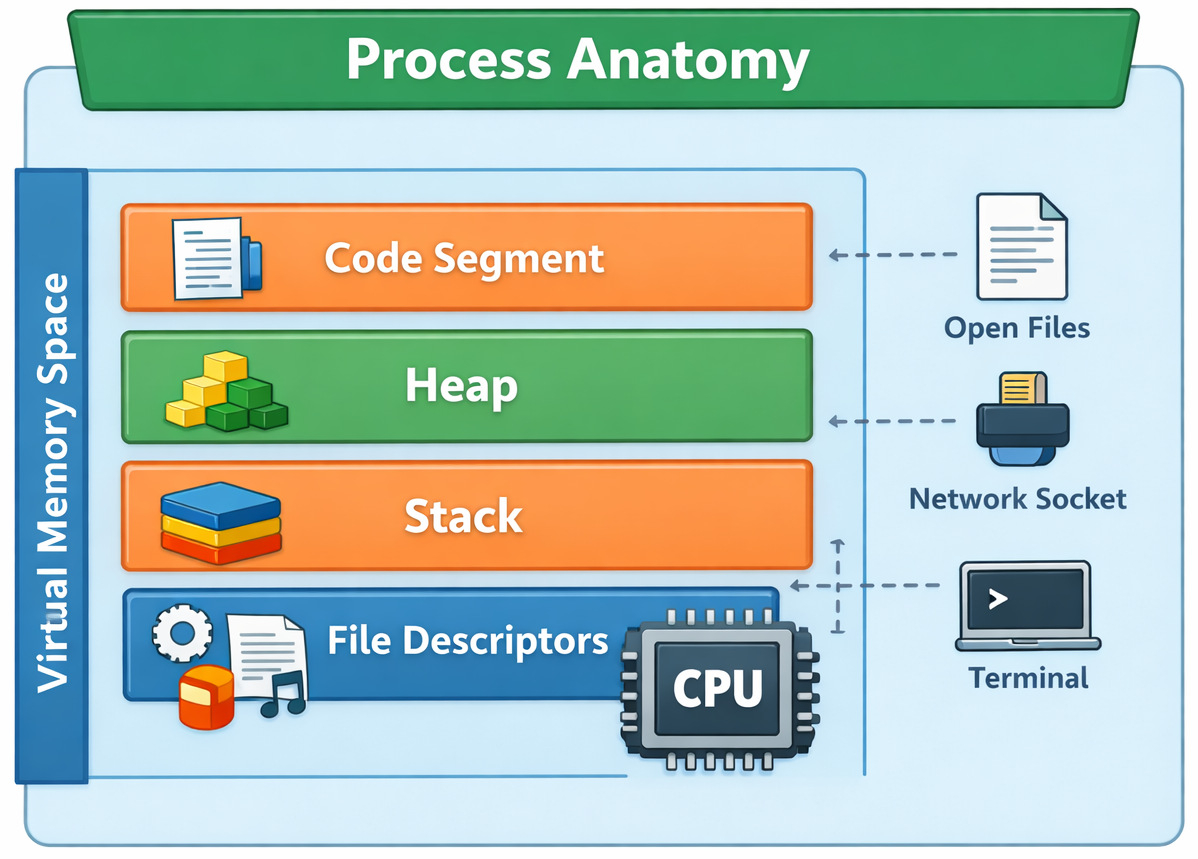
A single running program, complete with all its working parts, makes up what we call a process.
- Its own virtual memory space
- Program code
- Heap and stack
- Open file descriptors
- Environment variables
- At least one thread
Each process stays isolated. Running one never touches another, kept apart like pages in a closed book. What happens inside stays contained, without leaks or overlaps.
Read more: Processes in Operating Systems: Basic Concept, Structure, Lifecycle, Attributes, and More.
Why does this Isolation Matter?
- OS cleans it up
- Memory is reclaimed
- Other processes usually keep running
That’s the reason today’s operating systems handle many apps at once. Sometimes it is even hundreds, yet it keeps working when a single program crashes.
Creating a process is expensive. Behind the scenes, memory gets mapped, the bookkeeping, resources duplication, and each step takes its toll. Systems that spawn processes aggressively often hit performance ceilings much earlier than expected.
Process Lifecycle in OS (It is not just theory)
What happens during a process’s life inside an operating system shows how it acts when under load. A clear look at each stage reveals patterns in performance under pressure.
- New: created but not scheduled
- Ready: waiting for CPU time
- Running: executing instructions
- Waiting / Blocked: waiting on I/O or events
- Terminated: finished or killed
Every transition requires the kernel to step in. One limitation teams often overlook is that process creation and destruction are not cheap operations. Systems that regularly spin up short-lived processes (for example, one process per task) often struggle at scale.
What is a Thread?
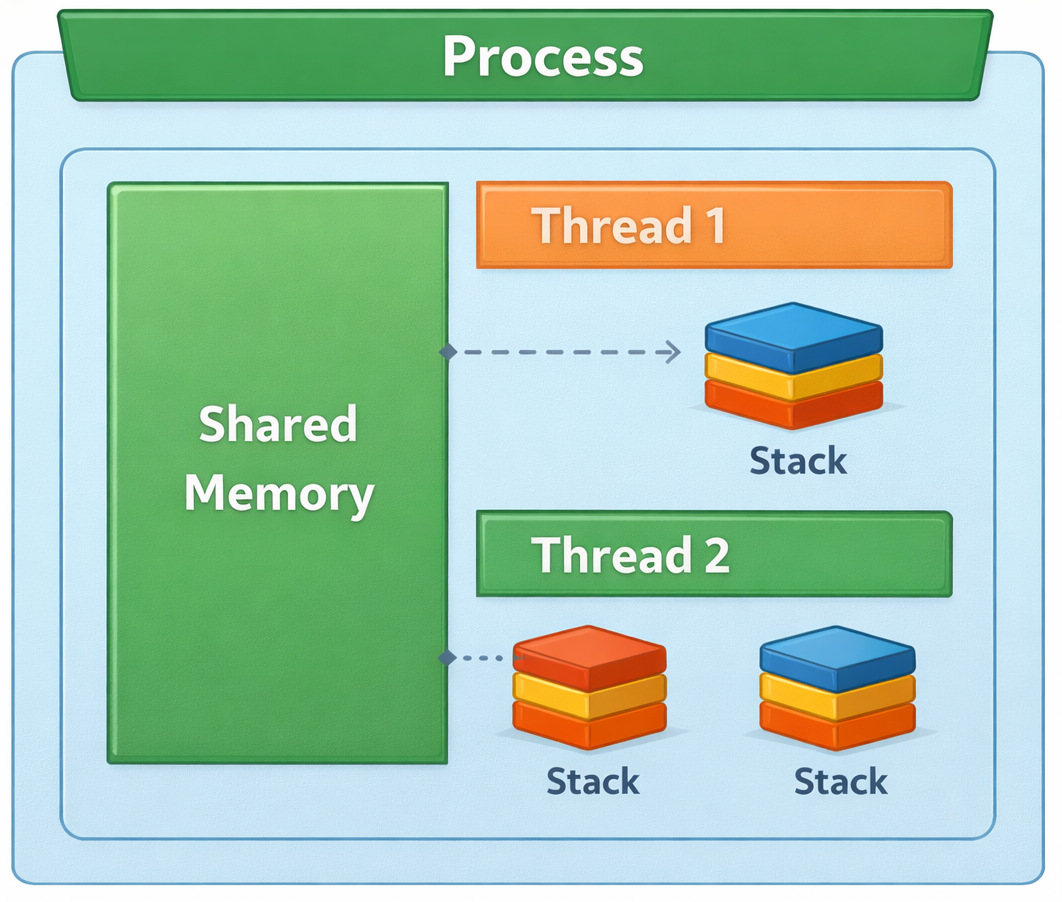
The smallest unit inside an execution makes up what’s called a thread. A single thread exists in each process, typically named the main thread. Work happens at the same time when extra threads are added through creation.
- Share the same memory space
- Share code and heap
- Share open files
- But have their own stack and CPU registers
What they share defines them, powerful at times, yet fragile in others.
Thread Lifecycle Explained (where actual complexity is)
- New
- Runnable
- Running
- Waiting
- Terminated
Few actual setups act exactly as diagrams suggest.
Threads frequently block on locks, wait for I/O, and preempt each other in unpredictable ways. This might look fine in theory, yet when you try it out…
Debugging thread-related issues is much harder than debugging process-level issues. Where processes keep problems contained, tangled threads spread chaos through shared memory.
Difference Between Process and Thread
What sets processes apart from threads? It boils down to how separated they are, plus what they pass around.
| Aspect | Process | Thread |
|---|---|---|
| Memory space | Separate | Shared |
| Creation cost | High | Low |
| Communication | IPC required | Direct memory access |
| Failure isolation | Strong | Weak |
| Debugging difficulty | Moderate | High |
| Resource overhead | Heavy | Light |
This table looks simple, but every row hides real tradeoffs.
Process vs. Thread Example: Web Server Under Load
Consider a web server handling thousands of requests per second.
- Simple mental model
- Very expensive
- Poor scalability
- Efficient resource usage
- Shared caches
- Risk of cascading failures
- Multiple worker processes
- Each worker runs multiple threads
This balances performance with fault isolation.
Thread vs. Process Comparison: Performance and Safety
A good thread vs. process comparison always ends in tradeoffs, not winners.
- Safety
- Fault isolation
- Security boundaries
- Speed
- Low-latency communication
- Efficient CPU usage
This may fail in real projects when teams optimize for performance early and pay the price later in reliability and maintainability.
How is Cost Affected Due to Threads and Processes?
Let us see how the cost is affected in projects due to threads and processes.
Memory Sharing Between Threads: Power With Sharp Edges
Memory sharing between threads allows rapid communication.
- Read and write shared data immediately
- Avoid serialization overhead
- Build high-throughput pipelines
- Race conditions
- Deadlocks
- Memory visibility issues
In real-life scenarios, it may fail if a developer adds a shared cache without proper synchronization, assuming “reads are safe.” They usually aren’t.
The bug appears under load. Logs don’t help. Restarting the service “fixes” it, until it happens again.
Synchronization & Deadlocks: Where Threads Quietly Fail
When people talk about threads, they often talk about speed. What is usually not talked about enough is synchronization, and that’s where most real systems get hurt.
- Mutexes (locks)
- Semaphores
- Read-write locks
- Condition variables
Seems quite possible in theory.
This might seem fine in theory, yet once you try it…
Synchronization logic tends to grow organically, then slowly get tangled. A single lock turns into a pair. That pair spreads, and soon there are five. Over time, nobody remembers exactly who owns which thread, or when they let go.
Context Switching in OS: The Cost You Don’t See
Context switching in an OS is what happens when the CPU switches from executing one unit of work to another.
- Switching memory mappings
- Flushing translation buffers
- Updating kernel structures
- Saving registers
- Switching stacks
- Minimal kernel work
Threads are much cheaper to switch. But cheap doesn’t mean unlimited.
One drawback that is often missed is that high thread counts can overwhelm the scheduler. Thousands of runnable threads may spend more time switching than doing useful work.
Deadlocks: The Most Expensive Bugs You’ll Ever Debug
A stalemate appears if one thread waits for another, while that one’s stuck waiting too. Each pauses, locked by the other’s hold.
No crash.
No error logs.
CPU usage drops.
Frozen. That’s what it feels like when everything halts for no clear reason.
Most of the time, actual projects hit a snag when someone refactors how locks are acquired during what seems like a tiny code cleanup, and no one spots it until things go sideways.
- Thread A locks resource X, then waits for Y
- Thread B locks resource Y, then waits for X
Neither can proceed.
Teams often overlook…
Code clears tests without issue. Staging shows no red flags. Yet when real users flood in, the system freezes. No warning. Just lock up. Deadlocks often appear only under production load.
Since technically no system “failed”, observability tools aren’t necessarily useful. Without clear breakdowns, spotting issues grows harder. Even with data flowing, understanding lags behind.
Read more: Deadlock in Operating Systems: Causes, Conditions, and Prevention Techniques.
How Processes Avoid this Class of Failure?
Most of the time, one process can’t touch another’s memory. Because of that, they must talk through set channels, which dramatically reduces accidental coupling.
When threads run loose, risk slips in. Synchronization is the tax you pay.
Multithreading vs. Multiprocessing: Choosing the Lesser Evil
The debate between multithreading vs multiprocessing isn’t academic; it’s architectural.
- Faster communication
- Lower memory usage
- Harder debugging
- Higher blast radius
- Strong isolation
- Easier fault containment
- Higher overhead
- Slower communication
| Use Case | Better Choice |
|---|---|
| CPU-bound tasks | Multiprocessing |
| I/O-bound tasks | Multithreading |
| Fault tolerance | Multiprocessing |
| Shared state | Multithreading |
In practice, an issue may arise when many production systems combine both approaches: processes for isolation and threads for concurrency within each process.
IPC Costs in Practice: The Hidden Price of Process Isolation
When comparing multithreading vs multiprocessing, people often say: “Processes are slower because they need IPC.”
That’s true, however, it is incomplete.
- Serialization
- Memory copying
- Kernel transitions
- Context switches
- Pipes
- Sockets
- Message queues
- Shared memory segments
Each comes with tradeoffs.
Some drawbacks include IPC overhead that turns into a hurdle long before CPU usage does.
- Serializing objects
- Copying buffers
- Waiting on kernel calls
Real projects may run into a snag when teams move from threads to processes for safety, but keep the same chatty communication patterns.
What worked with shared memory suddenly becomes painfully slow with IPC.
Additionally, teams may also miss considering latency amplification.
A few microseconds of IPC overhead don’t matter once. It matters a lot when it happens millions of times per second.
The upside (and why processes still win sometimes)
- Fault isolation
- Clearer boundaries
- Safer recovery
Many teams accept IPC overhead as a known, predictable cost, because unpredictable shared-memory bugs are worse.
Concurrency vs. Parallelism (Frequently Confused)
- Concurrency: multiple tasks making progress
- Parallelism: tasks executing at the same time
Threads enable concurrency. Multiple cores enable parallelism.
One can have concurrent programs on a single-core CPU and parallel execution without shared memory. Understanding the above distinction helps prevent false assumptions about performance.
Real-Life Incident: When Threads Took Down Production
A real-life example of how money moves online.
The team switched from a multi-process model to a heavily multithreaded one to reduce latency. Their new approach handled tasks at once through parallel paths rather than juggling outside containers. Speed improved because coordination happens inside a single space.
It worked until a rare race condition corrupted shared memory.
- Intermittent failures
- Corrupted in-memory state
- The entire process crashed
Fixing it meant a rollback.
Process vs. Thread in Operating System Design Decisions
It wasn’t luck that led operating systems to favor threads instead of processes. Processes define protection boundaries. Threads define execution units.
Still, separating helps programs grow across processors without losing security. Only if handled right.
When Threads are the Right Choice
- Tasks are tightly coupled
- Shared state is unavoidable
- Latency matters more than isolation
- Failure can be tolerated
- UI rendering
- In-memory data processing
- Streaming pipelines
When Processes are the Right Choice
- Failures must be contained
- Memory leaks are likely
- Untrusted code is involved
- Workloads are CPU-heavy
- Job workers
- Plugin systems
- Sandboxed execution environments
How to Decide: Process vs. Thread
- What happens when this fails?
- How hard will this be to debug?
- Is shared memory truly necessary?
- Can we afford isolation overhead?
If you answer these honestly, the choice often becomes obvious.
Failure-Mode Comparison Table
This is where the process vs. thread decision becomes very concrete.
The question isn’t: “Which is faster?”
It’s: “What happens when this goes wrong?”
| Failure Scenario | Threads | Processes |
|---|---|---|
| Memory leak | Affects the entire process | Contained in one process |
| Race condition | Silent data corruption | Rare (no shared memory) |
| Deadlock | The whole process freezes | Isolated to one process |
| Crash | All threads die | Other processes survive |
| Debugging | Very hard | Easier to isolate |
| Recovery | Often requires a restart | Can restart a single process |
| Blast radius | Large | Small |
Why does this Topic Keep Coming Back?
Understanding the differences between process and thread will continue, since tradeoffs never disappear. Hardware evolves, software scales, and systems scale.
Yet balancing isolation with speed stays at the core of the challenge.
Faster results come through threads. Speed shows up where it matters most. Processes give you safety. Mature setups figure out how to work with each other, slowly adjusting.
Frequently Asked Questions (FAQs)
Is a thread a process?
A:No. A thread is not a process.
A process is an isolated execution environment with its own memory space. A thread is an execution unit inside a process and shares memory with other threads in that process.
This distinction matters because when a thread fails, it can bring down the entire process. When a process fails, other processes usually survive.
Which is better: process vs. thread?
A: Neither is universally better.
- Tasks need to share memory
- Communication must be fast
- Latency matters
- Fault isolation is critical
- Memory leaks are likely
- Security boundaries matter
In real systems, this usually breaks when teams assume one model fits every workload.
How does the OS actually schedule processes and threads?
A: Modern operating systems schedule threads, not processes.
A process is a resource container. Threads are what the CPU actually executes. This is why a multithreaded application can utilize multiple CPU cores effectively.
Understanding this helps explain why adding threads sometimes improves performance and sometimes makes it worse.
 |