
How File Systems Work: Inodes, Directories, and Disk Structure Explained
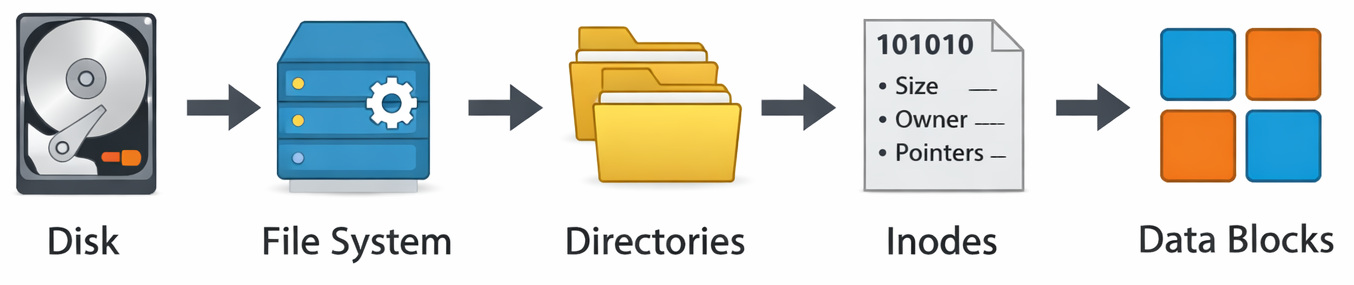
A few years ago, a major cloud provider had a major outage that led to the loss of access to millions of files. The data was not lost, but the metadata layer got corrupted. As a result, even though the files were not missing, the system could not find them. Think about losing your house keys while the house remains standing.
That’s the thing about file systems.
Not only do they hold onto your information. Whether it works when you need it – that’s up to them.
It is often assumed that saving a file guarantees its availability. But honestly, that’s not always true.
Ever wondered about how your OS finds a file in milliseconds, or why deleting a file doesn’t really delete it, or why disks slow down over time?
That thought leads straight to file systems.
| Key Takeaways: |
|---|
|
In the blog, we will be exploring inodes, directory structure, and disk structure.
What is a File System? (File System Explained for Beginners)
What is a file?
A file is simply a collection of data stored on disk, along with some metadata.
- Text (like a
.txtfile) - An image
- A program
- Or even a database
Every file is stored as a sequence of bytes on disk. But here’s the catch: those bytes don’t mean anything on their own. They need structure.
What is a file system?
Look, a file system is basically the system that organizes, stores, and retrieves files on a disk.
- Raw storage (disk)
- And meaningful data (files you can use)
- Where is the file?
- What does it contain?
- Who can access it?
- Files → boxes
- Directories → shelves
- Inodes → inventory records
- Disk → warehouse floor
Data is stored on disk in raw blocks, but it is interpreted using a file system.
Read: Processes in Operating Systems: Basic Concept, Structure, Lifecycle, Attributes, and More.
Directory Structure in Operating System (How Files Are Organized)
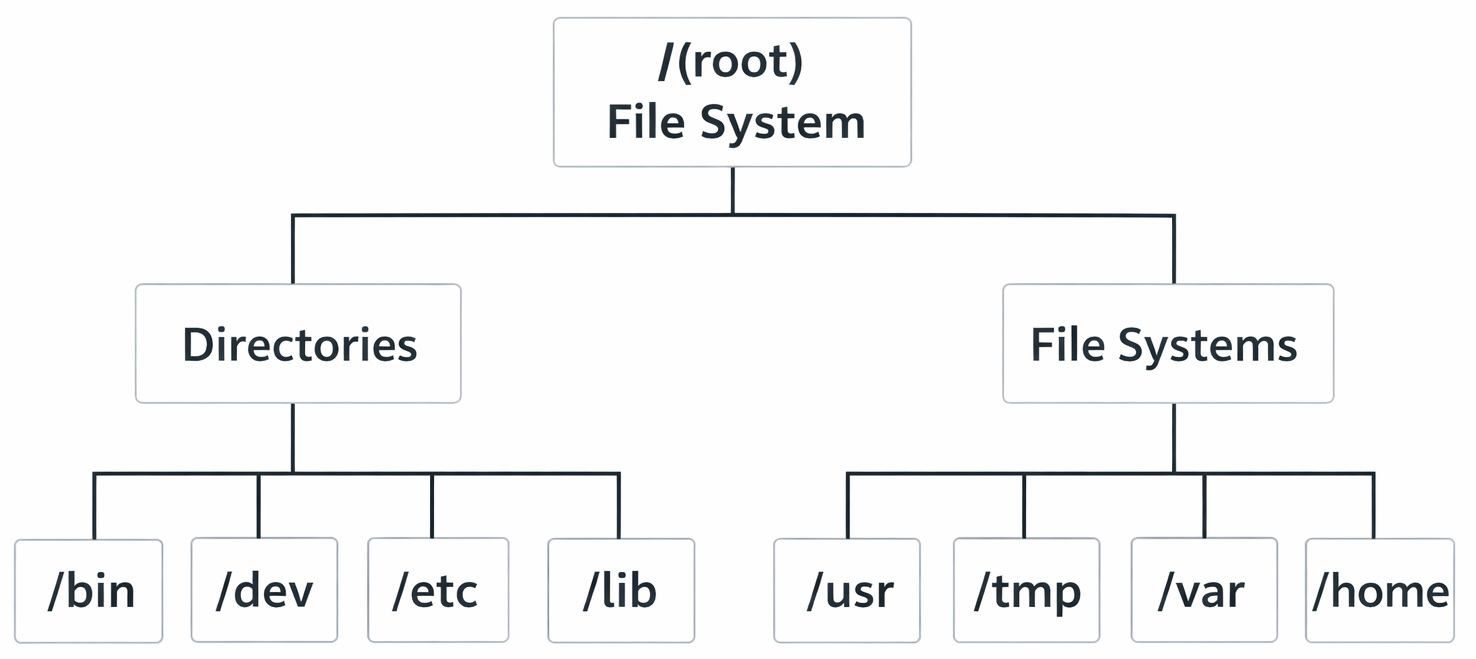
The above diagram shows the directory structure starting from the / (root) file system. It branches into standard directories like /bin, /dev, /etc, and /lib, which are part of the main file system.
Directories such as /usr, /tmp, /var, and /home are separate file systems with their own disk space.
These are mounted automatically at startup, so to the user, everything appears as a single unified structure.
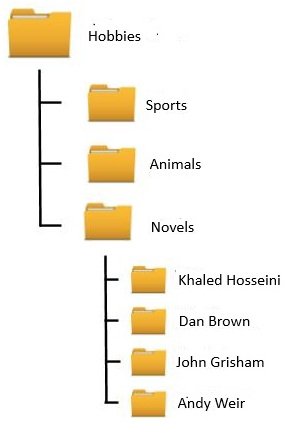
Directories are how we make sense of chaos. Instead of dumping all files in one place, we organize them into a tree structure with its branches and sub-branches.
Example:
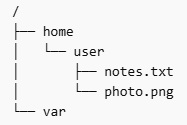
This diagram shows a simple file system hierarchy starting from the root /, which is the top-level directory.
homeandvarare directories under rootuseris a subdirectory insidehomenotes.txtandphoto.pngare files inside theuserdirectory
Files and references to metadata (inodes) are stored within directories, while directories can contain both files and other subdirectories.
The file name is not stored with the file data itself. That’s a subtle but important detail.
How Directories Work Internally
A directory is basically a mapping table:
filename → inode number
- The directory is searched
- The inode is located
- The data blocks are accessed
Simple? Yes.
But here’s where things get interesting.
In real-life scenarios, when folders grow out of control, they slow everything down.
Often, there are setups with just one folder holding millions of files. Things may slow down significantly because the system struggles to keep up.
- Lookup time increased
- Caching became inefficient
Most people think directory traversal works quickly, yet performance slips as things grow. Despite early speed, larger systems slow it down without warning.
Types of Directory Structures
| Type | Description | Problem |
|---|---|---|
| Single-level | All files in one directory | Naming conflicts |
| Two-level | Separate user directories | Limited flexibility |
| Tree structure | Hierarchical (modern systems) | Complexity |
| Graph structure | Allows shared files | Cycles, complexity |
Truth be told, almost all modern systems use tree structures.
You can also read: Page Replacement Algorithms Explained (FIFO, LRU, Optimal).
Inodes Explained (The Real Backbone of File Systems)
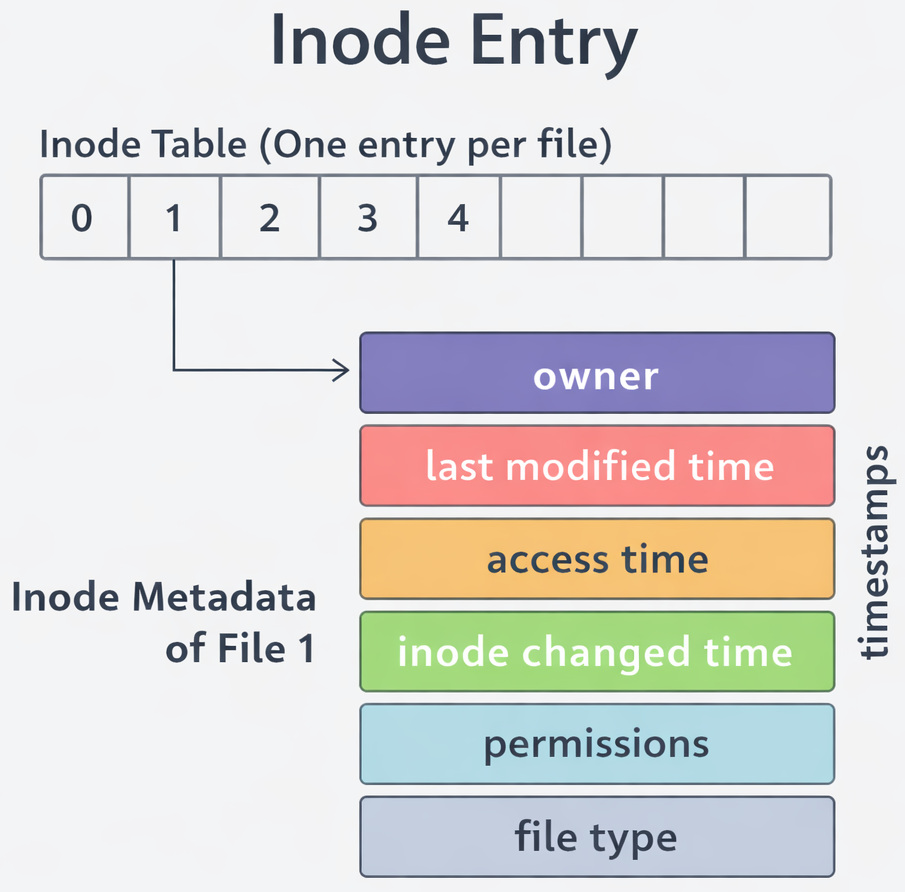
Here’s the part most people new to the concept miss. Files are NOT identified by their names.
They are identified by inodes.
What is an Inode?
An inode is a data structure that stores permissions, timestamps, pointers to data blocks, the owner, and file size. The inode is used to locate file data on disk. But it does NOT store the file name.
Why is the Need for Inode to Exist?
Truthfully, it’s brilliant.
- Multiple file names can point to the same inode (hard links)
- Renaming a file doesn’t move data
Example:
Let’s say:
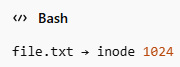
The inode might point to:

What happens when a file is split across multiple blocks like Block 5, Block 9, and Block 20 (as in the above diagram)?
The inode keeps track of all these block locations. When you open the file, the OS reads those blocks one by one (in order) and stitches the data back together.
The file is effectively reconstructed at runtime from different parts of the disk.
That’s where your data actually lives.
Surprisingly, teams often underestimate the risk of running out of inodes.
Yes, it happens.
- Plenty of disk space
- But no free inodes
And suddenly, you see: “No space left on device.”
Even though space exists.
Inodes are allocated during file system creation and are not easily expanded.
Disk Structure Explained (Logical vs. Physical Storage)
Your disk isn’t just a blank space. It’s structured very carefully.
Physical Structure (HDD)
At the hardware level, data is stored in sectors arranged along tracks on spinning platters.
Each sector represents the smallest addressable unit of storage on disk.
SSDs (Solid State Drives) do not have moving parts, but they expose a similar block-based abstraction to the OS.
How does storage type affect file system behavior?
The difference matters in practice. HDDs rely on mechanical movement, so seek time becomes a major factor when data is scattered. In contrast, SSDs have near-uniform access time, so fragmentation has less impact on read performance.
File system designs and performance characteristics are influenced by the underlying storage device.
Logical Disk Structure (What OS Sees)

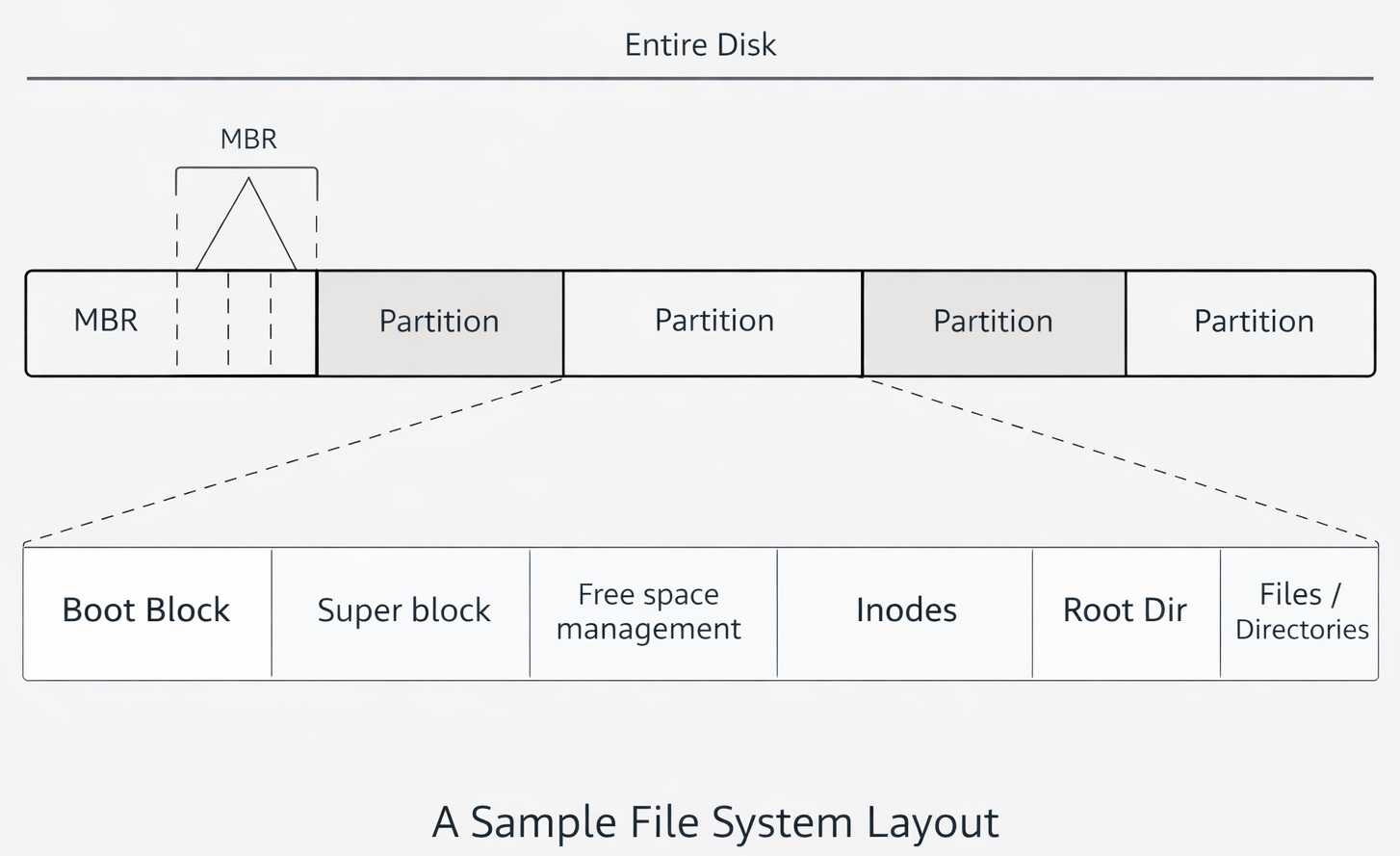
This diagram shows how a traditional disk using an MBR (Master Boot Record) partitioning scheme is organized, and how a file system is structured inside each partition.
- MBR → tells the system where partitions are.
- Partition → contains a filesystem.
- Superblock → describes the filesystem structure.
- Inodes → describe files.
- Directories → map names to inodes.
- Data blocks → store actual file contents.
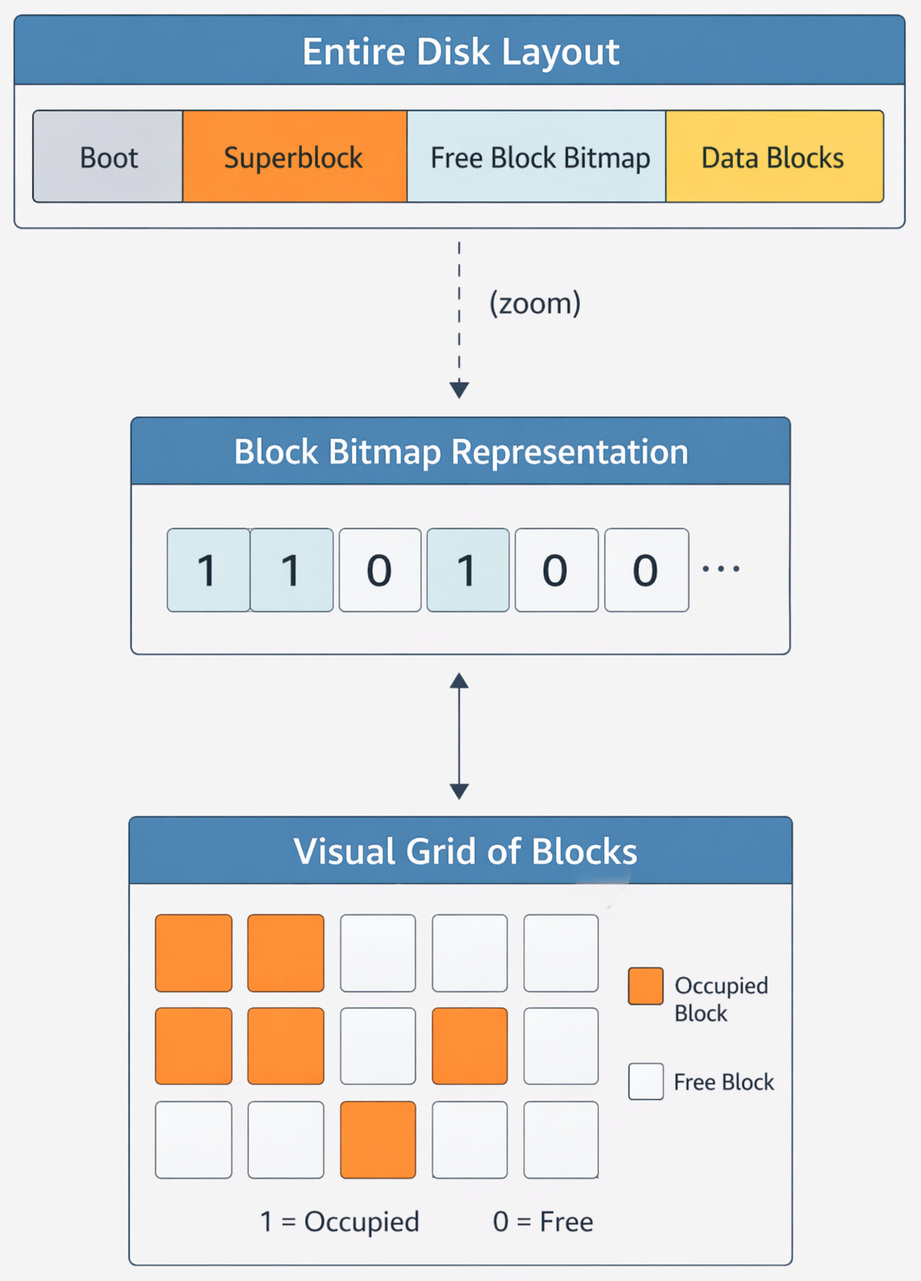
The above diagram shows how a filesystem organizes storage blocks. The Superblock stores metadata about the filesystem, while the Free Block Bitmap tracks which blocks are free or occupied. Each bit represents a block (1 = used, 0 = free), enabling efficient allocation. The Data Blocks store actual file contents, and the boot block is used for system startup.
What the above means is that:
The Boot Block is used to start the OS. Importantly, it is rarely touched after setup. The Superblock stores file system metadata. It is usually thought of as the “table of contents”. The Superblock is critical and is replicated in many systems. The Inode Table stores all inodes. And finally, the Data Blocks contain the actual file contents.
The above sounds simple, right? In theory, maybe, but in practice, fragmentation becomes a problem.
Files get scattered across the disk.
- Slower reads
- More seek time (especially in HDDs)
How File Systems Work Step by Step (Putting It All Together)
Let’s walk through a real example.
You open:

- Root directory / is accessed
- The home is located
- Then user
- Then report.pdf
- Directory returns the inode number
- Inode points to data blocks
- Data is read
Each step is resolved using metadata lookups.
- Slows the entire operation
- Multiplies at scale
File Allocation Methods (How Data is Stored on Disk)
This is where design choices matter.
Comparison Table
| Method | How It Works | Advantage | Limitation |
|---|---|---|---|
| Contiguous | Blocks stored together | Fast access | Hard to expand |
| Linked | Each block points to the next | Flexible | Slow random access |
| Indexed | Inode stores block pointers | Efficient | Slight overhead |
Most modern systems tend to use Indexed allocation (inode-based). The main reason is that it balances speed and flexibility.
Where Could it Possibly Fail?
In practice, things break at scale.
When files become large, inodes can no longer store all block pointers directly.
Instead, indirect pointers are used, where an inode points to another block that stores additional addresses.
Multiple levels of indirection are introduced for very large files, which increases lookup overhead and complexity.
Inode vs. Directory (Common Confusion)
| Feature | Inode | Directory |
|---|---|---|
| Stores name | No | Yes |
| Stores metadata | Yes | No |
| Points to data | Yes | No |
| Maps names | No | Yes |
Once you understand this difference, everything clicks.
A scenario where developers could be wrong is when they don’t think about file systems and simply assume that storage is “just there” (albeit wrong).
And obviously, it leads to problems.
- Too many small files: Millions of tiny files consume inodes quickly, even when disk space is available. File creation overhead becomes significant.
- Poor directory design: Very large directories slow down lookups because more entries must be scanned or indexed.
- Ignoring disk behavior: SSDs and HDDs behave differently. Sequential vs. random-access costs are not the same, and designs optimized for one may perform poorly on the other.
An Easy Analogy
- Directory → catalog
- Inode → book record
- Data blocks → actual pages
If the catalog is broken:
>>Books still exist
>> But cannot be found
Things to Keep in Mind when Building a File System
- Design directory structures carefully
- Avoid dumping everything in one place
- Monitor inode usage
- Think about access patterns
You need to decide if you are treating the storage as a black box or if you are designing with file system behavior in mind.
This is important, as this understanding is not optional if you are building scalable systems, handling massive datasets, and performance matters to you.
Final Thoughts
Nobody thinks about file systems much… right up until everything stops working.
- Data is lost
- Systems go down
- Debugging becomes painful
File system failures are often difficult to diagnose.
But once you understand inodes, directories, and disk structure, you start seeing systems differently.
Frequently Asked Questions (FAQs)
What is the difference between a file system and a database?
- File system → manages how data is stored on disk
- Database → manages how data is structured and queried
Databases rely on file systems underneath.
Why do file systems slow down over time?
A: The main reasons for this include fragmentation of files, directories growing large, and an increase in metadata lookups.
Data is no longer stored contiguously. As a result, increased disk seeks result in slow performance.
What happens when a file is deleted in a file system?
- The directory entry is removed
- The inode is marked as free
- The data blocks are not immediately erased
The space is simply marked as available for reuse. So the file can still be recovered unless it has been overwritten (by a recovery tool’s operation).
 |