
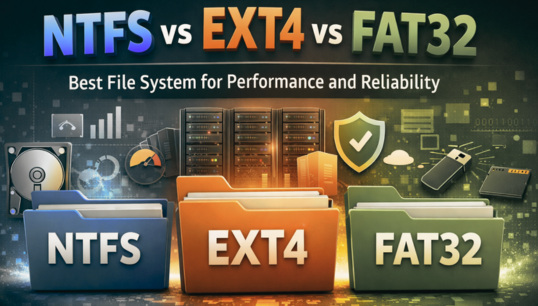
NTFS vs. EXT4 vs. FAT32: Best File System for 2026
For an operating system (OS), the file system is one of the most prominent components and forms the backbone of any OS. A file system organizes, stores, and retrieves data on storage devices such as hard drives, SSDs, and USB drives. There are various types of file systems an OS can use. The choice of the best file system is crucial as it directly impacts the performance, reliability, security, and compatibility.
| Key Takeaways: |
|---|
|
This article provides an in-depth comparison of the three widely used file systems, NTFS, EXT4, and FAT32. This article evaluates the performance and reliability of each file system, considering use cases, limitations, and practical recommendations.
What is a File System?
A file system is a method used by an OS to store, retrieve, and organize data on storage devices.
A file system manages the way data is stored and retrieved, ensuring data integrity and efficiency. Without a file system, your data will be scattered randomly, making it difficult to find what you need on time.
Think of a file system as a digital filing cabinet. Which stores every document/file in one secure, organized place that’s easy to search, share, and protect. With this neat organization of documents, you can spend less time digging through folders and more time on what matters most.
In a similar way, different OSes have different file systems according to their respective characteristics and requirements. It organizes and secures all data you store so that it is easier to search, share, and protect.
- A file system creates a structure and tells your device, “This is the location of your file, and this is how you access it whenever needed”.
- File systems are invisible organizers that run in the background to keep your digital life neat and accessible.
- File systems manage data storage, organization, and access across various storage devices, including HDDs, SSDs, and flash memory drives.
- Applications and the OS interact with storage content efficiently using a structure provided by the file system.
- Different file systems cater to specific needs and preferences.
- Journaling in the file system ensures data integrity and rapid recovery after crashes by maintaining a dedicated log (journal) of changes before writing them to the main storage.
- Memory Allocation in OS: First Fit vs. Best Fit vs. Worst Fit Explained
- Processes in Operating Systems: Basic Concept, Structure, Lifecycle, Attributes, and More
New Technology File System (NTFS)
NTFS, developed by Microsoft, is the default file system for Windows OS. It replaced FAT-based systems to provide enhanced performance, reliability, and security.
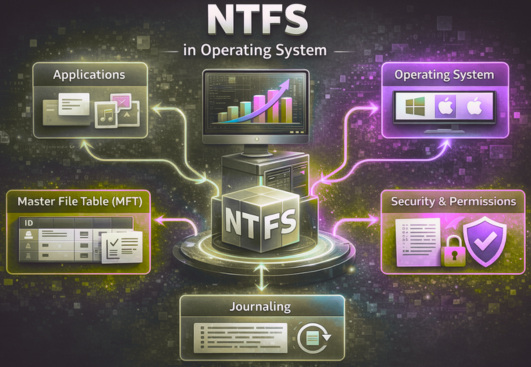
NTFS is the ideal file system for modern computing environments. NTFS enhances security by providing features such as file permissions and encryption. It handles metadata, allowing you to store additional information about files.
Key Features of NTFS
- Security: NTFS is more secure than FAT32 with its file-level security, along with permissions and encryption.
- Compression: It facilitates efficient use of disk space by supporting file compression.
- Recoverability and Reliability: NTFS includes metadata and transaction logging (journaling), which help recover from crashes and maintain data integrity.
- Large File and Volume Support: NTFS supports very large files and volumes, with theoretical limits far beyond typical consumer needs.
- Advanced Security, ACLs (Access Control Lists): It provides administrators with the ability to set detailed permissions for files and folders. These permissions specify which users or groups can read, write, or modify data.
Limitations of NTFS
- Limited Cross-Platform Support: NTFS works well with Windows, but has low compatibility with non-Windows systems.
- Complexity: NTFS is more complex than FAT32, potentially leading to increased overhead for certain operations.
Fourth Extended File System (EXT4)
EXT4 has evolved from EXT3 and is the default file system for most Linux distributions. It includes several performance and scalability improvements and is known for its efficiency and stability.
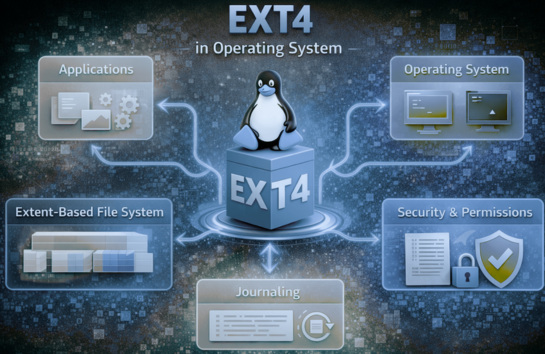
EXT4 supports large files and partitions, and its journaling feature makes it more reliable. EXT4 performs better than other file systems, especially when handling fragmentation and heavy workloads.
A huge plus for EXT4 is that it is backward-compatible with EXT3, so you can migrate older systems without too much hassle.
Key Features of EXT4
- High Performance: EXT4 is designed for speed, with quick access times and efficient storage management.
- Large Volume Support: It is suitable for extensive storage needs and supports volumes up to 1 Exabyte and files up to 16 Terabytes.
- Journaling: EXT4 provides a journaling feature that tracks changes. Journaling ensures data integrity in case of system crashes or unexpected shutdowns.
- Delayed Allocation: This feature improves performance by optimizing data organization and reducing fragmentation.
Limitations of Ext4
- Limited Compatibility: EXT4 is primarily compatible with Linux systems. It requires third-party software for use in Windows environments.
- No Native Encryption: It does not provide built-in encryption systems like NTFS.
File Allocation Table 32 (FAT32)
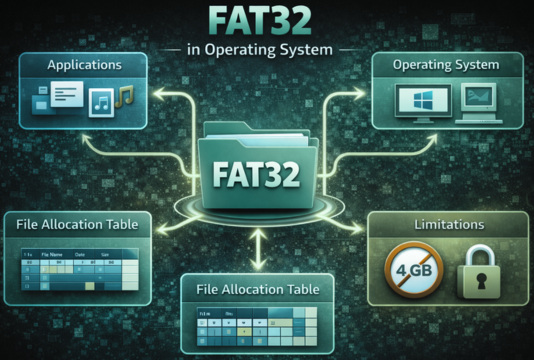
FAT32 is the classic file system still in use. It is one of the oldest and simplest file systems and is widely supported across nearly all OSes. Nearly every OS can read and write to FAT32. It has decent speed for smaller files, but performance may be affected when dealing with larger files (typically over 4GB).
Key Features of FAT32
- Universally Compatible: FAT32 is supported by almost all operating systems and devices, including Windows, macOS, and Linux.
- Simplicity: It is easy to use because of its straightforward design and is simple to implement.
- Ideal for Small Devices: Due to its wide compatibility and simplicity, FAT32 is well-suited for flash memory cards and USBs that hold smaller amounts of memory.
The limitations of FAT32 are:
- File Size Limit: FAT32 supports a maximum file size of 4GB, which is a limitation for modern applications and media files.
- Lack of Security: It lacks file permissions and encryption, making it less secure than NTFS.
- No Journaling: FAT32 does not provide journaling and is more prone to data corruption during improper shutdowns.
NTFS vs. EXT4 vs. FAT32
NTFS, EXT4, and FAT32 are widely used file systems designed for different operating systems and their storage requirements. NTFS is used in Windows and handles large files/drives with high security. EXT4 is used by the Linux OS and is highly stable and fast.
FAT32 is a classic, universal file system offering unmatched compatibility for old devices, but it limits files to 4GB.
- Performance
- Reliability and Data Integrity
- Security
- Compatibility
Performance Comparison
Performance is the most critical factor when choosing a file system. It is extremely critical for tasks like large-scale storage, databases, and gaming.
Here is a brief comparison of various performance factors for NTFS, EXT4, and FAT32.
Read and Write Performance
- NTFS shows good performance in sequential read operations and is suitable for large files such as videos or backups.
- EXT4 is generally excellent in random read/write operations and outperforms NTFS. The file creation in EXT4 is also better than in NTFS due to its efficient allocation strategies.
- When it comes to smaller tasks, FAT32 is fast but becomes inefficient with large files and heavy workloads.
- EXT4 uses extents instead of block mapping
- Its delayed allocation improves disk usage
- It has reduced fragmentation
- It supports advanced indexing (Master File Table)
- It is optimized for Windows I/O operations
NTFS handles extremely large files of size up to multiple terabytes. The same is true of EXT4, which handles very large files and volumes of up to exabytes. The FAT32 file system is, however, limited to 4GB per file, making it unsuitable for modern usage.
As far as read and write performance is concerned, NTFS and EXT4 perform well, while FAT32 is unsuitable for modern large-file workloads.
Fragmentation and Efficiency
- NTFS: This file system can suffer fragmentation over time
- EXT4: It has minimal fragmentation due to extent-based allocation
- FAT32: The FAT32 file system is highly prone to fragmentation
EXT4’s design (extent-based) makes it the most efficient in maintaining long-term performance.
Overall, EXT4 is the file system that performs best, especially when used on Linux. NTFS is optimized for Windows and has good performance. FAT32 is slower, and performance is significantly affected for larger files.
Reliability and Data Integrity
A file system is reliable if it can protect data during crashes, system errors, or power failures and maintain its integrity. Here are a few factors that determine the reliability of a file system.
Journaling
NTFS and EXT4 use a journaling feature that logs file system changes in a transaction log. Additionally, EXT4 also journals metadata and optionally file data. FAT32 does not use journaling and has a higher risk of corruption.
Journaling feature ensures faster recovery after crashes.
Crash Recovery
- NTFS: Crash recovery of NTFS is quite reliable, but slower recovery (
chkdsk) - EXT4: Compared to NTFS, EXT4 has faster recovery using efficient file system checks (
fsck) - FAT32: This file system has a high risk of data loss
EXT4 often has a faster recovery speed and performs well, especially on large volumes.
Data Integrity
- NTFS: NTFS exhibits strong integrity with logging and metadata tracking
- EXT4: This is reliable too, with checksums and journaling
- FAT32: A FAT32 system, without journaling, is, however, vulnerable to corruption.
In essence, NTFS and EXT4 are both highly reliable, while FAT32 lags significantly and is at a higher risk of corruption.
Security Features
Security is essential for protecting sensitive data. A file system often deals with sensitive data, and it is important to secure it. Let us see how the three file systems fare when it comes to security.
NTFS offers advanced security features, including encryption and ACLs. EXT4 provides file permissions but does not support built-in encryption. The FAT32 file system has no concept of security mechanisms and does not provide access control or permissions.
Hence, with its advanced security features, NTFS is clearly the best for secure environments, followed by EXT4.
Compatibility
Compatibility of a file system determines where it can be used in various OSes.
NTFS is best suited for Windows OS and has limited write support for macOS. The EXT4 file system is native to the Linux OS and provides limited support to other OSes. FAT32 is universal and supports almost all OSes, including Windows, Linux, macOS, gaming consoles, etc.
Thus, in terms of OS compatibility, FAT32 is the clear winner.
Use Cases
Listed here are the use cases for NTFS, EXT4, and FAT32 file systems:
When to Use NTFS
- You are working on Windows systems
- Using internal drives (HDD/SSD)
- There are large files (videos, games, OS files) involved
- When you are working in a secure storage environment
When to Use EXT4
- Your preferred OS is Linux
- You are running servers and databases
- You are handling performance-critical workloads
- You need long-term, stable storage
When to Use FAT32
- USB drives and SD cards
- Cross-platform file sharing
- Legacy systems
- Maximum compatibility
- File sizes are under 4GB
Advantages and Disadvantages
The following table provides the advantages of NTFS, EXT4, and FAT32 file systems.
| NTFS | EXT4 | FAT32 |
|---|---|---|
| High reliability | Excellent performance | Universal compatibility |
| Advanced security | Low fragmentation | Simple and lightweight |
| Large file support | Fast recovery |
The next table lists the disadvantages of the three file systems:
| NTFS | EXT4 | FAT32 |
|---|---|---|
| Limited cross-platform compatibility | Limited support outside Linux | 4GB file limit |
| Slightly higher overhead | Fewer built-in advanced features than NTFS | No security and journaling |
| Poor reliability |
Final Comparison
The following table summarizes the final comparison between NTFS, EXT4, and FAT32.
| Factor | NTFS | EXT4 | FAT32 |
|---|---|---|---|
| Developed By | Microsoft | Linux community | Microsoft |
| Default OS | Windows | Linux | Legacy / All OS |
| Type | Modern journaling FS | High-performance journaling FS | Basic non-journaling FS |
| Max File Size | ~16 TB+ | ~16 TB+ | 4 GB |
| Max Volume | Very large | Very large | ~2 TB |
| Journaling | Yes | Yes | No |
| Fragmentation | Moderate | Low | High |
| Permissions | Advanced | Basic | None |
| Encryption | Yes | Limited | No |
| Compatibility | Windows (Read/Write), Linux/Mac (Read Only) | Linux (Read/Write), Windows/Mac (Not Native) | Excellent (Windows, Linux, Mac, Consoles) |
| Security | High (Permissions + Encryption) | High (Permissions) | Low |
| Performance | Good | Excellent | Basic |
Which File System is Best?
To answer this question, you need to go back to the discussion above. After reviewing all the comparisons that we showed in this blog, we can safely say that there is no single “best” file system. Which one is best totally depends on your needs:
To summarize:
- Best for Performance: EXT4
- Best for Reliability & Security: NTFS
- Best for Compatibility: FAT32
- Use NTFS for Windows desktops and laptops
- Use EXT4 for Linux systems and servers
- Use FAT32 only for portable storage where compatibility is required
Conclusion
NTFS, EXT4, and FAT32 are the file systems that are widely used and represent three different generations of file system design. FAT32, while highly compatible, is outdated and not suitable for modern features. NTFS and EXT4, on the other hand, are robust, fast, journaling file systems designed for today’s computing demands.
EXT4 excels in performance and efficiency, especially in Linux environments. NTFS stands out in security and reliability, making it ideal for Windows systems. FAT32 remains relevant only for simple, cross-platform use cases.
Ultimately, the best file system to use depends on your operating system, workload, requirements, and priorities. Understanding the differences and comparing the file systems ensures optimal performance, data integrity, and long-term reliability.
Frequently Asked Questions (FAQs)
- Why is FAT32 still used if it has so many limitations?
FAT32 is still used because of its universal compatibility. It works across almost all operating systems and devices, making it ideal for USB drives, SD cards, and file sharing between platforms.
- What is the biggest limitation of FAT32?
The most significant limitation is the 4GB maximum file size, making it unsuitable for storing large files like HD videos, games, or backups.
- Is NTFS better than EXT4?
It depends on the use case.NTFS is better for Windows users, offering strong security and reliability.EXT4 is better for Linux systems, providing superior performance and efficiency.
- Which file system is the most reliable?
Both NTFS and EXT4 are highly reliable due to journaling features. EXT4 often has faster recovery, while NTFS offers stronger data integrity and security features.
- Can Windows read EXT4 file systems?
Windows does not natively support EXT4. However, third-party tools can enable read (and sometimes write) access to EXT4 partitions.
- Can Linux use NTFS?
Yes, Linux can read and write NTFS partitions using built-in or additional drivers, making it possible to share data between Windows and Linux systems.
 |