
Prompt Engineering for Developers: How to Generate Better Code with AI
Modern developers’ toolkit includes AI as a major component. They have a slew of AI-enabled tools, including OGs such as Google Gemini, Claude Code, and GitHub Copilot. From accelerating software development lifecycles to automating repetitive tasks, AI is everywhere.
At least 80% of the participants in a Stack Overflow survey said they have used AI in their development process. But despite the obvious helping hand, developers often struggle with subpar, low-quality AI-generated code.
Is the issue with the tools? No, it is with the prompts that you use.
Prompt engineering is steadily climbing the ranks as a necessary skill to have in the software development industry. When developers invest effort into learning how to prompt efficiently, it can drastically enhance productivity and decrease frustration when working with AI.
As is popularly noted nowadays, AI should be considered an enthusiastic yet naïve junior developer, not an expert.
| Key Takeaways: |
|---|
|
What is Prompt Engineering?
It is the capability to craft clear and structured instructions that direct AI tools to generate better results. Simply put, a prompt is the query or instruction you input into an AI tool.
For example:
“Write code for login”
It is a classic example of a bad prompt.
Improve it by:
“Write a secure login system in Node.js using JWT authentication, including input validation and error handling.”
The difference in output quality is massive.
- Write prompts that generate correct code
- Reduce bugs in AI-generated solutions
- Improve clarity and efficiency
Read: What Is Prompt Engineering: 101 Guide for 2026.
Why does a Prompt Fail?
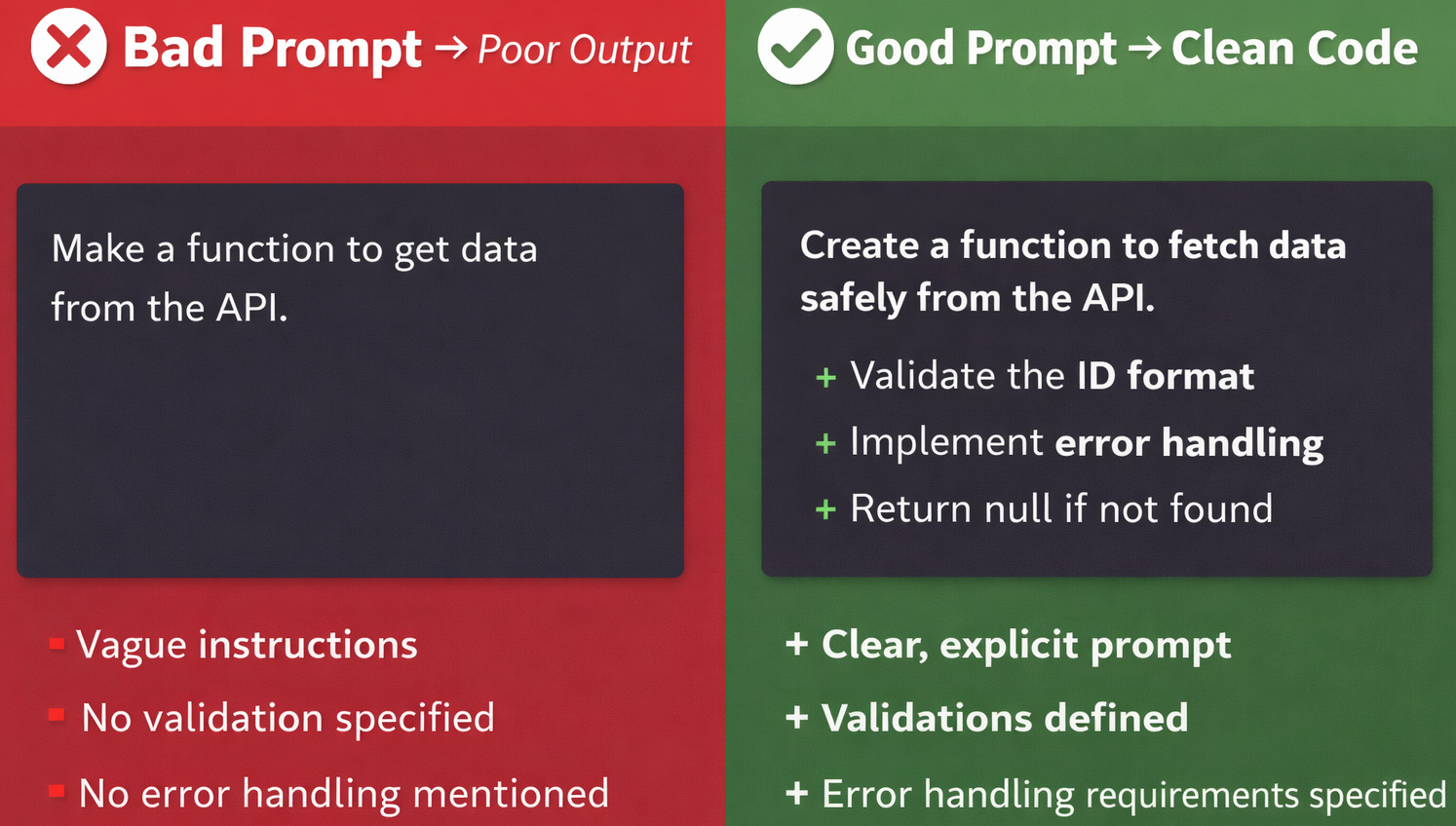
- What specifically is broken
- What is the expected behavior
- What limits or requirements exist
- What are the established coding standards to follow
Efficient prompt engineering removes this ambiguity through structure, context, and clarity.
Why AI Often Generates Bad Code: The PCTF Framework
When the prompt doesn’t follow the PCTF Framework (i.e., Persona, Context, Task, and Format), the chances of failure are high.
Person: To Define the Role of AI
It’s important to inform AI of the role it has to assume. This enables the model to adopt the right depth, tone, and approach.
Bad Prompt: Write a function to validate email addresses
Good Prompt: “Act as a senior backend engineer with expertise in data validation. Write a robust email validation function for a production fintech application.”
- Code quality (senior vs. junior approach)
- Security considerations (fintech requires extra rigor)
- Best practices (production-ready standards)
Context: Give Relevant Background
The AI needs to comprehend the environment, limits, and requirements. It is especially needed in coding tasks that depend a lot on architectural decisions.
Bad Prompt: “Why isn't this function working?”
Good Prompt: “This JavaScript function should have returned the sum of array like [1,2,3] à6, but instead it has returned NaN. Please check the code and the error and help me understand why it is not working.”
- Language
- Framework
- Version (if relevant)
- Error message
- Expected behavior
- Actual behavior
- Code snippet
With these details (context), you have ensured that you have converted guesswork into efficient logical reasoning.
Task: Be Very Specific and Break it Down
Divide the complex tasks into clear, manageable tasks. Confusing requests will produce confusing results.
Don’t ask the tool to generate an entire feature in one prompt.
- Generate component skeleton
- Add state management
- Integrate API
- Add error handling
- Optimize performance
You’ll achieve cleaner output and better control.
Format: Clarify the Desired Result
Inform the AI exactly what you want; this includes documentation level, code style, specific patterns to use, or test coverage.
One example of this: Provide only the Java method in a code block. Do not add any explanation.
Or, if you want the output to be easier to understand, you should input a prompt like:
“Explain this Python function step by step and include comments in the code.”
Examples
Here are practical examples you can use.
Example 1: Backend API
Prompt: “Act as a senior Node.js developer. Build a REST API using Express and MongoDB for a task manager app. Include authentication with JWT, input validation, and proper error handling. Return code with comments.”
Example 2: Frontend Component
Prompt: “Create a responsive React component using Tailwind CSS for a pricing table with three tiers. Include hover effects and mobile responsiveness.”
Example 3: Optimization
Prompt: “Optimize the following SQL query for performance and explain the improvements.”
Example 4: Debugging Code
Prompt: “This JavaScript function returns undefined. Identify the bug and explain how to fix it.”
Example 5: Refactoring Code
Refactor the code to use modern JavaScript (ES6+).

Input:
var sum = function(a, b) {
  return a + b;
};

Output:
const sum = (a, b) => a + b;

Input:
var multiply = function(a, b) {
  return a * b;

};

Output:
Example 6: Prompts for Test Cases Based on Examples
Write UI test steps in plain English. Provide the test steps in the desired format for an action, based on the examples that are provided below:

Example 1: Action: Login with valid credentials

Steps:
- Open the login page
- Enter username "user1"
- Enter password "pass123"
- Click "Login"
- Verify user is on dashboard

Example 2: Action: Logout

Steps:
- Click on the profile icon
- Click "Logout"
- Verify user is on the login page

Based on the above examples, what would be the steps for the following action?
Action: Add item to cart

Steps:
Additional resource: Best ChatGPT Prompts for Code Generation (With Examples).
Advanced Prompt Engineering Techniques
Once you master the basics, you can use advanced strategies.
Chain-of-Thought Prompting
You specifically ask AI to “think step by step” before providing the final answer. This significantly improves the accuracy for complex issues.
Example:
Problem: Design a rate-limiting system for our public API Prompt: Let's work through this step by step: First, assess the current API usage patterns and constraints:Then, design the rate-limiting strategy:
- Which endpoints receive the highest traffic?
- Are there different user types or plans that need different limits?
- What abuse patterns or traffic spikes have we seen so far?
- What are the current bottlenecks under heavy load?
Finally, implement:
- Choose the right limiting model for each use case (for example, fixed window, sliding window, or token bucket)
- Define limits by endpoint, user, API key, or IP
- Decide where enforcement should happen in the stack
- Plan how to handle bursts, retries, and distributed traffic
For each phase, explain your reasoning, call out tradeoffs, and end with a recommended approach.
- Middleware for request tracking and enforcement
- Storage for counters and expiration
- Fallback behavior when the limiter store is unavailable
- Logging, alerting, and dashboards for monitoring violations
- Accuracy
- Debugging capability
- Understanding
Iterative Refinement
Don’t expect perfect results in one go.
“Make this more efficient”“Simplify the logic”“Add error handling”
Iteration 1: “Build a file upload API that accepts image uploads and stores them.”

Review output, then iterate:

Iteration 2: “Good start. Now add:
- File size validation
- MIME type validation
- Structured error responses
- Upload progress reporting
- Retry handling for transient failures”
- Add presigned upload support
- Implement rate limiting
- Scan uploads before persistence
- Add observability with logs and metrics
- Make storage operations idempotent”
Few-Shot Prompting
Provide examples for better results.
Convert Python code to JavaScript.

Example:

Python:

def greet(name):
  return "Hello " + name
  JavaScript:
  function greet(name) {
    return "Hello " + name;
  }

What would be the JavaScript equivalent of the Python script below?

Python:

def square(n):
  return n * n
Constraint-Based Prompting
Problem: Build a password reset flow for a web application with these constraints:

Requirements:
- Accept email address input and validate format.
- Send a reset link if the account exists.
- Show success and error states clearly.
- Expire reset tokens after a fixed time.
- Let the user set a new password securely.
- Do NOT reveal whether an email is registered.
- Do NOT store reset tokens in plain text.
- Do NOT allow token reuse.
- Do NOT weaken the existing password policy.
- Do NOT skip server-side validation.
Prompt Templates
“Act as a [role]. Write a [type of code] in [language] for [use case]. Include [constraints]. Output should be [format].”
Common Mistakes Developers Make
- Being Too Generic: Generic prompts lead to generic code.
- Ignoring Edge Cases: Always include error handling, validation, and security.
- Not Reviewing Output: AI is not perfect or infallible; always review, test, and validate the output code.
- Overdependence on AI: It is not a replacement for thinking; use it as a tool.
- Ignoring Iteration: The best results are achieved by refining prompts multiple times.
Benefits of Prompt Engineering for Developers
- Increased Productivity: Generate code faster with fewer revisions.
- Better Code Quality: Structured prompts lead to cleaner, more maintainable code.
- Faster Debugging: AI can help identify and fix issues quickly.
- Skill Enhancement: You learn to think more clearly about problems and solutions.
How AI Tools like codeCake are Changing Prompt Engineering
While most developers think of prompt engineering as writing instructions for chat-based AI tools, newer platforms are taking a fundamentally different approach.
One such example is codeCake, an AI-powered development tool. Instead of relying purely on traditional prompts, codeCake uses a concept called Spec-Driven-Development (SDD), a natural evolution of prompt engineering.
From Prompts to Test-Driven Instructions
In traditional AI coding workflows, developers write prompts. With codeCake, the “prompt” becomes a test case written in plain English.
The test case acts as a structured, unambiguous instruction, guiding the AI to generate code that satisfies the requirement.
This approach eliminates one of the biggest issues in prompt engineering: ambiguity.
Beyond Prompts: Multi-Source Context
- Test cases (primary input)
- Ticketing systems like Jira
- Internal documentation (wikis, Google Docs)
- Existing codebases across repositories
This creates a richer, context-aware generation process, far beyond a single prompt.
AI that Works like a Developer
- Generates code based on requirements
- Opens a Pull Request instead of pushing directly to production
- Responds to code review comments
- Iterates until tests pass again
This makes it less of a “code generator” and more of a collaborative AI developer.
Conclusion
Generating better code with AI isn’t about luck; it’s about strategy.
- Get accurate and reliable outputs
- Reduce debugging time
- Improve overall development efficiency
Start with clear, structured prompts. Add context, constraints, and iterate continuously.
Frequently Asked Questions (FAQs)
- What is prompt engineering in coding?
A: It’s the practice of writing structured inputs to guide AI tools in generating accurate and useful code.
- How do I improve AI-generated code?
A: Use detailed prompts, include constraints, and refine outputs iteratively.
- Can AI replace developers?
A: No. AI enhances productivity, but developers are still essential for logic, design, and decision-making.
- What are the best prompts for coding?
A: Prompts that are specific, contextual, and structured with clear requirements produce the best results.
 |