
Why AI-Generated Code Fails in Production
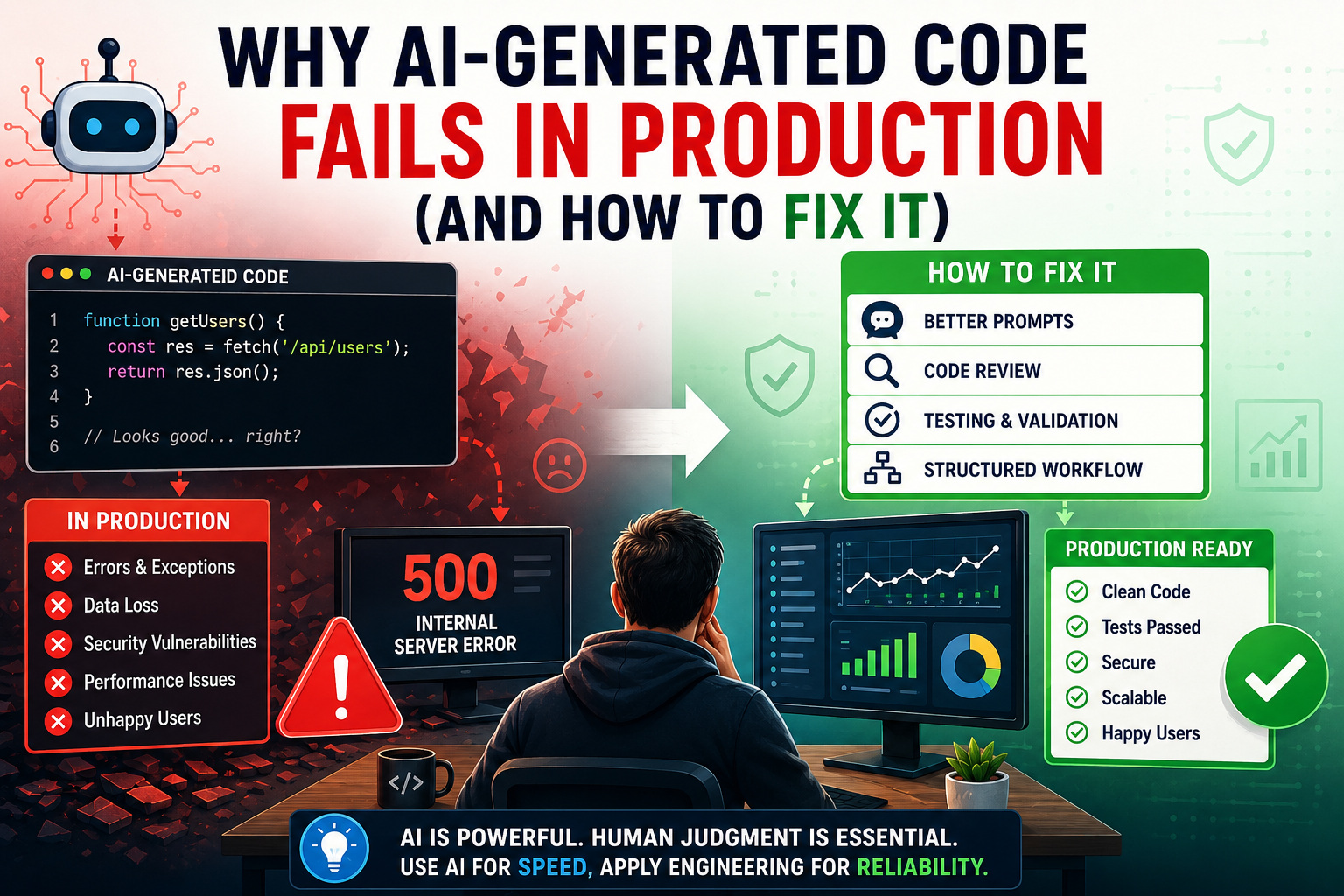
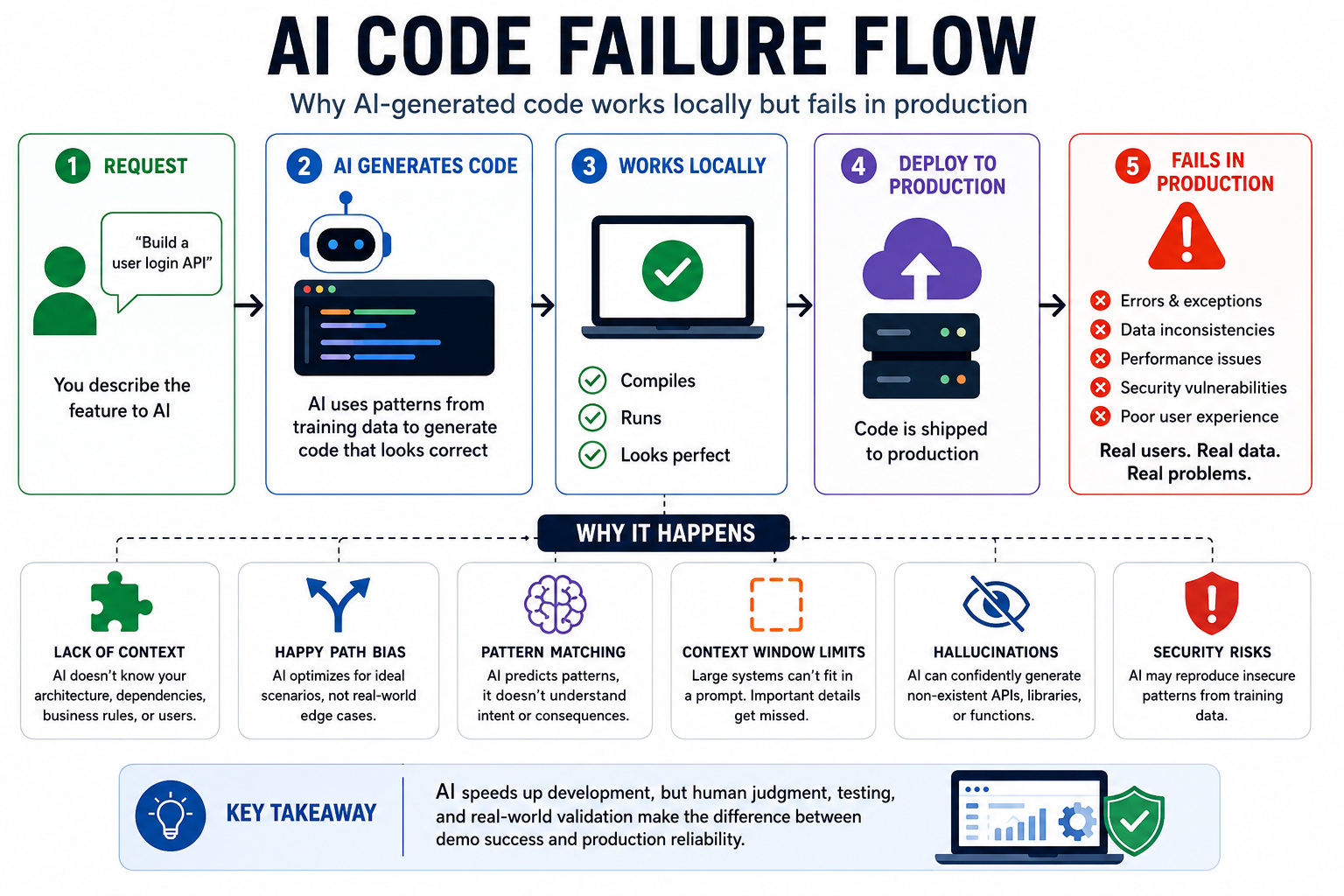
If you have switched to using AI assistants for code generation, this topic is something that you have experienced personally. You have seen it happen. The AI assistant-generated code appears to be perfect and runs well locally. It has clear syntax, logical structure, and even detailed comments that explain what each part does. Since it ran well locally, you ship it to production.
And all hell breaks loose.
Congratulations! You are part of the 84% of users who like to use AI for their development process. But also, unfortunately, you’re also part of the 66% developers who are frustrated with the “almost right” answers of AI assistants.
This blog is definitely not a complaint against AI tools. They are actually helpful and transformative. The blog tries to address an obvious problem and how to solve it, so that users can harvest the maximum efficiency from such tools.
| Key Takeaways: |
|---|
|
The Gap Between a Superb Demo and a Working Code
Say you are working on creating an app. The AI-generated code looks spectacular. You describe your needs, wait for some time (probably minutes), and get something that looks like the final product. A form that submits customer data, a login screen, a clean UI, etc. The demo works perfectly. The screenshots are clear. Most people you share it with are happy.
Then, real customers use it.
Data disappears between sessions. Buttons don’t respond. Random users are able to see private data belonging to other users. The app crashes under even minimal load. Developers try to salvage the situation and attempt to solve the issue. They end up breaking three other functionalities. A few days later, the idea is scrapped, and you are back to building from scratch.
It is a common pattern that has been observed across most AI-generated code in production. 100%? definitely not, but at a number that is alarmingly high and cannot be ignored.
Most of these failures are not due to a single problem. It’s usually a combination of structural issues that were missed during demos and become visible during real scenarios: real data, real users, edge cases, and actual load.
Why AI-Generated Code Fails in Production
Let’s try to understand why such issues happen. AI assistants tend to use big collections of existing code to improve their skills. Now these databases contain both high- and low-quality programming instances. Patterns, not intent, are learned by the model. The system doesn’t have the knowledge about the expected functionality of your app. The system doesn’t have an understanding of your users, system architecture, and the underlying business regulations that guide your application functions.
The AI model is simply working as an advanced version of the autocomplete functionality. The model offers impressive features, which are often limited or inaccurate because it lacks knowledge of your specific scenarios.
The Happy Path Problem
AI tends to generate code around a happy path, i.e., the user will give the right inputs, no delay in API response, and the system behaves in a predictable manner. These are mostly the kind of examples found in training data, and the AI system tends to replicate these.
Unfortunately, real-world development is never about ideal scenarios. It’s about edge cases where users behave erratically, data arrives in unexpected formats, networks fail, or processes collide in race scenarios.
Read: Does Using AI for Code Generation Actually Save Time?
Lack of Context and Context Window Problem
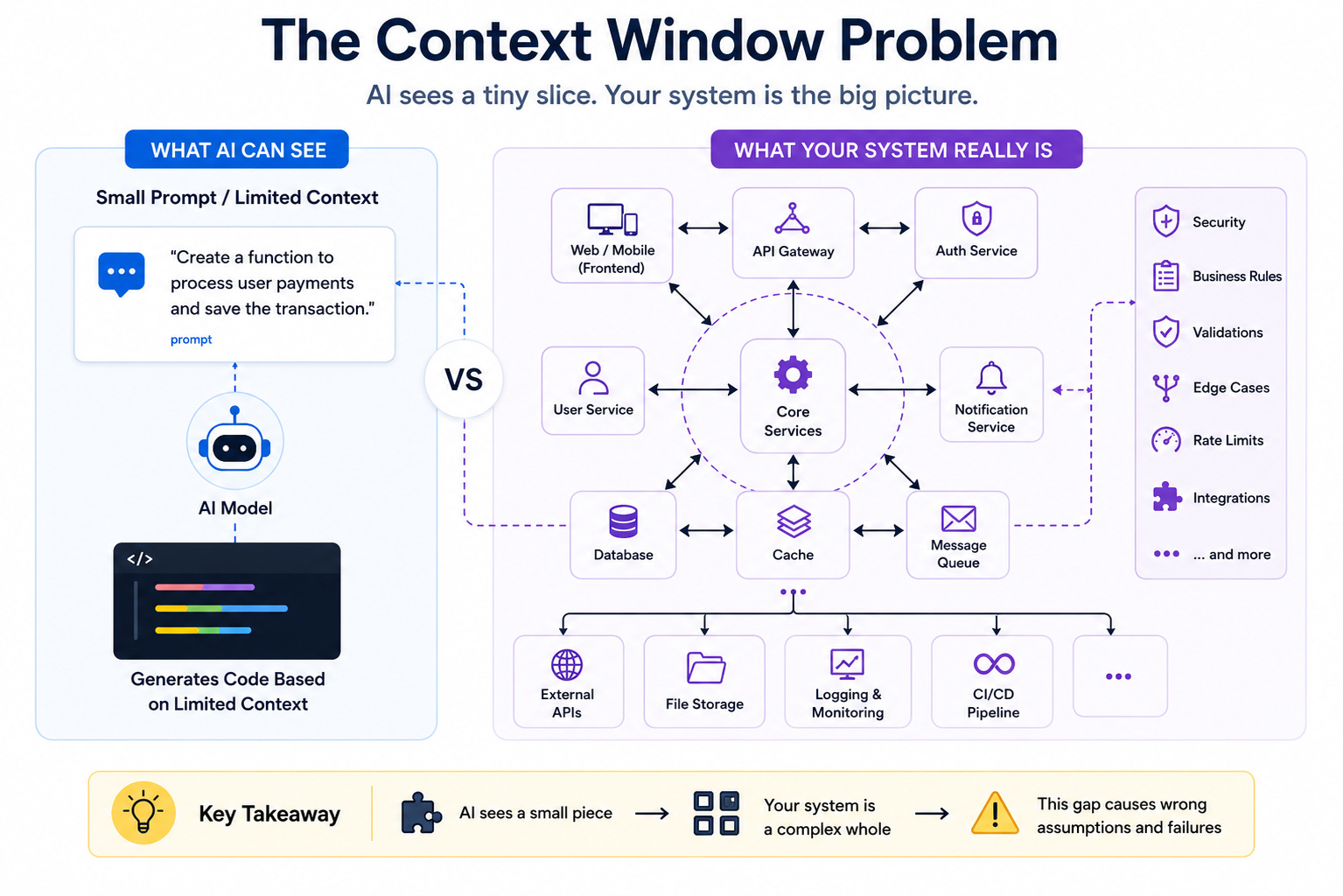
You have been asked to integrate a function into a large product. But you don’t have access to the architecture. You lack knowledge of the dependencies or how the rest of the system works. You will end up making mistakes. Which is exactly how AI behaves.
Even the most updated LLMs don’t have access to the codebase. The obvious answer would be, why can’t we just input the entire codebase if context is the bottleneck? It doesn’t work practically.
We have context size restrictions. An actual product will have thousands of lines of code, multiple services, integrations, and complex dependencies. You can’t try to fit all of these in one single prompt. Also, the problem of hallucinations. LLMs tend to hallucinate after reaching a limit of 100k+ tokens.
The code is not just text; it has a network of relationships, module interactions, architecture, system behavior, and hidden dependencies. Even with the availability of a large chunk of code, the AI model will not be able to fully reconstruct the picture.
Also, the context is always changing. Library versions update, APIs change, and business logic evolves. AI didn’t; it continued to work with a static snapshot that was input at the initial stages.
Read: Context Engineering for AI Agents: A Step-by-Step Guide.
Pattern Matching Problem
Software engineering is not about pattern matching. AI can’t understand code; it only predicts it. As dependence on AI grows, it’s easy to forget that LLMs don’t think like software engineers. They don’t analyze architecture or trade-offs; they simply predict patterns.
This is why AI-generated code looks convincing: it’s syntactically correct and familiar, but lacks real understanding. It may seem fine at first, yet it often ignores system constraints and complex scenarios.
This creates a paradox: we write code faster than ever, but spend more time debugging and fixing AI-generated issues.
Read: How to Review AI-Generated Code from Claude.
Security Vulnerabilities
This is a major but often overlooked issue. Research from Stanford University found that developers using AI coding tools introduced more security flaws, largely due to excessive trust and less code review.
Common risks include SQL injection, poor input validation, hardcoded credentials, and insecure API handling, since AI can unknowingly replicate unsafe patterns from its training data.
Over-Engineering Simple Problems
AI often turns simple tasks into overly complex solutions, adding unnecessary patterns and abstractions. This bloats your codebase, makes maintenance harder, and increases the risk of bugs. It is largely because AI mimics enterprise-level coding patterns, even when they’re not needed.
Hallucinated Libraries and Functions
AI can confidently reference libraries, functions, or APIs that don’t exist. They sound plausible and fit expected patterns, but the code fails when those fake dependencies can’t be found.
ChatGPT, Claude, and Copilot Code Issues Explained
AI tools have made coding faster and easier, but their limitations become clear in real-world development.
ChatGPT is great for generating and explaining code, but it often “hallucinates” APIs or functions that don’t exist, creating a false sense of correctness.
GitHub Copilot speeds up coding with autocomplete, but struggles in large codebases. It lacks big-picture awareness, which can lead to poor patterns and growing technical debt.
Claude provides well-structured and detailed responses, but can either oversimplify or overcomplicate solutions, often requiring extra refinement.
While newer tools aim to act like coding agents, they still don’t make architectural decisions or ensure correctness. Ultimately, AI remains a helpful assistant, not a replacement for developers.
Read: Claude vs. ChatGPT for Coding: Which One Should You Use?
How to Fix AI-Generated Code
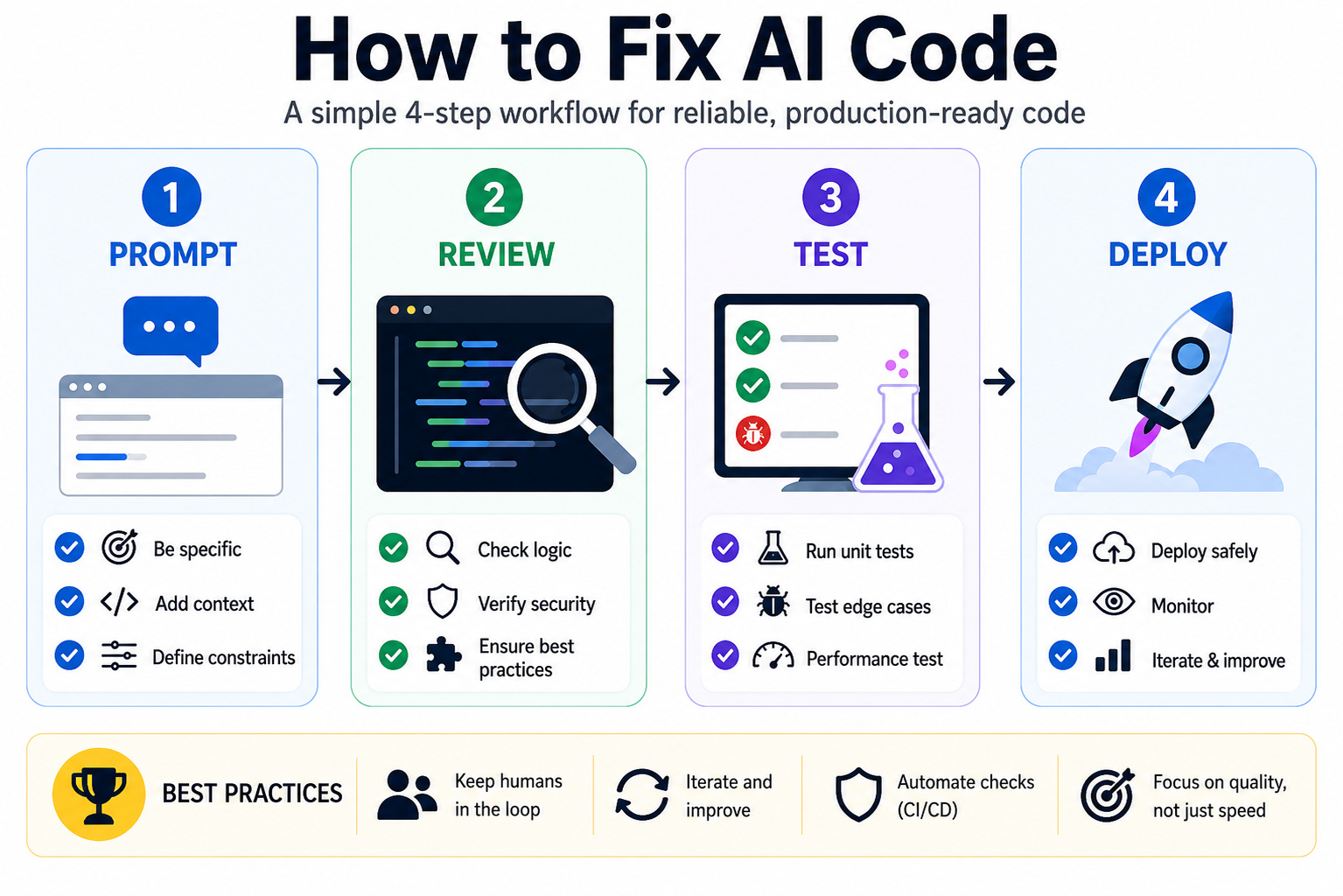
AI-generated code failing doesn’t mean AI is useless. It means it’s being used incorrectly. Most problems come from how it’s applied, not the tool itself.
Improve Your Prompts: Better input = better output. Be specific about context, tech stack, constraints, and edge cases. Vague prompts lead to weak, generic code.
Treat AI Code as a Draft: AI gives you a starting point, not a final solution. Always review it like junior-level code to ensure logic, quality, and best practices. Implement human-in-loop practice.
Fill in What AI Misses: AI often skips essentials like error handling, validation, logging, and edge cases. These must be added manually for production readiness.
Build a Structured Workflow: Use AI within a proper process, code reviews, testing, and CI/CD. With human oversight, AI becomes a powerful tool instead of a risk.
Read: What Is Prompt Engineering: 101 Guide for 2026.
Using Test-Driven AI Tools to Prevent Failures
One of the biggest issues with AI-generated code is that it’s rarely validated before deployment. This is where newer tools are trying to improve the workflow.
- compiles successfully
- passes linters
- meets predefined test cases
This test-first approach helps reduce common issues like hallucinated logic and broken implementations.
More importantly, it keeps humans in the loop by generating pull requests for review—ensuring that AI remains an assistant rather than a decision-maker.
While no tool eliminates risk entirely, approaches like this highlight an important shift: AI code needs validation, not just generation.
Final Thoughts
AI is changing software development forever, but it’s not replacing developers. It’s amplifying them.
The teams that succeed will be the ones who embrace AI for speed, apply human expertise for quality, and build systems that balance both.
If you treat AI-generated code as a starting point rather than a final solution, you’ll unlock its true potential, without risking production failures.
Frequently Asked Questions (FAQs)
Can AI-generated code be used in production?
Yes, but only with proper review, testing, and validation. AI-generated code should be treated as a draft and refined before deployment.
Is AI-generated code secure?
Not always. AI can introduce vulnerabilities like SQL injection, poor input validation, and hardcoded credentials if not carefully reviewed.
What is the “hallucination” problem in AI coding?
It refers to AI generating non-existent functions, APIs, or libraries that appear valid but cause failures during execution.
 |