
What Happens When You Run a Program? Step-by-Step OS Execution Explained
Every day, most people run apps again and again without thinking. We double-click an app, type a command, or deploy a service, and… it runs. It usually works… but not always. What happens behind the scenes stays hidden unless it breaks. Yet when you face a frozen terminal, midnight system failure, or code that refuses to run outside your setup, one thought often creeps in:
What actually happens when you run a program?
This blog explores how a program runs inside an operating system, moving gradually from disk to CPU to termination- all while admitting that rarely is the real world clean or predictable.
As we proceed, attention turns to common failure spots in actual software work, blind spots teams often miss, plus reasons core OS ideas hold weight even when everything lives online.
| Key Takeaways: |
|---|
|
Program vs. Process: The Distinction that Actually Matters
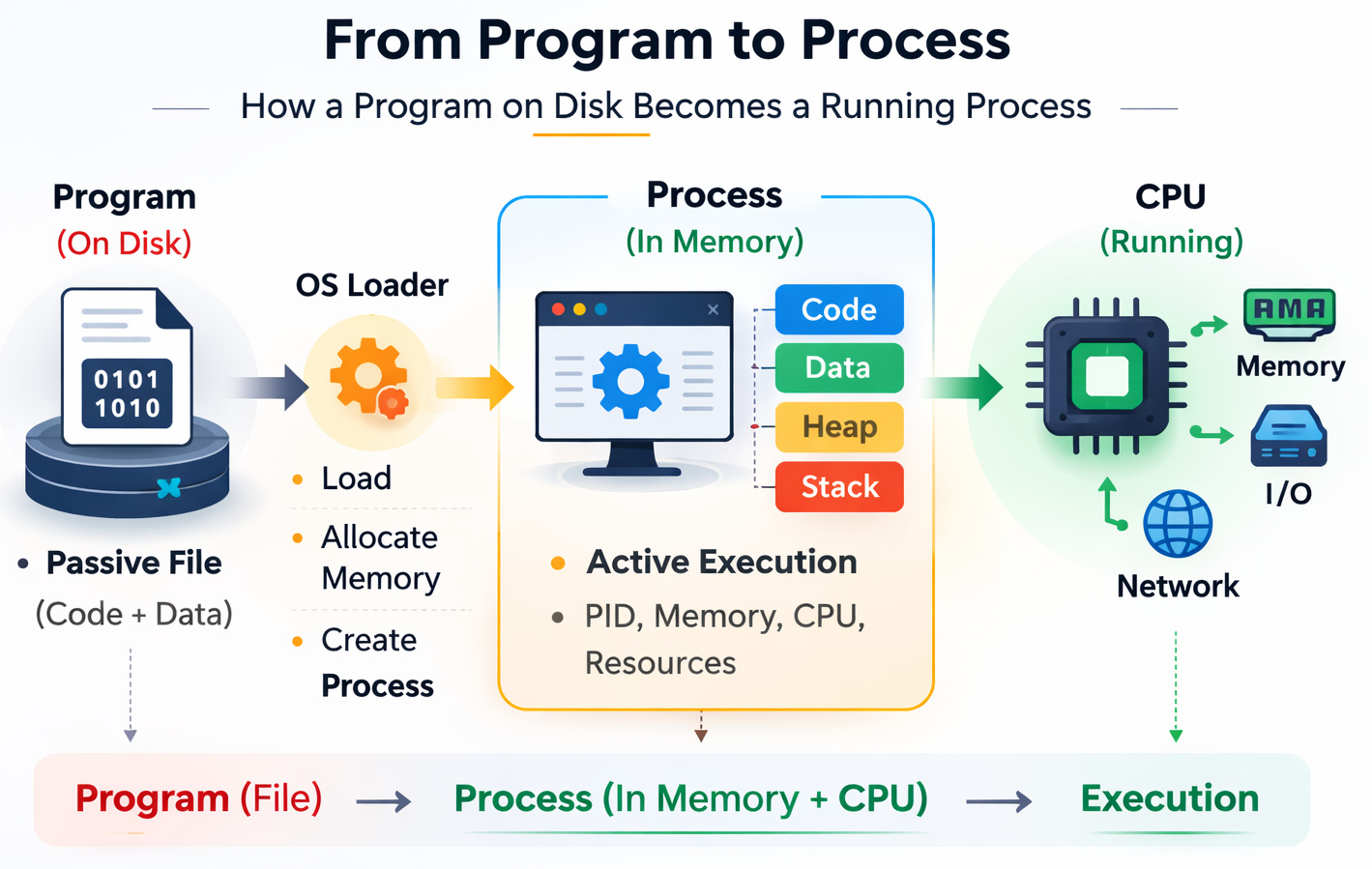
Fresh off the start line, clarity comes first. Let us see what seems obvious but isn’t.
A Program is Not a Process
- Program: A passive file sitting on disk (binary, script, executable)
- Process: A program in execution, with memory, CPU state, and OS resources
This difference is important in real systems.
Restarting an app does not mean that everything has reset at all times. It doesn’t mean that the slate has been wiped clean. Shared memory segments, child processes, zombie processes, or open file handles can continue to persist even after the main process exits.
- Multiple processes
- Each has its own individual memory, scheduling state, permissions, and resource usage.
This difference is the core of process management in OSs.
Read: Process vs. Thread: Key Differences Explained with Examples.
What Happens When You Double-click a Program?
When you open/launch a program, the OS initiates the protocol of setup operations before the app starts running. The OS will validate the executable, load the needed data into memory, ready the process environment, and schedule execution on the CPU.
As the majority of these steps take place in milliseconds, they are often invisible. This is the case unless and until something fails during launch.
Step 1: Execution Request Reaches the OS
- Double-click an app
- Run
./server - Trigger a container entrypoint
The operating system receives a request to execute a file.
- The program is still just bytes on disk
- Nothing is running yet
- No CPU time has been assigned
Most people think “execution” begins here. It doesn’t.
When a Program Never Actually Starts (Pre-Execution Failures)
Before going in depth regarding memory or CPU, it is important to understand that some failures take place before the OS transfers control to the program.
- Missing Execute Permissions: The OS stops execution if the file is not marked executable
- Invalid Binary Format: The executable format is unsupported or corrupted
- Architecture Mismatch: Trying to run software compiled for a different CPU architecture
- Loader Errors: Required shared libraries or runtime dependencies cannot be resolved
Usually, such errors are difficult to debug. This is because the app process may stop before initialization or when logging starts. This is why programs often exit immediately, without a proper error message.
Step 2: Program Loading into Memory
- Reads the executable file format
- Maps sections into memory (code, data, libraries)
- Prepares the runtime environment
Typical memory regions include:
| Memory Segment | Purpose |
|---|---|
| Text/Code | Executable instructions |
| Data | Global & static variables |
| Heap | Dynamic memory allocation |
| Stack | Function calls, local variables |

This might seem fine in theory, yet once you try it out…
- Stack overflows in deeply recursive code
- Heap fragmentation in long-running services
- Shared library version mismatches
And yes, sometimes a program begins running but falls apart so fast before showing anything.
Execution Doesn’t Start at main() (and that Matters)
A truth plenty of coders miss entirely.
Got straight to work without touching main().
- The language runtime initializes needed libraries and runtime state.
- Static and global variables are initialized in memory.
- Global constructors run in languages like C++.
- The process environment and startup arguments are readied.
Once initialization is finished, control is shifted to the program’s entry point.
Problems during this stage are cumbersome to debug, as crashes can take place before app logging or error handling is fully initialized.
Dynamic Linking: The Step Where Programs Often Fail Before Starting
When a program relies on shared libraries, things can go wrong in one more place.
What the OS Does During Program Startup
- Resolves shared library dependencies
- Loads needed libraries into memory
- Maps function symbols and memory addresses
- Wrong library versions are being loaded at runtime
- Missing
.so(Linux) or.dll(Windows) files - ABI (Application Binary Interface) incompatibilities between compiled components
These dependency problems are a common reason why software behaves differently across development, testing, and production environments. Containers help bring down some of this inconsistency by packaging dependencies together; however, runtime compatibility issues can still take place.
Step 3: Process Creation and the PCB
Once memory is ready, the OS creates a process.
- A unique Process ID (PID) is assigned
- A Process Control Block (PCB) is created
- Process State: If the process is ready, running, waiting, or terminated
- CPU Register Values: Execution context needed to continue the process later
- Memory Mapping Details: Information about the process address space and allocated memory
- Open Files and I/O Status: References to files, sockets, and active I/O operations
The PCB enables the OS to monitor and handle process execution.
Process execution also has measurable overhead. Building a process needs memory allocation, PCB setup, address space initialization, and resource tracking. In high-scale systems, excessive process creation can heighten startup latency and scheduling overhead. This is one reason thread pools and worker reuse models are usually used in production systems.
Processes Rarely Run Alone
Processes often lead to child processes to manage additional tasks or parallel work. The OS handles these parent-child relationships as part of process management.
- A parent process terminates before its child processes
- Child processes are not cleaned up correctly
- Process supervisors restart services without handling existing children
- Orphan Processes: Embraced by the init/system process
- Zombie Processes: Terminated processes whose exit status has not been collected by the parent process
These problems can result in unnecessary resource usage and process table exhaustion in long-running systems.
Program Execution Lifecycle in the Operating System
Once created, the process enters its lifecycle.
Process States Explained
| State | What It Means |
|---|---|
| New | The OS has created the process and is initializing required resources before execution begins. |
| Ready | The process is loaded into memory and waiting in the scheduler queue for CPU time. |
| Running | The CPU is actively executing the process instructions. |
| Waiting / Blocked | The process is paused until an external event completes, such as disk I/O, network response, or user input. |
| Terminated | The process has finished execution or has been stopped, and the OS begins releasing its allocated resources. |
The above is not mere academic trivia; these states drive performance.
When things actually run, they often fail because…
When too many processes sit in “waiting” due to slow disks, network requests crawl, or locks hold things up, plenty of tasks just pause. That delay piles up, threads starvation, and time runs out.
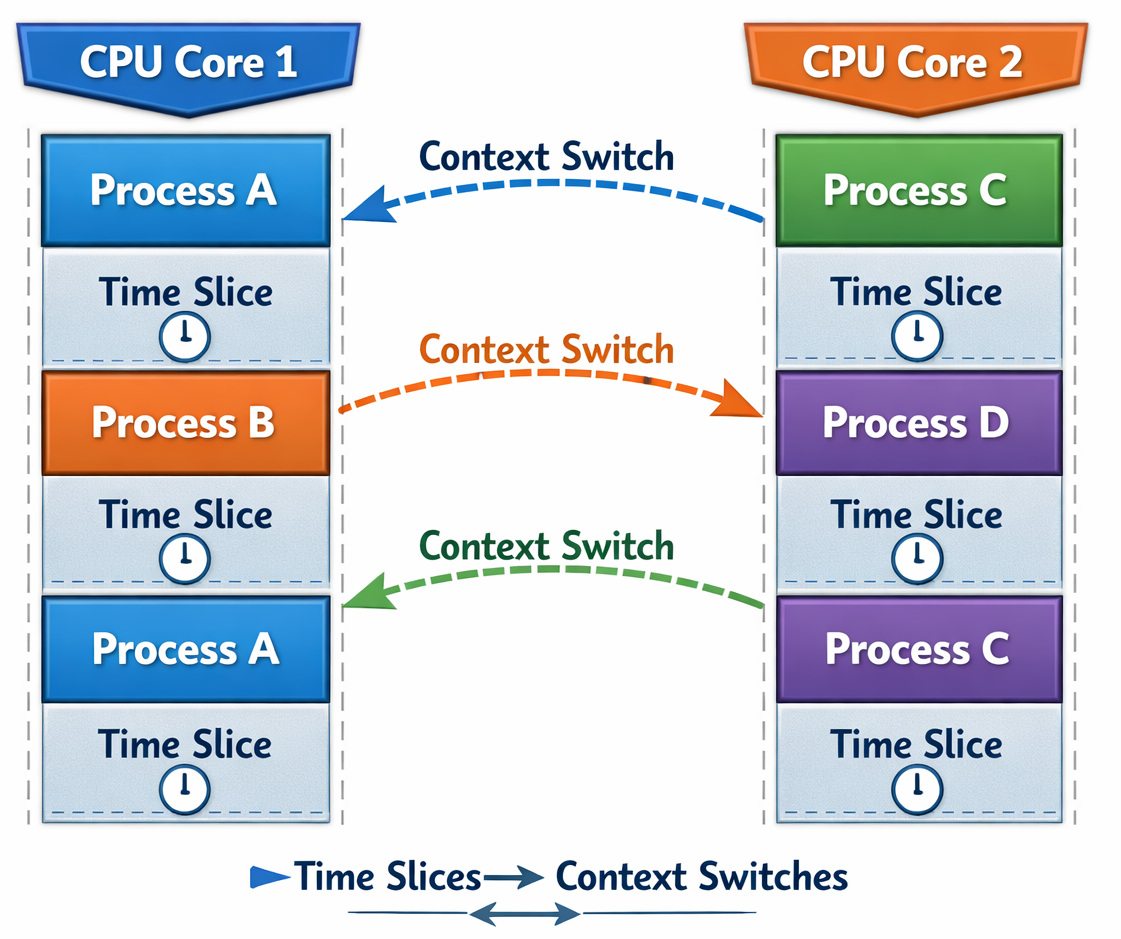
Step 4: CPU Scheduling and Dispatch
Your program does not own the CPU.
- Selects a runnable task from the ready queue
- Assigns it a short CPU time slice
- Temporarily pauses it when the time slice expires, or a higher-priority task needs the CPU
This scheduling mechanism enables multiple applications to run concurrently on the same processor.
Context Switching Explained
- Saves the current process state to its PCB
- Loads another process’s state
- Resumes execution elsewhere
| Pros | Cons |
|---|---|
| Enables Multitasking: Multiple apps can share CPU time, it allows users to execute programs simultaneously. | CPU Overhead: Saving and restoring process state during context switches consumes processor time. |
| Fair Resource Sharing: The scheduler distributes CPU time across processes to avoid one task from monopolizing the processor. | Cache Invalidation: Switching tasks can decrease CPU cache efficiency, increasing memory access latency. |
| Responsive Systems: Interactive applications continue to be usable because the OS regularly switches between running tasks. | Harder Debugging: Concurrent execution brings in timing-related problems like race conditions and deadlocks. |
This might seem neat when planned, yet once you try it out, things shift.
- High thread counts hurt throughput
- Async models do better than naive threading approaches
- CPU-bound tasks scale poorly with threads
Step 5: How the CPU Executes a Program
- Fetch instruction from memory
- Decode instruction
- Execute instruction
- Update program counter
- Repeat
Billionfold, this cycle repeats itself. Over and over again, execution takes place. Repetition defines its nature.
print("Hello") sets off:- Dozens of instructions
- Multiple system calls
- Context switches
When you’re debugging code, it often fails here…
People forget that every abstraction leaks. Cache misses, branch mispredictions, and memory latency suddenly matter when latency budgets get tight.
Your Program Doesn’t Get All Its Memory Up Front
Programs view virtual memory, not physical memory.
- Cold Starts Spike Latency: Initial requests may be slower while memory pages and dependencies are loaded into RAM
- Page Faults Stall Execution: Pauses execution temporarily when needed memory pages are currently unavailable in physical memory
- Unexpected OOM (Out of Memory) Kills Happen: The OS may kill processes when system memory becomes critically low
This explains first-request slowness and sudden crashes under load. Heavy pressure reveals weak spots without warning.
Read: Paging vs. Segmentation: Difference Between Memory Management Techniques.
Step 6: Interacting with the Operating System
Apps run in user mode, where direct access to hardware and secured system resources is limited. Operations like reading files, memory allocation, creating processes, or sending network data need the program to make system calls to the OS kernel.
- Execution switches from user mode to kernel mode
- The kernel conducts the requested privileged operation
- Control returns to the application
- File I/O operations
- Network communication
- Process and thread creation
- Memory allocation requests
System calls bring in overhead because each switch between the user space and kernel space needs extra CPU work. In high-performance systems, excessive syscall frequency can decrease throughput and increase latency. Techniques such as I/O batching, asynchronous operations, and zero-copy networking are often used to reduce this overhead.
Step 7: Blocking, Waiting, and I/O Reality
- It enters the blocked state
- CPU is freed for other processes
- It resumes when the event completes
Sounds efficient, right?
- Blocking Calls Inside Asynchronous Code: A blocking operation can pause the execution thread and decrease the scalability advantages of async processing.
- File Descriptors Leak: Files, sockets, or connections remain open longer than needed, thus exhausting available system resources
- Slow Network Operations: Delayed responses from external services can block request handling and increase latency across the full pipeline.
These problems are common sources of performance degradation in distributed and I/O-heavy applications.
Signals: When the OS Interrupts Your Program
- Ctrl+C sends a signal
- Containers stop via signals
- When a program ends smoothly, it often relies on how signals are managed
This might seem doable at first glance, but in practice, it can change: cleanup often doesn’t run, and data is lost. That’s the reason shutdown bugs are so common.
Step 8: Program Termination
- It finishes normally
- It crashes
- It is killed externally
- Reclaims memory
- Closes files
- Releases CPU structures
Yet, cleanup does not happen right away. Here are the termination types.
| Termination Type | Common Issue | Explanation |
|---|---|---|
| Normal exit | Memory not flushed | Buffered data may not be fully written to disk or network storage before the process exits. |
| Crash | Corrupted state | Unexpected termination can leave files, transactions, or shared state incomplete or inconsistent. |
| Forced kill | Leaked shared resources | Resources such as locks, sockets, shared memory, or temporary files may not be released properly. |
- Zombie Processes: Closed child processes remain in the process table until the parent collects their exit status.
- Locked Files: Resources remain unavailable as file locks were released incorrectly.
- Post Exhaustion: Network ports remain occupied by stale or wrongly closed connections.
These problems are frequent in long-running servers, distributed systems, and containerized environments.
Compiled vs. Interpreted Execution: A Practical Comparison
| Aspect | Compiled Programs | Interpreted Programs |
|---|---|---|
| Startup | Faster | Slower |
| Flexibility | Lower | Higher |
| Debugging | Harder | Easier |
| Deployment | Binary-based | Runtime-dependent |
Failures happen when…
Some teams think one model works everywhere. Yet high-frequency trading systems lean toward code that compiles into machine format. Rapid iteration tools favor interpreted runtimes.
Whatever the OS sees, it runs. How does it handle each? That depends. Different paths, same start.
Why Understanding OS Execution Helps You Decide Better
A good understanding of how the OS runs programs helps explain frequent performance and reliability problems in production systems.
- Should this workload use processes or threads?
- Why does the application slow down under high concurrency?
- Why are startup times inconsistent across environments?
- Why does latency increase during heavy I/O activity?
- Containers vs. VMs: Compromises in isolation, startup overhead, and resource usage
- Threads vs. Async Models: Differences in scheduling, scalability, and blocking behavior
- Fork vs. Spawn: Process creation cost and memory handling characteristics
- Debugging high CPU or memory usage
- Identifying hurdles caused by scheduling or I/O waits
- Understanding crashes during startup or shutdown
- Improving application scalability under load
Many application-level issues are typically connected to how the operating system manages processes, memory, and CPU time.
A Real-Life Example
A backend team scaled an API by increasing worker processes. However, performance got worse.
- Each worker created multiple threads
- Context switching exploded
- The CPU spent more time switching than working
It turned out the problem had nothing to do with hardware.
The issue was caused by excessive process and thread scheduling overhead. As the number of runnable threads increased, the operating system spent more CPU time performing context switches and scheduler management instead of executing application logic. Bringing down this concurrency improved throughput and stabilized response times.
Final Thoughts
- Makes you debug faster
- Design more realistic systems
- Avoid “magic thinking” in architecture
Operating systems are least bothered by trends or frameworks. They mean nothing to the system underneath.
What matters most? How things run, how much space they take, what the processor handles, plus how long it takes.
Once that execution pipeline clicks, “mysterious” bugs start making sense.
Frequently Asked Questions (FAQs)
- Why does my program work in the terminal but fail as a service?
A: This almost always comes down to execution context.When a program runs as a service:
- Environment variables may be different
- The working directory may change
- User permissions are often restricted
- Signals behave differently
One limitation teams often underestimate is how much programs rely on implicit context. Hardcoded relative paths and missing environment checks are common failure points. - What’s the difference between a process and a thread when a program runs?
- A process has its own memory space and OS resources
- A thread shares memory within a process but has its own execution context
Why this matters in real projects:- Processes are safer but heavier
- Threads are faster but easier to break with shared state
In real systems, this usually breaks when teams assume threads behave like isolated processes-and then debug race conditions for weeks. - Can two running programs affect each other even if they’re “separate”?
A: Yes, more often than people expect.Programs can interfere via:
- CPU scheduling contention
- Shared memory pressure
- Disk and network I/O bottlenecks
- System-wide limits (file descriptors, ports)
This sounds isolated on paper, but in practice… noisy neighbors are a real problem, especially in containerized or multi-tenant systems.
 |