
Virtual Memory in Operating Systems: How It Works (With Simple Examples)
Not long ago, computers came with barely any RAM at all. A breakthrough arrived when the IBM System/360 showed something new: memory didn’t have to stay within actual machine boundaries. Over time, this approach grew into what we today call virtual memory.
These days, you’ll find this idea running nearly all current operating systems, whether it’s Linux, Windows from Microsoft, or Apple’s macOS.
Today’s software, browsers, and IDEs often use hundreds of megabytes or even gigabytes of memory. When there’s no virtual memory built into the operating system, these programs wouldn’t even launch on most typical computers.
In real projects, memory behavior is often misunderstood until something crashes. I’ve seen developers blame performance issues on algorithms, only to later discover that memory paging was the real culprit.
| Key Takeaways: |
|---|
|
Understanding Virtual Memory in OS
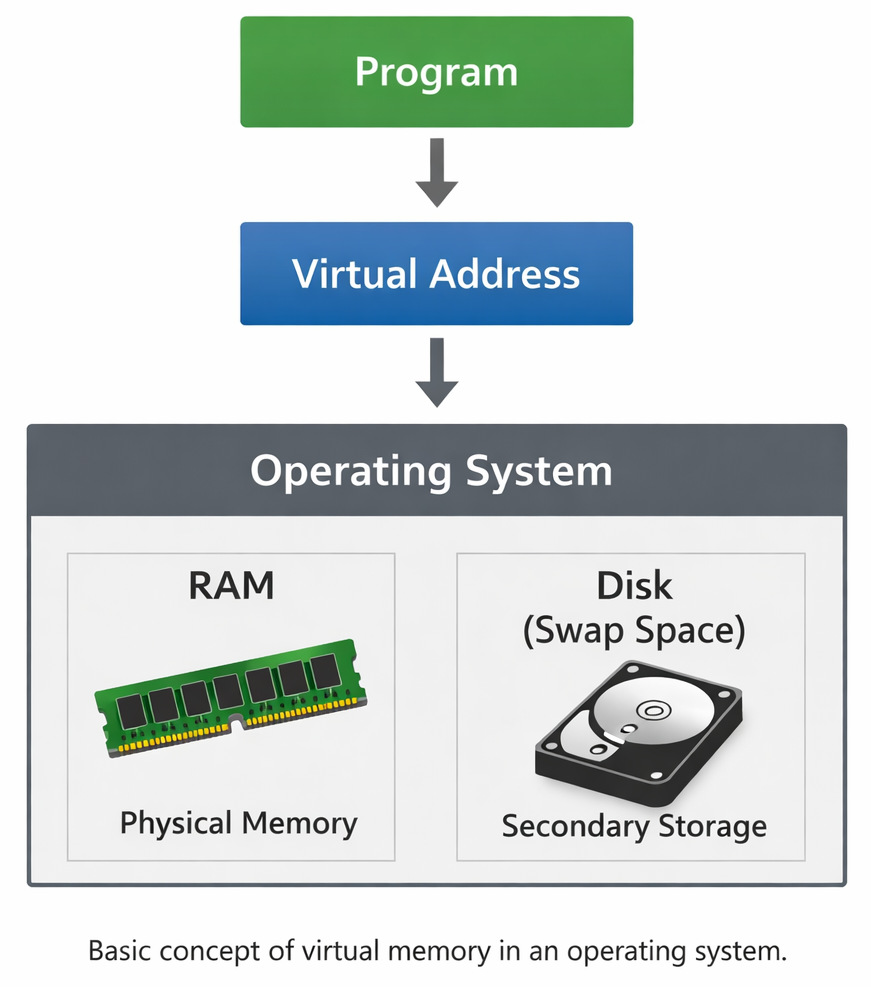
Inside every operating system, virtual memory works by letting programs use more memory than the physical RAM installed in the system. Instead of loading an entire program into RAM, the operating system loads only the parts that are currently needed.
Parts that aren’t actively used are stored temporarily on disk (usually in swap space or a page file).
This illusion of a large memory space is created by the operating system.
So, what is virtual memory?
Virtual memory is a mechanism that allows an operating system to extend RAM using disk storage so that larger programs can run efficiently. Running smoothly becomes possible even when physical RAM fills up.
A more formal definition of virtual memory is:
Virtual memory is a memory management technique where logical memory addresses used by programs are mapped to physical addresses in RAM, with inactive data stored on disk. Behind each click, mapping happens quietly – logical spots turn into physical ones through invisible redirection. When tasks pause, their data slips out to disk, freeing up active zones without shutting anything down.
It’s this simplification that allows today’s computers to juggle multiple tasks at once.
How Virtual Memory Works in Operating Systems
Truth is, RAM isn’t something programs have direct access to.
Virtual addresses shape how things move behind the scenes.
Hardware known as the MMU turns these addresses into physical addresses. Physical locations emerge when the MMU steps in to convert them. What looks like abstract labels becomes actual memory spots through the work of the MMU.
The translation is handled automatically by the operating system.
A typical workflow follows this pattern:
Program → Virtual Address → Address Translation → Physical RAM
This layer of abstraction is important because it gives every program its own address space.
Here’s how I break it down with a simple analogy.
Think of this massive library. Your desk space is small. Would you bring all the books in the library to your table? No. You will pick only the books you want to use. Once done reading, that book is returned, and you pick the next lot.
This is pretty much what you get when virtual memory runs.
Pages and Frames
Pages and frames: it is necessary to know about these two ideas to understand how virtual memory works. Virtual memory divides data into blocks called pages, while physical RAM is divided into frames.
Each page is mapped to a frame in memory.
Here’s a simple example.
Suppose a system has:
| Component | Size |
|---|---|
| Physical RAM | 16 KB |
| Page size | 4 KB |
| Frames available | 4 |
Now imagine a program that needs 32 KB of memory.
Pretty obvious that the entire program can’t fit into RAM.
Instead, only four pages are loaded into memory at any given time. The rest remain on disk until required.
Example:
| Virtual Page | Frame in RAM |
|---|---|
| Page 0 | Frame 2 |
| Page 1 | Frame 0 |
| Page 2 | Frame 3 |
| Page 3 | Frame 1 |
When the program requests Page 4, a page fault occurs.
The required page is then loaded from disk.
How expensive disk access can be is a factor that is often missed by teams. RAM access happens in nanoseconds, but disk operations are thousands of times slower.
Sounds good on paper, but in practice, excessive page faults can slow a system dramatically.
Virtual Memory Diagram
The relationship between physical memory, virtual addresses, and page tables is highlighted in a virtual memory diagram.
Program

↓

Virtual Address

↓

Page Table Lookup

↓

Frame Number

↓

RAM Physical Location
Page Fault

↓

Load Page from Disk

↓

Update Page Table

↓

Resume Execution
This process is repeated continuously while the program runs. Again and again, the steps return when active. This translation occurs at such speed that most people barely register it.
Techniques to Handle Virtual Memory in OS
When discussing types of virtual memory in an OS, two primary techniques are usually mentioned.
| Type | Description |
|---|---|
| Paging | Memory is divided into fixed-size pages |
| Segmentation | Memory is divided into logical segments |
Paging is the most widely used approach in modern systems.
Segmentation was popular previously because it allowed memory to be organized based on logical program components like stack, heap, and code.
Segmentation is rarely used alone in the existing operating systems.
Instead, many systems combine both techniques.
Read more: Paging vs. Segmentation: Difference Between Memory Management Techniques.
Virtual Memory Example
Let me walk through a simple virtual memory example.
Let us take an example of photo editor software that operates inside the machine.
- 1.2 GB memory
- RAM inside the machine stands at 8 gigabytes
- Several apps are active at once
Most of the time, just the parts that are running go into RAM. The system leaves the rest aside until needed. What matters, only those pieces get space in RAM. Everything else waits quietly.
Frozen features, say, unused filters or editing tools, stay on disk. They don’t vanish; they just sit.
Case in point.
I once worked on a data processing tool where large datasets were loaded into memory. Everything worked fine during testing.
Yet once live, performance started lagging within several hours.
Only later did it become clear – memory thrashing had begun. The OS had started swapping memory pages heavily.
This is when virtual memory changes from silent support to an annoying bottleneck.
Advantages of Virtual Memory
- Larger Programs can Run: Running programs larger than available memory
- Better Multitasking: Multiple processes can run simultaneously
- Memory Isolation: Each process has its own space.
- Efficient RAM Usage: Only active pages remain in RAM
Flexibility jumps when computers use virtual memory. Freed-up space gets reused smarter once tasks finish, and the system handles memory without wasting chunks.
Now, the turn of tradeoffs.
When lots of pages are swapped from disk to RAM, the system can collapse into what’s known as thrashing.
Once things go sideways, speed tanks – believe it.
Read: Process vs. Thread: Key Differences Explained with Examples.
Applications of Virtual Memory
There are multiple applications of virtual memory in real-world computing.
Large software systems count on it heavily.
- Web browsers running multiple tabs
- Virtual machines and containers
- Large data analytics tools
- Game engines handling large worlds
Honestly, game engines are a great example.
Open-world games often load environments dynamically while the player moves. That behavior is possible due to the support of virtual memory techniques.
Only the necessary game assets are loaded into memory.
Managing Virtual Memory
- Page tables
- Page replacement algorithms
- Translation lookaside buffers (TLB)
Page replacement algorithms decide which page should be removed from RAM when new data needs to be loaded. The choice shapes how smoothly everything runs later.
FIFO shows up often, yet LRU pops in just as much. The Optimal method? It appears, too, though harder to pull off.
Here’s a thing most people miss. Memory pages are constantly moved between disk and RAM.
I’ve personally seen developers spend days optimizing code, only for it to later dawn on them that memory allocation patterns were the real problem.
Read: Memory Allocation in OS: First Fit vs. Best Fit vs. Worst Fit Explained.
Final Thoughts
What if virtual memory wasn’t just some hidden part of your OS? It quietly shapes how computers work today. A single system can run many programs at once because this behind-the-scenes tool adjusts on the fly.
When missing, systems juggling multiple tasks find it hard to handle big apps. Smooth program performance happens because memory seems bigger than it is, despite limited hardware resources.
Yes, it’s not a silver bullet solution.
Heavy reliance on virtual memory can surprise teams with slow speeds (the cost of disk-based memory operations). Even so, the thought holds a kind of quiet genius.
Truth is, spotting virtual memory in action changes your view. Suddenly, the quiet effort inside operating systems shows itself more clearly. You see engineering complexity where you saw nothing before.
Frequently Asked Questions (FAQs)
What is the difference between virtual memory and physical memory?
A: Physical memory is the actual RAM installed in your computer. Virtual memory, on the other hand, is an abstraction created by the operating system to make it look like more memory is available than physically exists.
The mapping between the two is handled by the system automatically
What happens during a page fault in virtual memory?
A: A page fault happens when a program tries to access a page that isn’t currently in RAM.
- The program execution pauses.
- The operating system loads the required page from disk.
- The page table is updated.
Execution is then resumed.
What is thrashing in virtual memory?
A: Thrashing occurs when the system spends more time swapping pages between disk and RAM than executing programs.
It’s one of those things that doesn’t show up during small tests.
But in production systems with heavy workloads, thrashing can suddenly appear.
System performance is severely degraded when thrashing occurs.
 |