
Interprocess Communication (IPC) in OS: Pipes, Shared Memory, and Message Queues
Long ago, during the early days of Unix, a quiet truth emerged among developers. Not every program must work alone. This shift sparked ideas such as linking tasks through pipes.
cat logs.txt | grep error | sort
Three different processes. One task. Each process communicates with the others without delay. Not two, but three moving pieces work together. The task finishes because they connect clearly.
Famously, a core idea behind Unix shows up in this quote by Douglas McIlroy: “Write programs that do one thing well. Write programs that work together.”
Without a way for processes to talk, that plan falls apart fast. Interprocess Communication (IPC) makes it possible.
Today’s setups seldom let processes run in isolation. Instead, databases exchange information with caching services. Meanwhile, web servers stay in step through silent updates from background workers. Video pipelines transfer data between encoding and streaming processes. Communication must hold steady across separate processes that live in different memory spaces.
Funny enough, most beginners overlook this: processes can’t directly access each other’s memory. Designed that way on purpose – the OS keeps things separate to prevent chaos. Data sharing? That needs special pathways built right in.
Here’s how processes communicate inside an operating system.
- Pipes
- Shared memory
- Message queues
First one, the pipes tackle it fast. The second one, shared memory, cares more about safety. The third one keeps things basic. Every method handles the task its own way.
Truth is, figuring out each tool isn’t the hard part. Knowing when to pull the right one matters more.
People rarely talk about how a poor IPC pick chips away at speed over time. Truth is, I watched it slow things down on actual projects.
So, let’s explore how pipes, shared memory, and message queues work in practice.
| Key Takeaways: |
|---|
|
Interprocess Communication (IPC) in Operating Systems
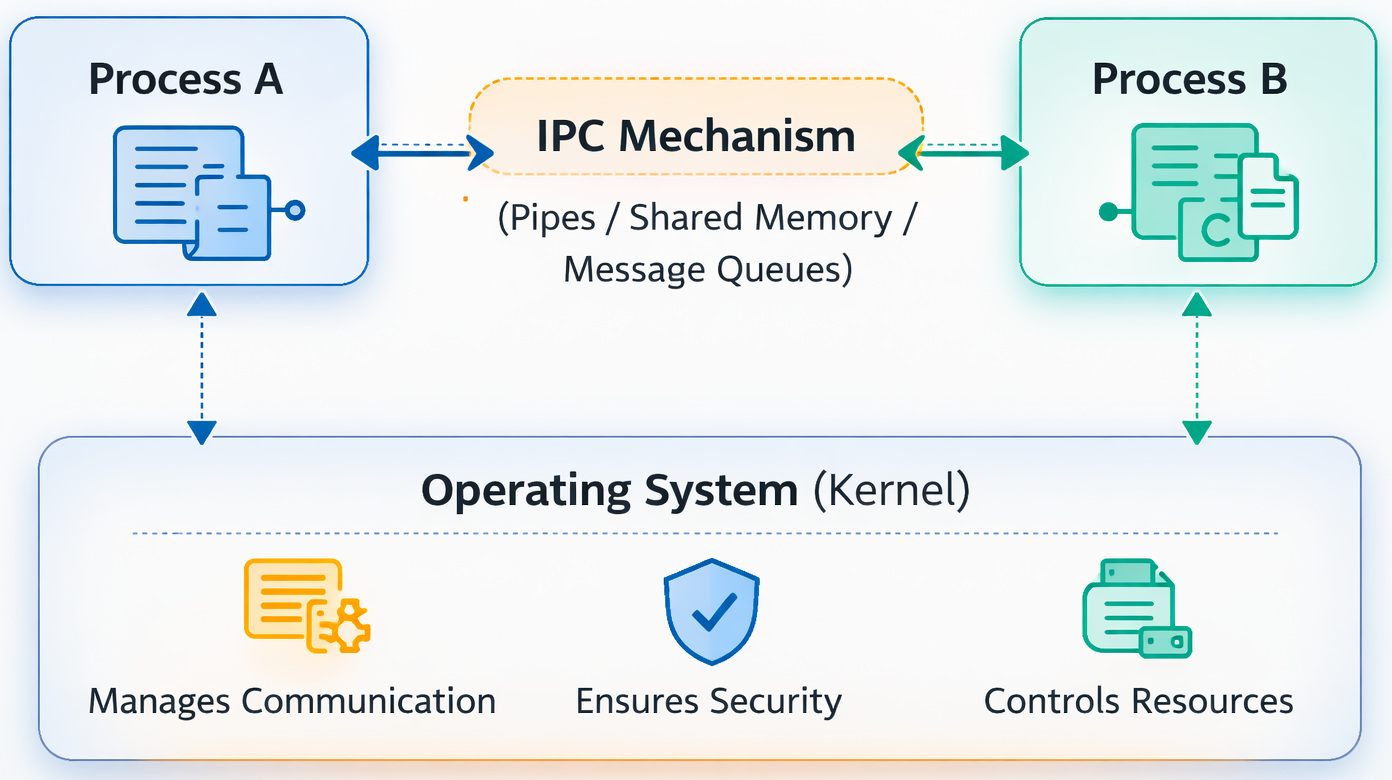
Processes exchanging data and coordinating their execution, that is what Interprocess Communication really means. Ways they share information often shape how smoothly they run together. One talks, another listens, messages pass back and forth. Coordination happens when signals move between them.
Processes live in isolated memory zones. Crashing apps can’t drag down the system thanks to this wall. But it also creates a challenge.
If two processes need to cooperate, data must be transferred safely through the operating system. Data is usually copied through kernel-managed structures when IPC mechanisms are used. Information flows through protected paths when tasks exchange details.
- Shared memory communication
- Message passing communication
Pipes and message queues are classified as message-passing categories. They pass messages between parts. On the other hand, shared memory works by letting pieces use the same space in memory (i.e., shared address space model).
Good in theory, but in practice, communication design decisions also impact the reliability of data exchange, CPU overhead, and system latency.
What slows things down more than expected? It’s the growing cost of inter-process communication as workloads increase. Teams tend to overlook that piece until it bites them.
Let us take an example of a real-life scenario, imagine in a web application, the web server process may communicate with a logging service or cache manager using IPC mechanisms to exchange requests and status information. A request received by the web server can be forwarded to another process for authentication, caching, or background processing. These processes exchange data continuously to keep the application responsive and synchronized.
The choice of IPC mechanism impacts system performance, latency, and scalability. A communication model that works efficiently for a few processes may become a bottleneck when hundreds of processes communicate concurrently.
(And yes, debugging IPC bugs can be… unpleasant.)
Read: Process Control Block (PCB) Explained.
Pipes in Operating Systems: A Basic IPC Mechanism
Pipes are one of the oldest and simplest IPC techniques. Pipes allow processes to send a stream of data to another process.
A pipe functions as a unidirectional data channel:
Process A→Pipe→Process B
A single process writes data into the pipe. Following that, a different process reads it.
The pipe buffer is managed internally by the operating system kernel. Easy to work with, pipes fit right into command-line routines. Their rise came from how smoothly they connect tasks step by step.
Types Of Pipes In IPC
Pipes come in two main kinds when it comes to how operating systems handle them.
Anonymous Pipes
Anonymous pipes are usually used between related processes, such as a parent and its child process. Communication flows without names, just shared access. Hidden pathways form during execution. Usually, they vanish once tasks finish. Such channels work only among linked pairs. No external reach is allowed by design.
They are created using system calls like pipe() before the process forks.
Example: A child process comes into play when a parent brings it to life – both hold onto the same pipe descriptor. Through that channel, data flows from parent to child, carried without fuss. What the parent sends, the child picks up moments later. Connection stays open just long enough for messages to pass through.
With this setup, tightly connected pipes can communicate accurately.
Yet here’s the snag.
Anonymous pipes exist only while the processes are running.
The pipe disappears once the process terminates.
Named Pipes (FIFO)
Named pipes handle what regular ones cannot.
Present within the system like special files, these files link unrelated processes. Communication happens through them, even when programs run on entirely different tracks. Named pipes are called using system calls like mkfifo() or mkfifo.
Processes can open the pipe file and send or receive data. Not every step happens at once – some read first, others write later. Connection timing shapes how info flows back and forth.
Data written into the FIFO is buffered by the kernel until it is read.
Named pipes pop up more often than you’d think in everyday software. While they might sound odd at first, these tools quietly handle tasks behind the scenes across common programs.
For instance, log processing pipelines sometimes use named pipes so multiple tools can read incoming logs in real time.
How Pipes Succeed (and Fail)
Pipes work best if messages go one after another, clear and straight. When steps are followed in order, they make things run without fuss.
- shell pipelines
- stream processing
- parent-child process communication
Truth is, this next bit matters most.
Might look fine in theory – yet once communication gets complicated, things fall apart fast. Pipes just can’t handle the mess that comes when people juggle too many threads at once.
Read: Process vs. Thread: Key Differences Explained with Examples.
For example, when multiple processes write to the same pipe simultaneously, message interleaving can take place. Pipes handle data as a continuous byte stream rather than separate messages, so parts of different writes may get mixed if synchronization is not implemented properly. This becomes highlighted under heavy concurrency, where faster processes may overwrite or interrupt slower ones. In real systems, the result is often corrupted logs, incomplete output, or difficult-to-debug communication errors.
Bug like that? It steals your time without warning.
Shared Memory in IPC: Fastest Communication Method
Faster results usually come from shared memory IPC when moving quickly matters most.
Shared memory lets processes access the same memory region directly, rather than passing messages through the kernel. The route shifts – no middle layer involved.
Process A
\
Shared Memory Segment
/
Process B
Both processes map the same memory segment into their address space. Their separate spaces link to it in unison.
The shared memory segment is created and managed by the operating system.
Once the shared memory segment is mapped, processes can read and write data directly without continuously transferring it through the kernel. This brings down message copying overhead and minimizes kernel involvement during communication. Thus, shared memory is typically considered the fastest IPC mechanism for high-performance process communication.
Shared Memory IPC Explained
- The operating system builds a shared memory segment using system calls such as shmget() in Unix/Linux systems. During creation, memory size and access permissions are specified.
- Processes attach the shared memory segment to their address space using shmat(). Once attached, all involved processes can access the same memory region directly.
- Data is written by one process and read by another without repeated kernel-level copying. This decreases communication overhead greatly compared to pipes or message queues.
- Synchronization mechanisms such as semaphores or mutexes are usually implemented to prevent race conditions during concurrent access.
- After communication is complete, processes detach the shared memory segment using shmdt().
- Finally, the shared memory segment is de-allocated using control operations such as shmctl() to release system resources and prevent memory leaks.
Permissions play an important role in shared memory IPC because unauthorized processes must be prevented from accessing sensitive data. Access control settings are implemented by the operating system during segment creation and attachment.
For example, in video processing systems, shared memory is commonly used to transfer large image frames between decoder and encoder processes efficiently. Using pipes in such cases would need repeated copying of large data blocks, increasing CPU and memory overhead.
Shared memory cuts that out. Frames stay in one memory location, and both processes access them.
Synchronization primitives are usually required to prevent simultaneous writes.
This is where things get toughest.
The Hidden Problem with Shared Memory
While shared memory offers high-speed communication, it does not include built-in synchronization mechanisms. Multiple processes can access the same memory region simultaneously, which creates the risk of concurrent read and write conflicts.
To maintain data consistency, processes must coordinate access manually using synchronization primitives such as semaphores, mutexes, or spinlocks.
Without the right synchronization, race conditions can take place. A race condition occurs when two or more processes attempt to change the same memory location at the same time, leading to unpredictable results or data corruption. For example, one process may overwrite data while another process is still reading or updating it.
These issues become more common in high-concurrency systems where multiple processes access shared resources regularly. Synchronization logic is usually implemented alongside shared memory to ensure safe communication between processes.
Projects see it fall apart once traffic spikes hit live systems. Sometimes the system just can’t keep up under pressure.
Finding errors in race conditions? Rarely a good time.
(Those are the ones I stayed up late trying to catch)
Message Queues in IPC- Structured Communication
Message queues offer a more organized communication model. Structure replaces clutter when pieces connect step by step.
Instead of streams or shared memory, processes exchange structured messages through a kernel-managed queue.
Process A —> Message Queue —> Process B
Once a message is sent to the queue, it remains stored in kernel-managed memory until the receiving process fetches it. The operating system manages message buffering, ordering, and delivery internally. Unlike pipes, which treat communication as a continuous byte stream, message queues preserve clear message boundaries, meaning each message is received as an independent unit. This decreases the risk of message interleaving and simplifies synchronization between communicating processes.
Message Queues in Operating Systems
- creating queues
- sending messages
- receiving messages
- deleting queues
A single note might carry metadata like what type or priority.
Funny how it opens up new patterns to communicate.
Example: Imagine a task processing system where workers pick up jobs from a queue. A message lands on the screen, the worker handles it, and then moves to whatever comes next. Following completion, another message appears, worked through without delay, the sequence continues. Once done, attention shifts – next item waits, picked up right away.
This model is widely used in distributed systems today.
Surprisingly, today’s tools, such as RabbitMQ and Apache Kafka, build on almost identical queue-based communication ideas. Though different in design, they both rely heavily on queuing methods. One might expect variation, yet their core approach stays close.
(Of course, they operate at a much larger scale.)
Practical Strengths of Message Queue IPC
- Asynchronous Communication: Sender and receiver processes do not need to run simultaneously. Messages remain stored in the queue until the receiving process retrieves them.
- Message Ordering: The queue system usually maintains message order based on arrival time or priority, ensuring predictable communication flow.
- Structured Communication: Unlike pipes, message queues preserve message boundaries, so each message is received as an independent unit without data mixing.
- Process Decoupling: Communicating processes remain loosely coupled because they communicate through the queue instead of communicating directly.
- Priority-Based Processing: Many message queue systems support message priorities, enabling critical tasks to be processed before lower-priority requests.
However, message queues also bring in trade-offs. Since the operating system kernel handles the queue, messages must be copied between process memory spaces and kernel memory. This increases communication overhead compared to shared memory IPC.
Under heavy workloads, a high volume of message traffic can lead to queue bottlenecks, leading to increased latency and reduced system scalability.
Pipes vs. Shared Memory vs. Message Queues
Choosing the right IPC mechanism depends on system requirements.
Here is a simplified comparison.
| Feature | Pipes | Shared Memory | Message Queues |
|---|---|---|---|
| Communication Model | Byte stream | Shared memory region | Structured messages |
| Speed | Moderate | Very fast | Moderate |
| Synchronization | Minimal | Required | Managed partially |
| Complexity | Simple | High | Medium |
| Kernel Involvement | Yes | Minimal | Yes |
Control versus simplicity is the biggest difference.
Shared memory gives maximum performance but needs careful synchronization. Pipes are extremely simple but limited in flexibility.
Message queues balance structure with reliability.
Choosing the Right IPC Mechanism for Real Systems
Truth is, picking an IPC method isn’t just about tech specs. Architecture decides it.
A practical comparison.
| Scenario | Best IPC Choice |
|---|---|
| Streaming command-line tools | Pipes |
| High-performance data transfer | Shared Memory |
| Asynchronous task processing | Message Queues |
Consider this: at times, a high-frequency trading setup uses shared memory because it cuts latency. Memory that is accessed quickly often makes the difference when every microsecond counts.
Meanwhile, a background job processing platform will likely use message queues.
What about shell tools? For those, pipes work just right.
Here’s a key point, though.
However, process scaling introduces unexpected communication bottlenecks in real scenarios.
Sometimes the fix is switching IPC mechanisms.
Sometimes the architecture must change entirely.
Final Thoughts
One thing about IPC – it looks simple when you start.
Data moves between processes. That is how it works. One passes to another without stopping. But when the systems scale, the IPC pick has a serious impact on performance, reliability, and scalability. Each IPC method was designed to solve a different communication problem. The point is not to be a master of one; it is important to know when each can be used.
And choosing the right IPC mechanism is the difference between a system that scales and one that quietly collapses under its own complexity.
Frequently Asked Questions (FAQs)
- What is Interprocess Communication (IPC) in an Operating System?
A: Interprocess Communication (IPC) refers to the mechanisms that enable processes to exchange data and coordinate execution in an operating system.Processes run in separate memory spaces, so direct data access isn’t possible. Instead, communication channels like pipes, shared memory, and message queues are used.
- Which IPC mechanism is the fastest: Pipes, Shared Memory, or Message Queues?
A: Shared memory is generally the fastest IPC mechanism.This happens because processes access the same memory region directly, avoiding repeated kernel copying.
- Why do shared memory systems require synchronization?
A: Shared memory allows multiple processes to access the same memory region simultaneously.Without coordination, two processes might modify the same data at the same time.Data corruption can occur if concurrent writes are not properly controlled.
 |