
Journaling File Systems Explained: How OS Prevents Data Loss
Have you ever noticed that your computer recovers cleanly after a sudden power loss or discharge without having to rebuild the entire file system? Or have you noticed your Linux system reboots quickly without any issues?
Well, you have to thank Journaling for this. Let us find out more about journaling file systems.
| Key Takeaways: |
|---|
|
This article explores journaling file systems in depth, what they are, how they work, and how they help prevent data loss.
Why Data Loss Happens?
Let us first understand why data loss happens and the root causes of data corruption before jumping into understanding journaling.
- Update the file metadata (file size, timestamps)
- Allocate or free the disk blocks
- Write actual file data
In the event that the system crashes or loses power midway during these operations (these operations are not instantaneous), the file will be left in an inconsistent state. For example, there may be a file that exists but points to invalid disk blocks, allocated space is not recorded, or a directory entry pointing to corrupted files.
- Remove the directory entry of the file.
- Release the inode to the pool of free inodes.
- Return all disk blocks to the pool of free disk blocks.
Now, if a crash occurs, say for example, after step 1 or before step 2, the inode released will be orphaned and cause a storage leak. In case a crash occurs between steps 2 and 3, then the blocks previously used by the file cannot be used for new files, as they are not properly released to the pool. This decreases the storage capacity of the file system. If you rearrange the steps, it also does not work, resulting in further inconsistency.
For traditional file systems like early FAT or ext2, there is no built-in mechanism to handle such inconsistencies. Hence, after a crash, the system had to run tools like fsck (file system check), which scans the entire disk. However, this is a slow and sometimes unreliable process.
In general, when file systems are updated, many separate write operations are required for the files and directories to reflect the changes. In the event of a power failure or system crash between these writes, data structures may be left in an inconsistent state.
To prevent these inconsistencies, a journaled file system allocates a special data structure, the journal, in which it records the changes it will make ahead of time.
Next, we will define the journaling file system.
What is a Journaling File System?
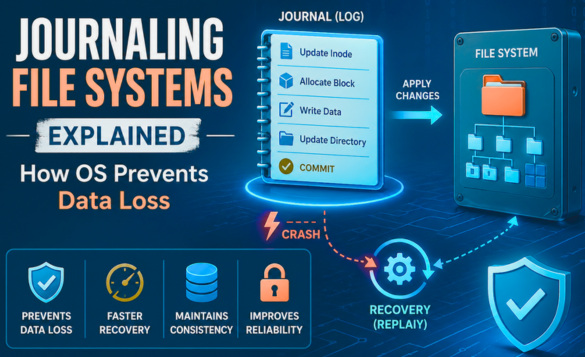
A journaling file system is a type of file system that keeps a special log (called a journal) of changes before applying them to the main file system.
In a journaling file system, the metadata for data (and optionally the data) changes are written to the filesystem journal.
- Prevent data corruption
- Preserve atomicity (data is not divisible)
- Allow quick recovery of data after crashes
- You record what you plan to do
- Perform the action
- Mark it as done
If unforeseen circumstances arise while performing the actions, you can always refer to the list and either finish the task or undo it. This significantly improves the reliability.
You will realize that similar actions take place in journaling file systems as well.
When a system crash or power failure occurs, recovery simply involves reading the journal entries from the file system and replaying changes from this journal until the file system is consistent again.
As already mentioned, these changes are atomic (not divisible), which means they either succeed (succeeded originally or are replayed completely during recovery) or are not replayed at all (are skipped because they had not yet been completely written to the journal before the crash occurred).
It should be noted that journaling does not guarantee the prevention of data loss but only filesystem consistency. Data-in-flight may still be lost depending on the journaling mode.
The Core Concept: Write-Ahead Logging
Write-Ahead Logging (WAL) is the core concept that is at the heart of journaling. It is a foundational mechanism for journaling. It ensures data integrity by recording intended changes to a persistent log before they are committed to the main data files.
WAL guarantees that data can be recovered by replaying the log, ensuring ACID (Atomicity, Consistency, Integrity, and Durability) even in the event of system crashes.
In essence, with WAL, no operation is lost in the middle, and the system always knows what happened before the crash.
Core Principles of WAL in Journaling
- Log-First Approach: The intended changes are never applied directly to the main data files until the corresponding action is safely recorded in the journal on a persistent storage.
- Sequential Writes: The journal/log is an append-only file. The writes are sequential and fast. This significantly improves the performance compared to direct data updates.
- Atomic Transactions: WAL ensures that a transaction is either fully applied (committed) or completely undone (rolled back) during recovery.
How Journaling Works?
Let’s walk through a typical file write operation in a journaling file system:
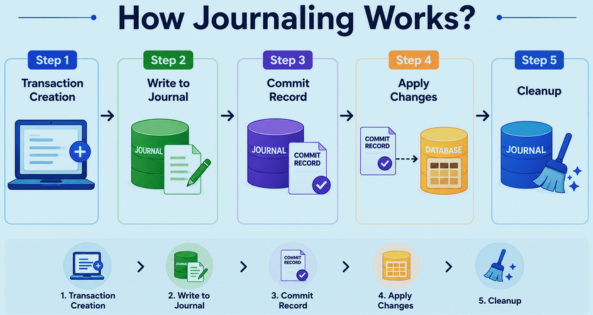
Step 1: Transaction Creation
The OS groups related changes into a transaction (e.g., updating metadata + writing data blocks). This transaction is to be written to the journal.
Step 2: Write to Journal
The transaction prepared in step 1 is written to a special area on disk called the journal.
Step 3: Commit Record
A “commit” marker is written to indicate the transaction is fully recorded in the journal.
Step 4: Apply Changes
After writing to the journal, the filesystem applies the corresponding changes to the real disk locations by updating the actual file system structures.
Step 5: Cleanup
Once the changes are committed and applied, the journal entry is cleared or marked reusable.
If the system crashes mid-commit, on next boot, the filesystem replays the journal and either completes or rolls back the inconsistent operation. This is why journaling greatly reduces FSCK (File System Consistency Checker) times and ensures predictable recovery.
How Journaling Prevents Data Loss
Journaling shines specifically during a system crash. After system crashes, the OS reads the journal during boot. Here, it looks for incomplete or committed transactions.
There are two scenarios that can arise. The OS may encounter a transaction that is not committed (incomplete). In such a case, the system ignores the transaction as no changes were applied. This is a safe state.
The second scenario is that the transaction is committed but not applied. In this scenario, the OS replays the transaction and ensures its consistency.
This process of replaying transactions is called journal replay. It is a critical recovery mechanism in modern OSes (such as Linux with ext4/XFS or Windows with NTFS) that restores file system consistency after an unexpected power failure or system crash.
The OS checks the journal during startup and reapplies completed transactions that are not yet written to the main file system. This ensures there is no data corruption.
Read: NTFS vs. EXT4 vs. FAT32: Best File System for 2026.
Types of Journaling (Journal Modes)
There are three main approaches to journaling. They are also called Journal Modes and are classified according to how journaling file systems behave.
Metadata Journaling (Ordered Mode)
This is also called Ordered Mode. In this mode, only the file system metadata is journaled. The contents of the actual file are not guaranteed to be safe, but the file structure remains intact.
The Process Sequence:
Write data to disk → Write metadata to journal → Commit → Write metadata to final location
As seen in the sequence above, only metadata is written to the journal. The OS, however, forces the actual file data to be written to the main disk before the metadata transaction is committed to the journal.
Metadata journaling is the default mode in many Linux file systems, compromising between safety and performance.
The metadata journaling method is faster and has less disk overhead. It prevents the “metadata points to garbage” problem.
However, metadata is safer than the data. If the system crashes during the data write, the file may be corrupted, but the system structure remains intact.
Some of the use cases for this mode are ext3 (default mode), ext4 default, and XFS.
Full Data Journaling (Journal Mode)
This mode is also known as Journal mode and is the safest but slowest type. It records both the metadata (file structure) and actual data content in the journal. The method offers the highest data safety but decreases the performance as data is written twice.
The Process Sequence:
Write data to journal → Write metadata to journal → Commit → Write to final location
Full data journaling mode writes both data and metadata to the journal first. It then commits the journal entry, and the data is then written to the final location (checkpointing).
Journal mode offers maximum data integrity and protects the system against data loss and file corruption. However, it is slower for many operations since data is written twice.
This journaling method is primarily used to handle critical data, for example, in financial systems.
Writeback Mode
Writeback mode journals only metadata and is the fastest type. It provides the lowest level of safety.
The Process Sequence:
Write metadata to journal → Commit → Write data and metadata to disk (any order)
In this mode, only metadata changes are logged. The order of writing data blocks is irrelevant. This means data is written to the disk in any order, before, during, or after the metadata is committed to the journal.
Writeback mode offers low safety with consistent metadata. Actual data may be garbage. However, it is the fastest with no ordering constraints.
The writeback mode, however, has the weakest consistency. After a system crash, the file may contain old, stale data because metadata was updated without checking if the data was properly written.
This mode is used for non-critical data and scratch disks.
Real-World Journaling File Systems
Real-world journaling file systems significantly improve data integrity and speed up recovery after power failures by writing intended changes to a dedicated data structure called a journal before writing them to the main file system. Primary examples include Linux’s default ext4, performance-oriented XFS, and Windows’ NTFS.
ext3 / ext4 (Linux)
These are Linux standards. Ext3 introduced journaling, while Ext4 improved performance and scalability. Ext4 offers high performance and supports both metadata and data journaling. The default journaling mode for this system is “Ordered,” which balances speed and data safety.
These standards are used widely in Linux distributions.
NTFS (Windows)
NTFS is the standard file system for Windows OS, and it uses metadata journaling to ensure consistency. NTFS uses a transaction log to handle metadata changes and is highly reliable for desktop and enterprise use.
XFS (Linux)
This is a high-performance 64-bit journaling file system often used in Linux for large-scale storage. It is optimized for large files and parallel operations and is known for efficient metadata management.
JFS (IBM)
JFS was originally developed by IBM for AIX and is now open-source. It is used in Linux and is optimized for enterprise servers.
JFS is efficient and lightweight and is typically designed for heavily used systems.
Advantages of Journaling File Systems
- Faster Recovery: With journaling, the OS does not need to perform a long full-disk scan to find inconsistencies. It only needs to check the log, which significantly speeds up the reboot and remount process.
- Reduced Data Corruption: Journaling ensures operations are atomic (all-or-nothing). The file system maintains a journal (WAL) to log intended changes before they are applied. When an unexpected event, such as a shutdown, occurs, the system can replay completed transactions from the log to the file system or undo partial ones, preventing corruption.
- Consistency Guarantees: File system structures remain intact even after crashes. With journaling metadata (data describing files), the metadata remains consistent, even if the user data itself is not entirely saved. This prevents file system structures from becoming broken.
- Improved Reliability: Journaling is especially important for servers and databases, as it enhances their reliability.
- Efficiency in Small/Medium Operations: Journaling consolidates multiple updates into a single transaction, particularly for metadata-heavy operations (creating/deleting files), improving performance.
Limitations of Journaling
- Performance Overhead: Writing to the journal means extra disk operations. Journaling often requires “double writing”, first to the journal, then to the main file system, which reduces performance.
- Not a Backup Solution: Though journaling prevents corruption, it does not recover lost files.
- Hardware Failures: While it helps in crashes and power failures, if the disk itself fails, journaling cannot help.
- SSD Wear: Consistent extra writes can slightly impact SSD lifespan (though modern SSDs handle this well).
- Data Integrity Misconception: Though file system structure remains intact as many systems journal metadata, the file itself might contain corrupted or missing data.
- No Guarantee Against Power Loss: Data can still be lost if a crash happens when the journal is empty or during specific times.
- Resource Usage: Since the journal requires dedicated disk space, typically a fixed-size partition or file, the total available storage is reduced.
Practical Example
Imagine saving a document on the computer. Given that there may be issues such as system crashes or power failures, you need to consider scenarios in which a system may or may not use journaling.
- File (which is to be saved) metadata is updated
- Power fails before data write
- This results in a corrupted file
As a result, the saved document contains corrupted data.
- The save operation is recorded in the journal
- If the system crashes, on reboot, the system replays or discards the transaction
- The end result is that the file system remains consistent
Hence, journaling helps maintain the integrity and consistency of the system.
Future of File System Reliability
- Next-gen Data Integrity (ZFS/Btrfs): Modern file systems are moving away from traditional journaling toward copy-on-write (CoW) systems that use checksums for every data block to detect and automatically repair data corruption (silent bit rot).
- Cloud-native and Distributed Systems: Future systems will prioritize distributing data across multiple nodes (e.g., GFS, HDFS) for high availability and fault tolerance, ensuring data survives node failures.
- Formal Verification: Systems will use mathematical proofs to verify the file system design, guaranteeing they never lose track of data during crashes or power failures.
- AI and Self-healing Automation: AI, being increasingly used for predictive maintenance, can also anticipate storage failures and automate data organization and repair.
Conclusion
Journaling file systems are considered a major leap in how operating systems manage data reliability. By recording intended changes before applying them to the file system, journaling ensures that systems can recover quickly and safely from unexpected failures.
While this may not be a complete solution to all data loss scenarios, journaling significantly reduces the risk of data corruption and provides a robust mechanism for maintaining file system integrity.
As storage technologies evolve, journaling remains a critical building block for newer approaches such as copy-on-write systems.
Frequently Asked Questions (FAQs)
- Does journaling slow down system performance?
Yes, slightly. Journaling introduces extra write operations, but modern systems minimize this overhead, and the reliability benefits usually outweigh the performance cost.
- Can journaling recover deleted files?
No. Journaling ensures consistency but does not act as a backup or recovery system for deleted files.
- Is journaling necessary for SSDs?
Yes. While SSDs are faster and more reliable than traditional drives, journaling still protects against unexpected shutdowns and ensures data consistency.
- How is journaling different from backups?
Journaling prevents corruption during operations, while backups store copies of data for recovery in case of loss or deletion. Both serve different purposes.
- Are there alternatives to journaling file systems?
Yes. Modern file systems like ZFS and Btrfs use copy-on-write (CoW) techniques instead of traditional journaling to ensure data integrity.
Reference Links:
- Memory Allocation in OS: First Fit vs. Best Fit vs. Worst Fit Explained
- What is Thrashing in OS? Causes, Effects, and Solutions
- Process vs. Thread: Key Differences Explained with Examples
- Processes in Operating Systems: Basic Concept, Structure, Lifecycle, Attributes, and More
- Process Control Block (PCB) Explained
 |