
How Docker Works Internally Using OS Features (Namespaces and Cgroups)
Docker is the latest innovation in the software development industry. It has transformed the way modern applications are developed, deployed, and managed. Docker packages applications and their dependencies into lightweight, portable containers, providing consistency across development, testing, and production environments. Unlike traditional virtual machines (VMs), Docker shares the host system’s kernel while maintaining isolation and resource control.
But how many of you know what happens behind the scenes when you use Docker?
This is what is discussed in this article.
| Key Takeaways: |
|---|
|
Understanding the Foundation of Docker
Traditionally, applications were isolated using Virtual Machines (VMs). Each VM included a complete operating system running on top of a hypervisor.
- Application
- Guest OS
- Virtual Hardware
- Hypervisor
- Host OS
- Physical Hardware
However, VMs consume significant resources as each VM uses its own operating system instance.
- Application
- Libraries & Dependencies
- Container Runtime
- Host OS Kernel
- Physical Hardware
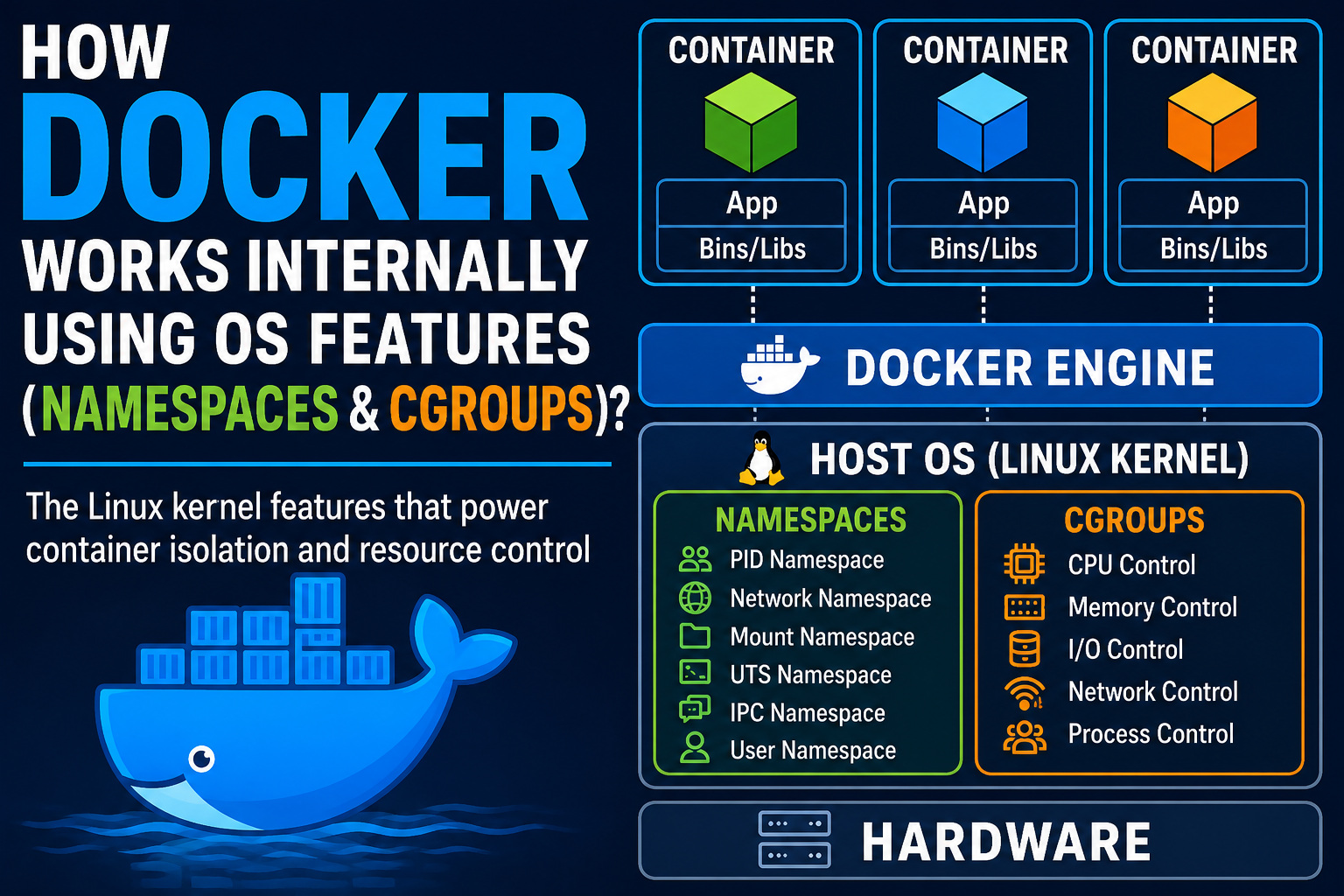
In this approach, Docker virtualizes the operating system environment rather than the hardware. The kernel is shared among multiple containers, and they appear to run independently.
Read the article, What is Docker? to understand more about Docker.
- Namespaces – Provide isolation.
- Cgroups – Provide resource allocation and control
Together, they create the foundation of container technology.
- How File Systems Work: Inodes, Directories, and Disk Structure Explained
- NTFS vs. EXT4 vs. FAT32: Best File System for 2026
- Virtual Memory in Operating Systems: How It Works (With Simple Examples)
Linux Namespaces: Creating Isolation
Namespaces are a Linux kernel feature that provides the illusion of a dedicated operating system by virtualizing global system resources. Namespaces isolate system resources so that processes inside a namespace see only a limited view of the system.
Without namespaces, every process on a Linux system will view the same resources, such as process IDs, network interfaces, and mounted file systems.
When the low-level container runtime (runc) spawns a container, it invokes system calls such as clone() or unshare() with specific flags to isolate the process context from the host.
Docker uses multiple namespace types simultaneously.
1. PID Namespace
The Process ID (PID) namespace isolates process visibility.
Normally, you can use the following command to view all running processes in Linux:
ps aux
But inside a Docker container, processes can only see other processes within the same PID namespace.
For example:
Consider the Host system having the following processes:
| PID | Process |
|---|---|
| 1 | systemd |
| 1200 | nginx |
| 2500 | docker container process |
Now inside the Docker container, these are the processes:
| PID | Process |
|---|---|
| 1 | application |
| 15 | worker process |
| 20 | helper process |
The main application inside the container is assigned PID 1, making it believe it is the primary system init process, even though it has a normal, high-value PID on the underlying host.
This creates process isolation and prevents applications from interacting with unrelated host processes.
2. Network Namespace
In the network namespace, each container has its own networking stack.
- Network interfaces
- Private routing tables
- Firewall rules
- Port configurations
Inside a container, the command ip addr might show the output "eth0 lo".
This way, the container believes it owns these interfaces exclusively.
Docker typically hooks this up to a virtual Ethernet pair (veth) connected to a virtual bridge. The Docker bridge acts as a virtual switch connecting containers to the host network.
- Container-to-container communication
- Host-to-container communication
- Internet access
3. Mount Namespace
This is yet another type of namespace that isolates file system views. In a mount namespace, processes inside a container view a different file system hierarchy than processes on the host.
Processes inside a container see a different file system hierarchy than processes on the host.
/
├── home
├── var
├── etc
/
├── app
├── bin
├── etc
The container does not automatically see the host’s files.
To achieve this, Docker creates a root filesystem from container images and mounts it within a separate namespace.
When a container is started with the following command:
docker run ubuntu
Docker mounts the Ubuntu image as the container’s root filesystem. Thus, the container behaves as if it were using a dedicated Ubuntu machine.
Mount namespace allows Docker to use chroot logic combined with storage drivers like OverlayFS to mount a customized container image without touching the host’s real root filesystem.
4. UTS Namespace
The UTS (UNIX Timesharing System) namespace isolates system identifiers such as Hostname and Domain name. With this, a container can have a specific name (e.g., web-server-01) separate from the host machine name.
Host hostname: production-server

Container hostname: container123

Inside the container:

Hostname will return container123
Thus, the application believes it is running on a separate machine.
5. IPC Namespace
IPC stands for Inter-Process Communication, the way through which processes communicate with each other.
Linux processes communicate using mechanisms such as shared memory, message queues, and Semaphores.
If not isolated, applications could accidentally access each other’s communication channels.
IPC namespaces ensure that processes within a container can access only IPC resources in the same namespace.
In other words, the IPC namespace prevents processes inside the container from accessing shared memory segments, message queues, or semaphores belonging to host processes or other containers.
6. User Namespace
In user namespaces, container user accounts are mapped to different host accounts, facilitating user and group ID isolation.
Using a user namespace, a process running with standard root privileges inside a container can be mapped to an unprivileged user on the host system, reinforcing security boundary layers.
For example, inside a container, root may appear to have UID 0.
However, on the host, its UID is 100000, which might actually be mapped.
- Container root ≠ Host root
- Additional security is provided
- Privilege escalation risks are reduced
User namespaces are especially important in multi-tenant environments.
- Processes in Operating Systems: Basic Concept, Structure, Lifecycle, Attributes, and More
- Process Control Block (PCB) Explained
- Process vs. Thread: Key Differences Explained with Examples
- What Happens When You Run a Program? Step-by-Step OS Execution Explained
How Docker Combines Namespaces?
Docker utilizes a standard kernel system to combine Linux namespaces and apply a full set of isolated environment flags to a single new process. When you launch a container, low-level APIs are invoked by Docker’s underlying runtime to spawn a process wrapped in multiple independent namespace dimensions simultaneously. This orchestration results in a cohesive, isolated sandbox environment that mimics a standalone virtual machine while remaining a standard host process.
docker run nginx
Create PID namespace
Create Network namespace
Create Mount namespace
Create UTS namespace
Create IPC namespace
Create User namespace
Start nginx process
This results in a process that behaves as if it were running on its own independent Linux system.
How Docker Combines Them Under the Hood
- API Request: The Docker Engine CLI, communicating with the Docker daemon (
dockerd) passes the request tocontainerd. - Low-Level Execution: The container runtime (
runc) issues the fundamentalclone()orunsharesystem calls. - Combining Flags: The container runtime
runcpasses multiple namespace flags simultaneously into the system call to bundle multiple layers of isolation into a single container.
bash
# Conceptual representation of how the kernel groups these flags for a new process
CLONE_NEWPID | CLONE_NEWNET | CLONE_NEWNS | CLONE_NEWIPC | CLONE_NEWUTS
However, remember that isolation alone is not sufficient. Containers must also be prevented from consuming excessive resources.
This is where cgroups become essential.
Linux Cgroups: Resource Management
While namespaces hide the rest of the system, they may not be able to stop a malicious process from consuming the physical hardware of the host system. To limit the hardware usage by imposing hard limits and grouping processes together, Docker employs Cgroups.
Control Groups (cgroups) are a Linux kernel feature that limit, monitor, and account for resource usage. They map straight to a pseudo-filesystem located at /sys/fs/cgroup/.
When resource arguments are configured during runtime, Docker acts as an interface manager. These limits are directly written into specific subsystem files by this interface manager.
- CPU
- Memory
- Disk I/O
- Network bandwidth
- Process counts
CPU Management
Docker can use Cgroups to restrict CPU usage.
docker run --cpus="1" nginx
This command limits the container to approximately one CPU core. Cgroup CPU scheduling parameters are internally configured by Docker, and the Linux scheduler ensures that the container receives only its allocated CPU share.
- Prevents CPU starvation
- Distributes workload fairly
- Helps with better multi-tenant hosting
Reference Link: Understanding CPU Scheduling: Types, Metrics & Examples
Memory Management
Memory isolation is one of the most important cgroup features. With this, Docker imposes strict caps on RAM utilization.
docker run -m 512m nginx
Ensures that the container receives a memory limit of 512 MB. If the container exceeds this limit, the kernel’s Out-Of-Memory (OOM) killer mechanism will automatically terminate the processes to preserve host stability.
Without any memory limits, a single container could crash an entire server by exhausting RAM.
Reference Links:
- Memory Allocation in OS: First Fit vs. Best Fit vs. Worst Fit Explained
- Paging vs. Segmentation: Difference Between Memory Management Techniques
- Journaling File Systems Explained: How OS Prevents Data Loss
Block I/O Control
Disk access is one resource that containers often compete for. Using Cgroups, Docker can regulate storage bandwidth.
docker run --device-read-bps
docker run --device-write-bps
Both these commands are used to limit disk throughput, preventing one container from monopolizing storage resources.
Process Limits
A container could potentially create thousands of processes. However, Docker allows process restrictions.
docker run --pids-limit 100
prevents process explosion attacks and accidental resource exhaustion.
Docker restricts the maximum number of concurrent child processes that can be forked within that cgroup.
Docker Images and Copy-on-Write
You have seen that namespaces and cgroups provide isolation and resource control. However, Docker also needs a way to manage file systems efficiently.
Docker uses the Copy-on-Write (CoW) mechanism that maximizes storage efficiency and speeds up container spinning by sharing underlying read-only image layers across multiple instances.
Thus, when you launch a container, Docker does not copy the entire base image filesystem. Instead, it overlays a thin, writable layer unique to that container.
If a container attempts to modify the original files, they are duplicated into this writable layer.
Ubuntu Base Layer
     +
Python Layer
     +
Application Layer
Read-Only Layers
-----------------
Ubuntu
Python
Application

Writable Layer
--------------
Container Changes
This is done using the CoW technique.
- Original file remains unchanged.
- The modified version is copied into the writable layer.
- Container accesses the modified copy.
- It reduces the storage usage
- It helps with faster image distribution
- It aids in efficient container startup
Conclusion
Docker intelligently combines existing Linux kernel features using the two fundamental building blocks, Namespaces and Cgroups.
Namespaces separate processes, networks, file systems, hostnames, and users to create isolated environments. In this, each container appears as an independent machine.
Cgroups control resource consumption, ensuring that containers cannot monopolize memory, disk, CPU, or other system resources.
When a Docker container launches, Docker configures multiple namespaces for isolation, applies cgroups for resource management, mounts a layered file system using copy-on-write techniques, and launches the application process. This results in a lightweight, portable, and efficient execution environment that behaves much like a dedicated server while sharing the host kernel.
When developers understand these internal mechanisms, they can troubleshoot container issues, optimize performance, improve security, and gain a deeper appreciation for the engineering principles behind modern containerization.
Frequently Asked Questions (FAQs)
- How does Docker differ from a virtual machine?
Docker containers share the host operating system’s kernel, whereas virtual machines run their own guest operating systems on virtualized hardware. As a result, containers are more lightweight, start faster, and use fewer resources than VMs.
- Why are Docker containers lightweight?
Containers are lightweight because they do not require a separate operating system instance. They share the host kernel and use namespaces and cgroups for isolation and resource management, thereby significantly reducing overhead.
- Is Docker secure since containers share the host kernel?
Docker provides strong isolation through namespaces, cgroups, Linux capabilities, seccomp, AppArmor, and SELinux. However, because containers share the host kernel, they generally offer less isolation than virtual machines and require proper security configurations.
- Why is understanding namespaces and cgroups important for Docker users?
Understanding namespaces and cgroups helps developers troubleshoot container issues, optimize performance, improve security, manage resources effectively, and gain a deeper understanding of how containerization works behind the scenes.
 |